


Updated Rules checked 2026-10-10
I use both Cryptopunks and Fee Otter, and from my own experience I recommend Fee Otter: it has one rate per exchange, records rebates separately for each day and each exchange, and pays out from 1 USDT per withdrawal. On the six exchanges both sites support (not counting OKX), Fee Otter’s rate is higher than even Cryptopunks’ top SVIP level. If you only trade on those six and are used to doing things in Telegram, Cryptopunks works too; the differences between the two come down mainly to records, levels and payout rules.
On both sites, the extra rebate is paid by the rebate site itself, not the exchange, and not Kevin Wu. This article puts the two sites’ rebate rates, payout minimums, records, levels and binding process side by side, with my own screenshots and the official explanations wherever possible.
Key points: Cryptopunks is a rebate bot that the YouTube channel of the same name runs on Telegram. Its rebates come in six levels, V1 to V5 and SVIP, and your rank last month decides next month’s rate. Fee Otter is a website that supports 15 exchanges, with one rate per exchange and no levels. On Binance, Bybit, Bitget, MEXC, BingX and Pionex, which both support, Fee Otter’s combined futures rates are 40% to 60%, against 30% to 40% at Cryptopunks’ SVIP level (Cryptopunks figures from my screenshots of 2026-10-10). Under Fee Otter’s terms effective 2026-10-13, the extra rebate is paid only on-chain in USDT (BEP20); its rebate page states a minimum of 1 USDT per withdrawal and a 0.015 USDT network fee. Cryptopunks’ public description says the rebate is “settled and paid back daily” and doesn’t state a payout minimum or fee.
The information below was checked against both sites’ official pages on 2026-10-22 (fact-check date). The rebate table and screens inside the Cryptopunks app are my own screenshots from 2026-10-10, shared for reference.
What are Cryptopunks and Fee Otter?
Cryptopunks is a YouTube channel about crypto market moves, and it also runs a Telegram announcement channel, @crypto_punksalert. Its video description dated 2026-10-22 says “50,000 subscribers, rebate + data site now in public beta”, and the rebate site is a Telegram bot called “Cryptopunks Data TG Site” (@cryptopunkswbot). The description lists sign-up links for six exchanges, Bybit, Binance, OKX, Bitget, Pionex and MEXC, and states that after signing up you bind your account in the “rebate site”, with the extra rebate “settled and paid back daily”.
Fee Otter is a website. Its “About Us” page describes it as an affiliate partner founded in 2026 with contracts with 15 exchanges. You sign up on an exchange with its invite code and then bind your UID on the website: the exchange first refunds part of your fees automatically to your exchange account, and Fee Otter then settles an extra rebate every day. How it works, its terms and its risks are covered separately in my Fee Otter review.
Both sites’ money comes from the same place: the commission the exchange pays the referrer. Affiliates get a higher share than ordinary users, and the rebate site passes part of it back to you. For the difference between referrer commission and invitee rebates, see referrer commission vs invitee rebate.
How much do Cryptopunks and Fee Otter rebate rates differ?
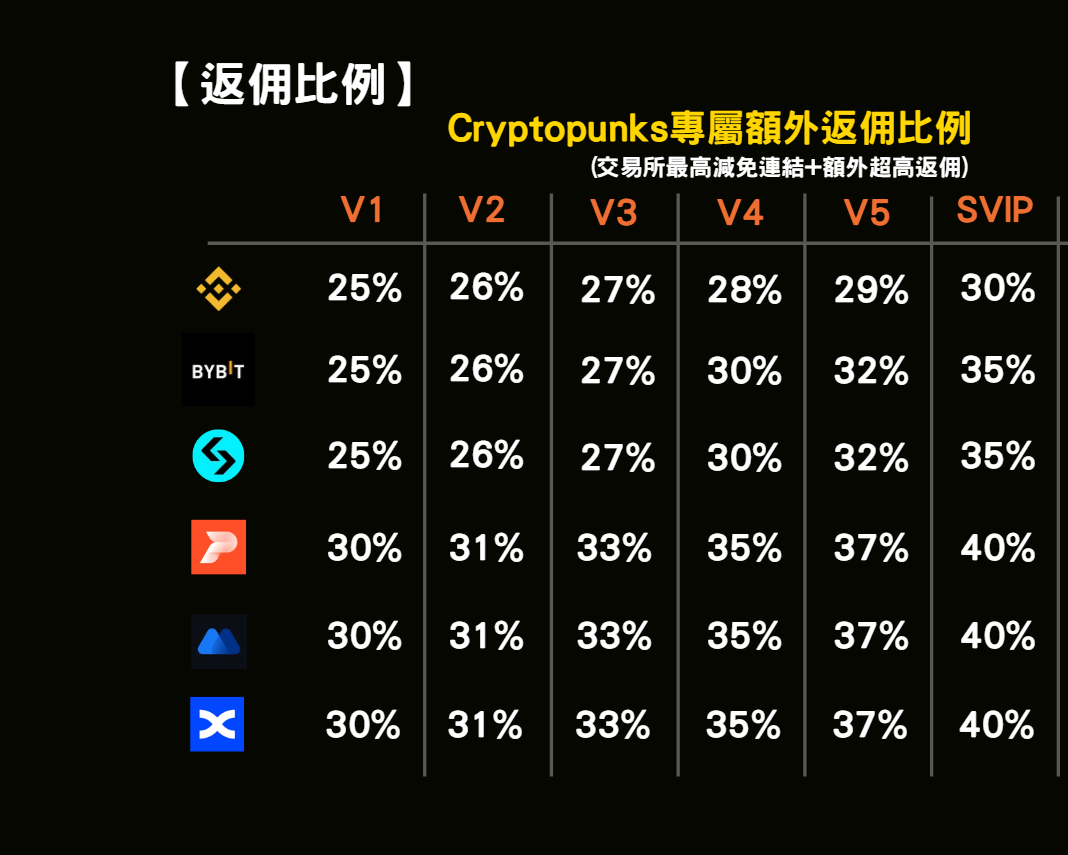
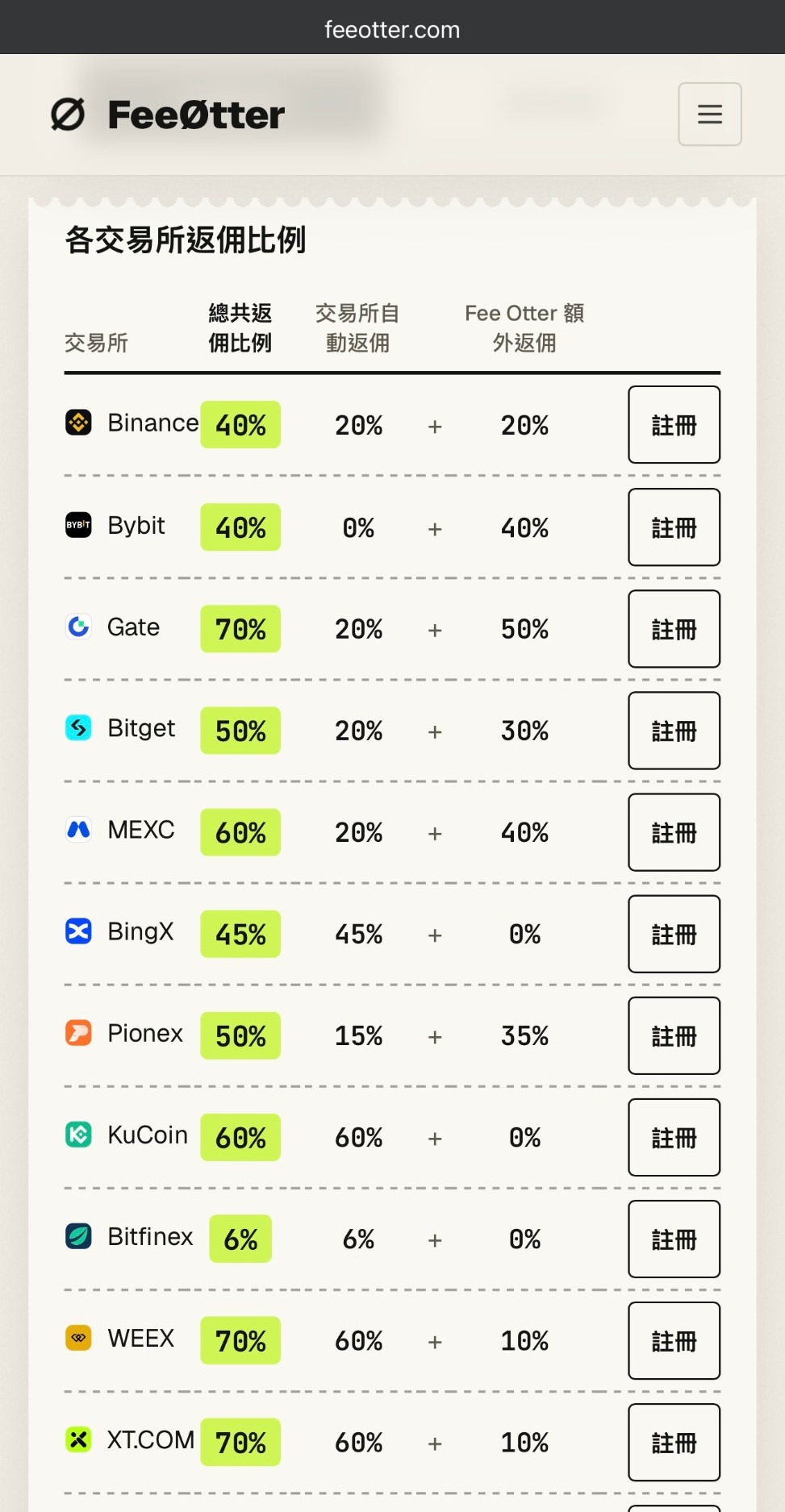
The easiest mistake when comparing rebate sites is setting one site’s total against the other’s extra portion. Here both sites are compared on totals, that is, how much of the fees you pay comes back to you in total. Cryptopunks’ rebate table notes that its numbers are the total of “the exchange’s highest-discount link + extra high rebate”. Fee Otter’s table splits each rate into “automatic fee rebate from the exchange + Fee Otter’s extra rebate”, and the two add up to the total. For how the terms convert, see the rebate glossary.
| Exchange | Cryptopunks (V1 → SVIP) | Fee Otter futures total (automatic + extra) |
|---|---|---|
| Binance | 25% → 30% | 40% (20% + 20%) |
| Bybit | 25% → 35% | 40% (0% + 40%; Bybit has no automatic rebate layer) |
| Bitget | 25% → 35% | 50% (20% + 30%); spot 45% |
| MEXC | 30% → 40% | 60% (20% + 40%) |
| BingX | 30% → 40% | 45% (45% + 0%, all automatic fee rebate from the exchange) |
| Pionex | 30% → 40% | 50% (15% + 35%) |
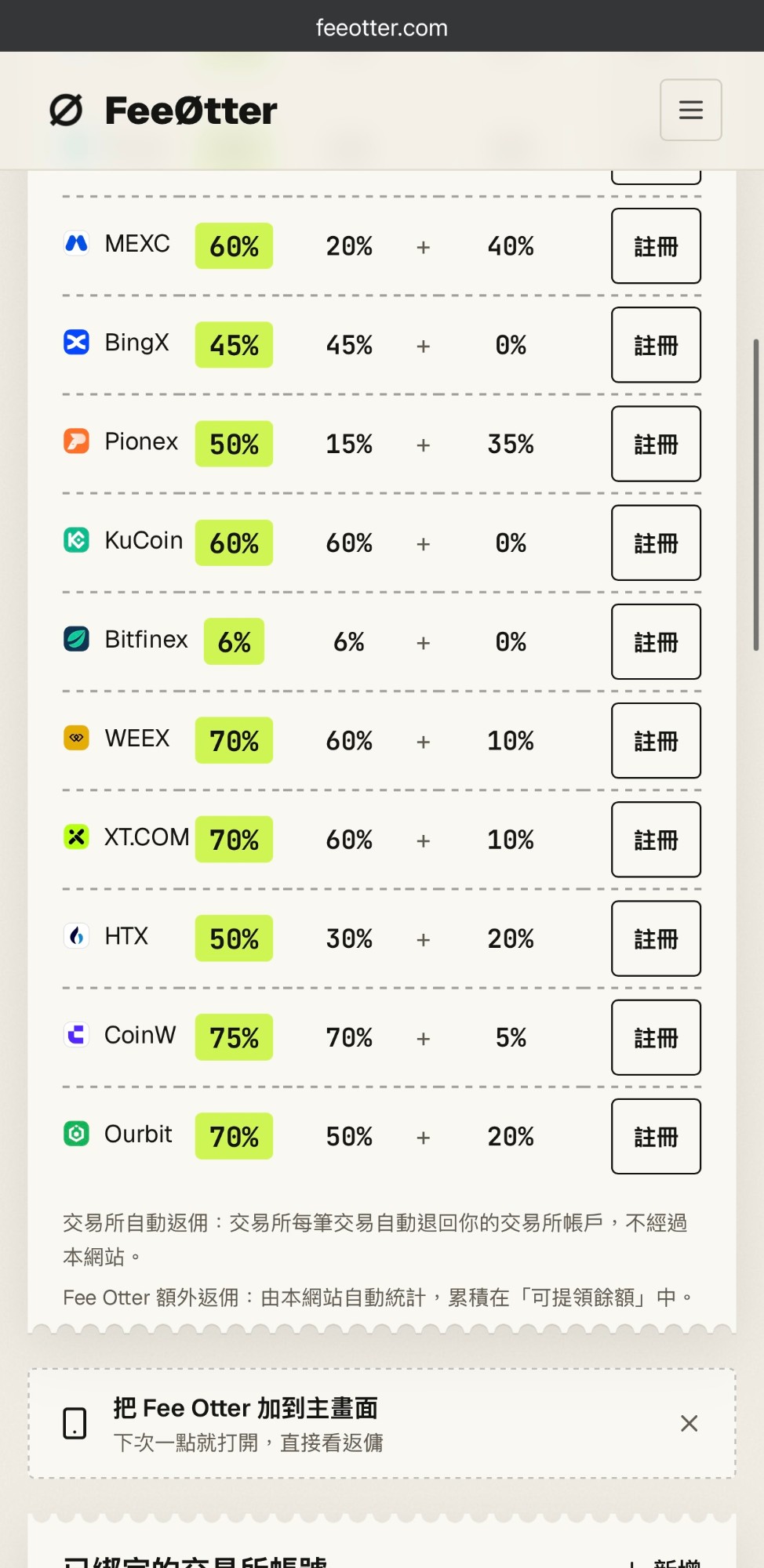
Sources: Cryptopunks figures are from the rebate rate table I captured on 2026-10-10; Fee Otter figures are from its rebate page, checked on 2026-10-22. Either site may change its rates, so go by each site’s current page.
It’s easier to see in amounts. Say you paid 100 USDT in fees on one exchange in a month:
| Exchange | Cryptopunks V1 | Cryptopunks SVIP | Fee Otter |
|---|---|---|---|
| Binance | 25 USDT | 30 USDT | 40 USDT |
| Bybit | 25 USDT | 35 USDT | 40 USDT |
| Bitget (futures) | 25 USDT | 35 USDT | 50 USDT |
| MEXC | 30 USDT | 40 USDT | 60 USDT |
| BingX | 30 USDT | 40 USDT | 45 USDT |
| Pionex | 30 USDT | 40 USDT | 50 USDT |
The calculation is 100 USDT × the total rate, using the rates in the table above. New Cryptopunks users start at V1, so the column that usually matters in practice is V1.
Both sites support OKX, but this site only ever covers OKX’s 20% automatic fee rebate from the exchange, so OKX is left out of the comparison and its row has been removed from the screenshots. Fee Otter’s OKX page lists the 20% automatic fee rebate plus an “exclusive reward”, with no rate given for the reward; you have to ask support. Fee Otter also supports Gate, KuCoin, WEEX, XT.COM, HTX, Ourbit, CoinW and Bitfinex, none of which are on Cryptopunks’ rebate table.
Which site has an automatic fee rebate from the exchange underneath?
The automatic rebate is refunded by the exchange directly into your exchange account. There’s nothing to request and no minimum, and even if the rebate site shuts down one day, this part keeps coming. The extra rebate has to go through the rebate site’s reports, settlement and payouts.
Fee Otter’s rate table lists the two parts separately. Of the six exchanges above, the automatic fee rebate is 20% on Binance, Bitget and MEXC, 45% on BingX and 15% on Pionex; only Bybit is 0%, because Bybit itself gives invitees no fee rebate. Cryptopunks’ rebate table shows totals only. On the level page in its app, Binance and Bitget are shown in two parts as “20%+6%”, the other exchanges show a single number, and the official description doesn’t say how much of it the exchange refunds automatically.
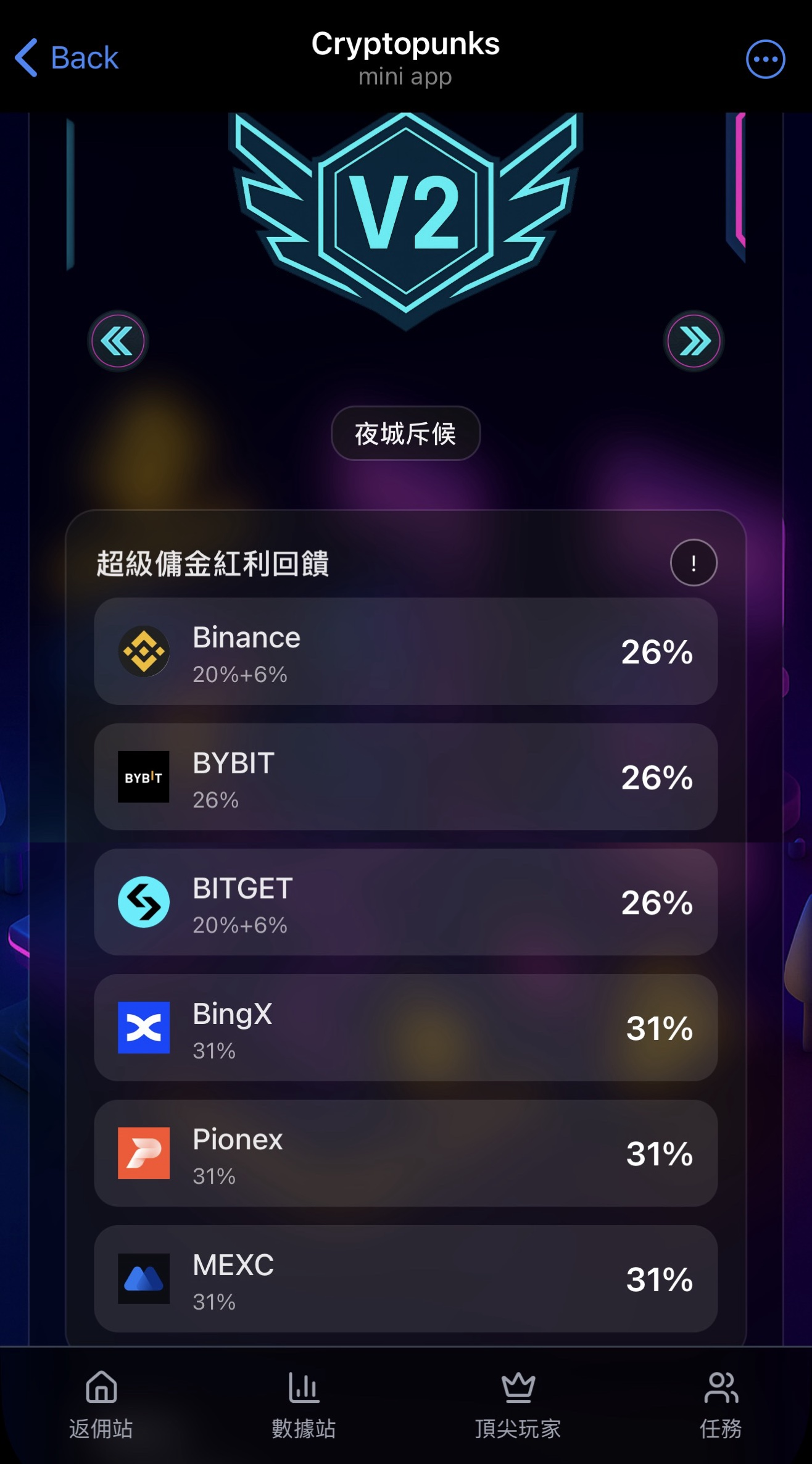
Having both parts spreads the risk: in the worst case, if the rebate site runs into trouble, the part the exchange refunds automatically is still there.
How do payout minimums, methods and fees differ?
Fee Otter’s rules are in its terms of service and on its rebate page. Under the terms effective 2026-10-13, the extra rebate is paid only as an on-chain USDT transfer (BNB Smart Chain, BEP20) to your own address. The rebate page states a minimum of 1 USDT per withdrawal and a 0.015 USDT network fee that you pay, with no service fee and no limit on how often you withdraw, though only one request can be in progress at a time. You can use an exchange’s USDT deposit address as the receiving address, as long as you pick the BSC (BEP20) network on that exchange and the amount is above its minimum deposit. Every payout is a public on-chain transaction you can look up on BscScan.
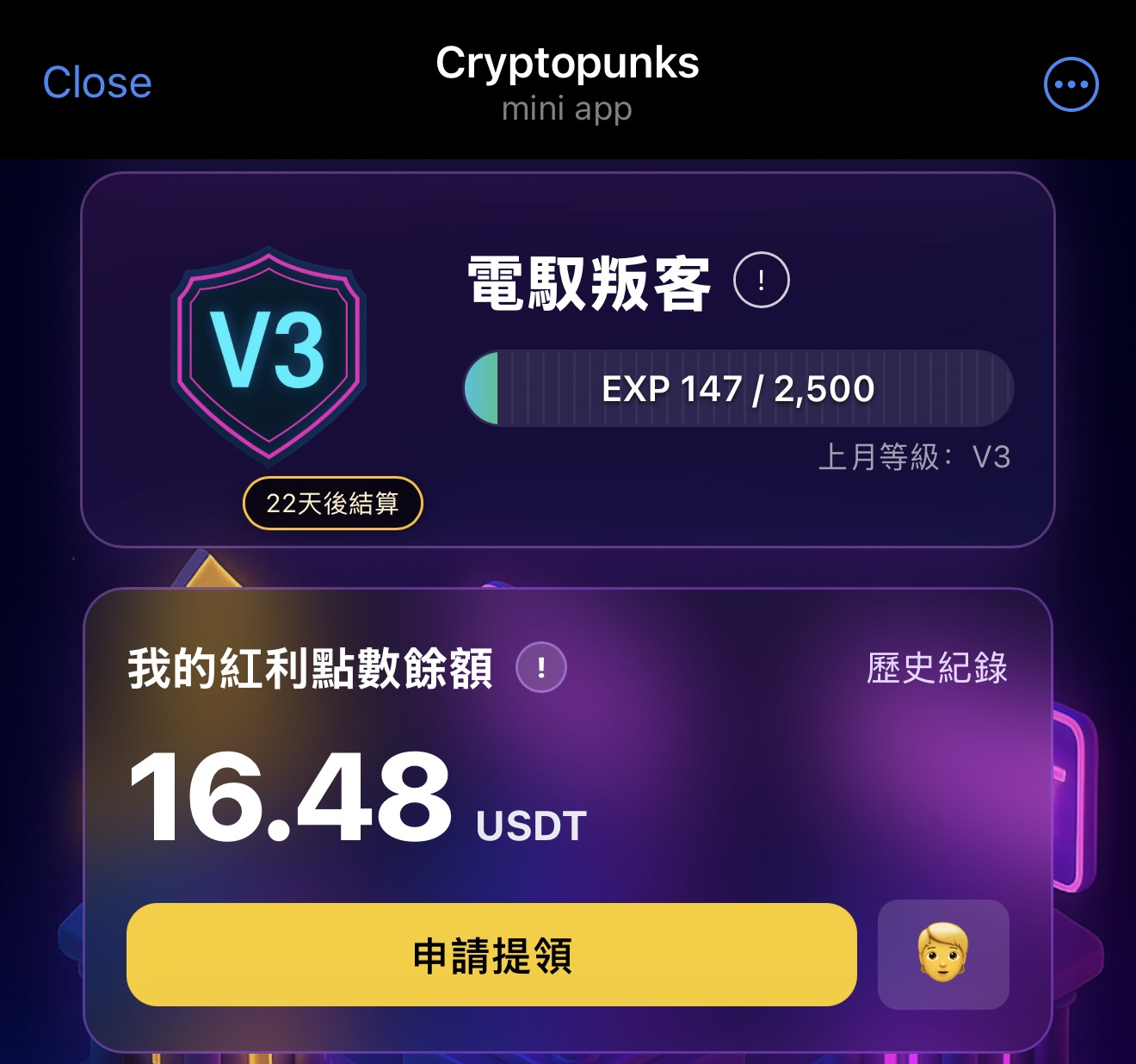
Cryptopunks’ public descriptions on YouTube and Telegram say “settled and paid back daily” and don’t state a payout minimum, payment method or fee. The app’s home screen shows a “bonus points” balance, which was 16.48 USDT when I took my screenshot on 2026-10-10.
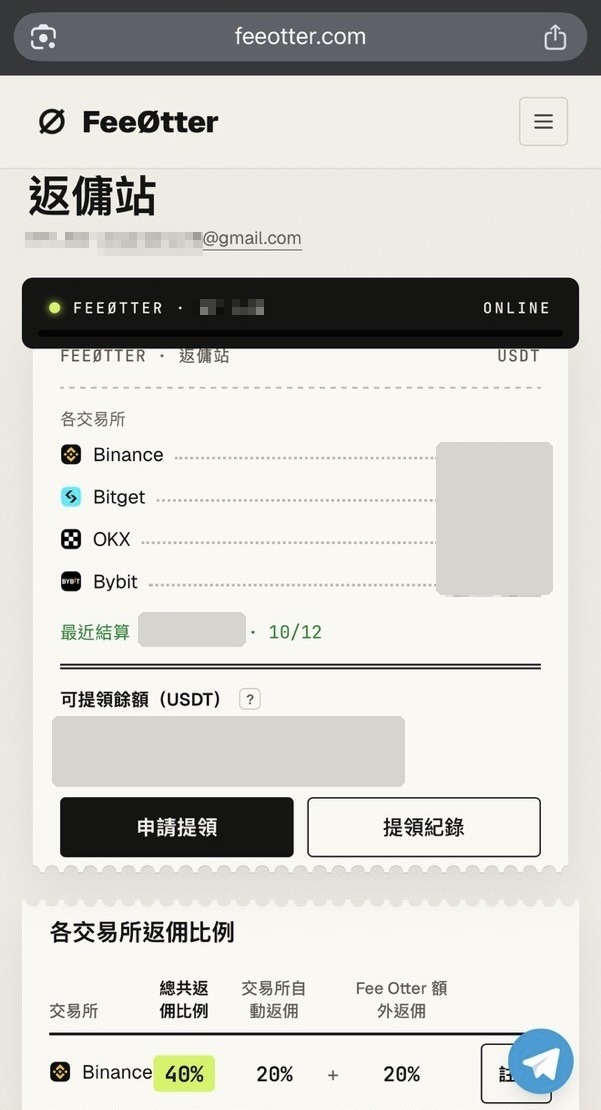
Fee Otter changed its payout rules recently: before October 13 you could transfer internally to an exchange UID, with up to 5 requests a month; the new terms keep only on-chain BEP20 payouts, with no limit on the number of withdrawals and one at a time. For what a USDT transfer costs on each network, see the USDT withdrawal fee comparison.
Can you check the records yourself?
The rate decides how much you should get; the records decide whether you can confirm you actually got it. This is where I think the two sites differ most.
The Cryptopunks app’s home screen shows your level, experience points and a bonus points balance to two decimal places. I couldn’t find a rebate breakdown by exchange or by date in the app, so I can only see the total and can’t match it back to my fees entry by entry.
Fee Otter settles the previous day’s fees at around 16:00 (UTC+8) every day, and each entry lists the date, the exchange and the amount, with fees, rates and amounts shown to four decimal places. The automatic fee rebate goes straight into your exchange account; Fee Otter’s page records the extra rebate.
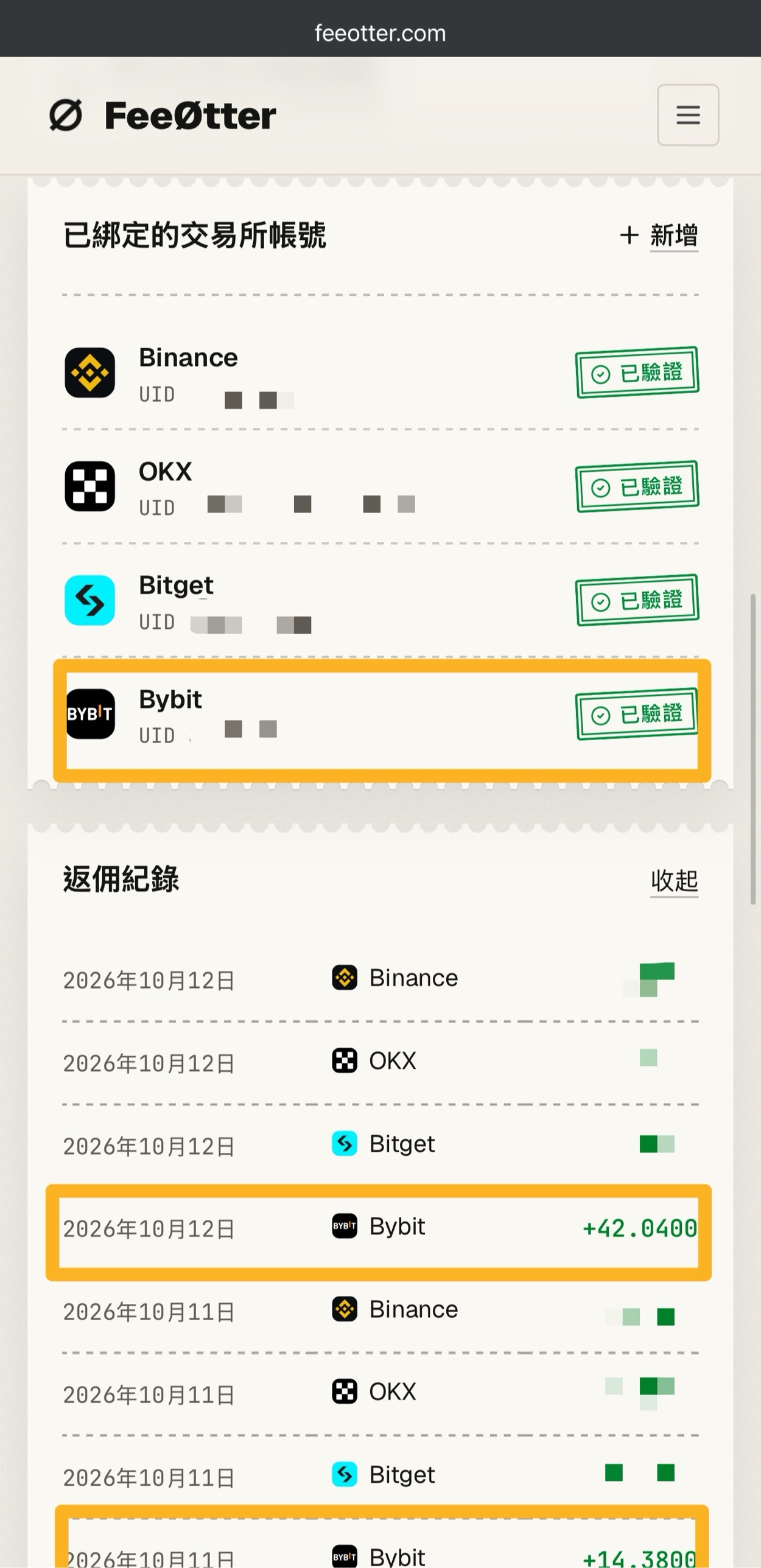
Take my own records: Bybit credited 14.38 USDT on 10-11 and 42.04 USDT on 10-12. Bybit’s rate is 40%, so working back from 42.04 USDT, the matching fees come to about 105.1 USDT (42.04 ÷ 40%), which you can check against Bybit’s fee records for that day. With only a total, you can’t check day by day and exchange by exchange like this.
How do the level rules differ?
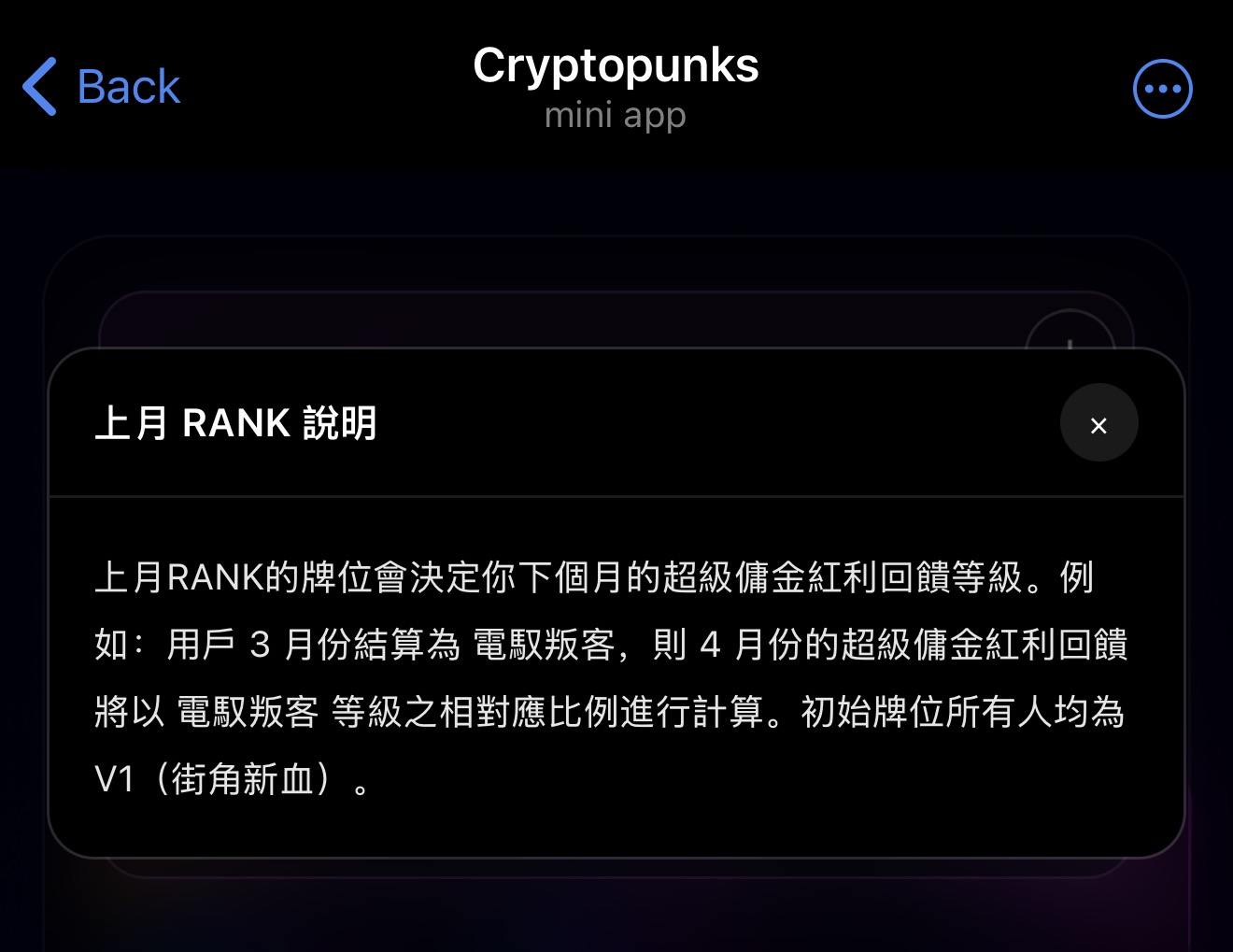
Cryptopunks’ rebate table has six levels: V1 to V5 and SVIP. The explanation in the app says ranks are settled once a month, last month’s rank decides next month’s rebate level, and everyone starts at V1. My account was V3 on 2026-10-10, with 147 / 2,500 experience points, but I couldn’t find anything in the app explaining how experience points are earned or how much trading volume you need to reach each level. Your level directly affects your rate, and without knowing how it’s calculated, it’s hard to estimate in advance which level you’ll be at next month.
Fee Otter has no levels: the rate on its rebate page is the rate you get after binding, with no trading volume to build up. Fee Otter’s page also says that people with high trading volume, or who are already VIPs on an exchange, can contact support to negotiate a higher rate.
How do binding and supported exchanges differ?
- Interface: Cryptopunks runs inside a Telegram bot, so you need a Telegram account first. Fee Otter is a website you can open in any browser, and you sign in with a Google account or an email verification code.
- Binding: Cryptopunks’ description says you sign up through its link and then bind in the “rebate site”. At Fee Otter, you sign up through its link, complete identity verification on the exchange, and enter your exchange UID on the website. Fee Otter refreshes the previous day’s data at around 16:00 (UTC+8) every day, and if you paid fees the day before, the binding is approved automatically.
- Supported exchanges: Cryptopunks’ rebate table lists 7 exchanges: Binance, Bybit, OKX, Bitget, MEXC, BingX and Pionex. The 2026-10-22 video description gives sign-up links for 6 of them, without BingX. Fee Otter supports 15: the same 7 plus Gate, KuCoin, WEEX, XT.COM, HTX, Ourbit, CoinW and Bitfinex (Bitfinex is open for sign-up only, not for UID binding).
- If you already have an exchange account: the referral relationship is set when you sign up, and whether you can add or switch one later depends on the exchange’s rules. Bybit, for example, lets a main account with no referrer add an affiliate partner’s code within 14 days of sign-up. Each exchange’s time limit is in can you add a referral code after sign-up.
The two systems at a glance
| Item | Cryptopunks | Fee Otter |
|---|---|---|
| How you use it | Telegram bot (@cryptopunkswbot) | Website (feeotter.com) |
| Supported exchanges | 7 on its rebate table: Binance, Bybit, OKX, Bitget, MEXC, BingX and Pionex | 15: the 7 on the left plus Gate, KuCoin, WEEX, XT.COM, HTX, Ourbit, CoinW and Bitfinex |
| How rates are shown | Total only | Total, split into automatic + extra |
| Automatic fee rebate from the exchange | The level page splits Binance and Bitget into two parts; the others show a single number | All except Bybit |
| Levels | V1 to V5 and SVIP; last month’s rank sets next month’s rate; the app doesn’t state the trading volume needed to level up | No levels; rates are public; high-volume traders can negotiate with support |
| Settlement | “Settled and paid back daily” | The previous day is settled at around 16:00 (UTC+8) every day |
| Payouts | Minimum, method and fee not officially stated | USDT (BEP20) only; minimum 1 USDT per withdrawal, 0.015 USDT network fee; no limit on the number of withdrawals, one at a time |
| Rebate records | Bonus points total, to two decimal places; I found no breakdown by exchange or date | Listed separately for each day and each exchange, to four decimal places |
Sources: Cryptopunks information is from its Telegram channel and its 2026-10-22 YouTube video description, and the in-app data is from my screenshots of 2026-10-10; Fee Otter information is from its rebate page, About Us page and terms of service (effective 2026-10-13), checked on 2026-10-22. If Cryptopunks has updated anything, please let me know and I’ll correct it.
Why do I find Fee Otter easier to use?
In my own use, the things that make Fee Otter easier are all concrete differences you can check:
- The records add up: there’s one entry per day per exchange, so you can check them by multiplying the exchange’s fee records by the rate. At Cryptopunks I can only see a single bonus points total.
- Fixed rates: Fee Otter has one rate per exchange, so there’s no guessing which level you’ll be at next month. I’m currently V3 at Cryptopunks, and my rate depends on last month’s rank.
- Clear payout rules: the 1 USDT minimum, the 0.015 USDT network fee, the BEP20 network and lookups on BscScan are all stated on Fee Otter’s pages.
- More exchanges: all 15 are in the same dashboard, so you don’t need to find another rebate site when you switch exchanges.
- An automatic rebate underneath: except for Bybit, every exchange Fee Otter supports includes a part refunded directly by the exchange.
Cryptopunks has its conveniences too: if you already watch its videos and use Telegram a lot, you don’t need to remember another website, and you can see your level and balance in the app. Which one to choose depends on which of these points matter more to you. How to get a Bybit rebate through Fee Otter is covered step by step in Bybit fee rebate with Fee Otter.
What should you ask before choosing a rebate site?
- Is the stated rate a total or just the extra part? Is it a percentage of fees, or of commission?
- Is there an automatic fee rebate from the exchange? That part doesn’t go through the rebate site, so it’s the most reliable.
- What’s the payout minimum, is there a fee, how is it paid, and how often can you withdraw?
- Can you see itemized records? Can you multiply back and check them yourself?
- If there are levels, are the upgrade thresholds and the calculation method clearly stated?
- How many exchanges does it support? Will you need to find another rebate site when you switch exchanges?
- Can you reach support if something goes wrong with binding or payouts?
What are the risks of using a rebate site?
- Rebate sites are overseas third parties. They pay the extra rebate themselves, and they may change their rules or shut down. Fee Otter’s terms state that it can change its rates, supported exchanges and features at any time.
- Binding for a rebate only needs your exchange UID. Never give anyone who asks for your password, a verification code, an API key or withdrawal permissions; common tricks are covered in how to spot a rebate scam.
- Trades the exchange judges to break its terms, such as wash trading or referring yourself, may not earn a rebate, and rebates already paid may be clawed back; each exchange’s rules are in can rebates be cancelled.
Can you skip rebate sites and just use a referral code?
If you only want the part the exchange refunds automatically and don’t want to bind another rebate site, signing up with a referral code is enough. Taking Binance as an example, after signing up with a referral code, the automatic fee rebate from the exchange on spot and futures is 20%; the sign-up page and how to check it are in Binance referral code. The automatic rebate rate for each exchange’s referral code is listed in the exchange referral code overview. Bybit gives invitees no fee rebate, so to get fees back there, you currently need to go through an affiliate partner like Fee Otter.
FAQ
Which is better, Cryptopunks or Fee Otter?
From my own experience I recommend Fee Otter, because it lists records by day and by exchange, its rates have no levels, and payouts start at 1 USDT per withdrawal. On rates, Fee Otter is higher than Cryptopunks’ SVIP level on all six exchanges both support. If you only use those six and are used to doing things in Telegram, Cryptopunks works too.
What are Cryptopunks’ rebate rates?
According to the rebate table I captured on 2026-10-10, Cryptopunks gives 25% to 30% on Binance, 25% to 35% on Bybit and Bitget, and 30% to 40% on MEXC, BingX and Pionex, rising level by level from V1 to SVIP. Your rate depends on last month’s rank; check Cryptopunks’ current page for the actual figures.
What’s Fee Otter’s minimum payout?
1 USDT per withdrawal, with a 0.015 USDT network fee and no service fee from Fee Otter (checked on 2026-10-22; the withdrawal page is the authority). Payouts go only over USDT’s BEP20 network to your own address, with no limit on how many, but only one can be processing at a time.
What’s Cryptopunks’ payout minimum?
Cryptopunks’ public descriptions on YouTube and Telegram don’t state a payout minimum; they only say the extra rebate is “settled and paid back daily”. The app’s home screen shows a bonus points balance, and the actual payout conditions are whatever the app’s own instructions say.
Can a rebate site touch my assets?
No. Your assets stay in your own exchange account the whole time. Fee Otter’s terms state that binding only needs your exchange UID, and that it won’t ask for your password, a verification code, withdrawal permissions or an API key with trading permissions. If any rebate site asks you for these, don’t give them.
I already have an exchange account. Can I still use a rebate site?
It depends on the exchange. Some exchanges let you add a referral code after sign-up; each exchange’s time limit is in can you add a referral code after sign-up. Some exchanges allow adding or switching a referral code; for the actual process, see the summary on Fee Otter, a fee rebate site.
What’s the OKX rebate?
OKX’s referral code rebate is 20%, refunded automatically by OKX. At Fee Otter, OKX also gets the 20% automatic fee rebate, and the page mentions an “exclusive reward” as well, but gives no rate for it; you need to contact support.
What’s the Binance rebate?
If you sign up with only a referral code, Binance’s automatic fee rebate on spot and futures is 20%, refunded directly by Binance; see Binance referral code. Fee Otter’s rebate page lists Binance at 40%, of which 20% is the automatic fee rebate from the exchange and the other 20% is Fee Otter’s extra rebate; Cryptopunks gives 25% to 30%.
For a full introduction to Fee Otter, see the Fee Otter review; for the Bybit rebate steps, see Bybit fee rebate with Fee Otter; and for rebate terms, see the rebate glossary.
To see Fee Otter’s current rates and how to bind on each exchange, visit the Fee Otter rebate page.