


Updated Rules checked 2026-10-13
Identity verification (KYC) on BingX is effectively mandatory. The official level table is clear: an unverified account cannot deposit, trade, or use fiat services and Launchpad, and is left with a withdrawal limit of at most 20,000 USDT per 24 hours. Once you complete Advanced Verification, deposits are unlimited, the 24-hour withdrawal limit rises to 5,000,000 USDT, and trading and fiat features are fully unlocked.
You need one valid ID (national ID card, passport or driver’s license; the options depend on the issuing country) and a phone or computer that can take photos. The verification page lists the requirement as “ID photo + face recognition”, and BingX states that the review takes 2 to 10 minutes.
Key points: BingX individual identity verification has only two states, “Unverified” and “Advanced Verification”. An unverified account cannot deposit or trade, and its 24-hour withdrawal limit is 20,000 USDT. With Advanced Verification the 24-hour withdrawal limit is 5,000,000 USDT and deposits are unlimited. On the web, click the profile icon at the top right → “Identity Verification” → “Personal” → “Start Verification” on the “Advanced Verification” card; in the app, tap your avatar at the top left → “Identity Verification” in the side menu. BingX says Advanced Verification review takes 2 to 10 minutes; if it takes longer or keeps showing as in review, BingX recommends contacting online customer support. The verification screens are provided by the third-party service Sumsub, and for Taiwan the document options are ID card, passport or driver’s license.
The information below was checked against BingX’s official guides on 2026-10-13 (fact-check date). The screenshots come from the BingX Help Center and are shown for reference.
Not signed up yet? Enter a referral code before KYC
The referral code goes in on the sign-up page, and KYC comes after sign-up. If you don’t have an account yet, sign up first by following the steps in the BingX referral code guide, then come back to verify your identity.
This site’s BingX referral code is KEVINWU; just enter it when you sign up.
If you forgot to enter it at sign-up, you still have a chance. According to the BingX account registration FAQs, as long as you haven’t deposited yet (including buying crypto) and haven’t invited any friends, you can add a referrer later under “My Referrer”; once bound, it cannot be changed or removed. This condition depends on deposits, not on KYC. But an unverified account cannot deposit in the first place, so the last chance to add a code is usually after KYC is approved and before your first deposit (each exchange’s rules are in adding a referral code after sign-up). If you have already deposited, BingX offers a KYC transfer option; the steps are in the BingX KYC transfer guide.
What are BingX’s KYC levels, and what does each unlock?
Individual verification now has just one level, Advanced Verification; the verification page also has a separate “Business Verification” tab for companies. Here is a summary based on the table in BingX’s official article “KYC benefits by level and the advantages of KYC”:
| Verification level | Daily deposit limit | Monthly deposit limit | 24-hour withdrawal limit | Trading | Fiat | Launchpad |
|---|---|---|---|---|---|---|
| Unverified | Not allowed | Not allowed | 20,000 USDT | No | No | No |
| Advanced Verification (Advanced KYC) | Unlimited | Unlimited | 5,000,000 USDT | Yes | Yes | Yes |
| Business Verification | Not listed in the official guide | |||||
Sources: KYC benefits by level and the advantages of KYC (2024-06-07) and How to complete identity verification (KYC). The official notes below the table include four points worth knowing:
- The KYC rules were upgraded starting November 19, 2024, and the new benefits are “being rolled out gradually by region”. Levels and benefits differ in some regions, and what the product page shows always takes precedence.
- Users who completed verification before June 13, 2024 are counted as Advanced automatically.
- Withdrawal limits for all tokens are calculated as their USDT equivalent.
- The 24-hour withdrawal limit counts from the time of your last withdrawal; it does not reset at a fixed time each day.
The official table and the app screen disagree on one point. The table says unverified accounts cannot deposit, yet the identity verification page in a 2026 app screenshot says “if the daily or monthly deposit amount reaches the limit, you need to complete Advanced Verification to continue depositing and trading”, which suggests that unverified accounts in some regions may have some deposit allowance. BingX doesn’t say how much, and benefits already vary by region, so go by what your own account page shows. Also, the “Individual identity verification (KYC) FAQ” says that if you don’t complete verification within the required time, you won’t be able to deposit, trade fiat or take part in Launchpad. Once trading is unlocked, that includes futures. Futures use leverage, and if the price moves against you, your position may be liquidated.
What do you need for BingX KYC?
- A valid ID: BingX lists “ID card, passport, driver’s license, etc.”, and the document must not be expired. In some countries/regions, including Vietnam, Indonesia, Timor-Leste and Thailand, driver’s licenses are not accepted; only new-style national ID cards and passports are.
- Matching details: your name, date of birth and ID number must match the document exactly, and the issuing country you select must match the document too.
- Photo quality: all images must be bright and clear, with all four corners of the document in frame.
- Selfie or face recognition: see below; BingX’s pages describe it differently.
- Age: if your ID shows you are under 18, you can’t complete identity verification for now.
- Proof of address: none of the official guides I checked require it.
BingX’s official materials describe the selfie requirement in different ways. I’ve listed them by date rather than draw a conclusion on BingX’s behalf:
| Official source | Date | What it says about the selfie |
|---|---|---|
| “Individual identity verification (KYC): common reasons for failure and solutions” | 2024-05-05 | In the selfie holding your ID, show a piece of paper with BingX and the verification date written on it |
| Text of “How to complete identity verification (KYC)” | Published 2022-03-02; the text mentions 2024-06-13; web screenshot watermark 2026-04-23 | Web: upload photos of your ID and submit “a photo of yourself holding your ID”; the ID details in that photo must match the uploaded document. App: take photos of your ID and a selfie, and “finally submit a selfie holding your ID” |
| 2026 app screenshots on the same page (Sumsub screens) | 2026 | Only two items: “Identity document: take a photo of your ID” and “Selfie: take a selfie”; the verification page lists the requirement as “ID photo + face recognition” |
The note with BingX and the date appears only in the 2024 article on failure reasons; the newer screens don’t show this requirement. BingX hasn’t made clear whether it is still needed. When you go through it, follow the instructions on the verification screens; if they ask for a photo holding your ID or a note, do as they say.
BingX KYC steps on the web
The screenshots in the official guide show the Traditional Chinese interface, and the issuing-country example is Taiwan. The button names below are English renderings of the labels in those screenshots.
- Log in to BingX, click the profile icon at the top right of the homepage, open “Identity Verification”, stay on the “Personal” tab, and click “Start Verification” on the “Advanced Verification” card.
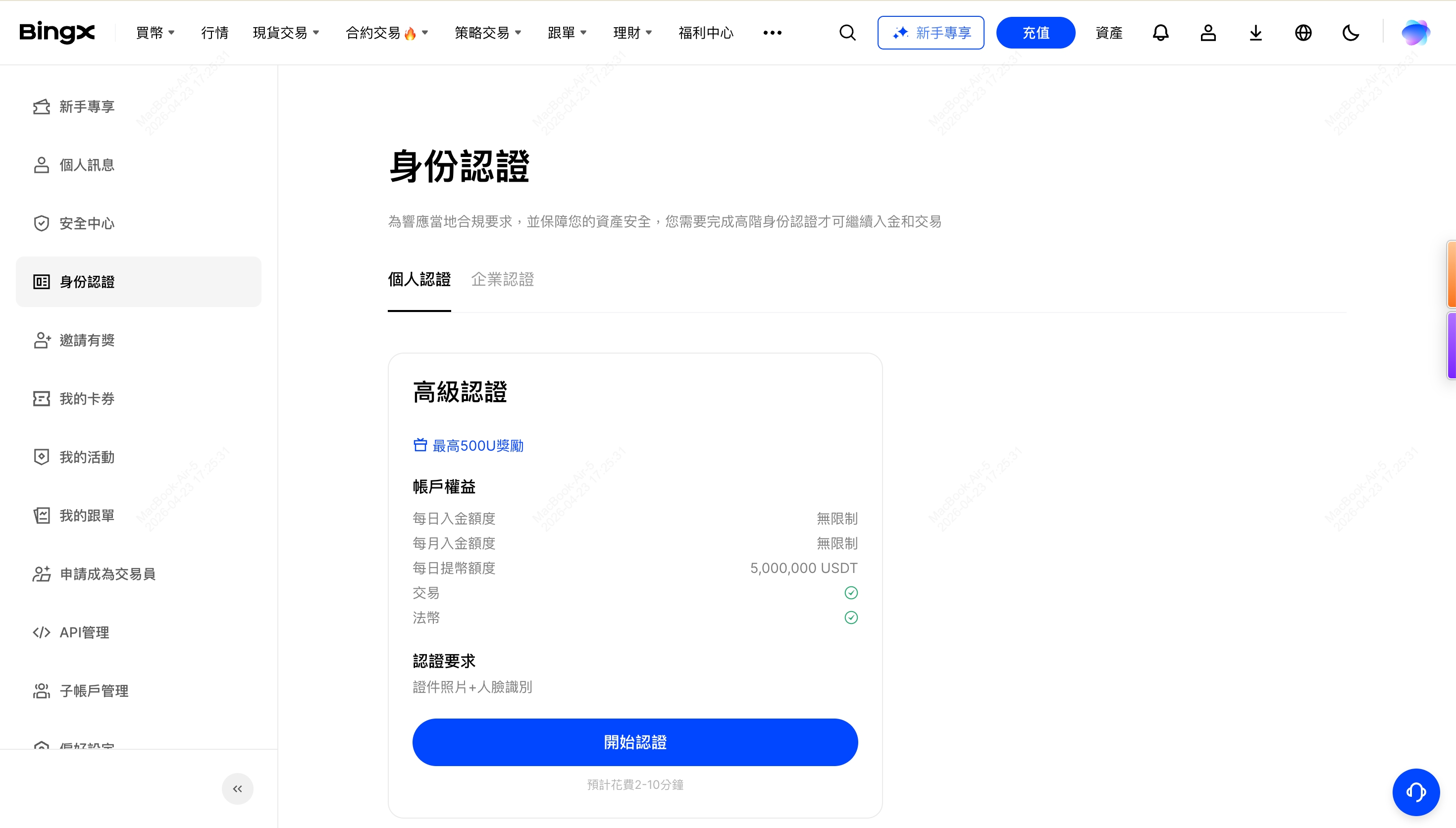
Image source: BingX Help Center
- Choose the country that issued your ID and the document type. For Taiwan, the options are ID card, passport and driver’s license. Click “Continue” to carry on at your computer, or “Continue on phone” if you’d rather take the photos with your phone.
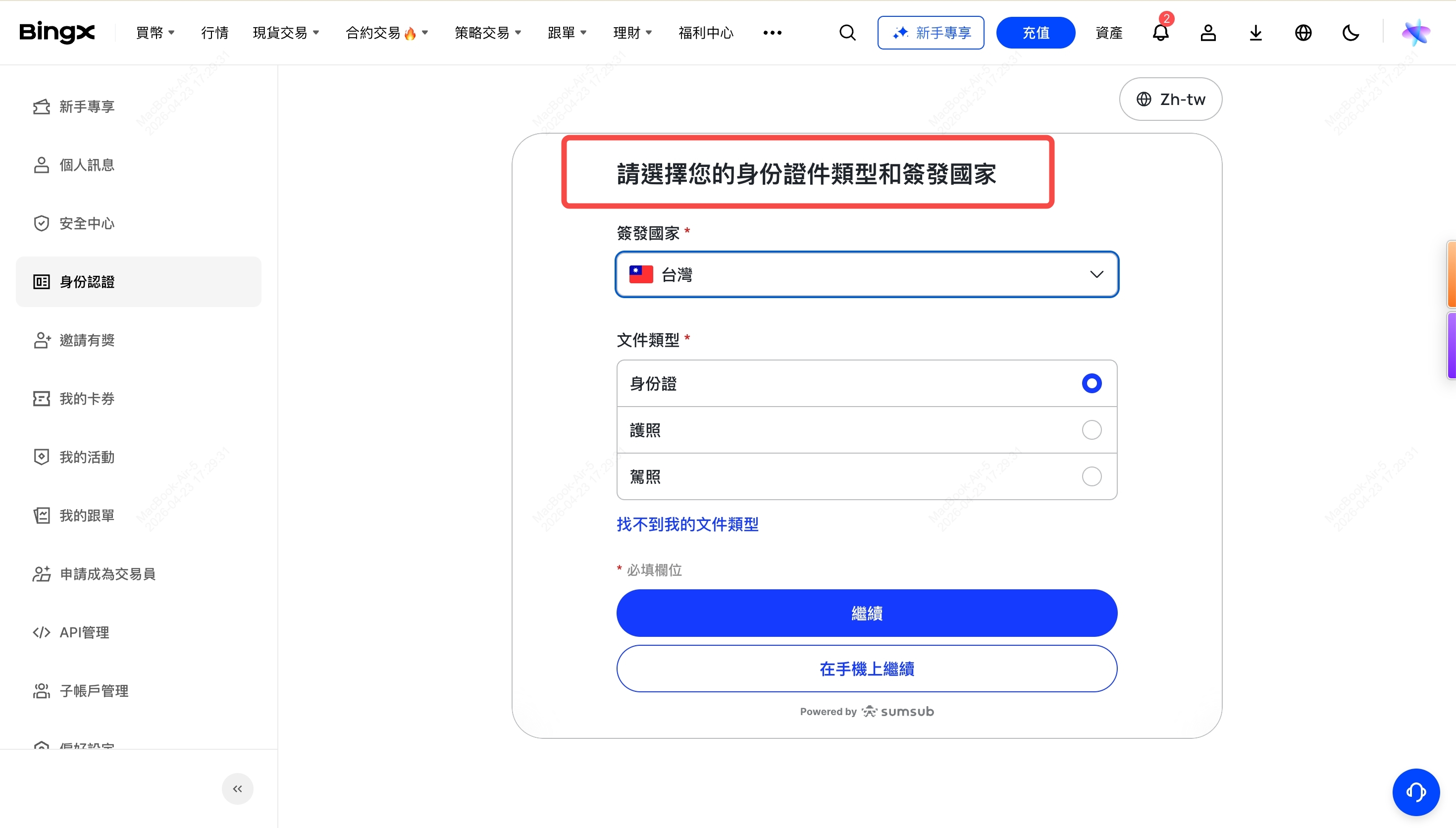
Image source: BingX Help Center
- Upload ID photos that meet the on-screen requirements, then complete the selfie or the photo holding your ID (BingX’s written guide says a photo holding your ID; see the previous section). Photos must be bright and clear, with all four corners of the ID in frame.
- Follow the prompts and click “Next” or “Continue” to submit, then wait for the review result.
BingX KYC steps in the app
- Log in to the app, tap your avatar at the top left, and tap “Identity Verification” in the “Settings” section of the side menu (if you haven’t verified yet, it shows “Unverified” on the right).
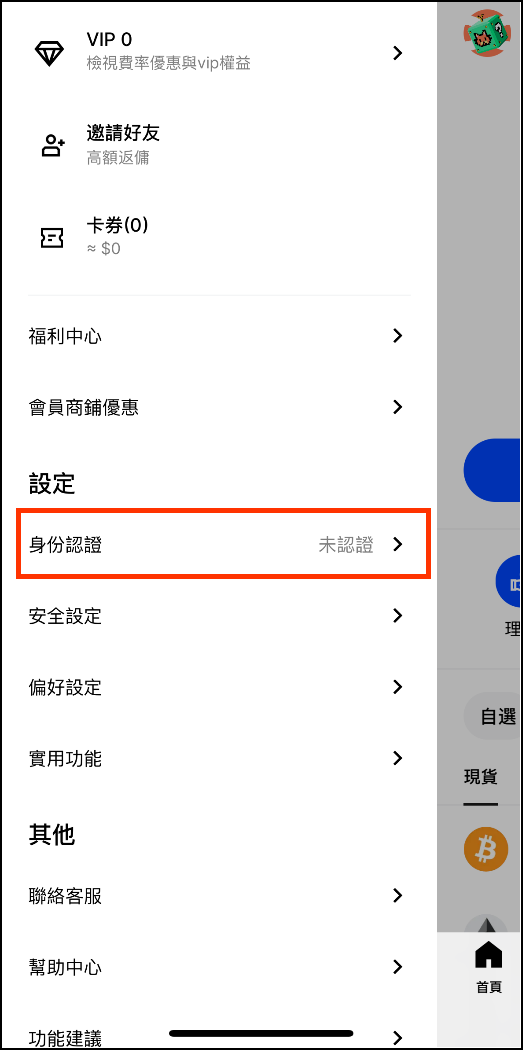
Image source: BingX Help Center
- On the “Advanced Verification” card, tap “Start Verification”. The card lists the account benefits and “Estimated time: 2~10 minutes”, with the “Business Verification” entry below it.
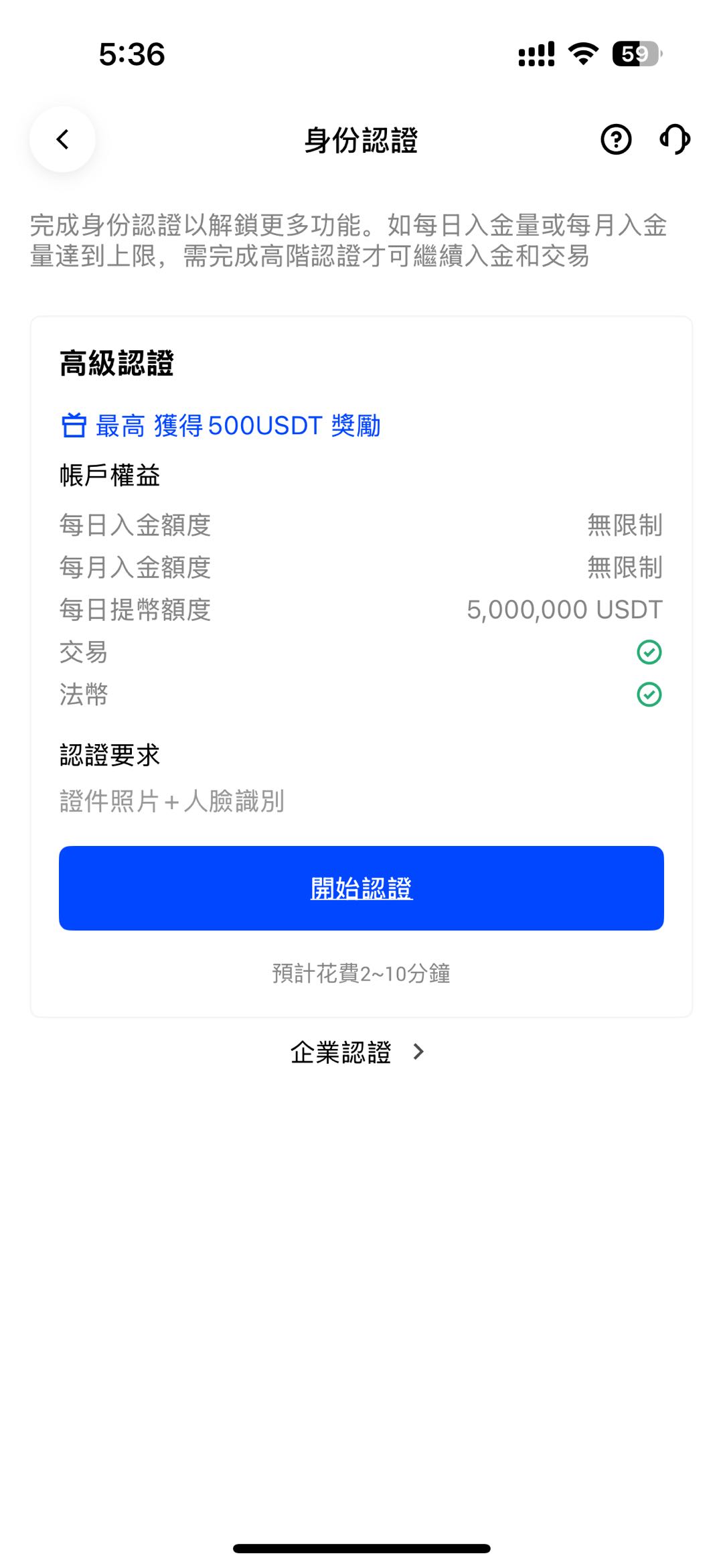
Image source: BingX Help Center
- The “Verify your identity” screen lists two things to do: photograph your ID and take a selfie. Tap “Continue”.
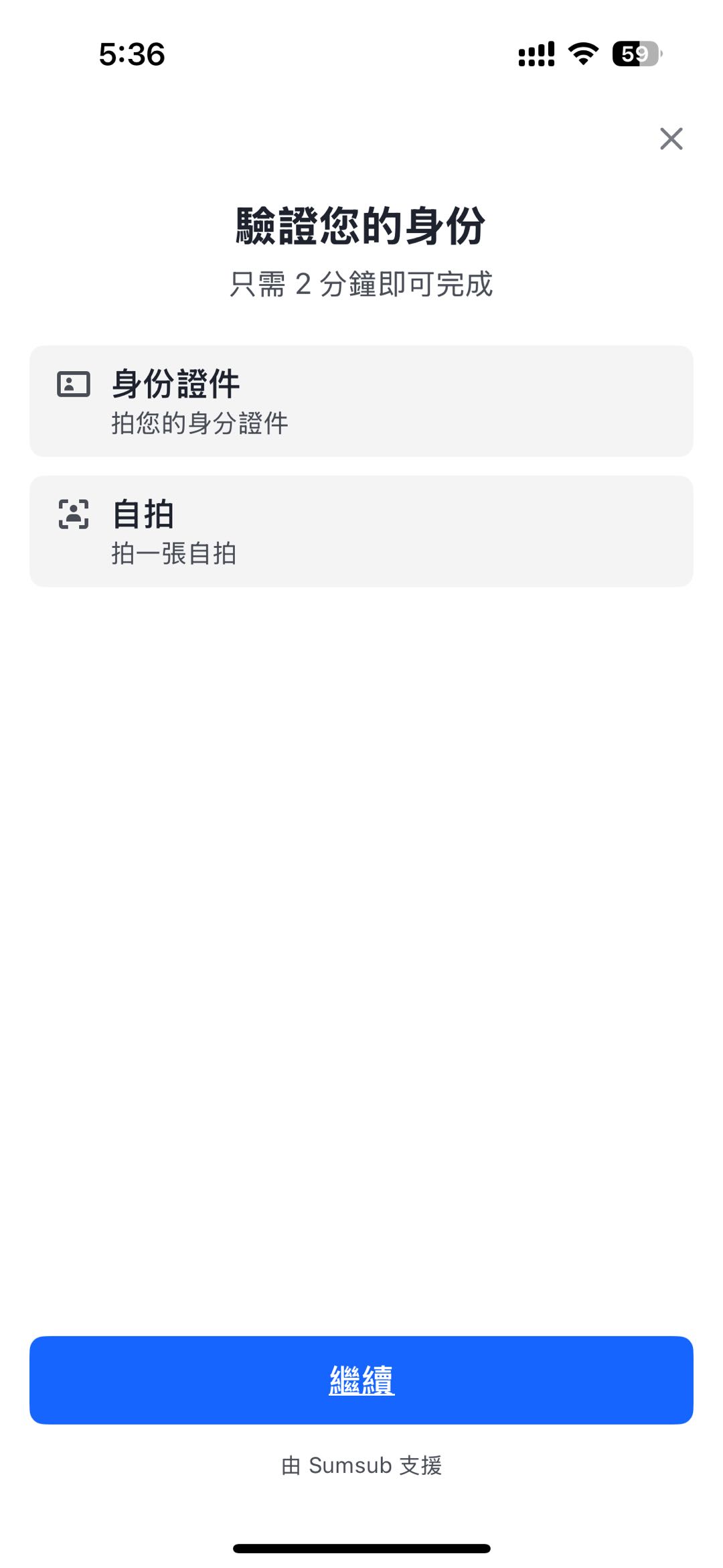
Image source: BingX Help Center
- Choose the issuing country/region and the document type. If you can’t find your document type or country, the screen tells you to contact customer support.
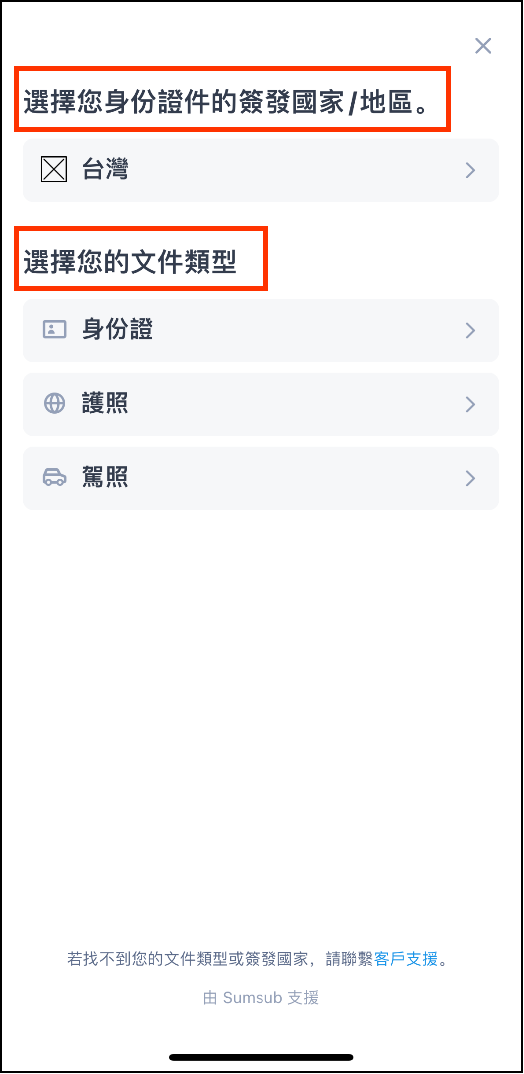
Image source: BingX Help Center
- Allow the app to use your camera, photograph your ID as instructed, and take the selfie last (BingX’s written guide says “finally submit a selfie holding your ID”).
- Submit and wait for the result. The screenshots in the official guide don’t include the photo, selfie or review screens, so follow what you actually see for these steps.
How long does KYC review take? What if you’re rejected?
BingX says “Advanced KYC verification is expected to take 2-10 minutes”, and the verification card also shows “Estimated time: 2~10 minutes”. If it takes longer or keeps showing “Verifying”, BingX recommends contacting online customer support. You’ll be notified of the result by in-site message, which you can read in the “Message Center”.
Here are the rejection reasons listed in “Individual identity verification (KYC): common reasons for failure and solutions”, arranged as a checklist you can go through one by one:
- The ID has expired, or that country/region doesn’t accept this type of document (for example the countries mentioned above that don’t accept driver’s licenses).
- The name, date of birth or ID number you entered doesn’t exactly match the document, or the country you selected doesn’t match the document.
- The same ID has already been verified on another account; one ID cannot be used to verify multiple accounts.
- The ID shows you are under 18.
- Restrictions under the laws of the user’s country/region (BingX refers users to its Disclaimer).
- The photo holding your ID doesn’t meet the requirements, for example it doesn’t show a note with BingX and the verification date (this comes from the 2024 article).
Find the problem on the list, fix it, then resubmit from the “Identity Verification” page. BingX’s guides don’t state a limit on how many times you can resubmit. If your ID has already been verified on another account, BingX offers a “KYC transfer” that moves the verification from the old account to the new one; the steps are in the BingX KYC transfer guide.
As for changing your details after approval, the “Individual identity verification (KYC) FAQ” says they can’t be changed unless your legal information changes, such as your legal name or nationality. These BingX articles don’t describe the actual update process.
What should Taiwan users watch out for with KYC?
The official BingX guides I checked contain no KYC rules written specifically for Taiwan users. The only Taiwan-related points in the official materials are these:
- Document types: in the official screenshots (web watermark date 2026-04-23), the issuing country selected is Taiwan, with three options: ID card, passport and driver’s license. Taiwan is not on the list of places where driver’s licenses are not accepted.
- Country list: BingX states that countries/regions not in the identity verification list are not supported for now. The English Disclaimer (last updated 2023-12-11) lists the countries and regions where it does not accept customers, worded as “including but not limited to”; the list includes mainland China, Hong Kong, Macau, Singapore, the United States, the United Kingdom, Canada, the Netherlands and others, and Taiwan does not appear on the page. This only means that list doesn’t name Taiwan; it does not mean approval by any regulator. Each exchange’s restricted regions are collected in exchange restricted countries.
- Regional benefits: the new rules from 2024-11-19 are rolled out region by region, so for the actual deposit and withdrawal limits on a Taiwan account, go by what your account page shows.
- Name format: BingX only requires your details to “match exactly” with the document; it gives no separate guidance on how to enter your name when you use a Chinese-language Taiwan ID card.
Is KYC safe? How is your personal data used?
BingX’s verification screens are provided by Sumsub, a third-party identity verification service: the bottom of the web version says “Powered by Sumsub”, and the app shows the Chinese equivalent (“supported by Sumsub”). The BingX Privacy Policy (last updated 2022-12-05) says that BingX collects proof of identity such as passports, driver’s licenses or government-issued IDs, along with ID numbers; that verification may use third-party data and service providers and cross-check against users’ personal data; and that after an account is closed, personal data may be kept for up to 5 more years. The privacy policy does not specifically mention facial or biometric data.
In practice, I’d suggest two things. First, verify only on BingX’s official website or official app, and confirm the URL and where the app came from yourself before you start. Second, don’t send photos of your ID, photos of you holding your ID or selfies to anyone who offers to “do your KYC for you”. Common tactics are covered in crypto exchange scam types, and the warning signs of rebate scams are in how to spot a rebate scam.
What 3 things should you do first after KYC is approved?
Once your identity verification is approved, you can deposit. Before you deposit, I recommend getting these three things done first:
- Turn on two-factor authentication (2FA) or a passkey: link it under “Account & Security → Google Verification” (BingX: link Google Verification). You can turn on passkeys in the BingX app’s security settings; once they’re on, logging in always requires passkey verification (BingX passkey announcement).
- Set an anti-phishing code: the path is Account & Security → Advanced Security → Anti-Phishing Code, and it can be 4–20 characters long. Once set, every verification-related email BingX sends will include this code (BingX anti-phishing code setup).
- Test with a small withdrawal first: the first time you withdraw to a new address, send a small amount, confirm it arrived, then send the larger amount (BingX withdrawal guide). BingX’s whitelist can be set to “withdraw only to addresses in the address book”; addresses set as verification-free skip verification when you withdraw, so that only suits your own addresses (BingX whitelist guide).
These three steps protect your own account; the platform’s own security record, hacks and proof of reserves are covered in the BingX review.
FAQ
How long does BingX KYC take?
BingX says Advanced Verification is expected to take 2 to 10 minutes. If it takes longer or keeps showing as in review, BingX recommends contacting online customer support; the result is sent as an in-site message, which you can see in the “Message Center”.
Can I trade or withdraw on BingX without KYC?
According to the official level table, unverified accounts cannot deposit, trade or use fiat services, and can withdraw up to 20,000 USDT per 24 hours. However, the wording on the app screen suggests that unverified accounts in some regions have a deposit allowance, so go by what your account page shows.
Do I still need a photo holding my ID and a note with BingX and the date?
BingX’s materials don’t agree on this. The 2024-05 article on failure reasons requires a note with BingX and the verification date in the photo holding your ID, and the text of the KYC guide also says to submit a photo holding your ID; but the Sumsub screens in the 2026 screenshots list only two items, the ID and a selfie. Follow the instructions on the verification screens.
Can I use a family member’s or someone else’s ID for KYC?
No. BingX requires a photo of you holding your own ID, the details you enter must match the ID exactly, and one ID can only be verified on one account.
What should I do if BingX KYC fails?
First go through the rejection checklist above. The most common causes are an expired ID, mismatched details or unclear photos; fix the issue and resubmit from the “Identity Verification” page. If your ID is already used on another account, you can consider a KYC transfer; if the reason is unclear, contact online customer support.
Can I change my name or nationality after KYC is approved?
As a rule, no. BingX says KYC details can’t be changed after approval, except when legal information changes (such as your legal name or nationality); these BingX articles don’t describe the specific process.
Can I transfer my BingX KYC to a new account?
Yes. BingX has an official Identity Transfer feature that moves an identity verification with completed advanced KYC from one account to another account that hasn’t been verified yet (BingX identity verification transfer between accounts). After the transfer, the original account becomes unverified: it can’t buy spot or open new futures positions, its withdrawal limit drops to the unverified level, and any KYC-related rewards not yet paid out are canceled. Neither account can transfer again within 180 days, and you can’t transfer while a P2P order or ad is in progress. BingX also states that it doesn’t recommend registering multiple accounts. For the steps to switch referral codes with this feature, see how to switch your BingX referral code.
Sources
- BingX tutorial | How to complete identity verification (KYC) (published 2022-03-02 and updated since; web screenshot watermark 2026-04-23): all screenshots in this article come from this page.
- KYC benefits by level and the advantages of KYC (2024-06-07)
- Individual identity verification (KYC) FAQ (2024-04-10)
- Individual identity verification (KYC): common reasons for failure and solutions (2024-05-05)
- BingX Disclaimer (English page, last updated 2023-12-11)
- BingX Privacy Policy (English page, last updated 2022-12-05)
- BingX Account Registration FAQs (conditions for adding a referrer later)
These pages were checked on 2026-10-13. If you haven’t signed up yet, the referral code and sign-up steps are in BingX referral code; fees are covered in BingX fees, and an overview of BingX, its security record and restricted regions are in BingX review. To check after sign-up whether your referral code was bound, see how to check whether a referral code is bound.