


Updated Rules checked 2026-10-13
Identity verification (KYC) on MEXC is effectively mandatory. The official guide states that “users must complete identity verification to access the relevant products and services provided by MEXC,” and the KYC FAQ adds that skipping verification affects some services such as deposits, withdrawals and trading, with the page prompts deciding which features are affected. The FAQ lists two pop-ups: one when depositing (“Funds restricted and cannot be credited; complete identity verification before they can be credited”) and one when withdrawing (“You have not completed identity verification; complete identity verification to continue withdrawing”).
Individual verification has two levels, Primary and Advanced. Primary needs only photos of your ID; Advanced adds a face scan, and you can skip Primary and go straight to Advanced. Only four document types are accepted (national ID card, passport, driver’s license, residence permit), and you must photograph the original. On review time, MEXC says verification is usually completed within 15 minutes, while some applications take 8 to 24 hours; the step-by-step guides say the system replies with a result within 24 hours.
Key points: MEXC states that users must complete identity verification to use the relevant products and services, and unverified users may be unable to have deposits credited or to withdraw. Primary KYC allows withdrawals of 80 BTC per day and Advanced KYC 200 BTC per day; Advanced also adds a fiat trading limit of 20,000 USD per day. Only national ID cards, passports, driver’s licenses and residence permits are accepted, as photos of the original document in JPG, JPEG or PNG format, no larger than 5 MB. KYC review is usually completed within 15 minutes, while some applications take 8 to 24 hours. Each account can apply for Primary and for Advanced up to 3 times each per day, and one person’s identity can verify at most two MEXC accounts.
The information below was checked against MEXC’s official guides on 2026-10-13 (fact-check date). The screenshots come from the MEXC Help Center and are shown for reference.
Not signed up yet? Enter a referral code before KYC
The referral code goes in on the sign-up page, while KYC comes after you’ve registered and logged in. If you don’t have an account yet, sign up first by following the steps in the MEXC referral code guide, then come back here for identity verification.
Our MEXC referral code is mexc-KEVINWU. Just enter it when you sign up.
If you’ve already signed up without one, you still have a chance: under MEXC’s affiliate rules, you can bind a referral code within 30 days of signing up, and once it is bound it cannot be changed or removed. How to add one afterwards is covered in adding a referral code after sign-up, and the MEXC details are in the MEXC referral switch guide.
What are MEXC’s KYC levels, and what does each unlock?
An individual account has two levels, Primary and Advanced. The table below follows the benefits tables in two MEXC pages, the KYC FAQ and the FAQ on individual identity verification; both pages give the same numbers:
| Item | Unverified | Primary KYC | Advanced KYC |
|---|---|---|---|
| What you submit | Sign-up details only | ID issuing country, ID type, photos of the front and back of the ID | ID photos plus a face scan |
| Crypto deposits | May be blocked with “funds restricted and cannot be credited”; page prompts decide | Unlimited | Unlimited |
| Crypto withdrawals | No limit listed in the official guides; a prompt to complete identity verification first may appear | 80 BTC per day | 200 BTC per day |
| Fiat trading | Not listed in the official guides | P2P | 20,000 USD per day |
| Spot and futures trading | Page prompts decide | Yes | Yes |
| Platform events | Not listed in the official guides | Yes | Yes |
Sources: MEXC KYC (identity verification) FAQ and Common questions about individual identity verification. Two more points are worth noting:
- The unverified limit: in a 2025 official screenshot in the Help Center, the “Unverified” column of the account benefits table shows 10 BTC per day, but the written guide doesn’t give that number, and the FAQ says unverified users may be blocked from withdrawing. So I don’t treat 10 BTC as a limit you can rely on.
- Besides individual verification, MEXC also has address verification (supplementary verification) and institutional verification. The official FAQ states that an account cannot convert individual KYC into institutional KYC, or the other way around; for institutional verification, MEXC suggests opening a new account.
My suggestion is to go straight to Advanced KYC. The reasons are all in the official documents: the Primary guide says “you can also skip Primary verification and proceed directly to Advanced verification,” and if you entered wrong details at the Primary level, MEXC also suggests doing Advanced directly, after which the system uses the Advanced details. Fees differ too: MEXC’s announcement on futures fee adjustments for new users (2026-06-04) says “new users in Chinese-speaking regions and Malaysia” get a 0-fee trading quota of up to USD 3 million combined on BTC, ETH and GOLD futures, and that “new users must complete advanced identity verification to participate.” Futures are leveraged, and if the price moves against you, your position may be liquidated.
What do you need for MEXC KYC?
- ID: the official guide states that “MEXC only supports the following ID types: national ID card, passport, driver’s license, residence permit,” and the document must be your own. It must be within its validity period, and the issuing country cannot be one where MEXC restricts trading.
- Photos: take or upload photos of the original document. Screenshots, photocopies and edited photos are not accepted. All four corners must be visible, and details such as your name and ID number must be clearly legible. Only JPG, JPEG and PNG are accepted, with a maximum file size of 5 MB. The official screen shows cropped, blurry and glare-covered photos as examples of what not to do.
- Face scan (Advanced only): you need a phone or a computer with a camera, and you have to allow the browser or app to use the camera. MEXC reminds you to pick a well-lit spot, or verification may fail. On the web version, the screen asks you to briefly turn your head in front of the camera as instructed.
- Proof of address (optional): an MEXC Learn article says address verification requires a document from the last 3 months and can only be done on the website. The Help Center’s Primary and Advanced guides don’t mention this step.
MEXC KYC on the web (Advanced KYC)
The screenshots in the official guide show the English interface. The button names below follow the official guide, using the English labels from the screenshots where they appear; the wording and layout of your interface may not match the screenshots exactly. The steps follow How to complete Advanced individual identity verification.
- Log in to the MEXC website, click your avatar in the top-right corner of the navigation bar, and choose “Identification.”
- In the Advanced KYC column, click “Verify via Web.”
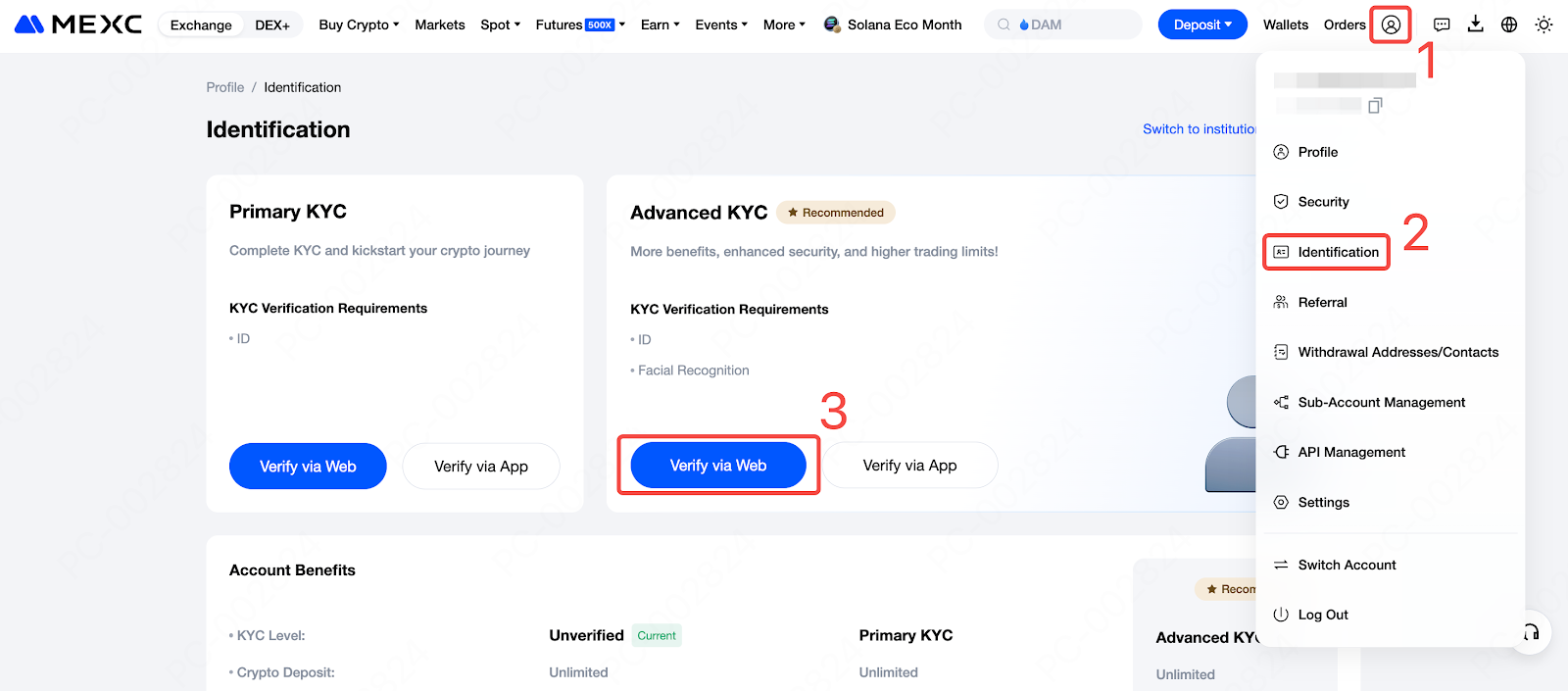
Image source: MEXC Help Center
- The page explains that Advanced KYC has two steps: proof of identity and facial verification. Click “Start Verification.”
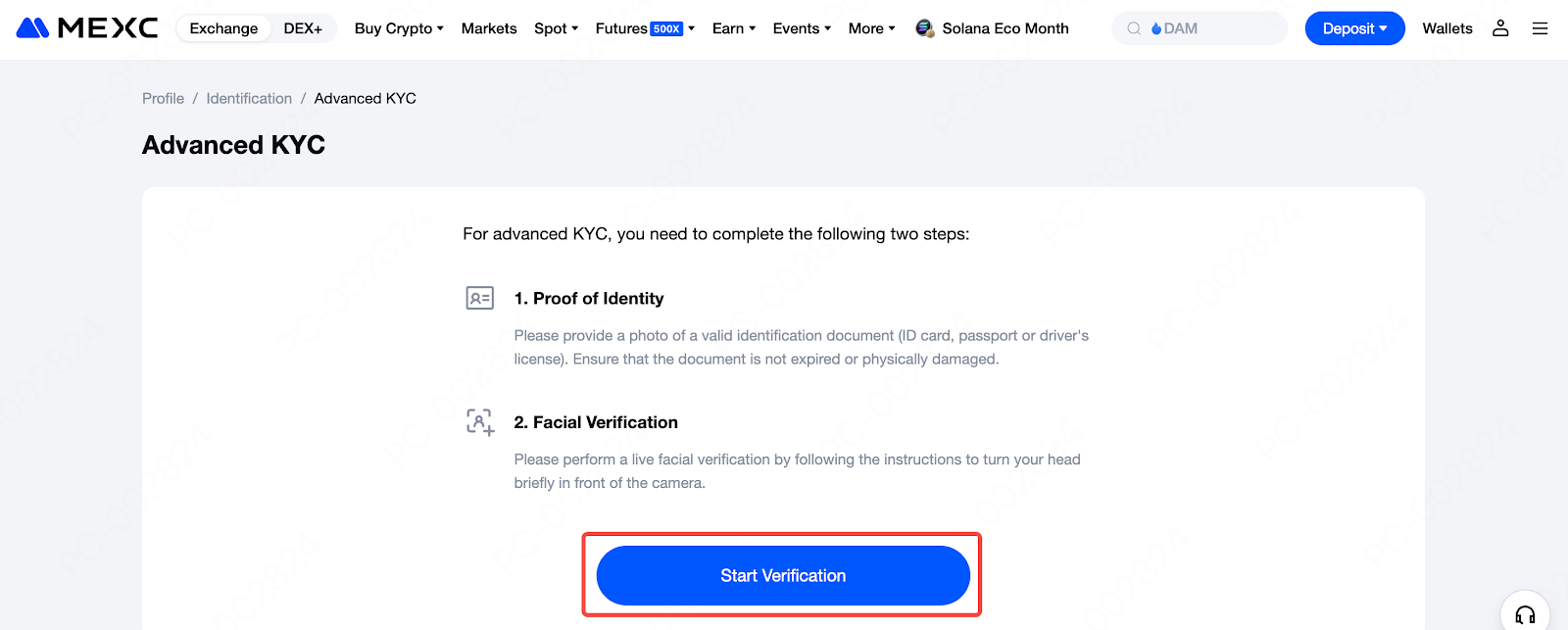
Image source: MEXC Help Center
- Choose the ID’s issuing country/region and the ID type, take or upload photos of the front and back, and click “Continue.”
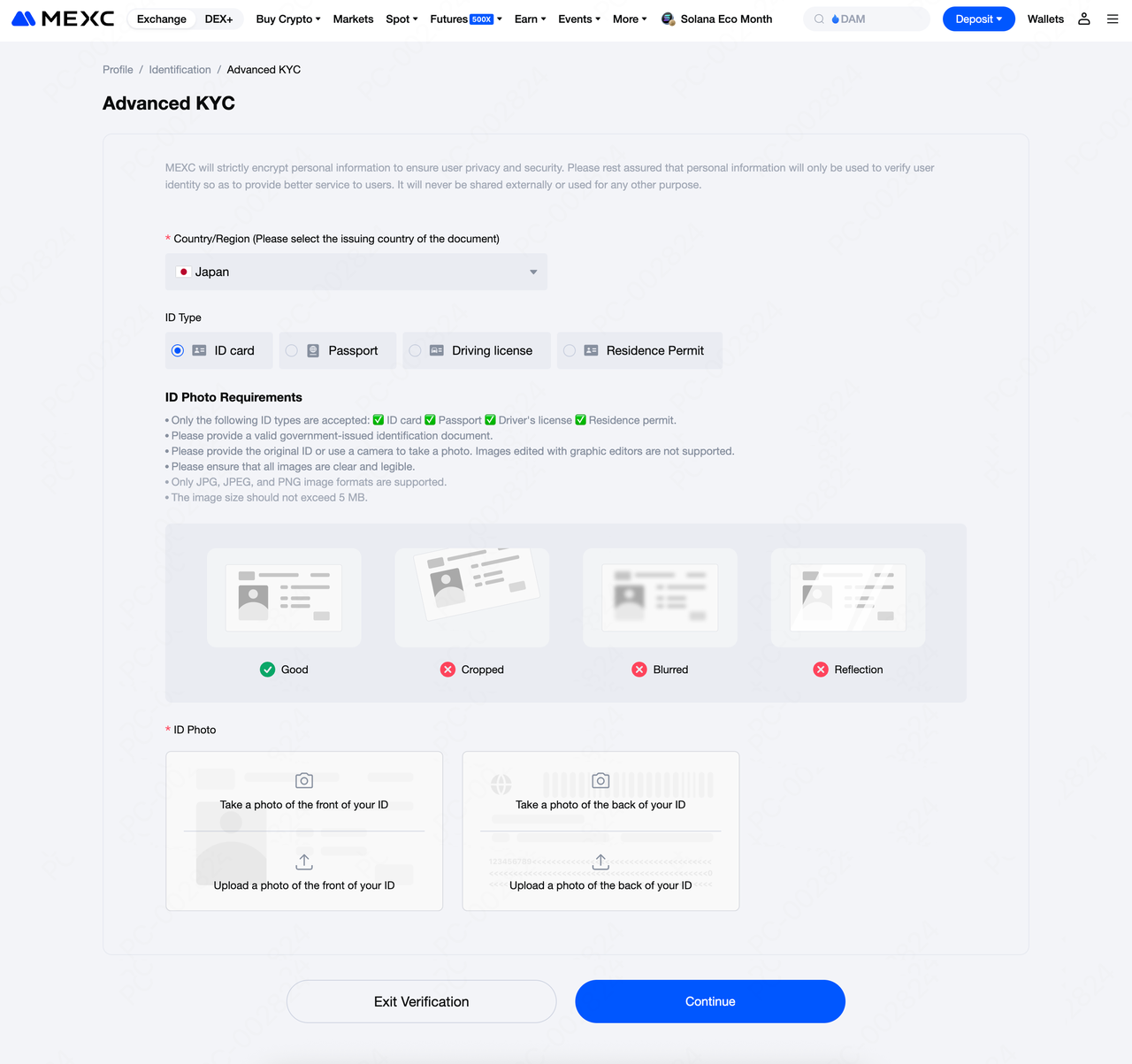
Image source: MEXC Help Center
- Tick the boxes to accept the privacy notice and the processing of your personal data, then continue.

Image source: MEXC Help Center
- Allow the browser to use your camera, position your face inside the frame, and complete the face scan as the screen instructs. If your computer has no camera, the screen also offers the option of finishing on your phone.
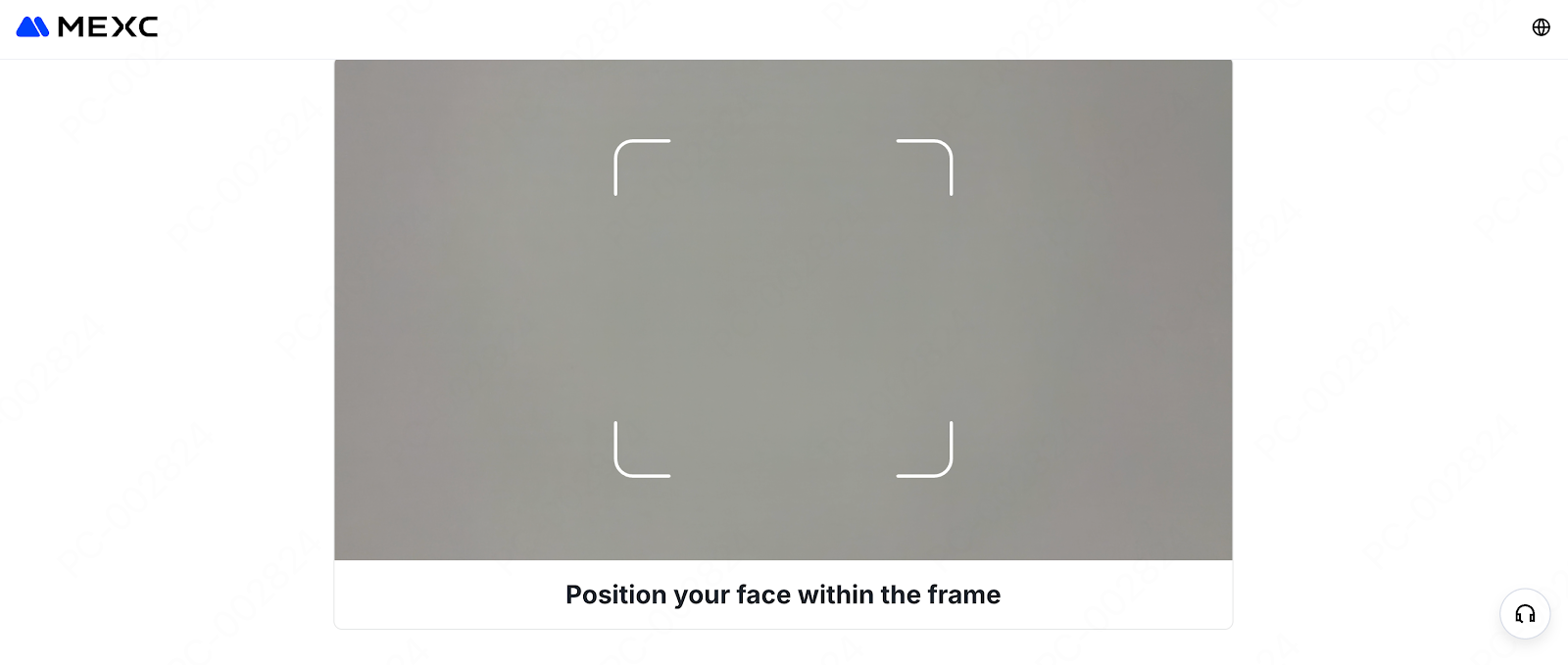
Image source: MEXC Help Center
After you submit, wait for the system review. The result is sent to your registered email address, and you can also check it on the “Identification” page.
MEXC KYC in the app (Advanced KYC)
- Open the MEXC app and tap your avatar in the top-left corner.
- Tap “Verify” next to your nickname at the top.
- Under Advanced KYC, tap “Verify.”
- Read the instructions, then tap “Start Verification.”
- Choose the ID’s issuing country/region and the ID type, then tap “Next.”
- Upload photos of the front and back of your ID and tap “Continue.” In the official screenshot, this page shows an estimated review time of 24 hours.
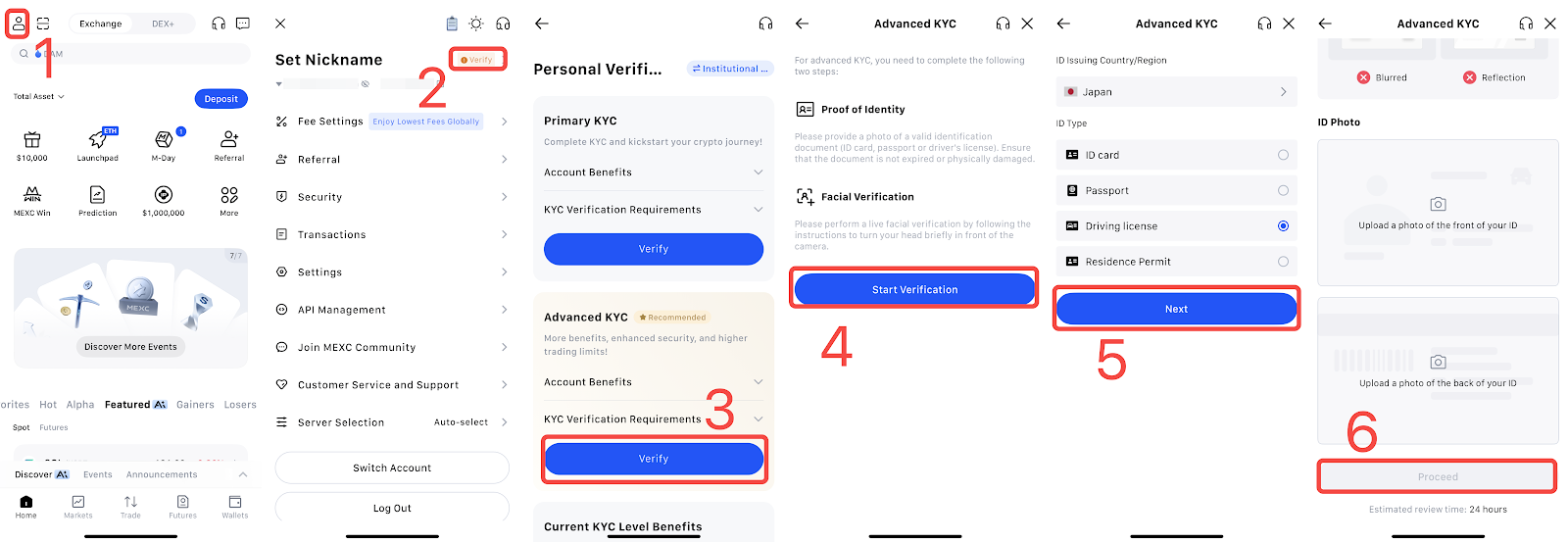
Image source: MEXC Help Center
- Choose your place of residence and tap “Continue.”
- The screen shows that your ID has been submitted and that the next item is a selfie. Tap “Continue.”
- Line your face up inside the frame as instructed to complete the face scan.
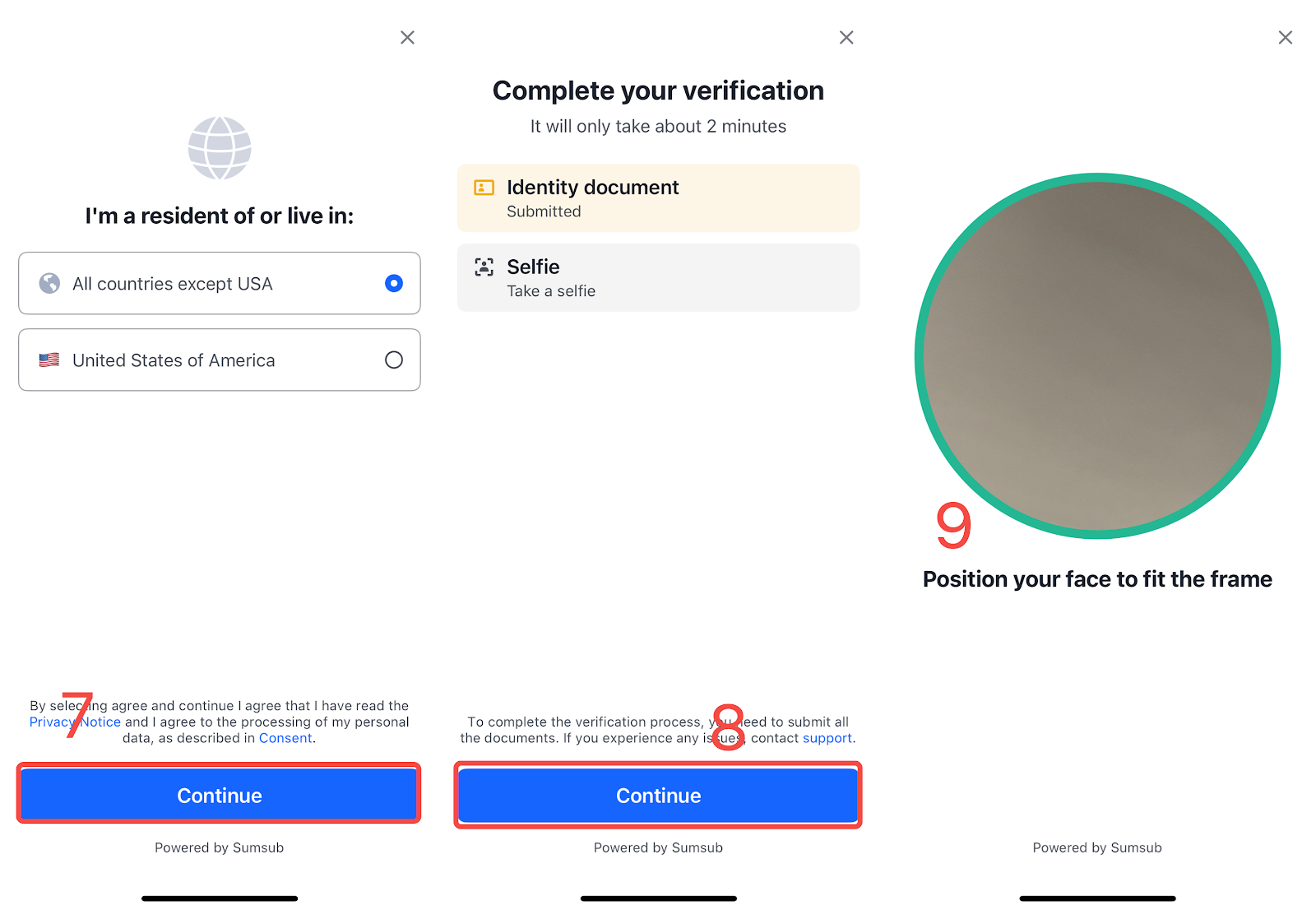
Image source: MEXC Help Center
If you only want Primary KYC for now
According to How to complete Primary individual identity verification, the process stops at the ID photos, with no face scan. In the app it goes: avatar → “Verify” → “Verify” under Primary KYC → choose the issuing country and ID type, then tap “Next” → upload the front and back, then tap “Submit.” On the web, click “Verify via Web” under Primary KYC on the “Identification” page, fill in the form and click “Submit for review.” If you upgrade later, the official guide says Advanced KYC keeps the issuing country you already chose, so you only need to choose the ID type.
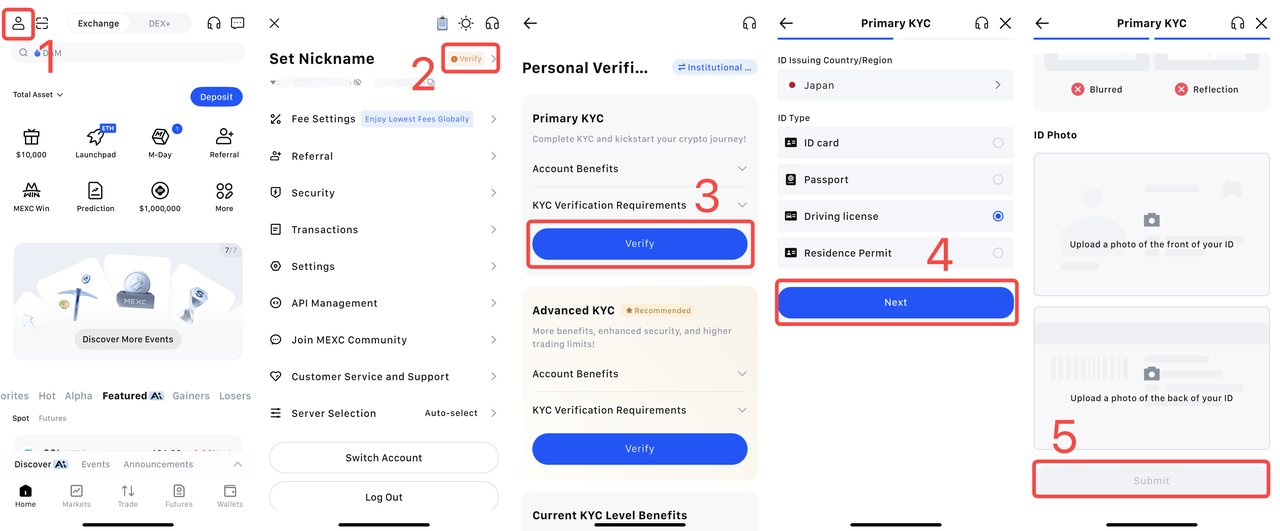
Image source: MEXC Help Center
How long does KYC review take, and what if you’re rejected?
MEXC gives two answers. The KYC FAQ says that “under normal circumstances, KYC (identity verification) review can be completed within 15 minutes,” and that some applications may take 8 to 24 hours depending on how complex the information is and the current review volume. The Primary and Advanced guides say the system replies with a result within 24 hours. The result is sent by email, and the reason for a failed verification is in that email, or you can check it on the “Identification” page.
The FAQ on individual identity verification lists six common reasons for failure. Here they are alongside MEXC’s suggested fixes:
| Reason for failure | MEXC’s suggested fix |
|---|---|
| Invalid or incomplete ID information (blurry photo, key details illegible, unsupported ID type) | Retake a clear photo, or use another valid ID |
| This ID has reached its limit of linked accounts | Use an ID that hasn’t been linked to any other account |
| The ID has expired | Upload an ID that is still valid |
| A screenshot or photocopy was uploaded | Upload a clear photo of the original ID |
| ID information not fully shown | Retake the photo so your name, ID number and other details are fully in frame |
| Primary and Advanced KYC details don’t match | Check the details from both verifications and make them match |
How to resubmit: fix whatever caused the rejection, then start verification again on the web or in the app; if it still doesn’t go through, contact online customer support or submit a ticket. Watch the attempt limit: each account can apply for Primary and for Advanced up to 3 times each per day, and after that you have to wait 24 hours before submitting again. If photo uploads keep failing, first check the format and the 5 MB size limit, then try clearing the cache, switching browsers, switching between the web and the app, or updating the app. If it still doesn’t work, take a screenshot of the error and contact online customer support.
If your details need correcting, it depends on which level you’ve reached. If you spot an error while still at Primary, MEXC suggests doing Advanced KYC directly and uploading the correct ID; the system then uses the Advanced details. If you’ve already completed Advanced KYC, you can submit an “Update KYC” request yourself on the platform, choose a reason (for example, an expired ID or changed details), and your details are updated once the request is approved.
What should Taiwan users know about KYC?
None of the official MEXC KYC guides I checked have rules specific to Taiwan. MEXC only says that “users who are not in MEXC’s restricted countries and whose country appears as an option on the page can submit identity verification,” with restricted countries/regions determined by the user agreement. Which IDs you can actually choose depends on the issuing country you select during the process, as shown on the page. These points are the most relevant to Taiwan users:
- Restricted regions: the MEXC Learn KYC article cites the user agreement (updated 2025-05-29), whose restricted regions include North Korea, Cuba, Sudan, Iran, mainland China, Singapore, Malaysia, the United States, the United Kingdom, Hong Kong, Kazakhstan, Canada and the Russian-controlled regions of Ukraine. Taiwan is not on that list. I haven’t checked the user agreement itself clause by clause; the latest version on the MEXC website is what counts.
- Choice of ID: among the four types (national ID card, passport, driver’s license, residence permit), MEXC doesn’t specify which one Taiwan users should use. What matters is that the details from both verifications match: if you use your ID card for Primary and switch to your passport for Advanced, a mismatch in your name or other details may get you rejected.
- New-user futures offer: the 0-fee futures quota mentioned above is, according to the announcement, for “new users in Chinese-speaking regions and Malaysia,” on condition of completing advanced identity verification. Full fee details are in MEXC fees.
For a comparison of restricted regions across exchanges, see exchange restricted countries.
Is KYC safe, and how is your personal data used?
MEXC says the purpose of KYC is to identify who actually controls an account and who actually benefits from its transactions, to strengthen screening and prevent money laundering and other illegal activity. The official ID upload screen says MEXC strictly encrypts personal data, uses it only to verify your identity, and does not share it externally or use it for other purposes. The Advanced KYC consent page and the face scan screen say “Powered by Sumsub,” so from the screens it appears this part is provided by a third-party provider, Sumsub, and before you start you have to accept the privacy notice and the personal data processing terms. None of the guides I checked say how long the data is kept.
In practice, I suggest sticking to two rules. First, only verify on the official MEXC website or in the official app, and check the URL and the app’s source yourself. Second, never send photos of your ID or selfies to anyone offering to “do your KYC for you” or “lift your fund restrictions.” MEXC states that the ID must be your own, and one identity can verify at most two accounts, so if someone else uses your ID for verification, they may also use up your own quota. Common tactics are covered in crypto exchange scam types, and the warning signs of rebate-related scams are in rebate scam warning signs.
What 3 things should you do first after KYC is approved?
Once your identity verification is approved, you can deposit. Before you deposit, I recommend getting these three things done first:
- Turn on two-factor authentication (2FA) or a passkey: link Google Authenticator, which then generates a new verification code every 30 seconds (MEXC: link Google Authenticator). MEXC also supports logging in to the website and app with a passkey (MEXC passkey guide).
- Set an anti-phishing code: once set, every official MEXC email shows the characters you chose, which helps you spot fake websites and emails (MEXC anti-phishing code setup).
- Test with a small withdrawal first: the first time you withdraw to a new address, send a small amount, confirm it arrived, then send the larger amount (MEXC withdrawal guide). With the whitelist on, you can withdraw only to whitelisted addresses, and a newly added address can be used for withdrawals only after 24 hours (MEXC withdrawal settings).
These three steps protect your own account; the platform’s own security record, hacks and proof of reserves are covered in the MEXC review.
FAQ
How long does MEXC KYC take?
Usually within 15 minutes, while some applications take 8 to 24 hours. That’s what the KYC FAQ says; the Primary and Advanced guides say a result comes within 24 hours. The result is sent to your registered email address, and you can also check it on the “Identification” page.
Can I trade or withdraw on MEXC without KYC?
Mostly not. MEXC states that users must complete identity verification to use the relevant products and services, and that not verifying affects some services such as deposits, withdrawals (cashing out) and trading, with the page prompts deciding which. If a deposit has already been blocked, you can apply on the “refund registration” page to have the restricted funds returned. If a withdrawal is blocked and you can’t complete verification, you can submit a “withdrawal appeal form,” but once it is approved, the account keeps only withdrawal and position-closing permissions.
Can I use a family member’s or someone else’s ID for KYC?
No. MEXC states that the ID must be your own original national ID card, passport, driver’s license or residence permit, and the Advanced face scan must also be done by you in front of the camera.
What if my MEXC KYC fails?
First check the reason for failure in the email or on the “Identification” page, fix it, and resubmit on the web or in the app. The most common causes are blurry photos, expired IDs, uploading a screenshot or photocopy, and Primary and Advanced details that don’t match. Each account can submit Primary and Advanced up to 3 times each per day, so make sure your photos are fine before resubmitting.
How many MEXC accounts can one person verify?
Two. The official FAQ says “each user can verify two MEXC accounts.” Beyond that, you’ll see a message saying your identity information has already been used to verify another account.
Can I transfer my MEXC KYC to a new account?
MEXC has no official KYC transfer feature, and its help center has no process for moving a completed identity verification to another account. What the KYC FAQ says is that each user can complete identity verification on up to two MEXC accounts, and an account can’t convert individual KYC into institutional KYC (MEXC KYC FAQ). For MEXC’s official rules on switching referrers and the risks involved, see how to switch your MEXC referral code.
Can I change my name or ID details after passing KYC?
Yes. After completing Advanced KYC, you can submit an “Update KYC” request yourself. Choose a reason (for example, an expired ID or changed details), submit it as the page guides you, and your details are updated once it is approved. If you’ve only completed Primary, MEXC suggests doing Advanced KYC directly and uploading the correct ID.
Do I have to complete Primary before Advanced?
No. The Primary guide says you can skip Primary and go straight to Advanced KYC. Advanced has a higher withdrawal limit, and the new-user 0-fee futures quota also requires advanced identity verification.
Sources
- MEXC: How to complete Primary individual identity verification (page shows updated 2026-08-24): the app Primary KYC screenshot in this article comes from this page.
- MEXC: How to complete Advanced individual identity verification (page shows updated 2026-07-24): the web and app Advanced KYC screenshots in this article come from this page.
- MEXC KYC (identity verification) FAQ (page shows updated 2026-06-02)
- MEXC: Common questions about individual identity verification (page shows updated 2026-04-02)
- MEXC: Why is identity verification (KYC) necessary? (page shows updated 2025-06-20)
- MEXC Learn: Does MEXC require KYC? (2026-10-09): the address verification details and the restricted regions list come from this article.
- MEXC announcement: fee adjustments for new users on BTC, ETH and GOLD futures (2026-06-04)
The pages above were checked on 2026-10-13. If you haven’t signed up yet, the referral code and sign-up steps are in MEXC referral code. Fee details are in MEXC fees, and MEXC’s reserves, safety record and restricted regions are covered in MEXC review. To confirm your referral code was bound after signing up, see how to check whether your referral code is bound.