


Updated Rules checked 2026-10-13
WEEX runs identity verification (KYC) through the third-party system Sumsub, and you can do it in the app or on the website. WEEX’s official guides do not say that you must complete KYC right after sign-up before you can deposit or trade. What they say is that WEEX will ask users to complete KYC based on their user level, and that it may require verification under local regulations when necessary; the one feature they clearly say requires KYC first is C2C (P2P) trading. KYC also affects withdrawal limits: for VIP 0, the 24-hour withdrawal limit is 10,000 USDT in the KYC1 column and 1,000,000 USDT in the KYC2 column.
kevinwuYou need your own identity document and a phone or computer with a camera. The documents offered in the official screenshots are an ID card, passport, residence permit and driver’s license. After choosing the issuing country, you upload the front and back, then complete a liveness check with your camera. The official review time is “under normal circumstances, manual review will be completed within 3 business days.”
KYC comes after sign-up. If you don’t have a WEEX account yet, start with the WEEX referral code and sign-up guide, then come back to this guide for identity verification once you’re registered.
Key points: WEEX KYC is completed through the Sumsub system, in the app or on the website (WEEX Help Center, updated 2025). WEEX asks users to complete KYC based on their user level, and C2C trading always requires KYC first. For VIP 0 users, the 24-hour withdrawal limit is 10,000 USDT with KYC1 and 1,000,000 USDT with KYC2, a 100x difference. WEEX states that manual review usually takes up to 3 business days. Common reasons for failure include an unclear document, poor lighting or a covered face, a dropped network connection, and a document or face already used by another account.
The information below was checked against WEEX’s official guides on 2026-10-13 (fact-check date). The screenshots come from WEEX’s official Help Center and are included for reference.
Not signed up yet? Enter the referral code before KYC
On WEEX you sign up first and do KYC afterwards. The WEEX sign-up guide states that the referral relationship cannot be changed once registration succeeds, so the referral code has to go in at sign-up; by the time you get to KYC, it’s too late. If you have already signed up, your options are covered in switching your WEEX referral code and can you add a referral code after signing up.
This site’s WEEX referral code is kevinwu. The steps for entering it at sign-up and the rebate rules are in the WEEX referral code guide.
What are WEEX’s KYC levels, and what does each unlock?
The WEEX Help Center has no article that explains KYC levels on their own. The only place the levels show up is the withdrawal limit table in WEEX VIP benefits (updated 2026-02-12), where each VIP level has two columns: “KYC1 24-hour withdrawal limit” and “KYC2 24-hour withdrawal limit.” The Help Center does not state what information KYC1 and KYC2 each require. The table below lists only the figures WEEX publishes; the multiples are my own calculation.
| VIP level | KYC1 24-hour withdrawal limit (USDT) | KYC2 24-hour withdrawal limit (USDT) | KYC2 as a multiple of KYC1 |
|---|---|---|---|
| VIP 0 | 10,000 | 1,000,000 | 100x |
| VIP 1 | 50,000 | 5,000,000 | 100x |
| VIP 4 | 100,000 | 10,000,000 | 100x |
| VIP 7 | 200,000 | 12,000,000 | 60x |
| VIP 8 | 500,000 | 15,000,000 | 30x |
In the official table, the limit cells for VIP 2, 3, 5 and 6 are merged with neighboring levels and have no figures of their own, so I left them out. Also, since April 30, 2025, WEEX has dropped the per-withdrawal cap and limits the daily total instead (WEEX maximum single USDT withdrawal). The figures still floating around online, “50,000 USDT per withdrawal without KYC, 100,000 USDT per withdrawal with KYC,” are an old rule that has been abolished.
Besides withdrawal limits, the other feature WEEX says requires KYC is C2C: the WEEX C2C trading FAQ states that C2C trading requires identity verification, and that you can only trade fiat with users in the country or region of your KYC. The WEEX identity verification (KYC) rules say that once you complete KYC, your account is upgraded to the corresponding level with more trading and withdrawal privileges, and you “will be exempt from any restrictions that may arise in the future.”
What do you need for KYC?
- Place of residence: the first Sumsub screen in the app asks “I live in (am a resident of),” and there are only two options: “All countries/regions except the United States” and “United States.”
- Document: choose the issuing country or region first, then the document type. The options in the official screenshots are ID card, passport, residence permit and driver’s license; what you can actually choose is whatever the page lists after you pick the issuing country. If your document type or issuing country isn’t listed, the Sumsub page says to contact the support team.
- Document photos: the upload page on the website asks for two images, front and back, in JPG, PNG, HEIC, WEBP or PDF format, up to 50 MB per file, and reminds you to make sure the information in the photo is clear and readable.
- Liveness check: you need to allow camera access. The website’s tips are to find a well-lit spot, keep your face inside the frame, and not wear a hat, glasses or a mask.
- Age: the WEEX User Agreement requires you to be at least 18, or another legal age set by applicable law.
The official guides do not mention proof of address, and they do not list any document validity requirement. In the older guide (2023), the process asked for a photo of you holding your ID; the current Sumsub process uses a camera liveness check instead, so older tutorials online may still describe the holding-your-ID version. Sources: How to complete WEEX KYC identity verification (web), How to complete WEEX KYC identity verification (app), WEEX User Agreement.
WEEX KYC steps on the website
The steps and button names below follow the WEEX Help Center’s Traditional Chinese article. The screenshots in the official guide show the Simplified Chinese interface, so the wording in your interface may differ somewhat; go by what you see on your screen.
- Go to the WEEX website and click “Log in” to sign in to your account.
- Once logged in, open the avatar menu in the top right and click “Identity Verification.”
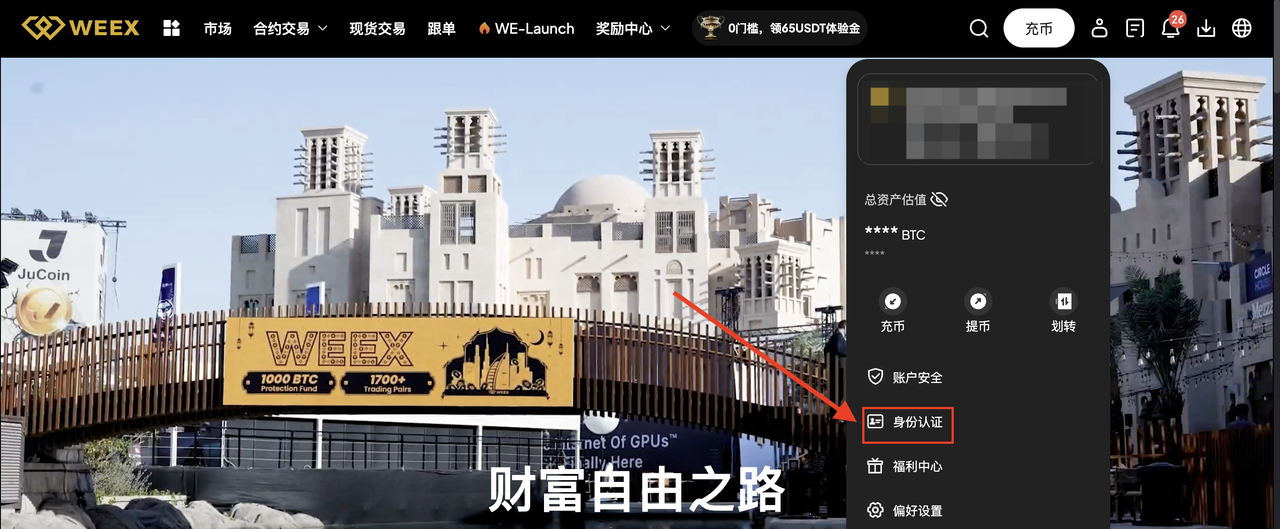
Image source: WEEX Help Center
- On the “Complete identity verification” page, click “Verify now.”
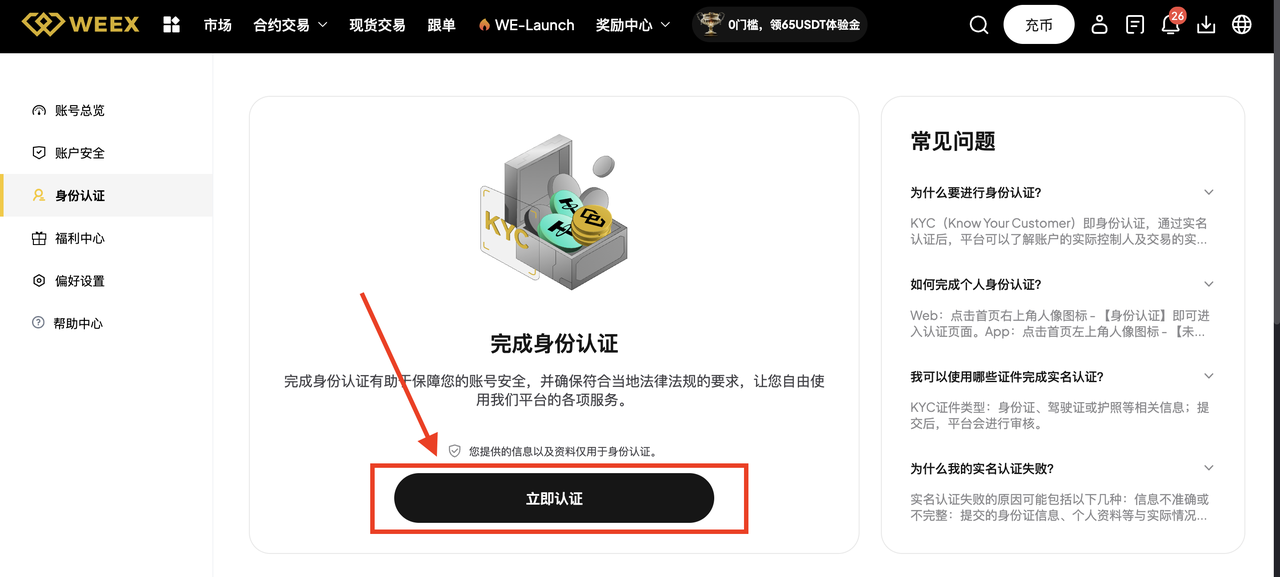
Image source: WEEX Help Center
- The Sumsub page opens and lists two steps: provide an identity document, then complete a liveness check. Click “Continue.”
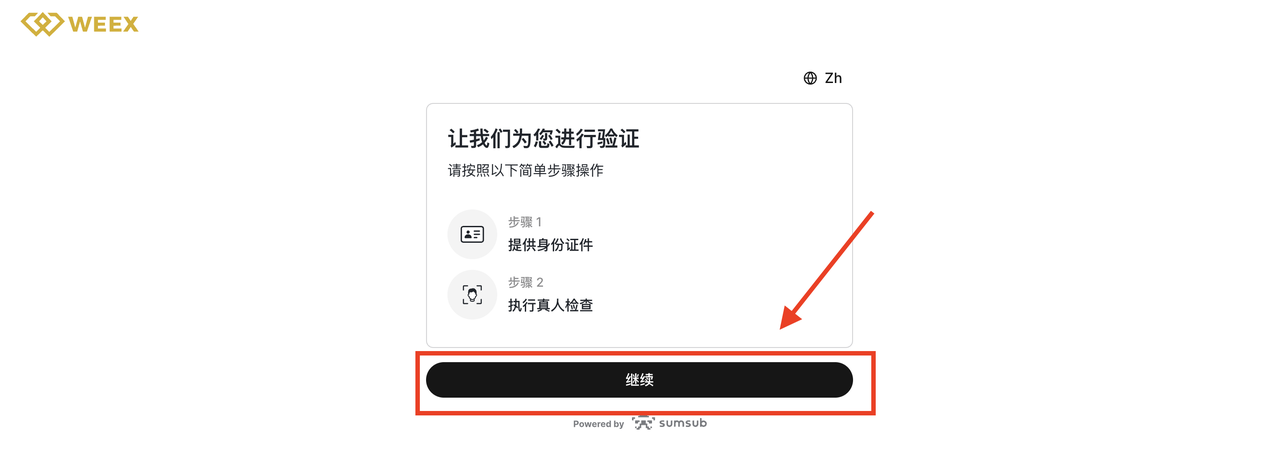
Image source: WEEX Help Center
- Choose the document’s “Issuing country/region” and “Document type,” then click “Continue.”
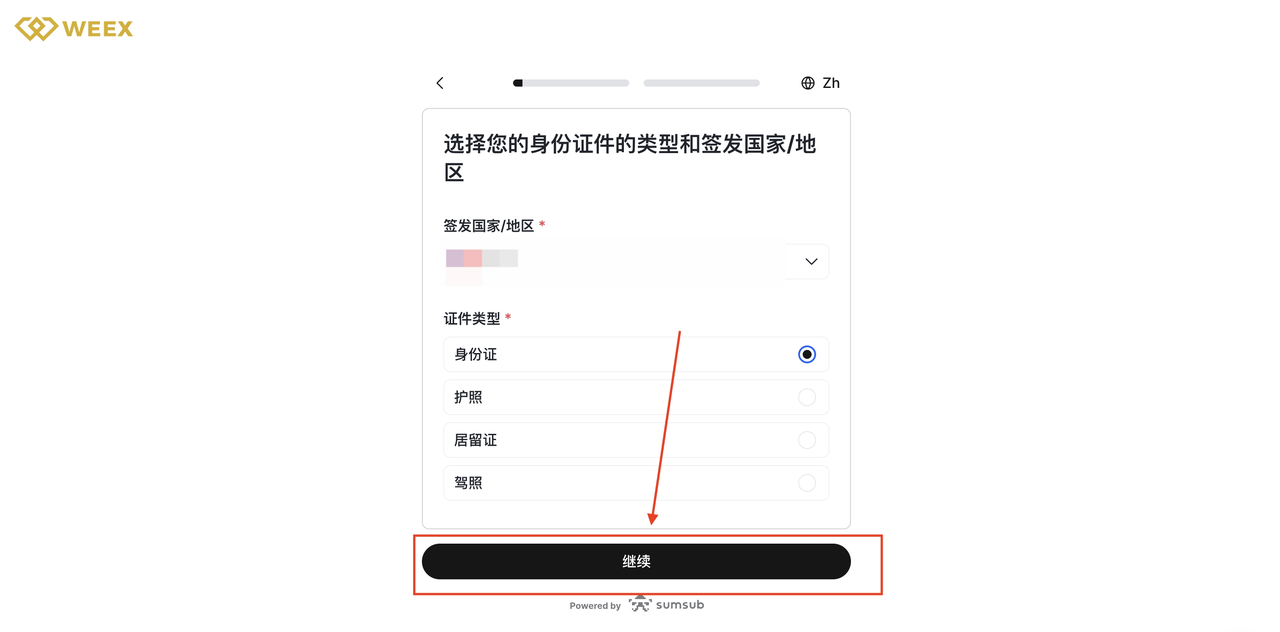
Image source: WEEX Help Center
- Upload the front and back of your document, then click “Continue.”
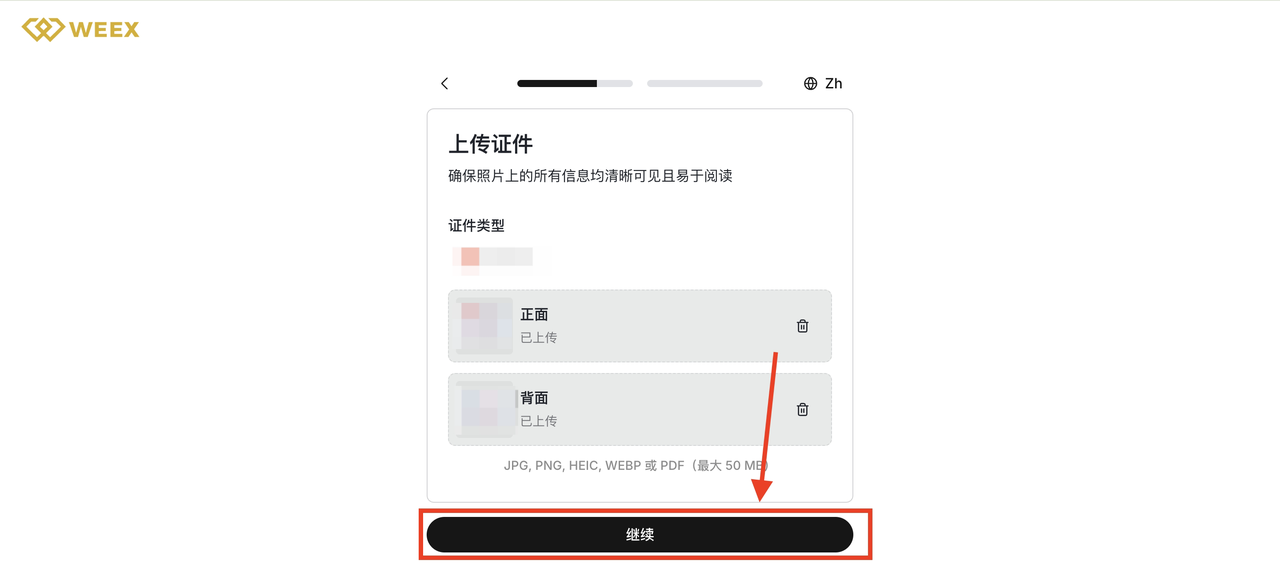
Image source: WEEX Help Center
- Get ready for facial recognition: read the tips, then click “Continue.”
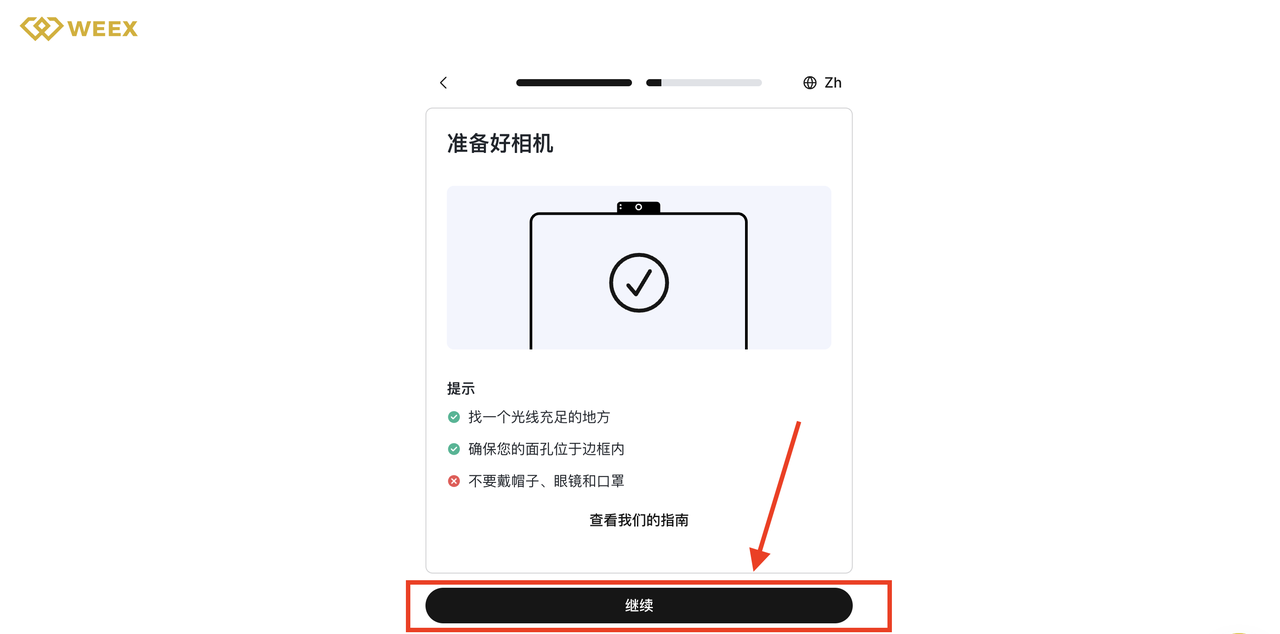
Image source: WEEX Help Center
- Allow the browser to use your camera, then click “Continue.” If your computer has no camera, the page offers to switch to a mobile device for verification.
- Follow the on-screen prompts to complete the liveness check.
- After submitting, wait for manual review.
WEEX KYC steps in the app
The app goes through Sumsub just like the website; only the entry point is different. The official screenshots for this part also show the Simplified Chinese interface, from app version 4.3.17.
- Open the app and tap “Personal center” (the grid icon) in the top left of the home screen.
- Tap the avatar row at the very top.
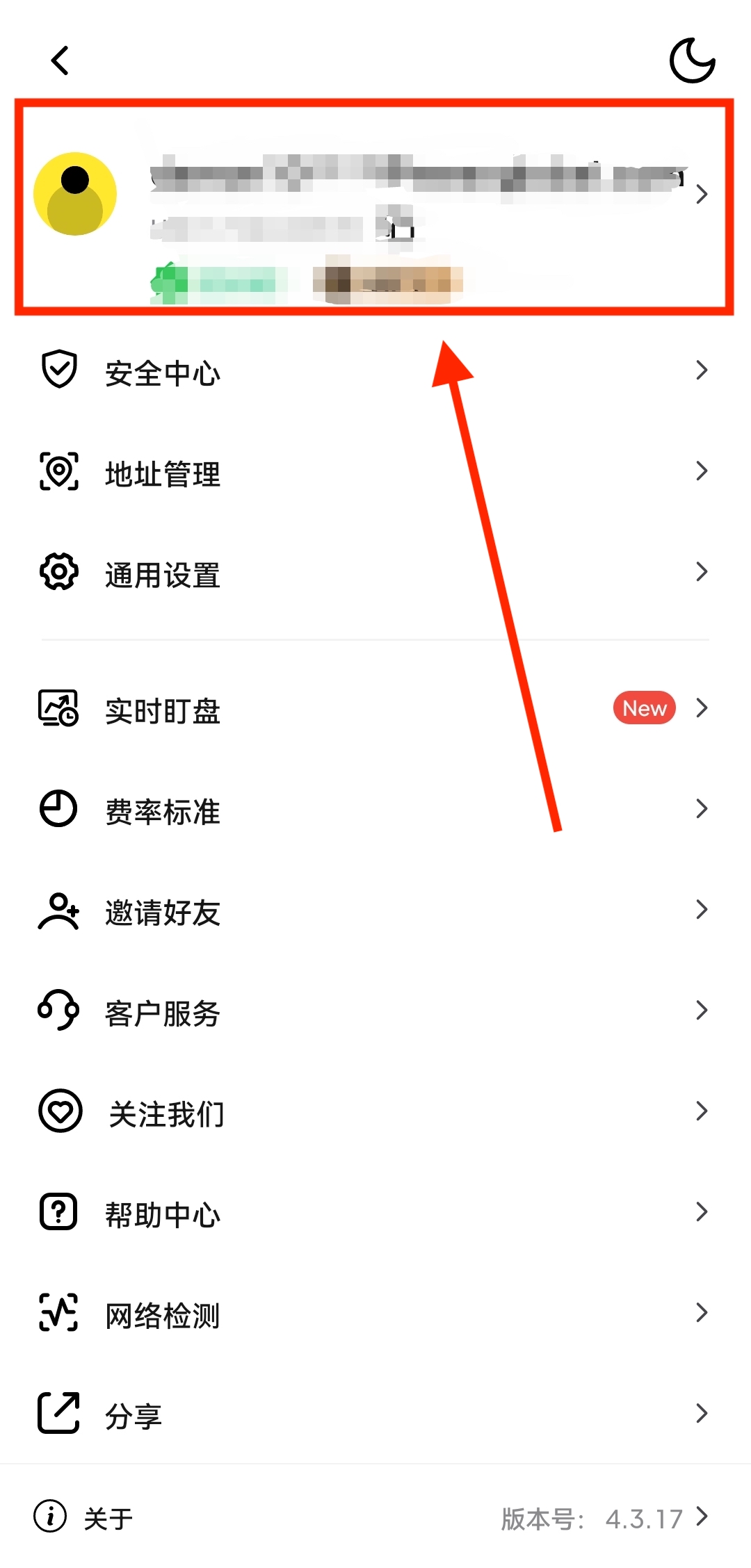
Image source: WEEX Help Center
- On the “Account info” page, tap “Identity Verification.”
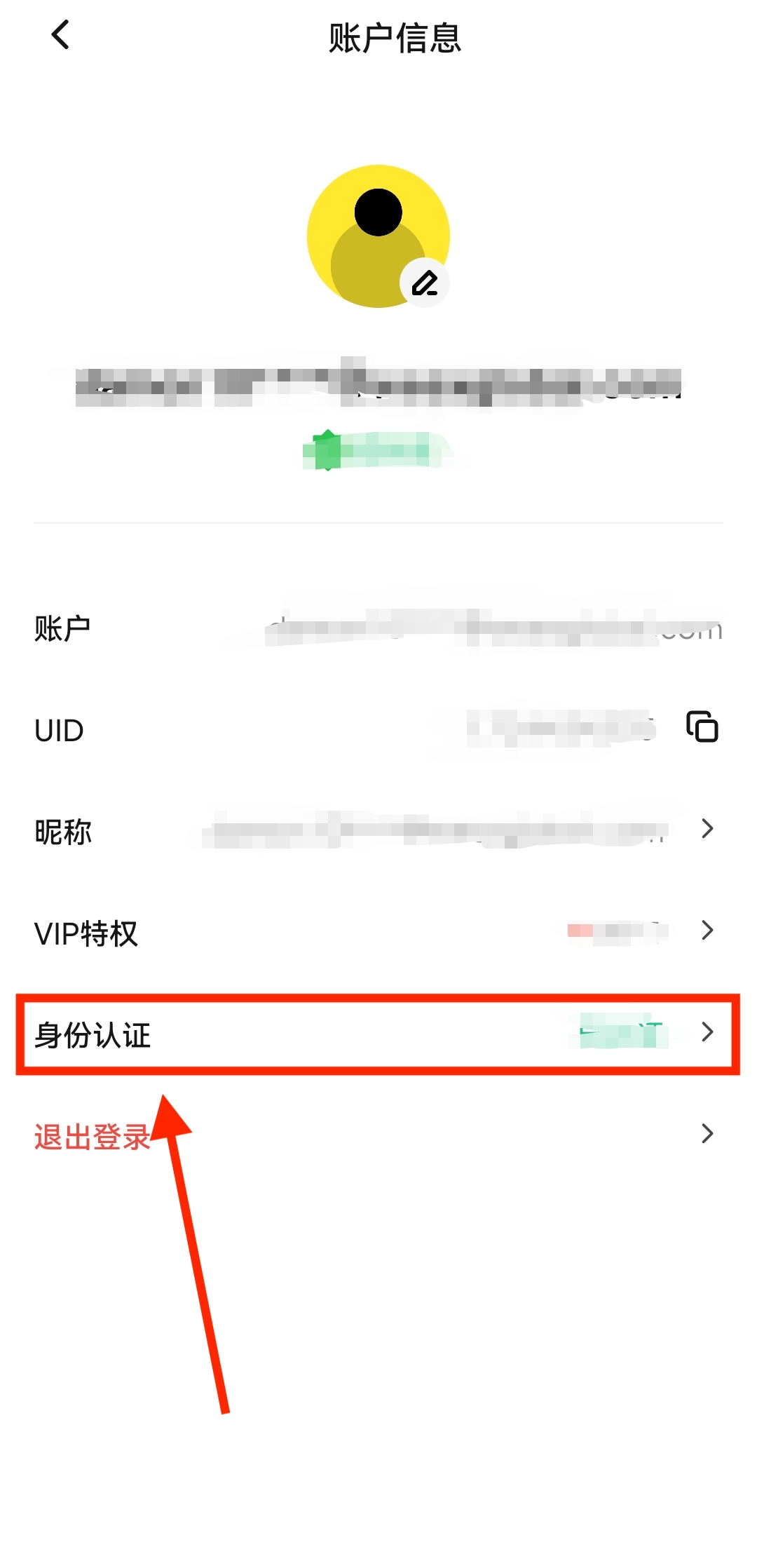
Image source: WEEX Help Center
- Choose your citizenship status (place of residence). Users in Taiwan choose “All countries/regions except the United States.”
- Choose the document’s “Issuing country/region” and “Document type,” then tap “Continue.”
- Upload your document and tap “Continue.” The screen shows the identity document as “Submitted,” with a selfie as the next item, and Sumsub says the whole process “only takes about 2 minutes.”
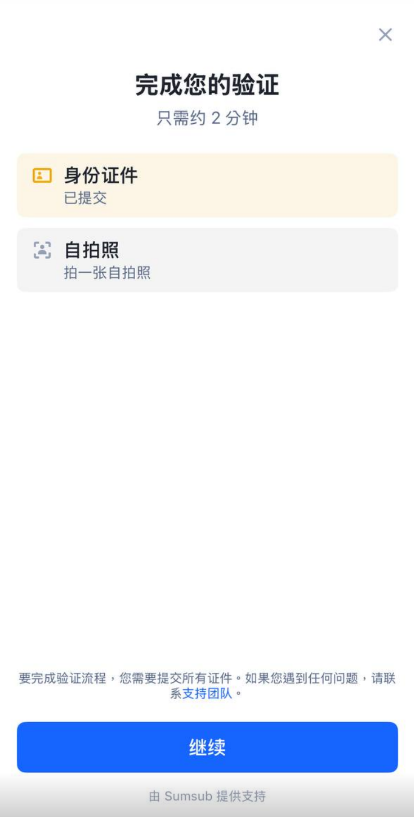
Image source: WEEX Help Center
- Allow camera access and follow the on-screen prompts to complete the liveness check.
- When you’re done, wait for manual review.
The “about 2 minutes” refers to the time you spend in Sumsub, not the review time; after submitting, you still have to wait for manual review.
How long does KYC review take, and what if you’re rejected?
Both WEEX’s app and website guides say “under normal circumstances, manual review will be completed within 3 business days.” WEEX does not say how you are notified of the result, or who to contact if it takes longer. My suggestion: check the status on the identity verification page first, and if nothing has changed, ask customer support through the app or the website.
| Reasons for failure listed by WEEX | What to do before resubmitting |
|---|---|
| The uploaded identity document is unclear or incomplete | Retake the photo with the whole document in frame and make sure the text is clear and readable |
| The liveness check failed because of poor lighting, a covered face or a blurry camera | Move somewhere well lit, take off your hat, glasses and mask, and wipe the camera lens clean |
| The network was unstable while uploading the document or during facial recognition, so the process didn’t finish | Switch to a stable connection and go through the process again from the start |
| The same document or face has already been used by another account | Retaking photos won’t help; contact customer support to explain. The WEEX User Agreement says you may not hold more than one account without consent |
The four items in the left column are the reasons listed in the app and web guides; the right column is my own summary based on the photo tips in the official screenshots. WEEX does not say how long you have to wait before resubmitting after a failure, or whether there is a limit on attempts.
What should users in Taiwan watch for with KYC?
- No Taiwan-specific rules: none of the official WEEX KYC guides I checked has a provision specific to Taiwan. Which documents you can use depends on the issuing country or region you choose during the process, and the page lists the available types.
- Unsupported regions: the WEEX User Agreement lists regions where it does not provide services, including the United States, Canada, mainland China, Hong Kong, Singapore and the UAE; Taiwan is not on the list. For a comparison of restricted regions across exchanges, see exchange restricted countries.
- Screenshots in Simplified Chinese: the Help Center’s Traditional Chinese articles come with screenshots of the Simplified Chinese interface only, so button names (such as “Identity Verification” and “Verify now”) may be worded differently in the Traditional Chinese interface.
- C2C only in your KYC country’s fiat currency: whichever country’s document you use for KYC, C2C lets you trade fiat only with users in that same country or region. Whether New Taiwan dollar (TWD) quotes are available is whatever the C2C page shows.
Is KYC safe, and how is your personal data used?
WEEX’s guides state that KYC is completed through the Sumsub system, and the bottom of the verification page shows “Powered by Sumsub.” The identity verification page in the official screenshots reads “The information and data you provide are used only for identity verification,” and the WEEX KYC rules say WEEX will ensure user information is verified lawfully and securely. The User Agreement states that it includes the Privacy Policy and the AML/customer due diligence policy, but I could not find a link to a standalone privacy policy page in the Help Center, so how long personal data is kept and who it may be shared with is not stated in the official guides.
A few things to watch when you actually do it:
- Only verify on WEEX’s official website (weex.com) or in the official app, going in through the app’s “Identity Verification” entry. Don’t click “KYC links” in messages from strangers.
- You can’t have someone else do KYC for you. The WEEX User Agreement says users must not impersonate others, use an alias or conceal their identity, so anyone who claims they can “get you through KYC” and asks for photos of your documents is not to be trusted. Common tactics are covered in types of crypto exchange scams and rebate scam warning signs.
- Never give anyone your password, verification codes or seed phrase; the KYC process never asks for them.
What 3 things should you do first after KYC is approved?
Once your identity verification is approved, you can deposit. Before you deposit, I recommend getting these three things done first:
- Turn on two-factor authentication (2FA): go to “Personal Center → Google Verification” and scan the QR code or enter the key to link it (WEEX Google verification guide). WEEX’s account security settings page also has a passkey option where you can link a passkey or a hardware security key; the help center doesn’t say which actions it can be used for.
- Set an anti-phishing code: turn it on in the account security settings. WEEX states that once it’s on, official emails and text messages (except verification codes) will carry this code, and messages without it should be treated as suspicious (WEEX SMS spoofing alert).
- Test with a small withdrawal first: the first time you withdraw to a new address, send a small amount, confirm it arrived, then send the larger amount (WEEX withdrawal guide). WEEX’s address management can limit withdrawals to pre-approved addresses, and adding a new address requires email confirmation (WEEX: secure your account in 4 steps).
These three steps protect your own account; the platform’s own security record, hacks and proof of reserves are covered in the WEEX review.
FAQ
How long does WEEX KYC take?
WEEX says manual review is usually completed within 3 business days. Uploading the document and taking the selfie in Sumsub takes about 2 minutes, according to the page.
Can I trade or withdraw on WEEX without KYC?
The official guides don’t answer this directly. WEEX says it will ask users to complete KYC based on their user level, and that it may require verification under local regulations when necessary; C2C trading always requires KYC first. As for withdrawal limits, for VIP 0 the KYC1 column is 10,000 USDT per 24 hours and the KYC2 column is 1,000,000 USDT.
Can I use a family member’s or someone else’s document for KYC?
No. The WEEX User Agreement says users must not impersonate others, use an alias or conceal their identity, and KYC requires you to complete the liveness check yourself in front of the camera. A document or face already used by another account is one of the review failure reasons WEEX lists.
What should I do if WEEX KYC fails?
Start by checking the four reasons WEEX lists: an unclear or incomplete document, a liveness check that failed because of lighting or something covering your face, an unstable network, or a document or face already used by another account. For the first three, retake the photos or change your setup and submit again; for the fourth, contact customer support.
How many WEEX accounts can one person have?
One, as a rule. The WEEX User Agreement states “unless we consent, you may not hold more than one account,” and KYC checks whether the same document or face is already used on another account.
Can I transfer my WEEX KYC to a new account?
WEEX hasn’t published a KYC transfer process. Its KYC guide lists “the same ID document or facial data has already been used by another account” as a reason verification fails (WEEX KYC verification guide), and Article 2.2(a) of the user agreement states that, unless WEEX consents, you may not hold more than one account (WEEX user agreement). If your account has a special situation, ask WEEX support first; for how to switch referrers and the risks, see how to switch your WEEX referral code.
Can I change my name or details after KYC?
The official guides don’t describe a way to change them yourself. The User Agreement requires you to notify WEEX promptly when your information changes and to keep your registration details complete and accurate, so if you need to change anything, contact customer support first to confirm how.
Can I add a referral code after completing KYC?
No. WEEX states that the referral relationship cannot be changed once registration succeeds, whether or not you have done KYC. To check whether your account is bound to a referral code, see how to check whether your referral code is bound.
Sources
These are the official WEEX pages used in this article (dates are the last-updated dates shown in the Help Center, checked on 2026-10-13). The screenshots come from the first two KYC guides and show the Simplified Chinese interface.
- How to complete KYC identity verification (web, Sumsub system) (updated 2025-06-30; screenshots kyc-weex-08 to kyc-weex-13)
- How to complete KYC identity verification (app, Sumsub system) (updated 2025-11-10; screenshots kyc-weex-02, kyc-weex-03, kyc-weex-06)
- WEEX exchange identity verification (KYC) rules (updated 2025-06-12)
- WEEX VIP benefits upgraded, with multiple exclusive perks (updated 2026-02-12)
- Maximum single USDT withdrawal (per-withdrawal limit removed) (updated 2025-06-09)
- Top 10 withdrawal questions (updated 2025-03-27)
- C2C trading FAQ (updated 2026-01-29)
- User Agreement (updated 2026-02-19)
- WEEX sign-up guide
If you haven’t signed up yet, the sign-up steps and referral code are in the WEEX referral code guide. Once KYC is done and you’re ready to trade, fee details are in WEEX fees, and an overview of the platform is in the WEEX review. To confirm your referral code is bound, see how to check whether your referral code is bound.