


Updated Rules checked 2026-10-13
Since 2023-08-31, KuCoin has required every new user to complete identity verification (KYC) before using KuCoin’s products and services. An unverified account cannot deposit crypto or buy crypto with fiat; in spot it can only place sell orders, and in futures it can only reduce or close positions. Older accounts registered before 2023-08-31 that are still unverified are left with selling, closing positions and redeeming from KuCoin Earn, although crypto withdrawals are not affected.
You need one original identity document (ID card, driver’s license, passport or residence permit; the verification screen recommends a passport) plus a facial verification, and you must be at least 18. KuCoin’s official troubleshooting article says KYC usually takes 3-5 minutes and in some cases up to 48 hours, with the result sent by email.
Key points: since 2023-08-31 00:00 (UTC), KuCoin has required new users to complete identity verification before using its products and services. There is only one level of individual verification (shown on screen as Basic Identity Verification), and it takes an original identity document plus facial verification; applicants must be at least 18. KuCoin states that KYC usually takes 3-5 minutes and in some cases up to 48 hours. Each person can verify only one KuCoin account, and the same document can be used for only one account. KuCoin’s identity verification is handled by the provider Sumsub, and KuCoin states that biometric data is stored on AWS or Google Cloud.
The information below was checked against KuCoin’s official guides on 2026-10-13 (fact-check date). The screenshots come from KuCoin’s official Help Center and are included for reference.
Not signed up yet? Enter the referral code before KYC
KYC happens after you sign up, while the referral code goes on the sign-up page. A KuCoin referral code is meant to be entered at sign-up; afterwards the only route is a “Link Referrer” or “Unlink Referrer” request in the Help Center, which KuCoin reviews under conditions it doesn’t state (checked 2026-10-22). If you haven’t signed up yet, follow the steps in the KuCoin referral code guide first, then come back here for identity verification.
This site’s KuCoin referral code is KEVINWU; just enter it when you sign up.
If you already signed up and forgot to enter one, your options are covered in switching your KuCoin referral code, and each exchange’s rules for adding a code later are in can you add a referral code after signing up.
What are KuCoin’s KYC levels, and what does each unlock?
KuCoin’s “About Identity Verification” article lists three statuses: unverified, individual identity verified, and institutional identity verified. Individual users have only one verification level, with no higher tiers; institutions go through a separate KYB process, and the FAQ on the verification page states that an account can choose only one verification type. Here are the items from KuCoin’s official permissions table that matter to regular users:
| Feature | Unverified | Individual identity verified |
|---|---|---|
| Crypto deposits | Not available | Available |
| Fiat deposits, buying crypto by card / P2P / third party | Not available | Available |
| Spot trading | Sell orders only | Available |
| Futures | Cannot open or add to positions; can only reduce or close them | Available, up to 125x leverage |
| Crypto withdrawals | Not affected for older accounts registered before 2023-08-31 | The 24-hour limit is whatever the withdrawal page shows |
| Fiat withdrawals, selling crypto by card / P2P | Not available | Available |
| Creating APIs, sub-account trading, Convert, pre-market trading | Not available | Available |
| Security settings, creating sub-accounts, referral and affiliate programs, exporting statements | Available | Available |
Sources: KuCoin: About Identity Verification, KuCoin: How to complete identity verification (KYC) on the website. Futures use leverage, and if the price moves against you, your position may be liquidated.
Be careful with how the withdrawal limits are described. The Help Center article only says verified users get “higher daily withdrawal limits” and that the exact figure is whatever the withdrawal page shows; KuCoin’s official blog KYC guide says verified users’ daily withdrawal limit is up to 999,999 USDT (KuCoin blog). Where the two differ, go by what your own account’s withdrawal page shows.
What do you need for KYC?
- Document: the web guide lists ID card, driver’s license, passport and residence permit, and the verification screen marks the passport as Recommended. Which ones you can actually choose depends on the issuing country/region you select. The troubleshooting article says “only a driver’s license, passport or ID card can be used” and does not list the residence permit, so the two articles don’t fully agree.
- Document requirements: it must be the original, clear and complete; printed, photocopied or scanned versions are not accepted. The document must show your full name, full date of birth, photo and issuing country, and it must still be valid. Applicants must be at least 18.
- File format: the web guide says JPG or PNG, ideally under 50 MB; the app guide says you can take a photo, pick one from your photo library or upload a PDF. The upload screen in the official screenshot shows JPG, PNG, HEIC, WEBP or PDF, up to 50 MB.
- Facial verification: place your face inside the frame and follow the on-screen prompts. KuCoin recommends no hat, no glasses, no filters, and enough light.
- Proof of address: it is not among the steps in the guide articles. The FAQ on the verification page in the official screenshot says proof of address may be requested in some cases, such as a utility bill or bank statement.
- One document, one account: KuCoin states that the same document can register only one KuCoin account, and each person can verify only one account.
KuCoin KYC steps on the website
The screenshots in the official guide show the English interface (the Traditional Chinese help page reuses the same English screenshots). The button names below follow the official guide, using the English labels from the screenshots where they appear. The layout of your interface may differ from the screenshots.
- After logging in, go to [Account Center] → [Identity Verification] and click [Individual Verification].
- Choose the document’s issuing country/region (Issuing Country/Region), which must match your document, then click Get Verified. The screen states that this step collects two kinds of data: facial recognition and photo ID recognition.
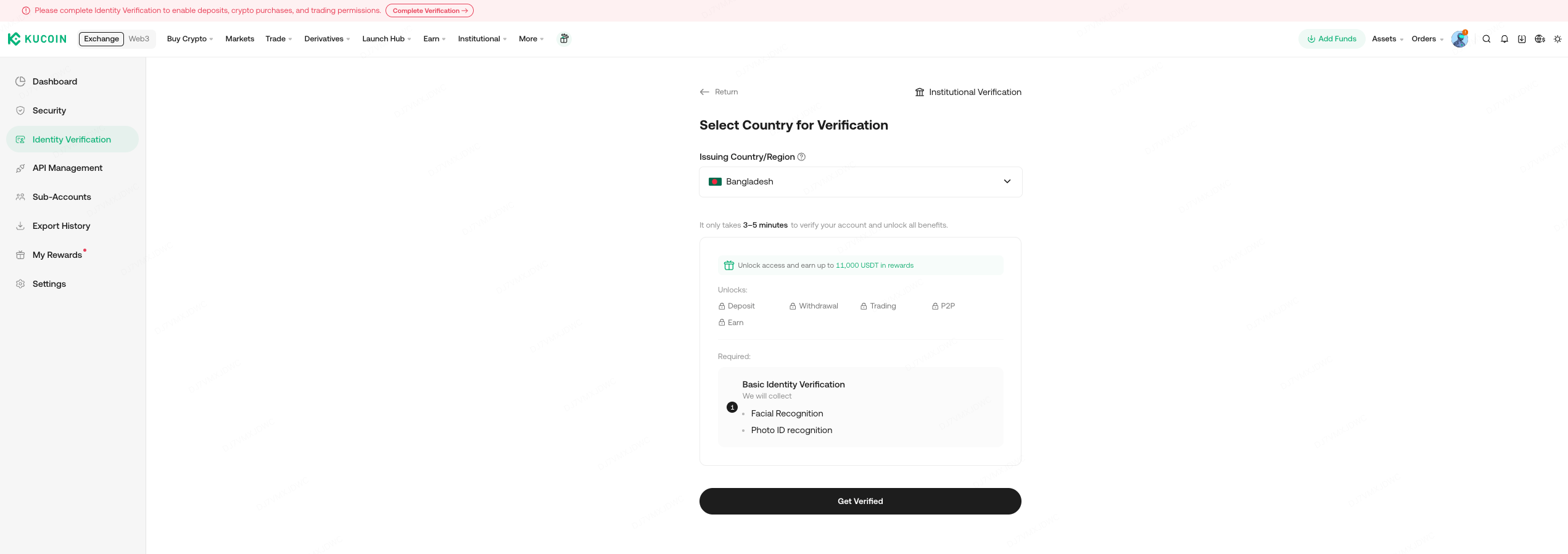
Image source: KuCoin Help Center
- Choose the document type (Passport, ID Card, Driver’s Licence, Residence Permit), check the consent statement below it, and click [Continue].

Image source: KuCoin Help Center
- Choose which device to photograph your document with: scan the QR code with the KuCoin app and continue on your phone (marked as recommended on screen), or verify directly on the current computer (Verify on Current Device).

Image source: KuCoin Help Center
- Follow the prompts to photograph your document, or upload photos of its front and back.

Image source: KuCoin Help Center
- Choose the device for facial verification and complete it in a well-lit place, following the on-screen prompts.
- After about a minute, your first name, last name and ID number appear on screen. Check that they are correct and submit; the system then sends them for review automatically.
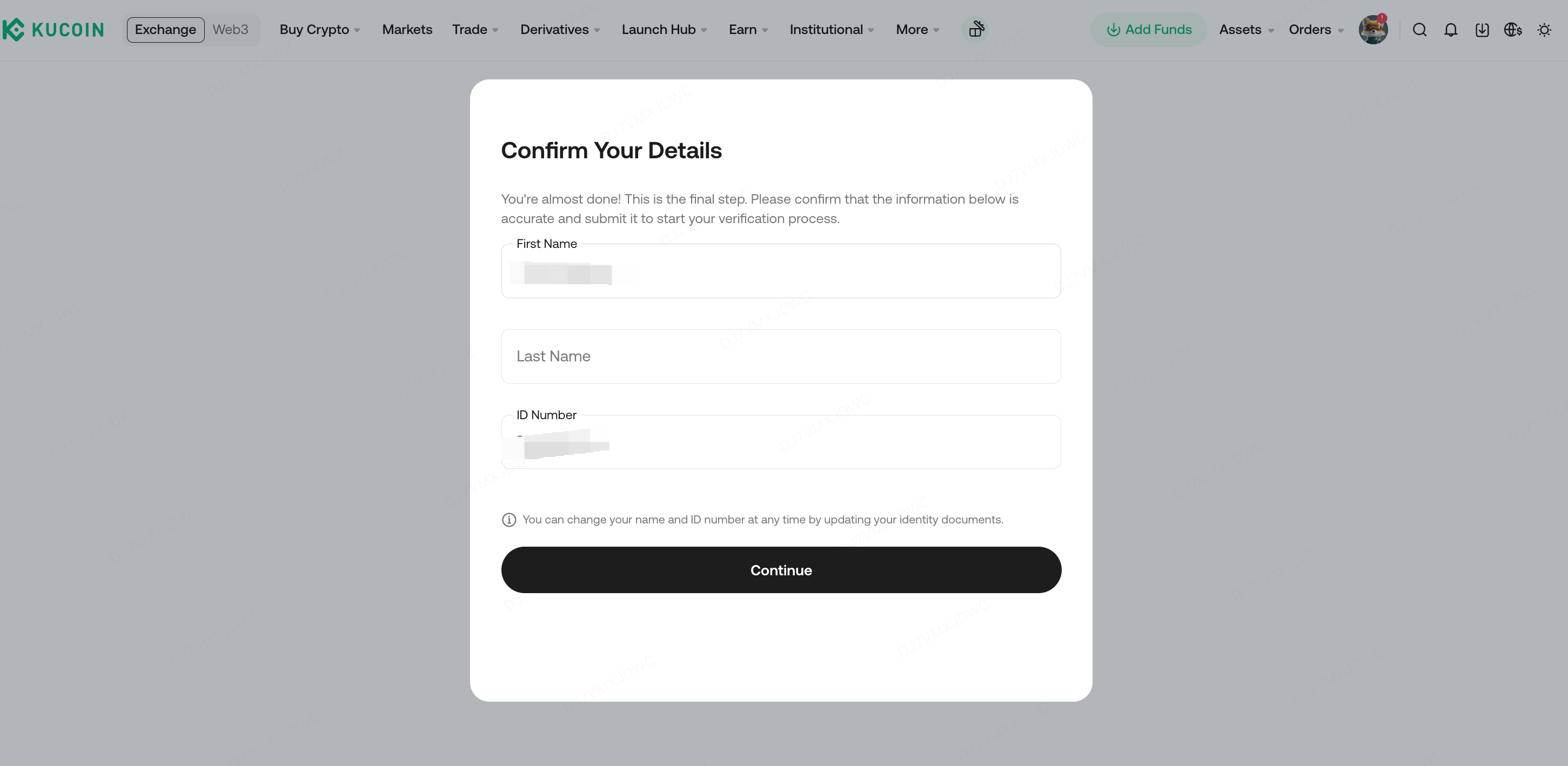
Image source: KuCoin Help Center
- Wait for the review result; KuCoin will notify you by email.
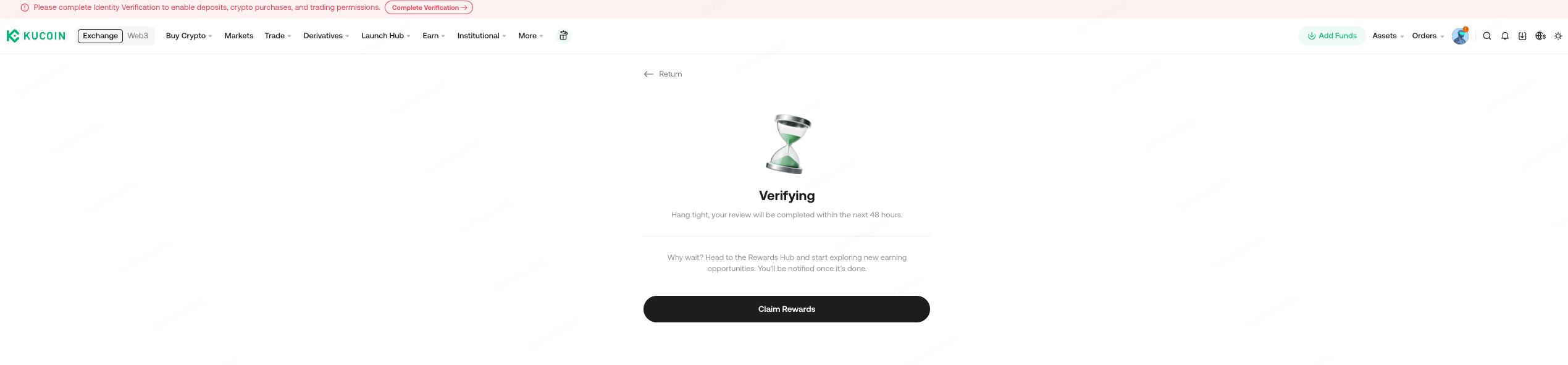
Image source: KuCoin Help Center
KuCoin KYC steps in the app
The app follows the same order as the website; only the entry point and the way you take photos differ:
- Tap [Verify Now] on the app’s home screen, or tap your profile avatar at the top left and then [Unverified].
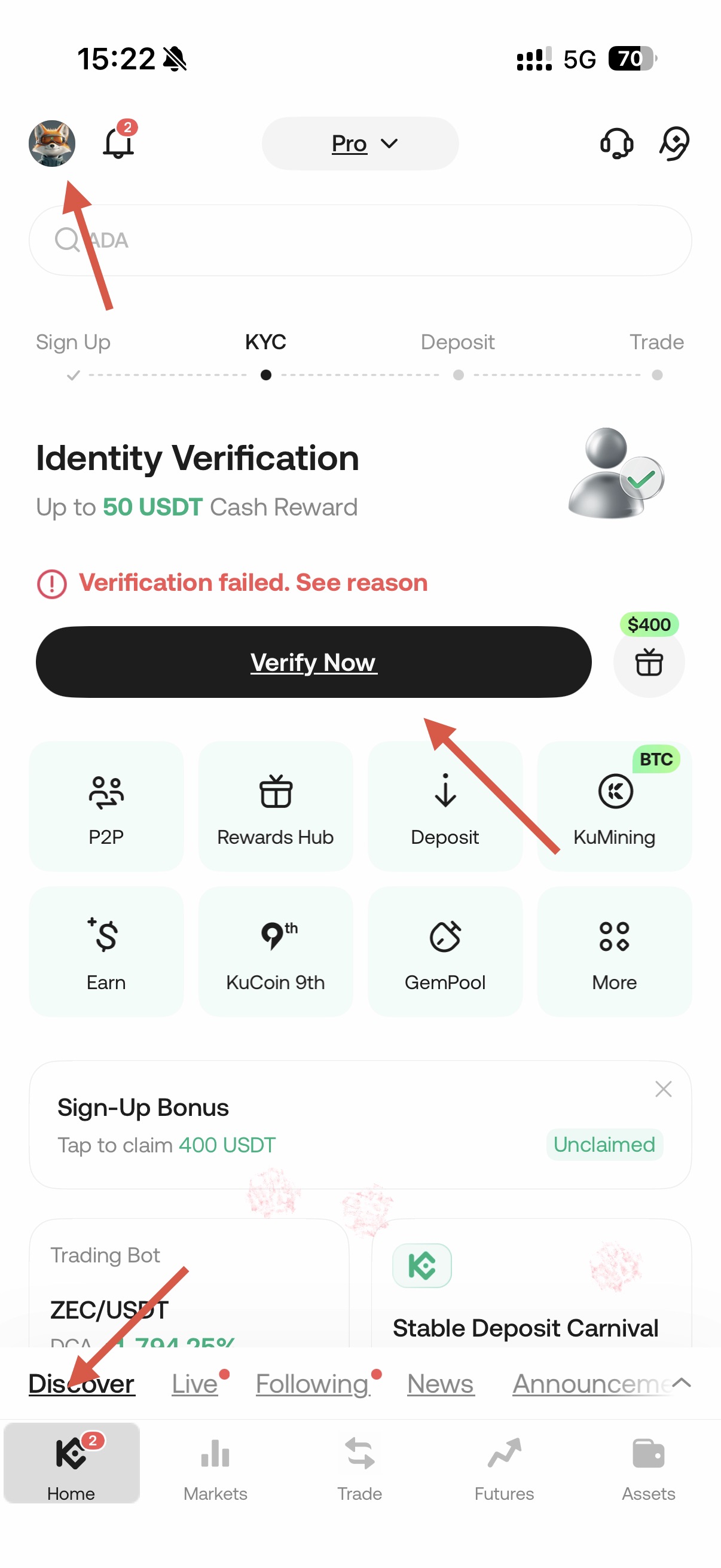
Image source: KuCoin Help Center
- Choose the document’s issuing country/region.
- Choose the document type.
- Photograph your document; you can also pick a photo from your library or upload a PDF.
- Place your face inside the frame and follow the on-screen prompts to complete facial verification.
- After the selfie, wait about a minute, check your first name, last name and ID number, then submit.
- Check the review result. If you didn’t pass, read the reason for the failure and resubmit.
How long does KYC review take, and what if you’re rejected?
KuCoin’s troubleshooting article says “the KYC process usually takes 3-5 minutes” and “in some cases, it may take up to 48 hours.” The under-review screen after submission also says the review will be completed within 48 hours. So there’s no need to worry if you have no result a few minutes after submitting; if 48 hours pass with no news, contact customer support. The web and app guide articles themselves don’t give a review time; they only say the result will be sent by email.
KuCoin lists these five common reasons for rejection, which you can check one by one before resubmitting:
- The person on the document is under 18.
- The document is blurry or unclear.
- The document is covered or not fully captured.
- The document has expired.
- The document type is invalid.
On the website, go to [Account Center] → [Identity Verification] to see the reason for the failure, fix it, and click [Try Again] or [Verify Again]. In the app, tap [Verify Now] on the home screen to see the reason, then tap [Get Verified] to resubmit; the app guide states that resubmissions are prioritized for review. KuCoin does not state any limit on the number of resubmissions.
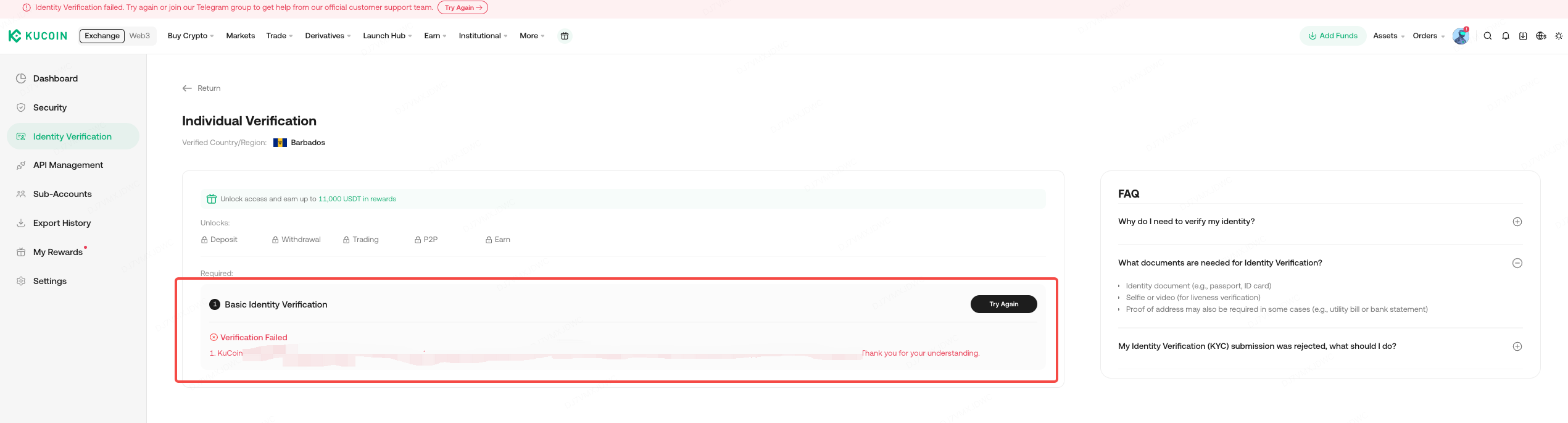
Image source: KuCoin Help Center
If the problem is that you can’t submit at all, rather than being rejected: the web guide suggests checking your connection, updating your browser, switching browsers or devices, or switching networks; if none of that works, record a video of the whole process and contact customer support. If the app shows an error during the face scan, KuCoin suggests switching networks and trying again; if automatic capture doesn’t respond, you can tap the question mark at the top right to take and upload the photo manually.
If you’re already verified and your document later expires or your details change, you need to update your identity verification information. KuCoin lists 6 reasons for an update: an expired document, a name change on the document, a change of ID number, a change of nationality, switching documents to meet the requirements of a specific fiat channel, and changing your name to a language the system can recognize (for example, from a local-language ID card to an English passport). If the identity verification page has a reset option, just upload the new document; if not, you first have to ask customer support to reset your KYC. A reset comes at a cost: the account goes back to the not-yet-verified status, crypto deposits, fiat withdrawals and some trading features are temporarily unavailable, and the crypto withdrawal limit becomes 0-25,000 USDT and may also be lowered or disabled. KuCoin also says some users will receive re-verification emails in batches, and accounts that don’t complete it before the deadline may be restricted.
What should users in Taiwan watch for with KYC?
None of the KuCoin official guides I checked contain KYC rules specific to Taiwan. You pick the document’s issuing country/region yourself during the process, and the document types available are whatever options appear on screen after you choose. Based on the official guides, a few points are more relevant to users in Taiwan:
- Choice of document: the verification screen recommends a passport. If you use an ID card, you have to upload both the front and the back.
- Name language: one of KuCoin’s update reasons is “changing your name to a language the system can recognize,” and the example it gives is switching from a local-language ID card to an English passport. In other words, if you verify with a document showing your name in Chinese, there is still an official way to change it to the name on your English passport later.
- Checking your details: the confirmation page lists your first name, last name and document number, so check them character by character before submitting. Changing them later means going through the update or reset process, and your permissions are reduced during a reset.
Each exchange’s service restrictions by country are summarized in exchange restricted countries.
Is KYC safe, and how is your personal data used?
KuCoin’s “User Privacy Acknowledgment and Consent” states that identity verification is handled by the provider Sumsub (the bottom of the verification screen also says Powered by Sumsub, while the consent statement on the document-type page lists the privacy policies of both Sumsub and Jumio). The data collected includes your name, gender, ID number, date of birth, nationality, address, document data and biometric data such as face scans, plus selfies, videos and audio recordings. KuCoin says the purpose is to comply with anti-money laundering, counter-terrorist financing and anti-fraud regulations; Sumsub also processes the data for its own compatible purposes, such as developing its services and preventing fraud. Biometric data is stored on AWS or Google Cloud and permanently destroyed once the original purpose or the legal retention period ends. Clicking [Continue] means you consent; the full terms are in the KuCoin Privacy Policy.
In practice, I recommend sticking to two things. First, only verify on KuCoin’s official website or official app, and check the URL and the app’s source yourself. Second, never send photos of your documents or selfies to anyone offering to “do your KYC for you” or “lift your restrictions.” Common tactics are covered in crypto exchange scam types, and the signs of rebate-related scams are in rebate scam warning signs.
What 3 things should you do first after KYC is approved?
Once your identity verification is approved, you can deposit. Before you deposit, I recommend getting these three things done first:
- Turn on two-factor authentication (2FA) or a passkey: link Google 2FA on the account security page (KuCoin Google 2FA). KuCoin also supports passkeys; once one is added to your account, you can log in without entering a password or completing 2FA (KuCoin passkey guide).
- Set an anti-phishing code: set it under “Profile → Security → Safety Phrase (anti-phishing code),” and official KuCoin emails and text messages will carry this code; if the code is missing or wrong, it’s a phishing site or email (KuCoin anti-phishing safety phrase guide, KuCoin anti-phishing code setup).
- Test with a small withdrawal first: the first time you withdraw to a new address, send a small amount, confirm it arrived, then send the larger amount; addresses you use often can be saved to the address book (KuCoin withdrawal and internal transfer guide).
These three steps protect your own account; the platform’s own security record, hacks and proof of reserves are covered in the KuCoin review.
FAQ
How long does KuCoin KYC take?
KuCoin says it usually takes 3-5 minutes and in some cases up to 48 hours. The result is sent by email; if you’re rejected and resubmit in the app, KuCoin says the resubmission is reviewed with priority.
Can I trade or withdraw on KuCoin without KYC?
New users who signed up after 2023-08-31 must complete KYC before using the products and services. Older accounts registered before that date and still unverified can only sell crypto, close futures and margin positions, and redeem from KuCoin Earn. They cannot deposit crypto, but crypto withdrawals are not affected.
What documents does KuCoin KYC require?
An original ID card, driver’s license, passport or residence permit; the screen recommends a passport. The document must be valid and show your full name, date of birth, photo and issuing country. Printed, photocopied or scanned versions are not accepted.
Can I use a family member’s or someone else’s document for KYC?
No. Verification requires your own document plus your own facial verification. KuCoin also states that the same document can register only one KuCoin account, and each person can verify only one account.
What should I do if KuCoin KYC fails?
First check the reason for the failure on the [Identity Verification] page, fix it, then click [Try Again] to resubmit. The most common causes are a blurry, covered or expired document, or a document type that isn’t accepted. If you can’t submit at all, try a different network or browser first; if that still doesn’t work, record the process and contact customer support.
How many KuCoin accounts can one person have?
Each person can verify only one KuCoin account. If you need to manage funds separately, you can create sub-accounts under your main account; however, sub-account trading is only available after the main account is verified.
Can I transfer my KuCoin KYC to a new account?
No, KuCoin has no process for moving identity verification to another account. KuCoin states that each person can verify only one KuCoin account (KuCoin: about identity verification), and the same document can be used for only one account (KuCoin web identity verification guide). What KuCoin can do is update the identity information on the same account: after a reset, the original document data is cleared, and the account stays unverified until you verify again (KuCoin: update identity verification information). For the rules on switching referrers, see how to switch your KuCoin referral code.
Can I change my name or details after KYC?
Yes, but you have to go through the process for updating your identity verification, and it has to fit one of the 6 reasons KuCoin lists, such as an expired document, a change of name or ID number, or a change of nationality. If there’s no reset option, you have to ask customer support to reset your KYC. During the reset, the account goes back to unverified status and the crypto withdrawal limit becomes 0-25,000 USDT.
Sources
- KuCoin: How to complete identity verification (KYC) on the website (updated 2026-08-14): the web step screenshots come from this page.
- KuCoin: How to complete identity verification (KYC) in the app (updated 2026-08-07): the app screenshot comes from this page.
- KuCoin: About Identity Verification (updated 2026-08-14)
- KuCoin: Troubleshooting identity verification (KYC) (updated 2026-01-06)
- KuCoin: How to update my identity verification information (updated 2026-07-07)
- KuCoin: User Privacy Acknowledgment and Consent (updated 2025-12-16)
- KuCoin official blog: How do I complete the KYC process on KuCoin? A comprehensive guide (2025-12-26)
The pages above were checked on 2026-10-13. If you haven’t signed up yet, the referral code and sign-up steps are in KuCoin referral code; fees are covered in KuCoin fees, and KuCoin’s reserves, security record and restricted regions are in the KuCoin review. After signing up, if you want to confirm your referral code is linked, see how to check whether your referral code is linked.