


Updated Rules checked 2026-10-08
The Pionex referral code on this page comes with a trading fee discount of 15%. Once you enter the code, the sign-up page shows “trading fee discount” along with the rate.
As of 2026-10-24, signing up for Pionex with referral code KEVINWU gives an automatic fee rebate (fee discount) of 15%, paid by Pionex itself.
| Item | Details |
|---|---|
| Referral code | KEVINWU |
| Auto fee rebate (fee discount) | 15% |
| Taker fee after the rebate | Futures 0.0425% (standard 0.05%), Spot 0.0425% (standard 0.05%) Official fee page, checked 2026-10-08 |
| Rebate change log | Tracked since 2026-10-07; no changes so far Full log |
| Covered trades | Spot, leveraged tokens and futures (stock-token spot and MEME excluded) |
| Duration | Not published by the exchange |
| Settlement | Credited in USDT to the primary account after the trade; records update hourly |
| Where to check | App: Home → My Account → Deposit → clock icon → "Invitee Cashback"; web: More → Rebate |
| Existing accounts | Can be added within 14 days of sign-up (3 days if you have placed a trade order); cannot be changed once bound |
| After signing up | Pionex KYC verification, Pionex review |
The referral discount is offered by Pionex itself: the exchange sets the rate and applies it directly. What follows is information I compiled for reference.
Where does the Pionex referral code’s fee discount rate come from?
Pionex’s affiliate program rules (v3, effective from August 1, 2025) give every inviter a fixed 20% commission on spot and 15% on futures. The inviter can allocate part of it to friends as their trading fee discount (Pionex affiliate program rules). The most an invitee can get is a 15% discount on futures and 20% on spot. (Official pages checked on 2026-10-08.)
This code currently passes a trading fee discount of 15% to invitees, which you can compare with the caps above.
Does the Pionex sign-up page show the discount rate?
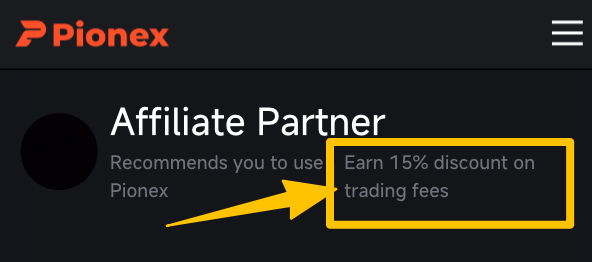
Pionex’s registration guide says that after entering a referral code you can see the code’s discount rate. Compare it with the screenshot before you register.
Already have a Pionex account? Can you still add a referral code?
You can, within a time limit. Pionex’s help center says an account that didn’t enter a referral code at sign-up can add one if (Pionex: refill referral code, checked 2026-10-08):
- it was registered less than 14 days ago; but
- if you have placed any trade order since registering, the code can only be added within 3 days of registration.
Where to add it:
- Web: profile icon at the top right → Account settings → Referrals, then enter the code.
- App: Account → Settings → Profile, then enter the code in the “Referral code” field.
Once a referral code is bound, it can’t be changed, so check the code first (see the details at the end).
How is the Pionex referral code’s fee discount calculated?
The discount is a share of the trading fees you pay, not of your trading volume. If your fees for a month come to 100 USDT, a 10% discount saves 10 USDT. The 10% is only an example; see the referral code details below for the actual rate. Pionex’s trading bots are free to use, but bot orders still pay normal trading fees, so the discount applies to them as well.
Pionex standard fees
| Market | Maker | Taker |
|---|---|---|
| Spot | 0.05% | 0.05% |
| Futures | 0.02% | 0.05% |
| Leveraged tokens | 0.1% | 0.1% |
These are regular-user rates (Pionex fee page, checked on 2026-10-08).
Example: futures (taker 0.05%)
| Monthly volume | Fees (0.05%) | Auto rebate (15%) | Net fees |
|---|---|---|---|
| 10,000 USDT | 5 USDT | 0.75 USDT | 4.25 USDT |
| 100,000 USDT | 50 USDT | 7.5 USDT | 42.5 USDT |
| 1,000,000 USDT | 500 USDT | 75 USDT | 425 USDT |
Example at a futures fee rate of 0.05% and the current 15% automatic rebate (rate updated 2026-10-24). Your exchange statement prevails.
Example: spot (0.05%)
| Monthly volume | Fees (0.05%) | Auto rebate (15%) | Net fees |
|---|---|---|---|
| 10,000 USDT | 5 USDT | 0.75 USDT | 4.25 USDT |
| 100,000 USDT | 50 USDT | 7.5 USDT | 42.5 USDT |
| 1,000,000 USDT | 500 USDT | 75 USDT | 425 USDT |
Example at a spot fee rate of 0.05% and the current 15% automatic rebate (rate updated 2026-10-24). Your exchange statement prevails.
Which Pionex trades are excluded from the fee discount?
Pionex’s rules say spot, leveraged tokens and futures all take part in the program, whatever the pair and whether maker or taker; stock-token futures are supported. Stock-token spot and MEME trades are excluded.
Duration, and what Pionex doesn’t say
Pionex’s rules say a non-KOL inviter’s commission lasts 365 days from the invitee’s registration. The invitee’s discount isn’t taken off the fee when it is charged: it is refunded in USDT to the primary account after the trade, and the records update hourly. The rules don’t give a duration for the discount itself; your account records are the reference.
Pionex sign-up bonuses (new-user tasks, trial funds) vs the referral code rebate: what’s the difference?
Pionex’s new-user tasks, trial funds and vouchers are one-off promotions. You usually have to complete tasks such as identity verification, a deposit or a trading volume target to get them; amounts and conditions change from campaign to campaign and they expire, so the campaign page and its terms are what count. The referral code rebate is bound at sign-up, and from then on a share of every fee you actually pay is refunded automatically. It’s separate from the sign-up bonus, so you don’t have to choose one or the other.
I couldn’t find a standing new-user trading fee voucher in Pionex’s official help center (checked 2026-10-12); past offers were mostly limited-time campaigns, so the current campaign page’s conditions are what count. The referral code’s fee discount, on the other hand, is bound at sign-up and paid back in USDT to your main account after you trade. For the full comparison, see fee vouchers vs referral code rebates.
Rebate change history
- 15% (tracking started)
Rates sync with the exchange daily; every change is recorded automatically.
Where is Pionex not available?
Pionex’s terms of service list restricted jurisdictions: mainland China, Hong Kong, the United States, Singapore, Afghanistan, Cuba, Iran, North Korea, Syria, the United Kingdom, Canada, the Netherlands, Spain and France. The list changes; the Pionex terms of service prevail (version effective 2024-07-09).
Common questions
Does the discount apply to trading bots?
Bot orders pay normal trading fees. Pionex says spot, leveraged tokens and futures all take part and doesn’t exclude bots, but it doesn’t mention bot orders by name; your account records are the reference.
I forgot to enter the code at sign-up. What now?
You can add it within 14 days of registration, or within 3 days if you have already placed a trade order.
Can the discount rate change?
This code’s rate syncs with Pionex daily; any change is updated here and recorded in the change history above.
How can I check whether my Pionex referral code is bound?
On Pionex you can see it directly. In the app, go to Home → your avatar at the top left → “Referrer’s invitation code”; on the web, go to your avatar at the top right → “Account overview” → the “i” next to the invitation code. This shows the referral code’s fee discount rate.
If the rate shows 0%, the referrer hasn’t allocated any discount to invitees. If you aren’t bound, the deadline and where to add a code are covered in the section on adding a code above. How to check on each exchange is covered in how to check whether your referral code is bound.
What are Pionex’s trading fees?
For regular Pionex users, spot fees are 0.05% each for maker and taker, futures are 0.02% maker and 0.05% taker, and leveraged tokens are 0.1%.
Trading bots such as Grid and Martingale charge no usage fee; their fills pay trading fees at the same rates. VIP and withdrawal fees are covered in Pionex trading fees, and how bot fees work in Pionex grid bot fees.
If I sign up in the app, can the Pionex referral code fail to bind?
Pionex doesn’t state any separate restriction for app sign-ups. After you enter the referral code, the sign-up page shows the code’s discount rate; just check that it appears before you submit.
If you find after signing up that the code didn’t bind, Pionex lets you add one within 14 days of registration; if you’ve already placed a trade order since registering, you can only add one within 3 days of registration. For what to watch for when signing up in the app on other exchanges, see will a referral code bind if you sign up in the app?
Is Pionex safe?
I couldn’t find any major public security incident at Pionex so far, but that only reflects the past record; no exchange can guarantee safety.
Pionex’s only proof of reserves is a third-party report on a 2022-12-13 snapshot, and I found no newer report; in that report, stablecoins combined stood at 103.69%, and USDT alone at 90.02%. Each exchange’s record is compiled in the exchange safety record and exchange proof of reserves compared.
Pionex referral code details
Referral code: KEVINWU
Sign-up link: Pionex official sign-up page
Trading fee discount: 15% (updated 2026-10-24). Pionex’s current page prevails.
To compare referral codes and automatic rebates across exchanges, see the exchange referral code overview.