


Updated Rules checked 2026-10-17
An exchange UID is your account number. The system generates it automatically when you sign up, each account gets exactly one, and it can’t be changed afterward. It isn’t your phone number or email address: customer support, rebate sites and internal transfers all use this string of digits to find your account. Across Binance, OKX, Bybit, Bitget, MEXC, Gate, BingX, KuCoin, HTX, XT, WEEX, Pionex and Ourbit, most exchanges show it once you log in and click your avatar or profile icon.
You can give your UID to customer support and rebate sites, but give them only the UID. Someone who has your UID can’t log in to your account, place orders or withdraw; never hand over your password, SMS or Google Authenticator codes, or API keys. That said, a UID isn’t a number you can make public without any consequence: if you are someone’s invitee, that referrer can use your UID to see your cumulative deposits, withdrawals, trading volume and fees. Gate’s official help also lists the UID as sensitive information and warns against revealing it to unofficial channels.
I put the UID locations that 13 exchanges give in their official help centers into one table, with web and app listed separately, and marked every spot the exchange doesn’t state. After that I explain how a UID differs from a referral code and a deposit address, and when you need to provide your UID.
Key points: A UID is the account number an exchange generates automatically at sign-up, and the official help pages of both Bitget and Pionex state that it cannot be changed. Of the 13 exchanges, 12 say on an official page where to find the UID; Ourbit does not state it officially. Someone with only your UID can’t log in, place orders or withdraw, but on Gate and Bitget they can send you a fee-free transfer by UID, and that transfer can’t be reversed once sent. OKX’s official API documentation shows that a referrer who enters the UID of one of their own invitees can see that person’s cumulative deposits, withdrawals, trading volume, fees and region. A rebate site needs only your UID to verify the referral relationship; if anyone asks for your password, verification codes or API keys, don’t give them.
The information below was checked against official pages on 2026-10-17 (data check date) and is provided for reference.
What is an exchange UID?
UID is short for User ID, a user identifier. Bitget’s official explanation is the most complete: the UID is generated automatically at sign-up, each account has only one, it isn’t the phone number or email you registered with, Bitget uses it to identify the account and to handle customer support and other account-related services, and it cannot be changed (Bitget: How to check your Bitget account UID). Pionex goes a step further, stating that the UID is fixed for life and can’t be changed by you, nor changed or regenerated through customer support (Pionex: How to find your UID).
Length and naming vary from exchange to exchange. KuCoin states that a UID has at least 8 digits; the field hint on Bybit’s support form reads “your 8-digit Bybit UID”; Binance calls it “User ID (BUID)”. OKX lists its uses as customer support, security verification, the affiliate program and certain transactions (OKX: How do I find my UID). Put simply, a UID does inside an exchange what a bank account number does inside a bank: it finds the account, but on its own it can’t move the money in it.
Where to find your UID on 13 exchanges
The paths in the table follow the menu names in each exchange’s official Chinese-language help article (given here with the English interface names where known), and the dates in parentheses show when each article was updated or published. Menu names may change after a redesign; if they don’t match, look for your avatar or “Profile” icon first, since that’s where most exchanges put it.
| Exchange | Web | App | Official guide |
|---|---|---|---|
| Binance | Hover over the profile icon and click [Dashboard]; the User ID is at the top of the page | Tap the [Account Center] icon at the top left; the User ID is next to your nickname | How to find my Binance User ID (English version updated 2025-11-24) |
| OKX | Click the profile avatar at the top | Grid icon at the top left → “Account settings” → “Account info” → “UID” | How do I find my UID (2026-08-25) |
| Bybit | The dropdown under the profile icon at the top right of any page; or open the account settings page directly | “Home” at the bottom left → profile icon at the top left; the UID is at the top left of the personal info page | How to check your account UID (2025-11-25) |
| Bitget | Hover over the “Profile” icon at the top right; or go to the “Overview” page | “Profile” icon at the top left of the home screen → Profile | How to check your Bitget account UID (2024-04-23) |
| MEXC | Not stated officially | Tap your avatar at the top left; the “Profile” section shows your avatar, nickname, linked email and UID | Complete guide to the MEXC app home screen (2026-02-19) |
| Gate | Click the avatar at the top right of the navigation bar; the UID is on the first line of the “Overview” in your personal center | Tap the avatar at the top left to open your profile page → tap the top → “User Center” | How to find my Gate user ID (2025-03-13) |
| BingX | Click the “Personal Center” icon; the UID is in the dropdown | Tap the “Personal Center” icon on the home screen; the UID is in the sidebar | How to check my UID (2023-08-29) |
| KuCoin | Hover over the profile icon; click it to open your user profile page | Tap the profile icon at the top left to expand the menu | How to find your KuCoin account UID (2026-07-21, Australia help center) |
| HTX | After logging in, click “Account Security” | Not stated officially | How to find my UID (published 2019-01-08) |
| XT | “User Center” → “Overview”; the UID is at the top of the page | “Account Center” icon at the top left → “Profile” | How to find your user ID on XT (2026-10-15) |
| WEEX | Click the avatar icon at the top right; the UID is below your email address | Tap the icon on the home screen; the UID is below your email address. The official guide is inconsistent about where the icon is (it says top left first, then top right) | WEEX official event guide (2025-12-04) |
| Pionex | After logging in, click your avatar | Tap “Home” at the bottom, then your avatar | How to find your UID (2026-09-24) |
| Ourbit | Not stated officially | Not stated officially | No UID lookup article in the help center |
A few details to note. Binance’s Chinese version says the app shows the User ID “below” the nickname, while the English version says “above,” so the table says “next to.” HTX’s article is an old one published in 2019 and only covers the web version. The MEXC app has a setting to hide sensitive information, so if you can’t see your UID, check that toggle first. WEEX’s guide is an event sign-up tutorial and puts the steps after identity verification, but it doesn’t say the UID is hidden until you’re verified. KuCoin’s article comes from the Australia help center; whether the global app looks exactly the same is not stated officially.
Is it safe to share your UID? What can someone do with it?
Giving out only your UID won’t get your account stolen. Logging in takes your email or phone, your password and a verification code, and withdrawals and internal transfers require another round of security verification; Bitget’s internal transfer guide states that you must complete 2FA, email or SMS verification before transferring (Bitget: How to make an internal transfer on Bitget). The real danger is verification codes: the first item in Bybit’s security tips is “Never share your verification code with anyone” (Introduction to Bybit Protect).
A UID does reveal some information, though. OKX’s official API documentation has a “Get the invitee’s detail” endpoint: a referrer who enters an invitee’s UID can retrieve these fields (OKX API: Get the invitee’s detail):
- When the rebate relationship was set up and when the first trade was completed
- Trading fee tier (for example Lv1) and the invitee’s own rebate rate
- Cumulative deposits and cumulative withdrawals (in USDT)
- This month’s trading volume, cumulative trading volume, cumulative fees, and the total commission the referrer has earned from you
- When KYC2 identity verification was completed, and the country or region
This endpoint only works for the main accounts of invitees the referrer invited personally (the data returned includes sub-accounts under the main account), so a stranger can’t look up this data with your UID. The fields listed in the documentation don’t include account balance, positions or password. Other exchanges don’t publish a field-by-field list of what their referrer dashboards show, but the principle is the same: whoever’s referral code your account is bound to can see an overview of your trading.
| What the other person has | What they can do | What they can’t do |
|---|---|---|
| Only your UID (a stranger) | Send you a transfer on the same exchange (Gate and Bitget support transfers by UID); ask customer support to find an account by UID | Log in, place orders, withdraw, view your balance |
| Your UID, and you are their invitee (referrer, rebate site) | Confirm you are under their referral code; view statistics such as trading volume, fees, and cumulative deposits and withdrawals (taking the OKX API as an example) | Log in, place orders, withdraw |
| UID plus password plus verification code | Log in to the account, and possibly change settings or withdraw next | This amounts to handing over your account; never give these out |
| API key | Read data and place orders within the key’s permissions; a key with withdrawal permission enabled can also move assets out | Anything beyond its permissions |
What scammers exploit most often is the fact that they already know your UID. A fake support agent or fake rebate site first recites your UID to win your trust, then asks for a verification code, gets you to log in on a fake website, or tells you to transfer money to “unfreeze” your account. The security tip on Gate’s UID page states: “Your UID is sensitive information; do not disclose it to unofficial channels.” If you’re in Taiwan and get a suspicious call or message, you can call the 165 anti-fraud hotline (165 反詐騙專線) to check. Common tactics are covered in crypto exchange scam types and rebate scam warning signs.
UID vs referral code vs deposit address
These three get mixed up more than anything else. A UID is your account number; a referral code is the invitation code entered at sign-up, which decides whose referral your account is bound to; a deposit address is a receiving address on the blockchain, with a separate one for each coin and each network.
| Item | UID | Referral code | Deposit address |
|---|---|---|---|
| Purpose | Identifies the account: customer support, rebate site binding, internal transfers | Binds you to a referrer at sign-up and decides who gets the rebate | Receiving on-chain transfers from other exchanges or wallets |
| Can it be changed? | No (stated officially by Bitget and Pionex) | Most exchanges don’t allow a change after sign-up; a few have a deadline for adding or rebinding one | Depends on the exchange; usually fixed for the same network |
| Transfer cost | Internal transfers on the same exchange are fee-free (Gate, Bitget) | No transfer involved | You pay an on-chain withdrawal fee, and choosing the wrong network may mean you can’t get the funds back |
| Effect of sharing it | The other person can send you transfers and confirm the referral relationship | Anyone who signs up with your code is bound under you | The other person can only send coins in |
UIDs and referral codes overlap in a few cases. MEXC’s self-service referrer linking feature states that you can enter the referrer’s referral code or UID to complete the binding, provided the account was registered less than 30 days ago, and only for main accounts; sub-accounts aren’t supported (MEXC self-service referrer linking guide). In other words, on MEXC someone else’s UID can work as a referral code. For the rules on adding a referral code after sign-up, see can you add a referral code after signing up; for how referral codes themselves work, see what is a referral code.
The cost gap between a UID transfer and an on-chain transfer is concrete. Gate’s internal transfer guide states that it “charges no fee and arrives instantly,” but “cannot be revoked once submitted,” so if you send to the wrong account, all you can do is ask the recipient to return it (Gate: How to make an internal transfer). Bitget also states that internal transfers are free and can’t be canceled once confirmed. Moving coins between two accounts on the same exchange costs 0 in fees by UID, while an on-chain withdrawal means paying a network fee. For USDT withdrawal fees across exchanges, see USDT withdrawal fees compared.
When do you need to provide your UID?
There are four common situations:
- Contacting customer support: Binance and OKX both state that support requests require your UID, and BingX states that you often need to provide your UID when contacting support. If identity verification gets stuck or a deposit hasn’t arrived, including your UID gets it handled faster; for each exchange’s verification process, see KYC guides such as Binance identity verification.
- Checking whether your referral code is bound: if you can’t find it in the exchange’s dashboard, give your UID to customer support to look it up; the steps are in how to check whether your referral code is bound.
- Binding a rebate site: after signing up through a rebate site’s link, enter your UID on the rebate site; once it’s approved, your account is under its referral code. Rebate sites are compared in rebate site comparison.
- Receiving transfers and event sign-ups: a friend wants to send you coins, or an exchange event asks you to register with your UID.
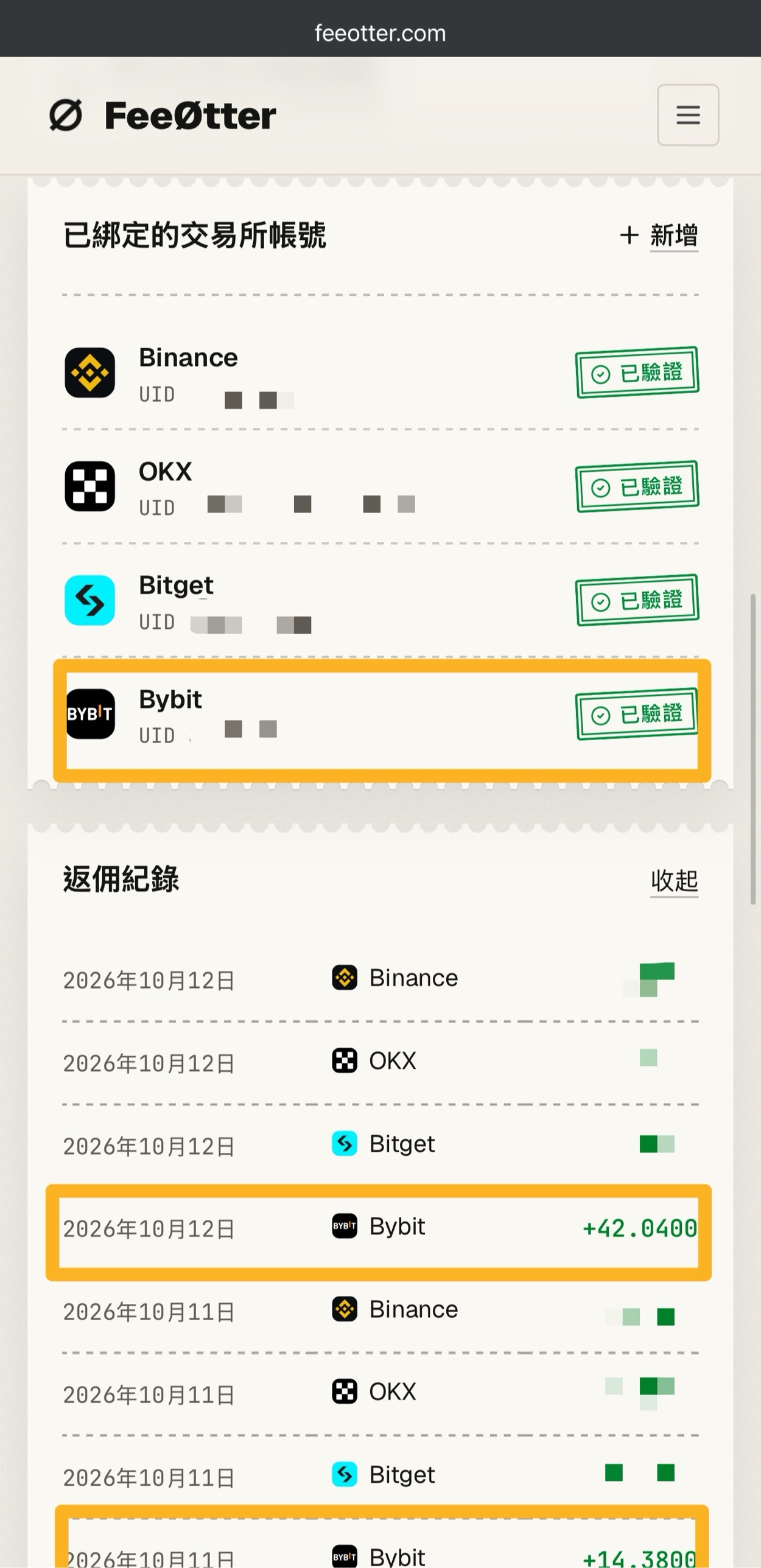
Bybit is a special case. This site has no automatic exchange rebate for Bybit, so to get fees back you go through Fee Otter: after signing up for Bybit with its link, bind your UID on Fee Otter, and once it’s approved, your rebate records are shown in your Fee Otter account as well. This extra rebate is paid by Fee Otter, not by the exchange and not by Kevin Wu. The whole process needs only your UID, not your password or API keys. Details are in Bybit fee rebate: Fee Otter.
On other exchanges, if you sign up with this site’s referral codes, the exchange pays the rebate to your account automatically based on the referral relationship, and you don’t need to give your UID to any website. For example, with the Binance referral code KEVINWU, the current automatic exchange rebate is 20% (updated 2026-10-23). Each exchange’s referral code and current rate are listed in the exchange referral code overview; the rates are synced with the exchanges every day, and the method is explained in the rebate rate report.
What to check before you give out your UID
- Make sure it’s an official channel: reach customer support through the entry point on the exchange’s website or in its app, and don’t click links in messages from strangers. Bybit offers an “Official Verification” tool for checking whether a URL or contact detail is genuine.
- Give only the UID: a rebate site needs only your UID to verify the referral relationship. Anyone asking for your password, verification codes, seed phrase, or for you to “send a security deposit first” is not following a normal process.
- Give your main account’s UID: OKX’s referrer endpoint only recognizes invitees’ main accounts, and MEXC’s self-service binding is also limited to main accounts. If you bind a rebate site with a sub-account UID, the referral relationship may not show up.
- Handle API keys separately: some bookkeeping or copy-trading tools ask for an API key, which is a different thing from your UID. If you really have to provide one, enable only the permissions it needs and leave withdrawal permission off.
- Check the UID before you receive: when you ask someone to send you a transfer by UID, check the number digit by digit. Gate and Bitget both state that internal transfers can’t be reversed once sent.
FAQ
Can an exchange UID be changed?
No. The official help pages of both Bitget and Pionex state that the UID is generated automatically at sign-up and can’t be changed, and Pionex adds that customer support can’t regenerate it for you either. The official help pages offer no way to change a UID.
Can my account be stolen if my UID leaks?
A UID alone won’t get your account stolen. Logging in takes a password and a verification code, and withdrawing requires passing security verification. What you need to guard against is someone using your UID to pose as customer support or a rebate site, then tricking you into handing over a verification code or logging in on a fake website.
Is a UID the same as a referral code?
No. A UID is your account number; a referral code is the code used at sign-up to bind you to a referrer. The exception is MEXC: when a main account registered within the last 30 days uses self-service referrer binding, it can enter the referrer’s referral code or UID.
Is there a fee for transferring by UID?
Internal transfers within Gate and within Bitget are fee-free. Gate states that they arrive instantly; both state that they can’t be reversed once sent, so check the recipient’s UID before you transfer. UID transfers only work within the same exchange; between exchanges you need a deposit address and an on-chain withdrawal.
Why does a rebate site want my UID?
A rebate site uses your UID to confirm that your account is under its referral code, so it can match your fees and pay out the rebate. Taking OKX as an example, a referrer can use an invitee’s UID to see statistics such as trading volume, cumulative fees, and cumulative deposits and withdrawals, but not the password. Your UID is all it takes, so be especially careful with anyone who asks for more.
Do sub-accounts have their own UIDs?
Yes. Bybit’s official API documentation has an endpoint specifically for listing all the sub-account UIDs under a main account UID (Bybit API: Get Sub UID). Use your main account UID when binding a referrer or a rebate site; the related features at OKX and MEXC only recognize main accounts.
Is Binance’s BUID the same as a UID?
Yes. Binance’s help article is titled “User ID (BUID),” and it states that the Binance ID or UID is a unique identifier assigned to each account and is required for support requests. On the web it’s at the top of the [Dashboard] page; in the app it’s under [Account Center].
What if I can’t find my UID?
First try again on the other version (web or app), then check whether hiding sensitive information is turned on (the MEXC app has this setting). If you still can’t find it, contact official customer support using your registered email or phone number. KuCoin’s help article, for one, recommends live chat or submitting a ticket. Ourbit doesn’t state the location officially, and neither does HTX for its app, so there you can only look through the interface or ask support.
To check whether your account is bound to a referral code, see how to check whether your referral code is bound; if you’re thinking of rebinding, read the guide to switching referral codes first. Terms like rebate, referral code and UID are explained in the rebate glossary, and if you’re asked to pay before you can withdraw, see fake exchange withdrawal scams.