


Updated Rules checked 2026-10-13
Every new Binance user has to complete KYC identity verification and reach the Verified level before they can deposit or trade. Binance’s official guide states that new accounts that have not completed verification cannot use Binance’s products and services, not even crypto deposits. Existing accounts that are still unverified are switched to “withdraw only” access.
You need three things: a valid identity document (in most regions you can choose a passport, ID card or driver’s license), a phone or computer with a camera for the liveness check, and personal details that match your document. Binance gives the review time as “usually within 48 hours,” longer in special cases. Some regions or payment channels also ask for proof of address, and that review takes up to 1-2 business days.
Key points: every new Binance user must complete identity verification at the Verified level before depositing or trading; existing accounts that are still unverified can only withdraw, cancel orders, close positions and redeem. On the web the entry point is [Account] → [Identification] → [Get Verified]; in the app it is [Verify Now] on the home screen. The flow is: choose your residence and document, upload the front and back of the document, do the liveness check, then confirm your personal details. Binance’s official review time for identity verification is usually within 48 hours, and proof of address takes up to 1-2 business days. Once you confirm your personal details you cannot edit them yourself; an expired document or a name change goes through the [Update Identity] flow. Each person can have only one verified personal account; if you need to keep funds separate, you can use sub-accounts (up to 5).
The information below was checked against Binance’s official guides on 2026-10-13 (fact-check date). The screenshots come from Binance’s official Help Center and are included for reference.
Not signed up yet? Enter the referral code before KYC
KYC happens after you sign up, while the referral code goes on the sign-up page. If you want to use a referral code, sign up first following the steps in the Binance referral code guide, then come back here for identity verification.
This site’s Binance referral code is KEVINWU; just enter it when you sign up.
If you already signed up and forgot to enter one, it may not be too late. Binance lets you add a referral code within 30 days of sign-up, as long as you have not deposited or traded yet, and those conditions say nothing about identity verification. But most people deposit right after KYC is approved, and once you deposit you can no longer add one. If you forgot, it’s best to sort it out before your first deposit (the rules are in switching your Binance referral code, and the general approach is in adding a referral code after sign-up).
What are Binance’s KYC levels, and what does each unlock?
Binance’s Traditional Chinese guide names only one basic level, Verified, and says that “this level determines your Binance account’s transaction limits; to raise your limits, complete the corresponding identity verification level.” The exact withdrawal limits for each level are not written in the guide articles; Binance asks users to check the [Identification] page after logging in. I’ve summarized the statuses Binance mentions in the table below:
| Status | What you submit | What you can do | Limits |
|---|---|---|---|
| Unverified (new user) | Sign-up details only | Cannot use Binance’s products and services, including crypto deposits and trading | Not applicable |
| Unverified (existing user) | Sign-up details only | “Withdraw only”: withdraw funds, cancel orders, close positions and redeem | Not listed in the official guide |
| Verified | Identity document, liveness check, personal details | Withdrawals and deposits, trade freely, fiat / spot / futures accounts, more advanced features | Go by your account’s [Identification] page; withdrawal amounts are limited if you did not complete face verification |
| Upgraded verification (proof of address) | Proof-of-address document | Depends on your region or payment channel; the example in the official screenshot is a higher fiat limit | Screenshot example: daily fiat limit of 2M USD (go by what your own account shows) |
Sources: How to complete identity verification for a personal account, Why do I need to complete identity verification on my Binance account?, How to verify my residential address on Binance. The 2M USD in the last row comes from an upgrade card shown for a verified example account in an official screenshot; the written guide does not state it, and the figure may differ by region. Also note that although the futures account unlocks after verification, futures use leverage, and if the price moves against you your position may be liquidated.
Passing KYC doesn’t guarantee that you can withdraw. Binance lists two common reasons. If you did not complete face verification during identity verification, your withdrawal amount is limited. The other is two-factor authentication (2FA): the Traditional Chinese guide says “you can withdraw funds only after enabling at least three verification methods,” which you can turn on under [Profile] → [Security].
What do you need for Binance KYC?
- Identity document: first choose your residence, the document issuing country/region and the document type. Binance says “most users can choose a passport, ID card or driver’s license”; which ones you can actually pick depends on the issuing country/region you select. For an ID card, upload both the front and the back.
- Document requirements (shown on the verification screen): use the original document; photocopies and screenshots are not accepted. All details must be fully in frame, and damaged or expired documents are not accepted either. On the web, uploads must be .jpg, .jpeg or .png, up to 50 MB each.
- Liveness check: allow camera access on your device; don’t wear a hat or glasses, don’t use filters, and make sure there’s enough light. Keep your face centered in the frame, with your whole face clear and your eyes open. The screen also notes that your face and background are recorded during verification.
- Personal details: what you enter must match your document exactly. Binance states that “once confirmed, they cannot be changed.”
- Proof of address (only if you are asked for it): the document must show your name (matching your identity document), home address, issue date, issuing authority, and information that identifies the issuing authority. You can use a utility bill, internet service bill, bank or credit card statement, government letter and similar documents. Photocopies are not accepted, and a standalone mobile phone bill is not accepted except in some jurisdictions.
Binance KYC steps on the web
The screenshots in the official guide show the English interface; where a button appears in them, the steps below use its English name. The layout of your interface may not match the screenshots.
- Log in to your Binance personal account, hover over the profile icon in the top-right corner, click [Account] → [Identification], then click [Get Verified]. You can also click [Verify] on the banner on the home page.
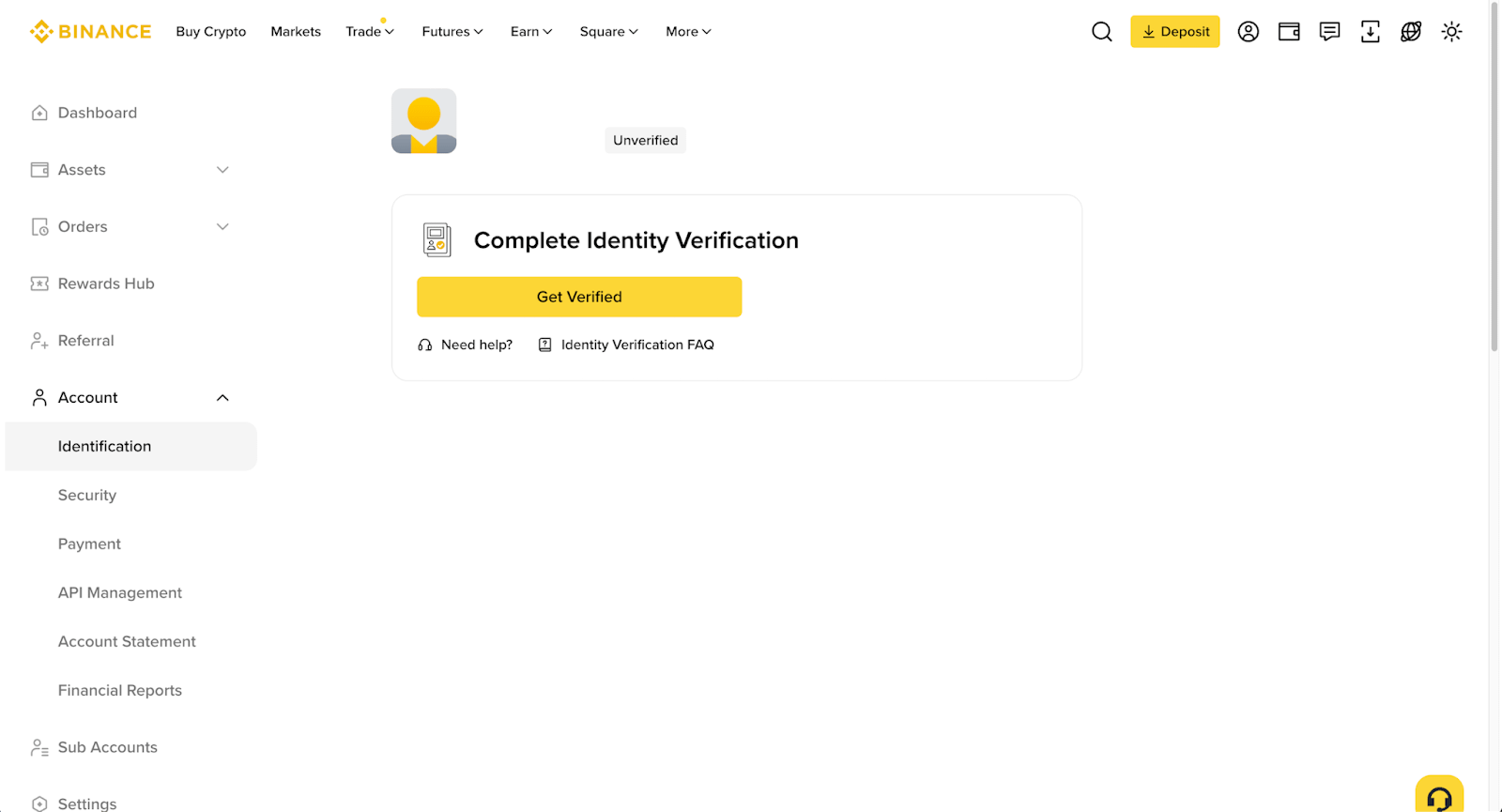
Image source: Binance Help Center
- Choose your Residence, the Document Issuing Country/Region and the document type, then click [Continue].
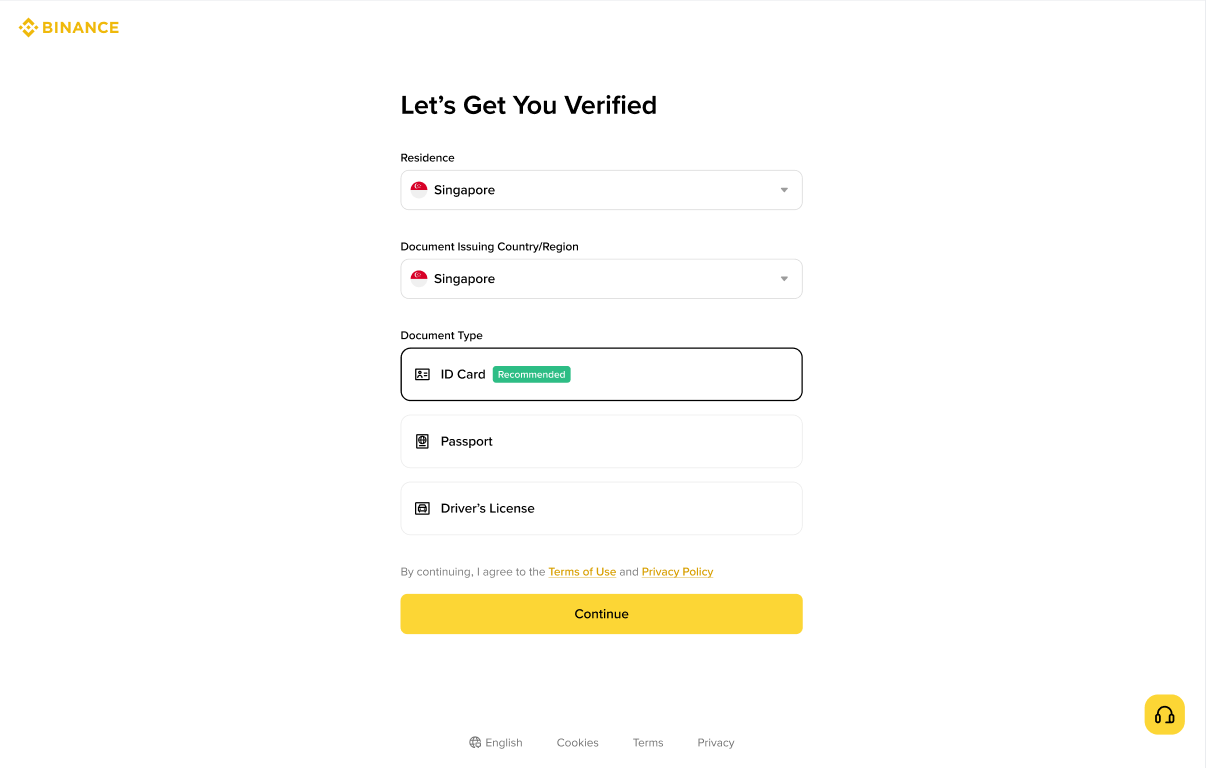
Image source: Binance Help Center
- Choose to upload your document directly from your computer (Upload from Current Device), or scan a QR code with your phone to finish on your phone (Verify with Phone). Binance notes that whether manual upload is available depends on the country/region.
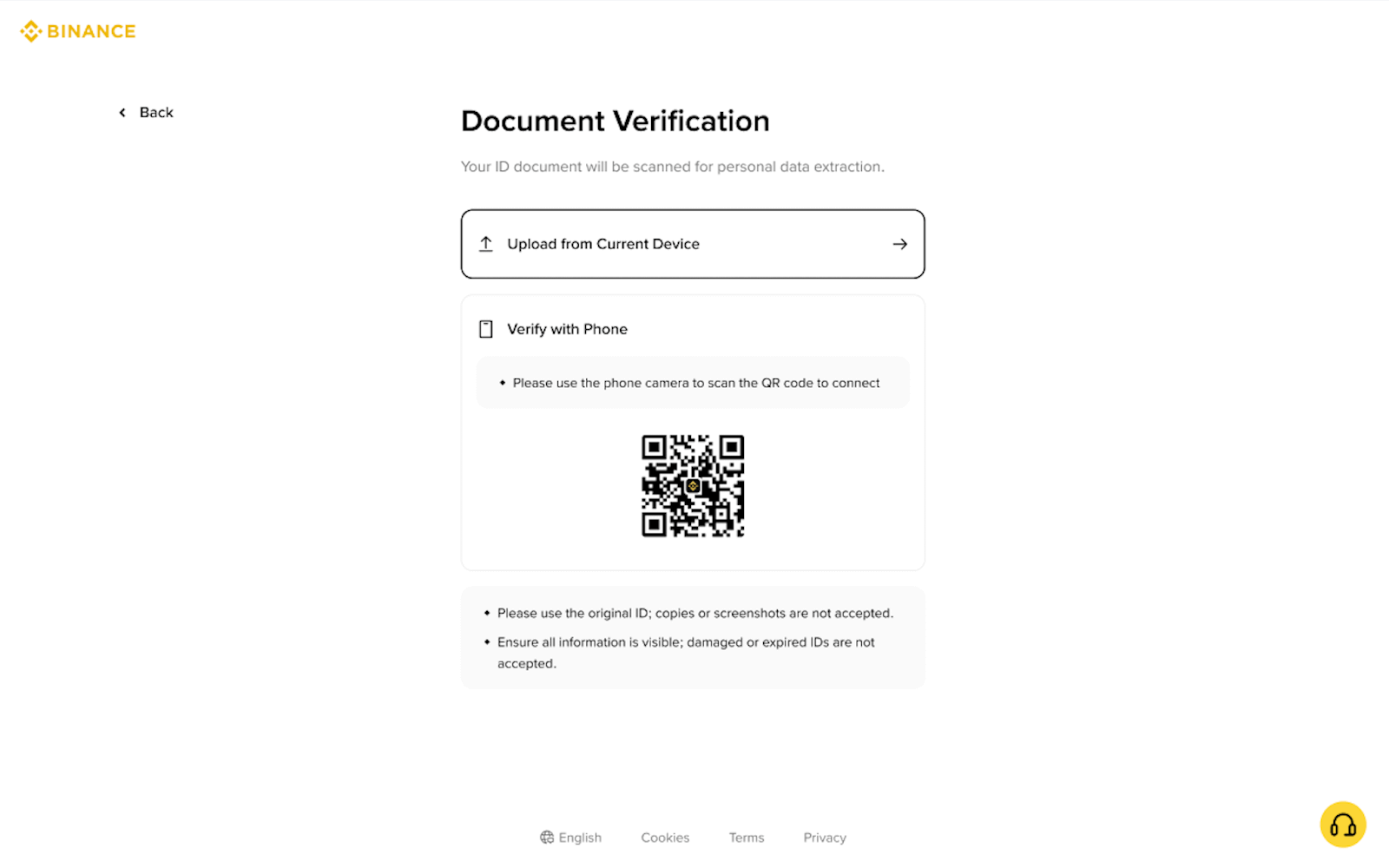
Image source: Binance Help Center
- Upload the front and back of your ID card, and click [Continue] once both sides have uploaded successfully.
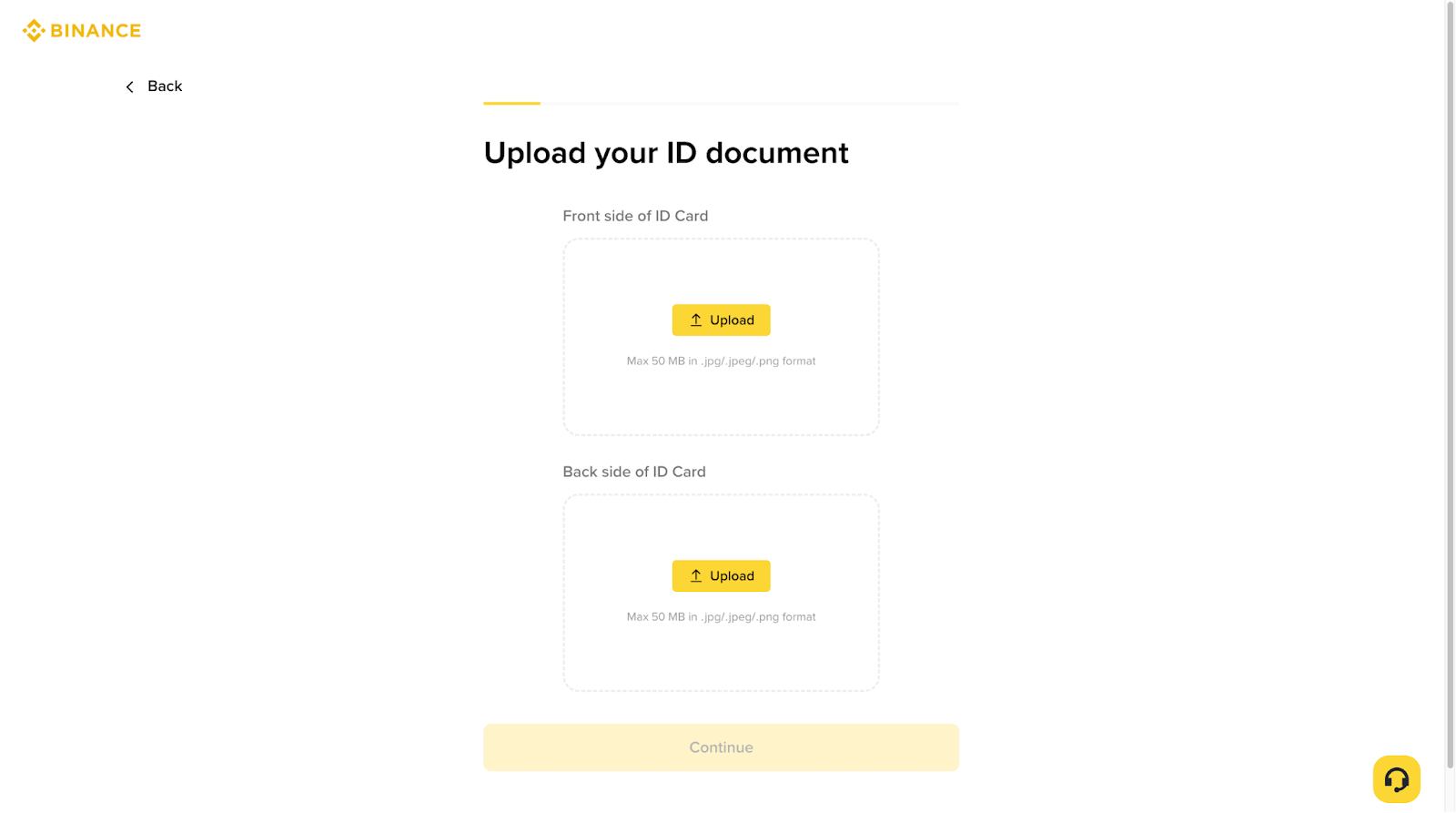
Image source: Binance Help Center
- Click [Continue] to start the Liveness Check and follow the on-screen instructions.
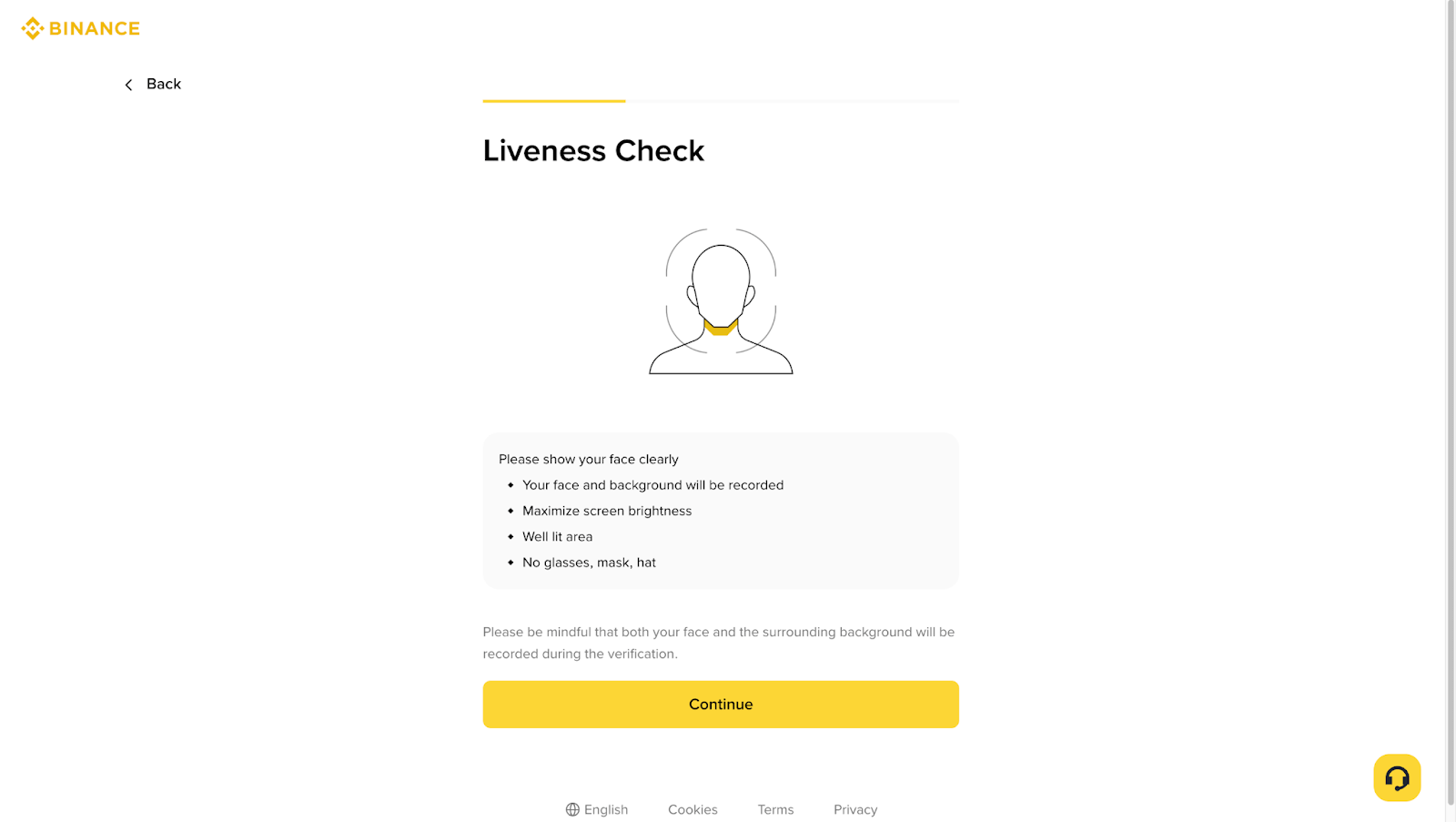
Image source: Binance Help Center
- Confirm your personal details (nationality, name, date of birth, address and so on), and click [Continue] once you’re sure they match your document. After you confirm this step, the details can no longer be changed.
- Wait for the review. Binance sends a notification once you’re approved; don’t refresh your browser at any point during the process.
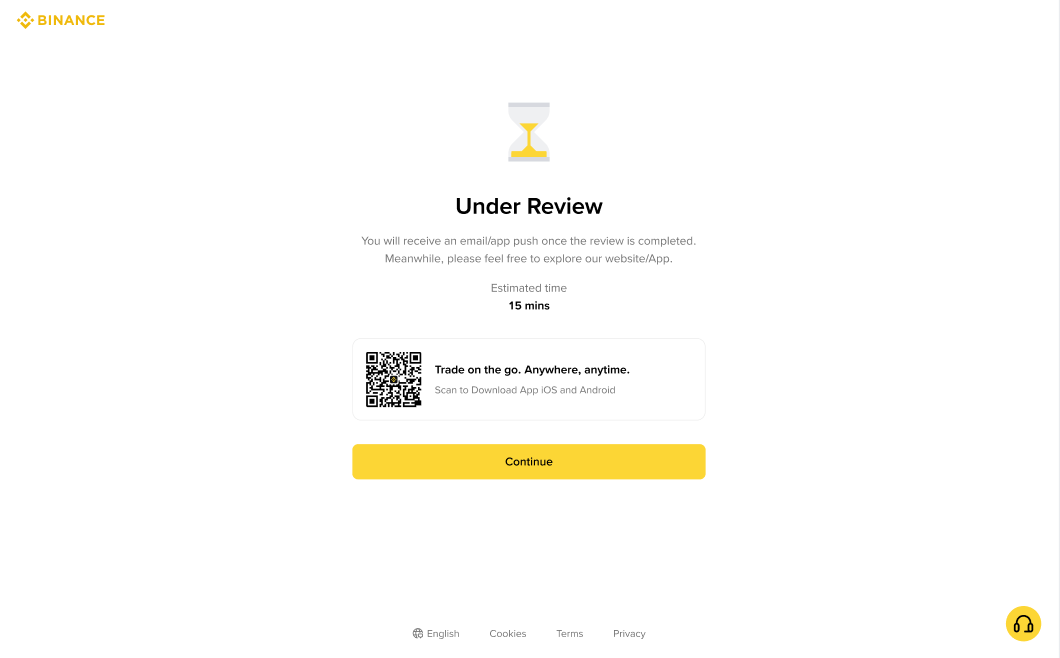
Image source: Binance Help Center
Binance KYC steps in the app
The app follows the same order as the web version; the differences are the entry point and how you take the photos:
- After logging in, tap [Verify Now] on the app’s home screen; or tap the account center icon in the top-left corner, then tap [Unverified].
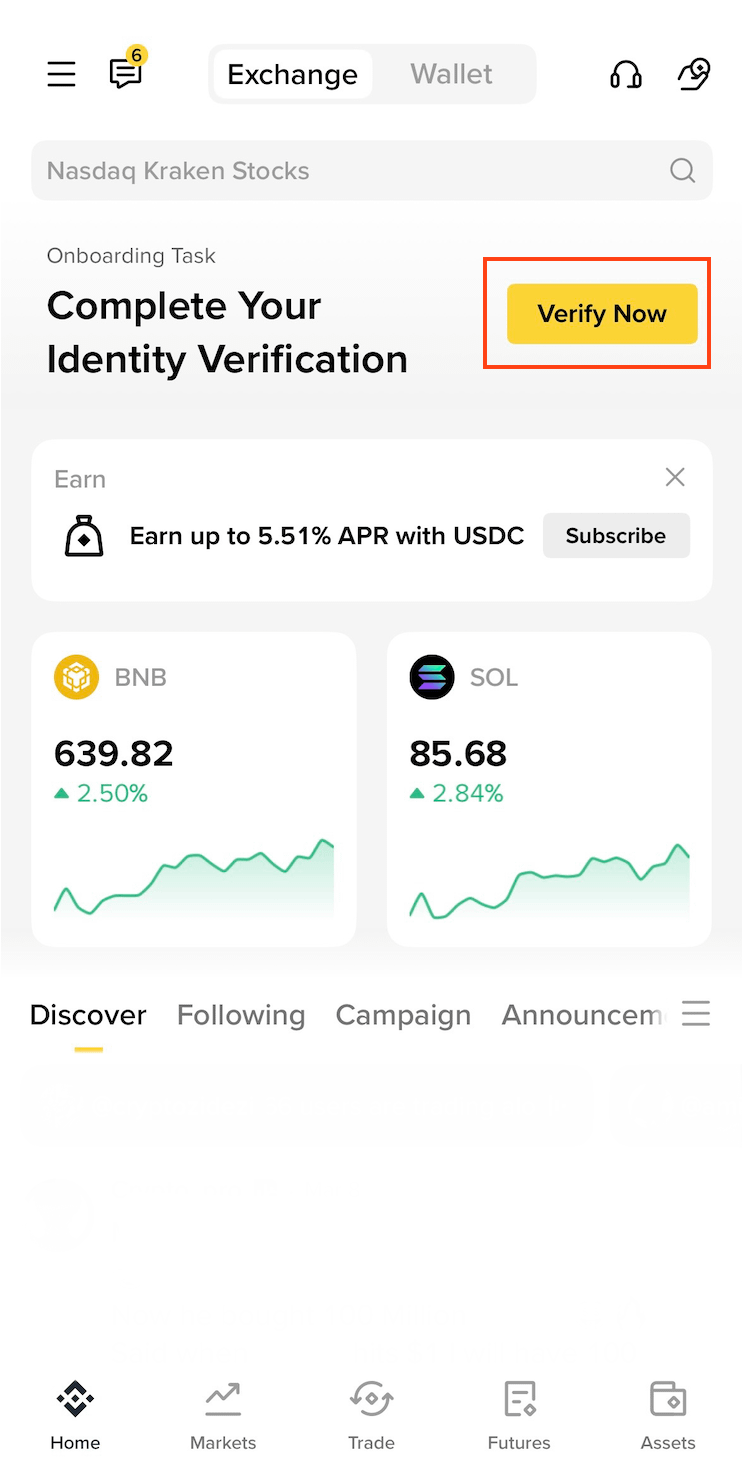
Image source: Binance Help Center
- Choose your residence, the document issuing country/region and the document type, then tap [Continue].
- Choose Take Pictures or Upload Photos, then tap [Continue].
- Upload the front and back of your document (whether manual upload is available again depends on the country/region).
- Complete the liveness check: keep your face centered in the frame with both eyes open.
- Confirm your personal details and tap [Continue]; they cannot be changed after you confirm.
- Wait for the review; you’ll get an email once you’re approved. Don’t refresh or exit the app during the process.
How long does KYC review take, and what if you’re rejected?
Binance’s written statement is: “Submitted documents are usually reviewed within 48 hours. In some special cases, it may take longer.” The Under Review screen in the official screenshot shows an estimate of 15 minutes (Estimated time 15 mins). That is an on-screen estimate, not a promise; if you have no result after 15 minutes there’s no need to worry, since you only go past what Binance describes as the normal case at 48 hours. Proof of address has its own review, which Binance says takes up to 1-2 business days; you’ll be notified when it’s done, and you don’t need to contact support.
The official guide does not list rejection reasons, but you can check your submission against the rules in the flow, one by one:
- You used a photocopy or screenshot of the document, or the document is damaged or expired.
- The photo is incomplete, and not all the details on the document are clearly in frame.
- During the liveness check you wore a hat or glasses, used a filter, or the lighting was too dim.
- The personal details you entered don’t match your document.
- You refreshed the browser or exited the app partway through.
After fixing the problem, go back to the [Identification] page and resubmit as prompted. Binance also says that if the identity verification information you submitted is incomplete, your account’s withdrawal function is temporarily disabled, and you need to contact Binance support to provide the missing information. The official guide does not say how many times you can resubmit.
If you’re already verified but your document has expired or your details have changed, use [Update Identity]. Binance accepts 7 reasons for an update: an expired document, a name change on the document, a change of ID number, a change of nationality, updating the document to meet the requirements of a specific fiat channel, changing your name to a language the system can recognize (for example, switching from a local-language ID card to an English passport), and updating the document to meet Binance Card requirements. The steps are: on the [Identification] page click [Update Identity] → choose the reason → choose the issuing country/region and document type → follow the instructions. You’ll get an email once it has been processed.
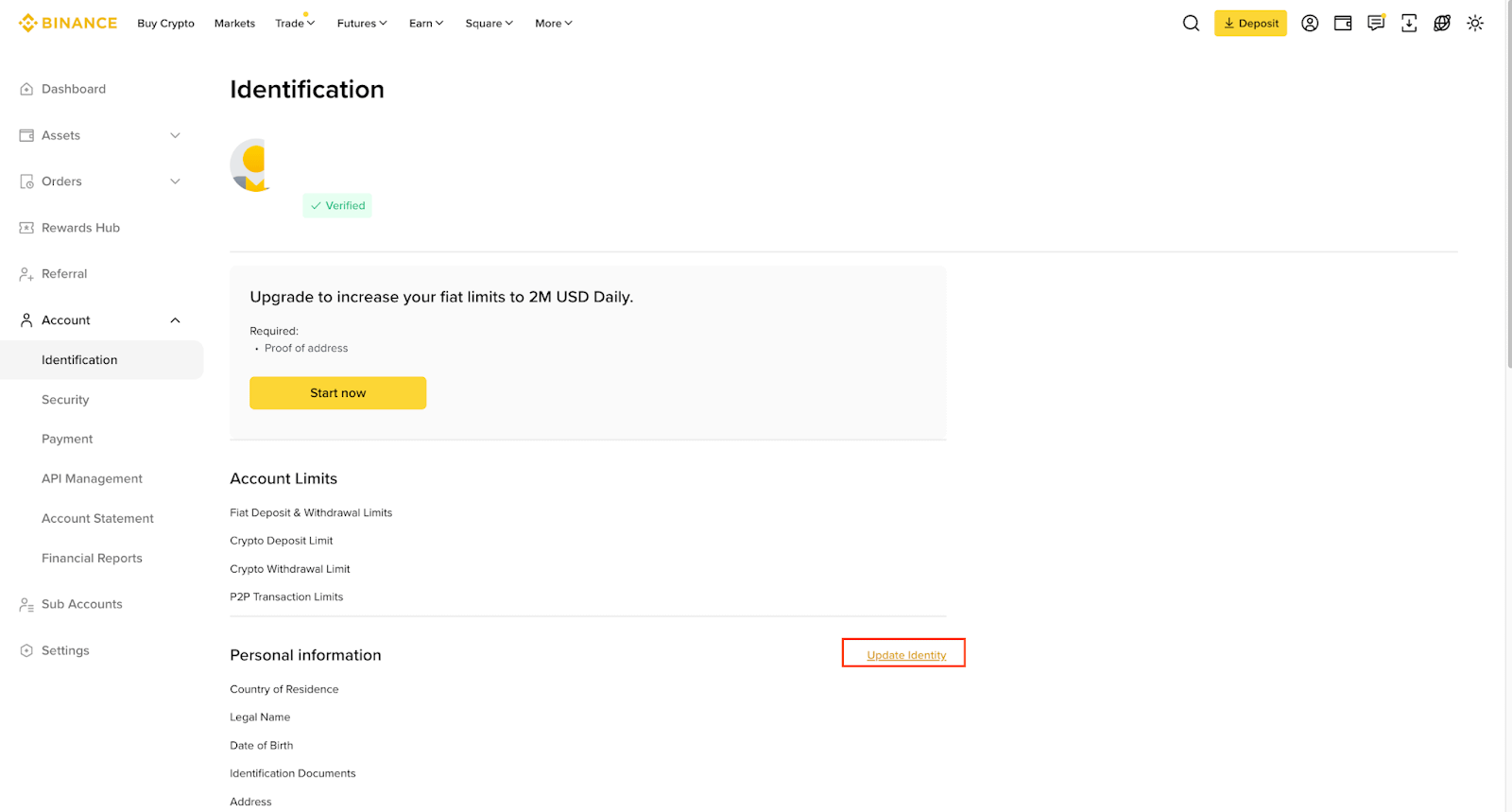
Image source: Binance Help Center
What should users in Taiwan watch for with KYC?
None of the Binance guides I checked include KYC rules specific to Taiwan. Which documents you can choose is determined by the document issuing country/region you select in the flow, so go by the options that appear on screen. Based on the official guides, a few points are more relevant to users in Taiwan:
- Name language: one of the reasons for [Update Identity] is “changing your name to a language the system can recognize,” and the example Binance gives is exactly switching from a local-language ID card to an English passport.
- Matching details: you can’t edit your personal details yourself after confirming them, so before submitting, check your name and date of birth against your document character by character.
- Proof-of-address validity: Binance’s validity table lists some exception countries (for example, 3 months for Australia and 2 months for India). Taiwan is not on the exception list, so the table’s 6 months for “all countries/regions not mentioned below” applies.
- Bill types: telecom plan bills (such as internet, TV or mobile plan bills) are accepted, while a standalone mobile phone bill is not accepted except in some jurisdictions. The document must be photographed in portrait orientation with all four corners in frame, and black-and-white scans are not accepted either.
Each exchange’s service restrictions by country are summarized in exchange restricted countries.
Is KYC safe? How is your personal data used?
Binance’s answer is that identity verification is safe and your documents are kept confidential. Binance also explains that KYC is meant to protect your account and to guard against fraud, corruption, money laundering and terrorist financing. The verification screen also notes that your document is scanned to extract your personal data, and that the liveness check records your face and background; the page before verification starts says that clicking [Continue] means you agree to the Terms of Service and Privacy Policy. The official guides I checked do not state whether KYC is handled by a third-party service provider.
In practice, I recommend sticking to two things. First, only verify on Binance’s official website or in the official app, and check the URL and the app’s source yourself. Second, don’t send photos of your ID or selfies to anyone who offers to “do your KYC for you” or “lift your restrictions.” Common tactics are covered in crypto exchange scam types, and the signs of rebate-related scams are in rebate scam warning signs.
What 3 things should you do first after KYC is approved?
Once your identity verification is approved, you can deposit. Before you deposit, I recommend getting these three things done first:
- Turn on two-factor authentication (2FA) or a passkey: under “Account → Account Security,” link an authenticator app such as Google Authenticator (Binance authenticator setup guide). Binance also supports passkeys; once added, a passkey can be used for 2FA on the linked device, and if you turn on “Require passkey verification,” you need the passkey both to log in and to withdraw (Binance passkey guide).
- Set an anti-phishing code: once it’s on, genuine emails and text messages from Binance carry this code, and anything without it wasn’t sent by Binance (Binance anti-phishing code guide).
- Test with a small withdrawal first: the first time you withdraw to a new address, send a small amount, confirm it arrived, then send the larger amount. Binance reminds users to choose the network carefully: the network you select must match the one used by the receiving platform (Binance withdrawal guide). Addresses you use often can be added to the withdrawal whitelist, up to 200 of them (Binance withdrawal settings guide).
These three steps protect your own account; the platform’s own security record, hacks and proof of reserves are covered in the Binance review.
FAQ
How long does Binance KYC take?
Binance says the review is usually completed within 48 hours and may take longer in special cases. The 15-minute estimate on the Under Review screen is only an on-screen estimate. Proof of address is reviewed separately and takes up to 1-2 business days.
Can I trade or withdraw on Binance without KYC?
New users can’t: without the Verified level you can’t deposit or trade. Existing users who are still unverified have “withdraw only” access, which limits them to withdrawing funds, canceling orders, closing positions and redeeming.
Can I use a family member’s or someone else’s ID for KYC?
No. Binance states that you cannot transfer your account to anyone else, and you cannot use someone else’s identity document in place of your own. The document, the liveness check and the personal details must all belong to the same person.
What should I do if Binance KYC fails?
First check the rejection points above, then use the original document, retake the photos somewhere well lit, and resubmit on the [Identification] page. If your withdrawals have been suspended because your information was incomplete, contact Binance support to provide the missing information.
How many Binance accounts can one person open?
Each person can have only one verified personal account. The alternatives Binance offers are opening a separate entity (corporate) account, or creating up to 5 sub-accounts under your personal account.
Can I transfer my Binance KYC to a new account?
No. Binance has no official feature for moving identity verification to another account. Binance’s account closure guide says only that if you close your account and then create another one, identity verification may be blocked for 30 days or longer (Binance account closure guide); the Referral Pro FAQ also states that when the system detects an account was closed and a new one opened to get referral benefits, Binance may terminate the referral commission on the new account (Binance Referral Pro FAQ). For the official channels and conditions for switching your referrer, see how to switch your Binance referral code.
Can I change my name or details after KYC verification?
Not directly. You can use [Update Identity] only if one of the 7 reasons Binance lists applies, such as an expired document, a change of name or ID number, a change of nationality, or switching to a name in a language the system can recognize. Your address has a separate [Modify Proof of Address] flow.
Why can’t I withdraw even though my KYC was approved?
Common reasons are not completing face verification (which limits the withdrawal amount) or not enabling enough verification methods. Binance also mentions that logging in from multiple IP addresses may be flagged as suspicious and lead to withdrawals being suspended; in that case, contact support to verify your identity.
Sources
- Binance: How to complete identity verification for a personal account (published 2019-04-23, updated 2026-07-02): all screenshots in this article come from this page.
- Binance: Why do I need to complete identity verification on my Binance account? (published 2021-05-14)
- Binance: How to verify my residential address on Binance (published 2022-02-09, updated 2026-06-11)
- Important update on Binance identity verification (announcement) (published 2021-08-20, supplemented 2024-10-09)
The pages above were checked on 2026-10-13. If you haven’t signed up yet, the referral code and sign-up steps are in Binance referral code; fees are in Binance fees, and Binance’s reserves, security record and restricted regions are in Binance review. To check after sign-up whether your referral code was linked, see how to check whether your referral code is linked.