


Updated Rules checked 2026-10-13
XT.COM’s official help center describes KYC (identity verification) as “recommended,” not as a requirement for signing up or trading: “XT.COM recommends that users complete KYC to increase account security.” Once verified, you get a higher daily withdrawal limit, and you can use fiat trading and apply to become a P2P verified merchant. Fiat withdrawals are the exception: XT’s withdrawal limit announcement states that unverified accounts are “prohibited” from withdrawing fiat. Depending on your region or payment channel, you may also be asked for further identity verification.
KEVINWUYou need color photos (front and back) of a valid ID document in your own name, plus either a liveness check or a verification video: the Sumsub channel has you turn your head for a liveness check, while the manual channel has you record a video reading out a number shown on the page. Which one you get depends on the country/region you select. The official review time is within 2 days, and the result is sent by email or in-site message.
KYC comes after registration. If you don’t have an XT account yet, start with the XT referral code and sign-up guide, then come back here for identity verification once you’ve registered.
Key points: XT.COM’s official guide says completing KYC is “recommended.” Once verified, you get a higher daily withdrawal limit and can use fiat trading and apply for P2P merchant status (XT help center, “How to complete identity verification?”, updated 2026-09-18). Unverified accounts can’t withdraw fiat, according to XT’s withdrawal limit announcement of 2024-10-28. Verification runs through one of two channels, Sumsub or manual, depending on the country/region you select; Sumsub allows up to 3 attempts, and after 3 rejections you’re moved to manual review. The official review time is within 2 days, and the result is sent by email or in-site message. Once identity verification is approved, your details can’t be changed, and the platform only accepts deposits and withdrawals from accounts in the verified user’s own name.
The information below was checked against XT.COM’s official documentation on 2026-10-13 (fact-check date). The screenshots come from the official help center and are provided for reference.
Not signed up yet? Enter the referral code before KYC
With XT you register first and do KYC afterward, and the referral code (called an “invitation code” in XT’s interface) goes in at sign-up. XT’s “How to use the XT referral rebate feature” reminds you to “complete registration with the invitation code filled in,” and none of the XT official documentation I found describes a way to add or change it after sign-up. So if you only think of a referral code when you get to KYC, it’s usually too late. I’ve summarized which exchanges let you add one later in can you add a referral code after signing up.
Our XT referral code is KEVINWU. The steps for entering it at sign-up and the rebate rules are in the XT referral code guide.
What are XT’s KYC levels, and what does each unlock?
XT doesn’t use a multi-tier scheme like Lv1 and Lv2. An account has one of three statuses: unverified, individual identity verification, or business verification (for companies or institutions; the process is described separately in XT’s “How to complete business verification?” and isn’t covered here). Daily withdrawal limits are messier: I found three official sources, and their numbers all differ. They’re listed side by side below with their dates, and I’m not choosing one on XT’s behalf.
| Verification status | Permissions in the official guide | Daily crypto withdrawals (2024-10-28 announcement) | Daily fiat withdrawals (2024-10-28 announcement) | Daily withdrawal limit (2025-01-02 withdrawal limit guide) |
|---|---|---|---|---|
| Unverified | The official guide lists no trading restrictions and only says KYC is recommended | 6,000,000 USDT | Withdrawals prohibited | 200,000 USDT |
| Individual identity verification | Higher daily withdrawal limit; fiat trading and P2P merchant applications available | 10,000,000 USDT | 500,000 USD | 10,000,000 USDT |
| Business verification | For use in the name of a company or institution | 10,000,000 USDT | 500,000 USD | 15,000,000 USDT |
Sources: XT’s announcement on daily withdrawal limits by identity verification level (signed October 28, 2024) and the XT withdrawal limit guide (published 2025-01-02). The third is a screenshot in “How to complete identity verification?” (an interface from around August 2024): below the “Identity Verification” card it lists unlimited fiat deposits and fiat withdrawals of 999,000 USD/day, plus unlimited crypto deposits and crypto withdrawals of 50,000 USDT/day (the app version writes it as 50K USDT/day). The screenshot doesn’t say which verification status these numbers apply to.
The same guide also says “different countries/regions have different limits and verification channels,” so the most reliable figures are the ones in your own account. The withdrawal limit guide gives the path as “Personal Center” → “Identity Verification” → “View limits,” and on the web verification page there’s a “Your current limits” button. The guide also states that limits reset daily at 08:00 (UTC+8) and are calculated in USDT: with a 200,000 USDT limit and BTC at 100,000 USDT, you could withdraw about 2 BTC in a day, and other coins are converted at market price. At the end, the guide notes that KYC will keep being adjusted to meet compliance and regulatory requirements.
What do you need for KYC?
- A valid ID document in your own name: the Sumsub channel first asks you to choose the issuing country/region and the document type. In the official screenshots the options are ID card, passport, household register/residence permit and driver’s license (Simplified Chinese interface); the options you actually get are whatever the page lists after you choose the issuing country. In the manual channel, you choose the “Document type” on a form and enter your real name and ID number.
- Photos of the document: they must be in color and unedited, and the document details must be clear and complete. The manual channel asks for a front photo and a back photo; the web version accepts jpg, jpeg and png, up to 5M per image.
- Liveness check (Sumsub channel): good lighting, your face inside the frame, no hat, glasses or mask, and turn your head slowly following the green guide.
- Verification video (manual channel): record a video with your phone or a camera reading out the number shown on the page. Accepted formats are MP4, OGG, WEBM, 3GP and MOV, up to 50MB.
- An email address you can access: before a manual submission goes through, a verification code is sent to your registered email, and the submission counts only after you enter it.
What you enter has to match your ID document. The web version warns that “once identity verification is approved, it can’t be changed,” and the manual form in the app also notes that “after identity verification is approved, it can’t be modified, and the platform only accepts deposits and withdrawals from accounts in the verified user’s own name.” The official documentation I found doesn’t mention proof of address. Source: the text and screenshots in XT’s “How to complete identity verification?”.
XT KYC steps on the website
These steps follow “How to complete identity verification?” in the XT help center, and all the screenshots come from that article. In the official screenshots, XT’s own pages are in the Traditional Chinese interface, while the Sumsub verification window is in Simplified Chinese. The screenshots date from around 2024, so go by the button positions and labels you actually see.
- Log in at the official website https://www.xt.com/, click the Personal Center (your avatar) in the top-right corner, and choose “Identity Verification” (the guide’s text calls it “real-name verification”).
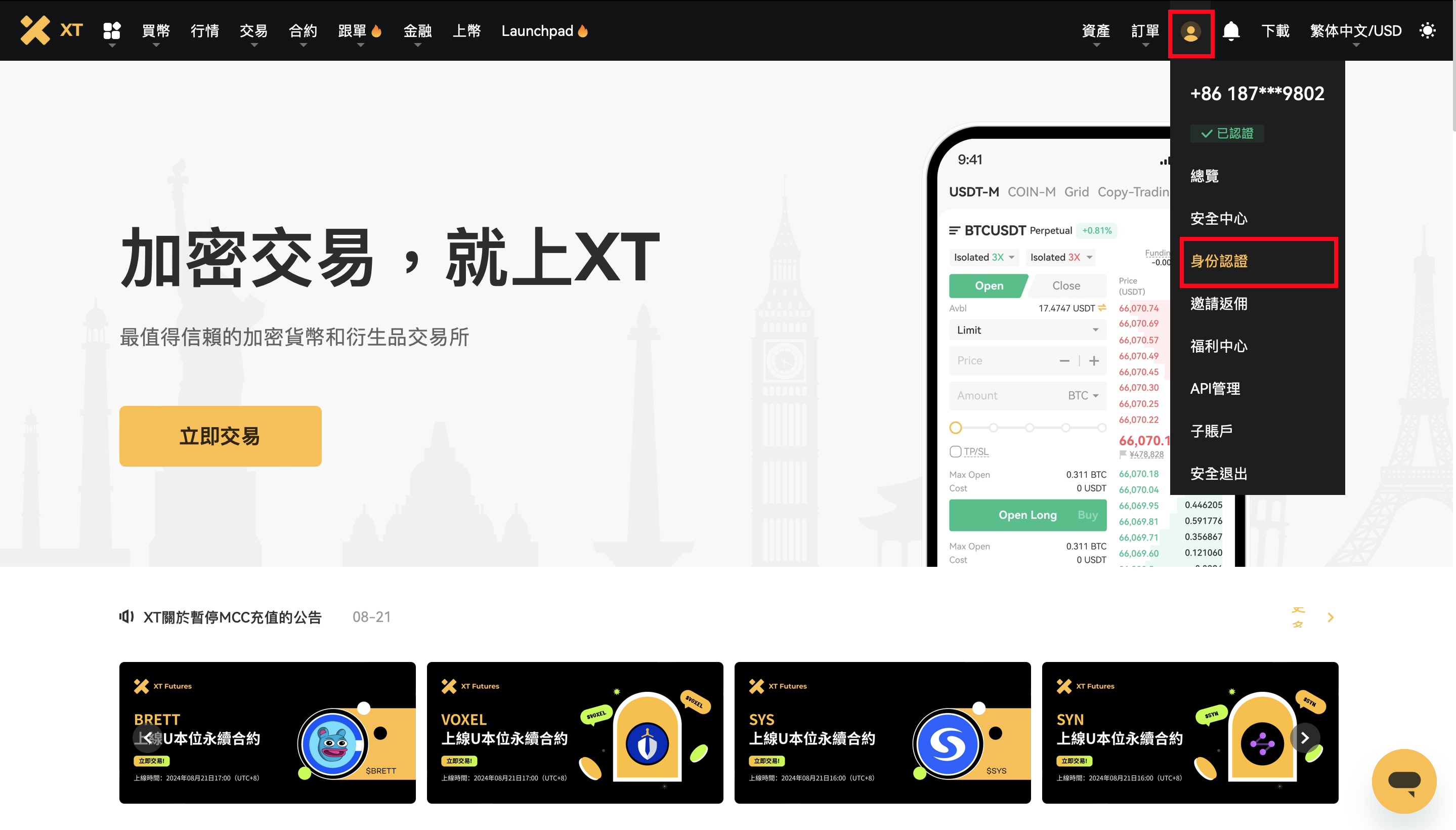
Image source: XT.COM Help Center
- On the verification page, choose your “Country/Region” first; the page reminds you to “be sure to select your country/region before KYC verification.” Limits and verification channels differ by country/region, and the prompt on the page tells you whether you’ll go through Sumsub or the manual channel. Then click “Go to verify.”
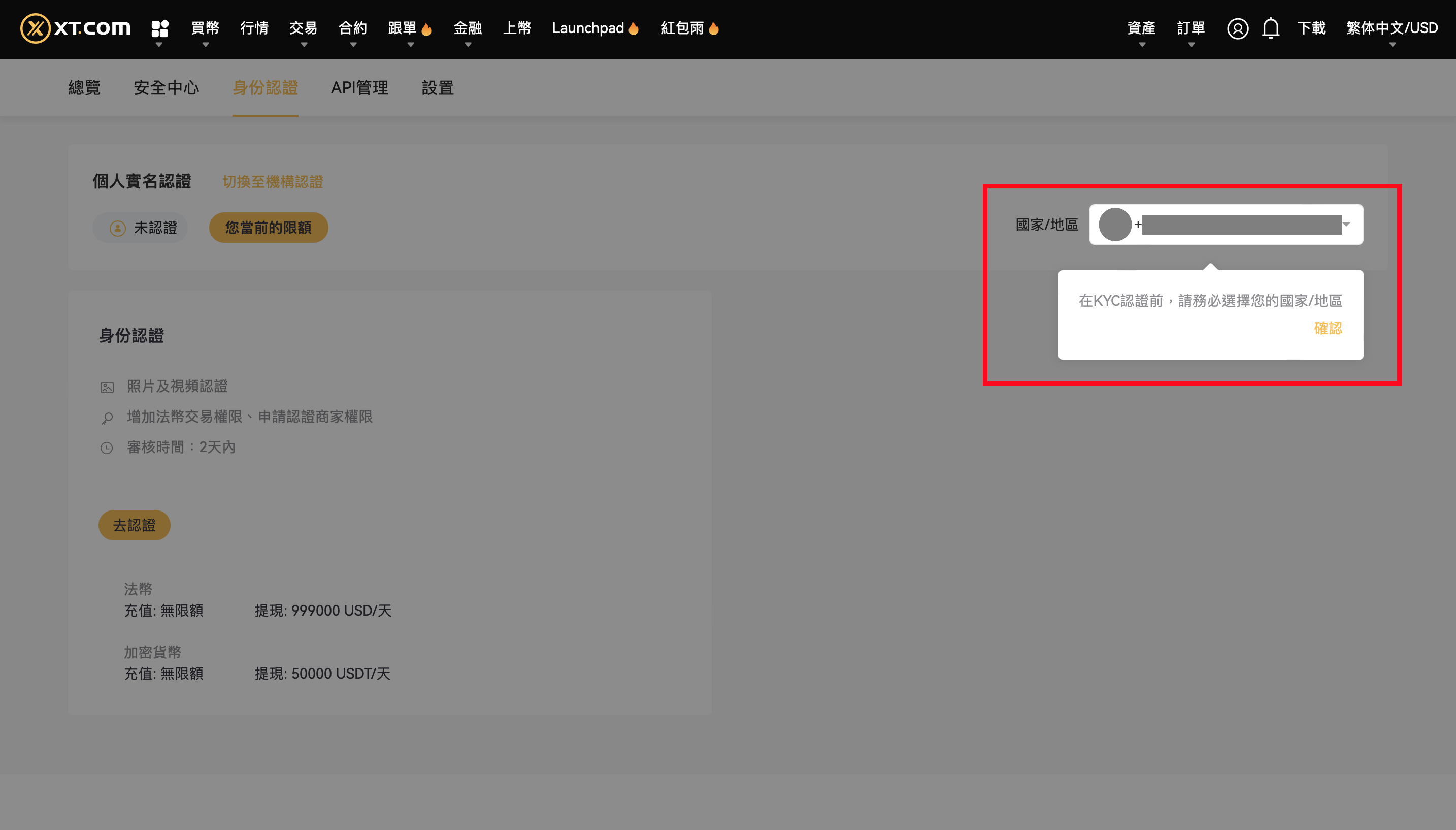
Image source: XT.COM Help Center
Sumsub channel
- The system explains that you’ll provide an ID document and complete a liveness check. Choose “Continue on this device” (on your computer) or “Continue on phone” (to take the photos with your phone instead).
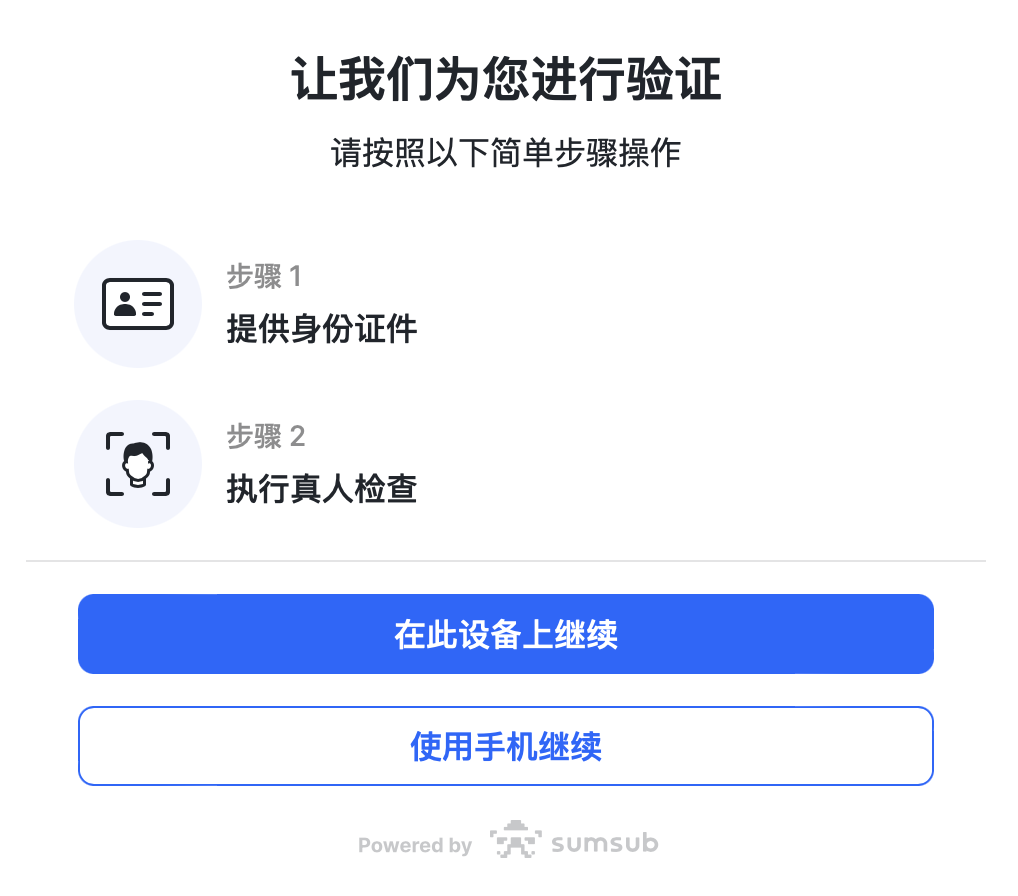
Image source: XT.COM Help Center
- Choose the document’s issuing country/region and the document type, then click “Next.”
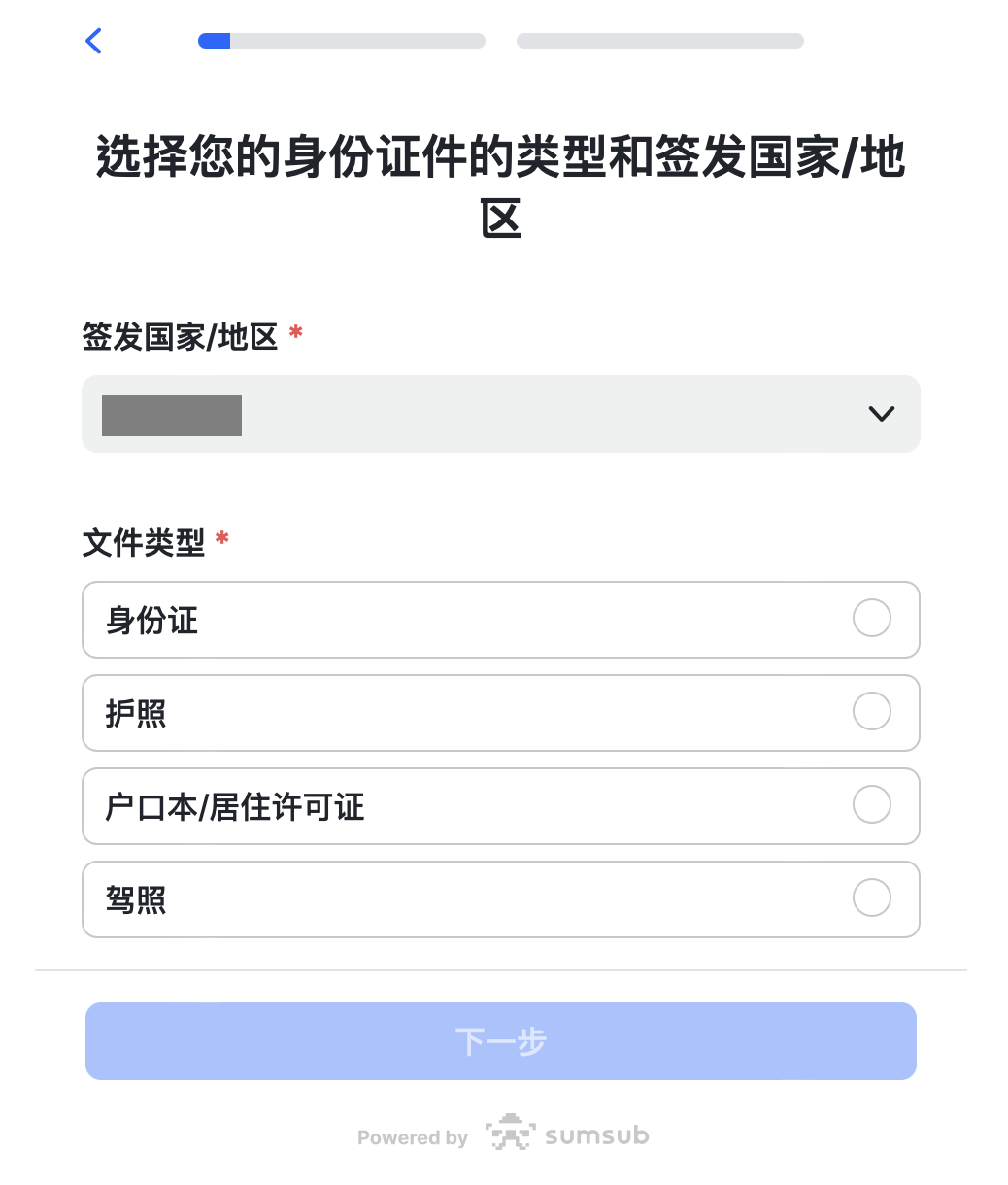
Image source: XT.COM Help Center
- Upload photos of your document as prompted, check that the details are clear and complete, and click “Continue.”
- Do the liveness check: put your face inside the frame and turn your head slowly following the green guide.
- When you see the message that your data has been uploaded, you’re done; now wait for the review. Don’t refresh your browser during verification.
Manual channel
- After clicking “Go to verify,” choose the document type on the same page, enter your real name and ID number, and upload a front photo and a back photo of the document.
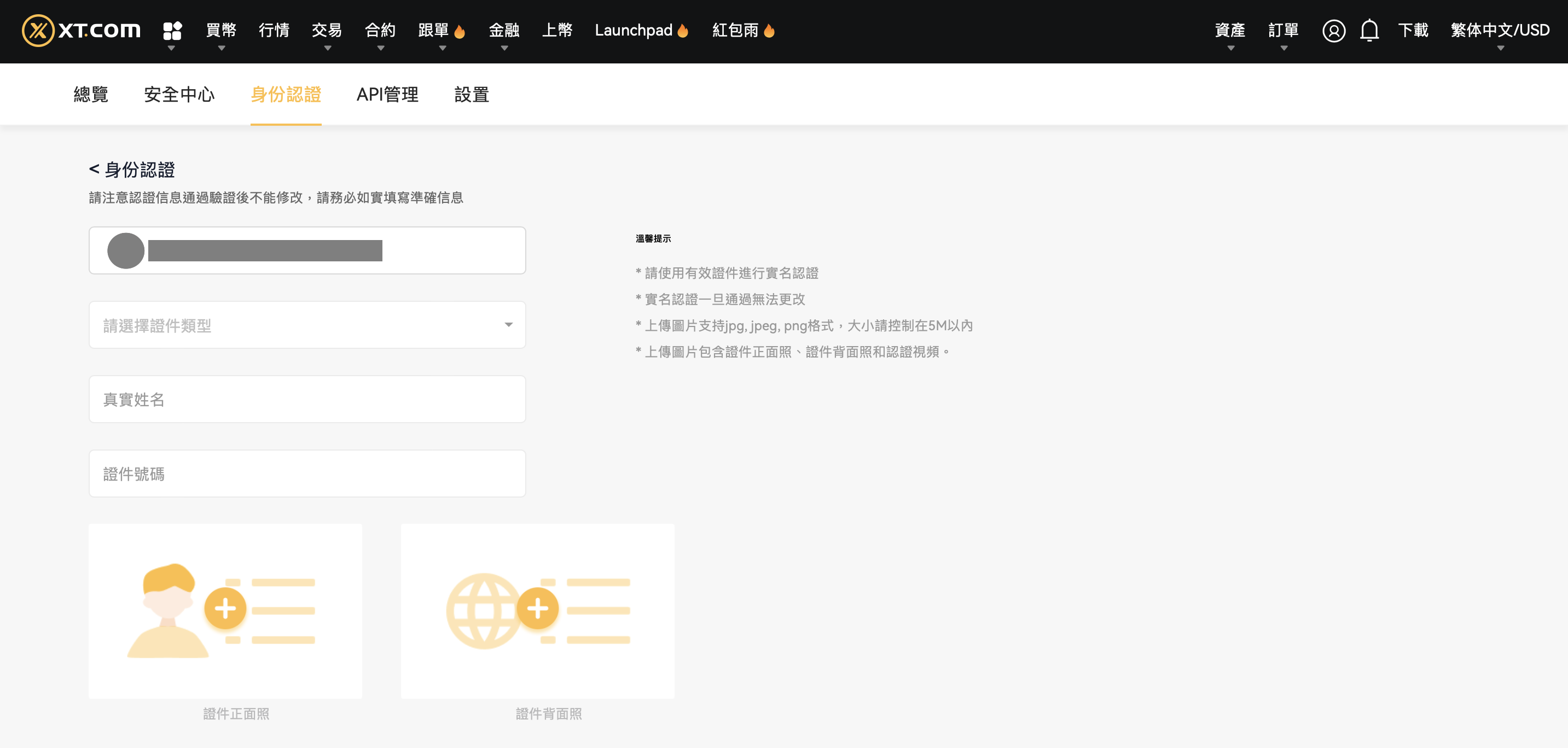
Image source: XT.COM Help Center
- Under “Upload verification video,” record a video reading out the number shown on the page and upload it. The page also has a QR code you can scan to finish in the app instead.
- Once you’ve checked your details, a verification code is sent to your registered email; enter it and click confirm.
- Back on the verification page, the status shows “Under review.” The official review time is within 2 days.
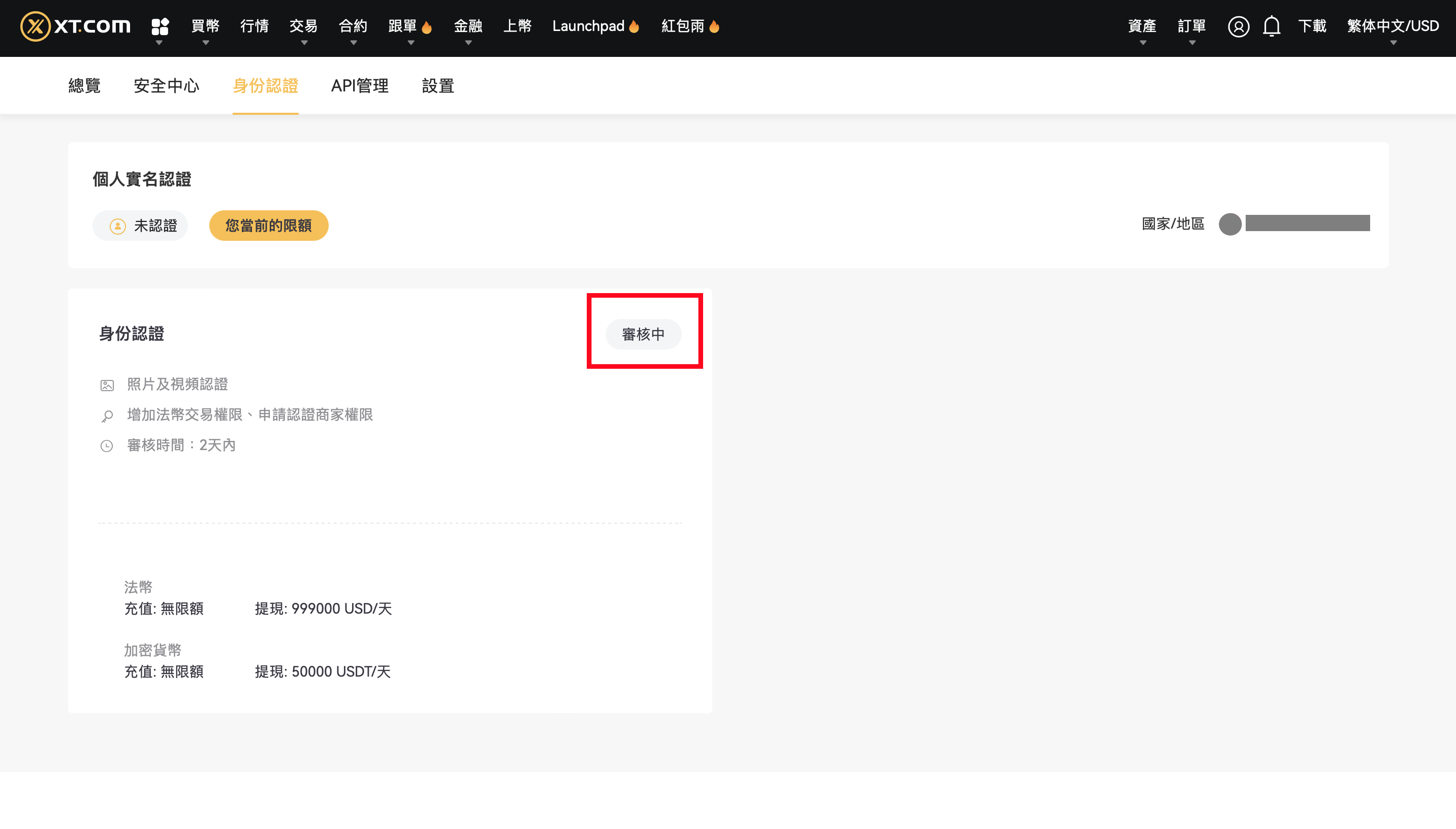
Image source: XT.COM Help Center
XT KYC steps in the app
The official app screenshots are also in the Traditional Chinese interface, but some labels differ from the website; for example, the account info screen uses a different Chinese term for “Identity Verification” than the website does. The Sumsub screens are again in Simplified Chinese.
- Log in to the XT app and tap the top-left corner to open the Personal Center.
- The top of the Personal Center shows “Unverified”; tap the arrow on the right.
- Tap “Identity Verification” to start individual verification.
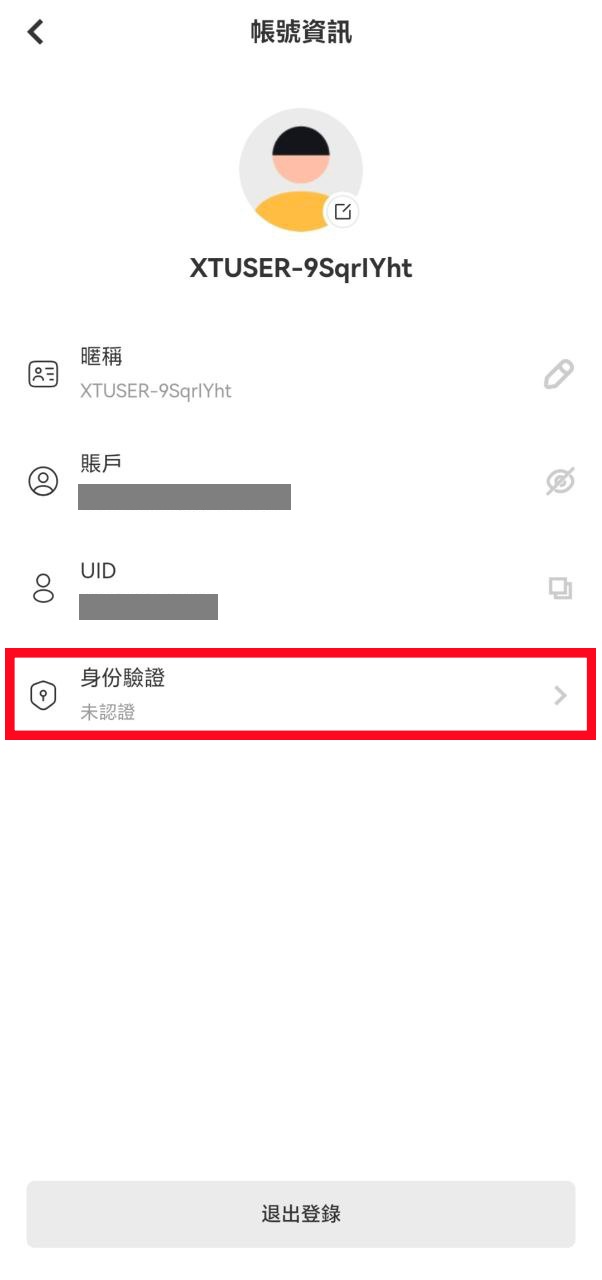
Image source: XT.COM Help Center
- Choose your country/region and tap “Go to verify.” Just like on the website, your country/region determines whether you go through Sumsub or the manual channel.
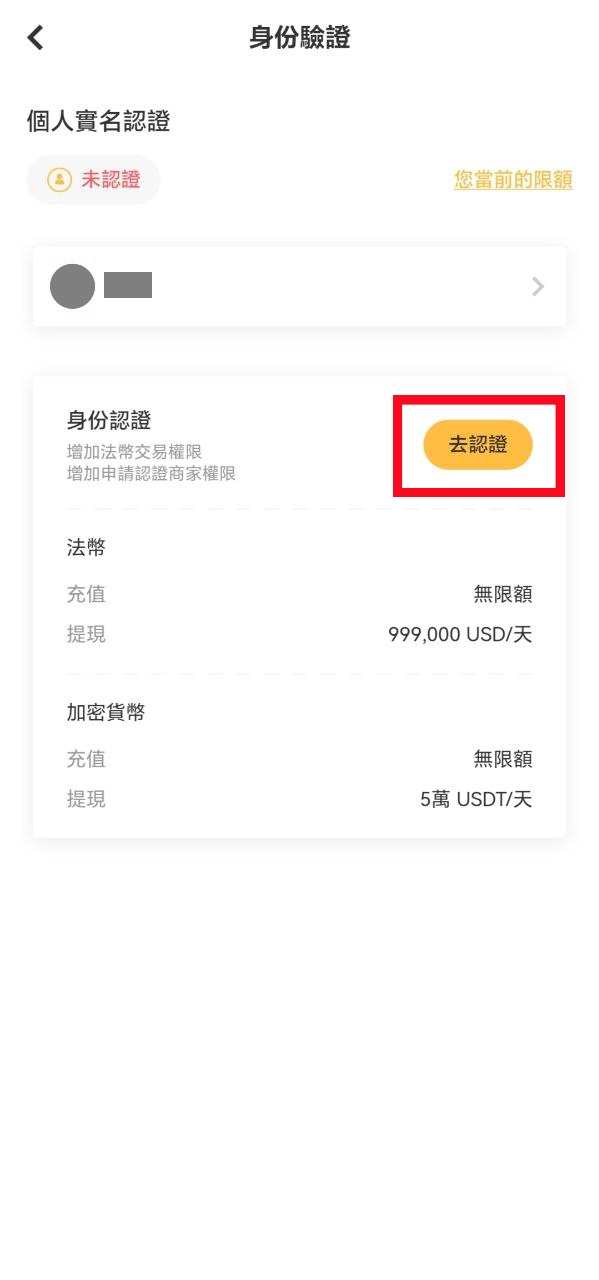
Image source: XT.COM Help Center
- Sumsub channel: choose your country of residence and tap “Continue,” then choose the issuing country/region and document type, photograph your document, and complete the liveness check (face in the center of the circle, no hat or glasses, good lighting). When you see the message that your data has been uploaded, wait for the review, and don’t refresh the app during the process.
- Manual channel: fill in your country/region, document type, real name and ID number in that order, and tap “Next”; then upload the front and back photos of your document and the verification video of you reading out the number, and finally enter the email verification code to confirm.

Image source: XT.COM Help Center
How long does KYC review take, and what if you’re rejected?
XT’s guide says “XT.COM will complete the review within 2 days,” and the card on the verification page also shows “Review time: within 2 days.” You’ll be notified by email or in-site message once you’re approved, so keep an eye on both your registered inbox and your site notifications. The official documentation doesn’t give a separate processing time for the Sumsub channel.
The official guide doesn’t list rejection reasons. These are the only rules it mentions:
| Situation | What the official guide says | What to do |
|---|---|---|
| Sumsub verification rejected | Up to 3 attempts; manual review is offered after 3 rejections | After the first or second rejection, check your photos and lighting before trying again; after the 3rd, wait for manual review |
| Verification interrupted | Don’t refresh the browser or app during verification | Finish in one go, without switching away or reloading the page |
| Photo not accepted | Upload color photos and don’t edit the document image; details must be clear and complete | Retake photos of the original document, without cropping or retouching |
| Liveness check failed | Face inside the frame, no hat, glasses or mask, good lighting | Move somewhere well lit and turn your head slowly following the green guide |
| Details don’t match | The information you enter must match your ID document | Enter your name and ID number exactly as they appear on the document |
Once approved, your details can’t be changed. The web version says “once identity verification is approved, it can’t be changed,” and the official documentation doesn’t offer any way to edit them yourself, so double-check your name and ID number before you submit. In addition, the withdrawal limit guide notes that KYC will keep being adjusted to meet compliance and regulatory requirements, and “How to complete identity verification?” says further verification may be required depending on your region or payment channel. If you get a request for more documents, just follow what the page asks for. Sources: XT’s “How to complete identity verification?” and the XT withdrawal limit guide.
What should Taiwan users know about KYC?
- No Taiwan-specific rules: the XT KYC guide, withdrawal limit announcement and AML/KYC policy I checked contain no provisions specific to Taiwan. Whether Taiwan users go through Sumsub or the manual channel, and which documents they can choose, is shown in the page prompt after selecting a country/region on the verification page.
- Go by the limits in your account: XT states that limits differ by country/region, and the numbers in the three sources above don’t agree, so before a large withdrawal, check your own figures under “View limits” or “Your current limits.”
- Use only your own account for deposits and withdrawals: the app form states that the platform only accepts deposits and withdrawals from accounts in the verified user’s own name. Moving money in or out through a family member’s bank account or anyone else’s account doesn’t comply with this rule.
- Mixed interface languages: in the official screenshots, XT’s website and app are in Traditional Chinese and the Sumsub window is in Simplified Chinese, so the button labels you see will differ somewhat from the ones quoted here.
Is KYC safe, and how is your personal data used?
The Sumsub channel uses Sumsub, a third-party verification service: the official guide refers to it directly as the “Sumsub channel,” and the verification window shows Powered by Sumsub at the bottom. XT’s privacy policy lists the data it collects, including copies of identity information and government-issued ID and passport numbers. It states that this data won’t be sold or disclosed to third parties without permission, except to “third-party security partners related to the service” and service providers that help run its operations, which receive only limited information to the extent necessary and are bound by confidentiality. The XT AML/KYC policy and procedures state that XT doesn’t open anonymous or pseudonymous accounts and screens customers against anti-money-laundering lists.
In practice, three things are worth remembering:
- Only verify on XT’s official website (xt.com) or official app, and check the URL and where the app came from before entering any data.
- Don’t send your ID photos or verification video to anyone. Anyone who claims they can “get you through KYC” and asks you to message them your ID is not XT; common tactics are covered in crypto exchange scam types and rebate scam warning signs.
- The manual channel asks for a verification code sent to your email. Only enter it on XT’s page and never tell it to anyone. The same goes for your password, seed phrase and private keys; the KYC process never needs any of them.
What 3 things should you do first after KYC is approved?
Once your identity verification is approved, you can deposit. Before you deposit, I recommend getting these three things done first:
- Turn on two-factor authentication (2FA) or a passkey: link Google Authenticator in the “Security Center” (XT: set up Google Authenticator). XT also supports passkeys, which can be used for login and withdrawals (XT passkey setup).
- Set an anti-phishing code: set it in the “Security Center,” which requires entering a Google Authenticator code; once set, genuine emails from XT will show this code (XT anti-phishing code setup).
- Test with a small withdrawal first: the first time you withdraw to a new address, send a small amount, confirm it arrived, then send the larger amount; addresses you’ve confirmed can be saved to the address book so you can pick them directly next time (XT withdrawal guide).
These three steps protect your own account; the platform’s own security record, hacks and proof of reserves are covered in the XT review.
FAQ
How long does XT KYC take?
The official review time is within 2 days. The card on the verification page also shows “Review time: within 2 days,” and you’re notified by email or in-site message once you’re approved.
Can I trade or withdraw on XT without KYC?
The official guide says completing KYC is “recommended” and doesn’t say unverified users can’t trade. Unverified accounts also have a daily crypto withdrawal limit, but they can’t withdraw fiat. For the unverified limit, the 2024-10-28 announcement says 6,000,000 USDT/day and the 2025-01-02 withdrawal limit guide says 200,000 USDT; go by what your account page shows. Depending on your region or payment channel, you may also be asked for further verification.
Can I use a family member’s or someone else’s ID for KYC?
No. XT requires your own real information, and the platform only accepts deposits and withdrawals from accounts in the verified user’s own name; its AML/KYC policy also states that it doesn’t open anonymous or pseudonymous accounts.
What if my XT KYC fails?
The Sumsub channel allows up to 3 attempts, and after 3 rejections XT offers manual review. Before retrying, check that your ID photos are in color, unedited, clear and complete; for the liveness check, make sure the lighting is good and you’re not wearing a hat, glasses or a mask, and don’t refresh the page during verification.
How many XT accounts can one person open?
The official KYC guide doesn’t say how many main accounts one identity can verify. If you need to keep activity separate, XT has an official sub-account feature: XT’s “What is a sub-account? How do I create one?” states that each person can create up to 20 sub-accounts and that sub-accounts share the main account’s VIP level.
Can I transfer my XT KYC to a new account?
No. XT’s identity verification FAQ states that each user can verify only one XT account; identity verification can’t be removed from an account on its own, and the same identity information can’t be reused on or transferred to another account (XT identity verification FAQ). If you need to keep activity separate, XT suggests opening sub-accounts under your verified main account. For the limits on switching referrers, see how to switch your XT.COM referral code.
Can I change my name or ID details after KYC is approved?
No. The XT website says “once identity verification is approved, it can’t be changed,” and the app form also notes that details can’t be modified after approval, so check everything carefully before you submit.
Can I add a referral code after completing KYC?
The XT official documentation I found has no process for adding or changing a referral code, and that has nothing to do with whether you’ve done KYC; XT reminds you to complete registration with the invitation code filled in. To check whether your account is linked to a referral code, see how to check whether your referral code is linked.
Sources
These are the XT.COM official pages used in this article (with each page’s creation and update dates in parentheses, checked 2026-10-13). All screenshots in this article come from the first one, “How to complete identity verification?”
- How to complete identity verification? (created 2024-04-08, updated 2026-09-18; screenshots kyc-xt-01, 02, 05, 07, 14, 17, 20, 22, 27)
- XT announcement on daily withdrawal limits by identity verification level (signed 2024-10-28, page updated 2026-07-07)
- Withdrawal limit guide (created 2025-01-02, updated 2026-09-26)
- XT.COM AML/KYC policy and procedures (edited 2025-03-14, updated 2026-10-10)
- Privacy policy (edited 2025-08-14, updated 2026-10-10)
- What is a sub-account? How do I create one? (created 2024-03-05, updated 2026-09-18) and How to complete business verification? (updated 2026-07-23)
- How to use the XT referral rebate feature (created 2025-09-24, updated 2026-06-13)
If you haven’t registered yet, the sign-up steps and referral code are in XT referral code. Once KYC is done and you’re ready to trade, the fee details are in XT fees, and the overall platform details are in XT review. To check whether your referral code is linked, see how to check whether your referral code is linked.