


Updated Rules checked 2026-10-22
Fee Otter is a fee rebate site founded in 2026 and an affiliate partner of 15 exchanges. Sign up on an exchange with its sign-up code, then bind your UID on Fee Otter, and the exchange first refunds part of your fees automatically to your exchange account; on top of that, Fee Otter settles an extra rebate every day, which you can withdraw in USDT (BEP20). That extra part is paid by Fee Otter, not the exchange and not Kevin Wu.
When I checked Fee Otter’s website on 2026-10-22, its Bybit rebate was 40%, all of it paid by Fee Otter. Across the 13 exchanges this site covers, Fee Otter’s combined futures rates ranged from 20% (OKX) to 70%. The rates change, so Fee Otter’s page is what counts.
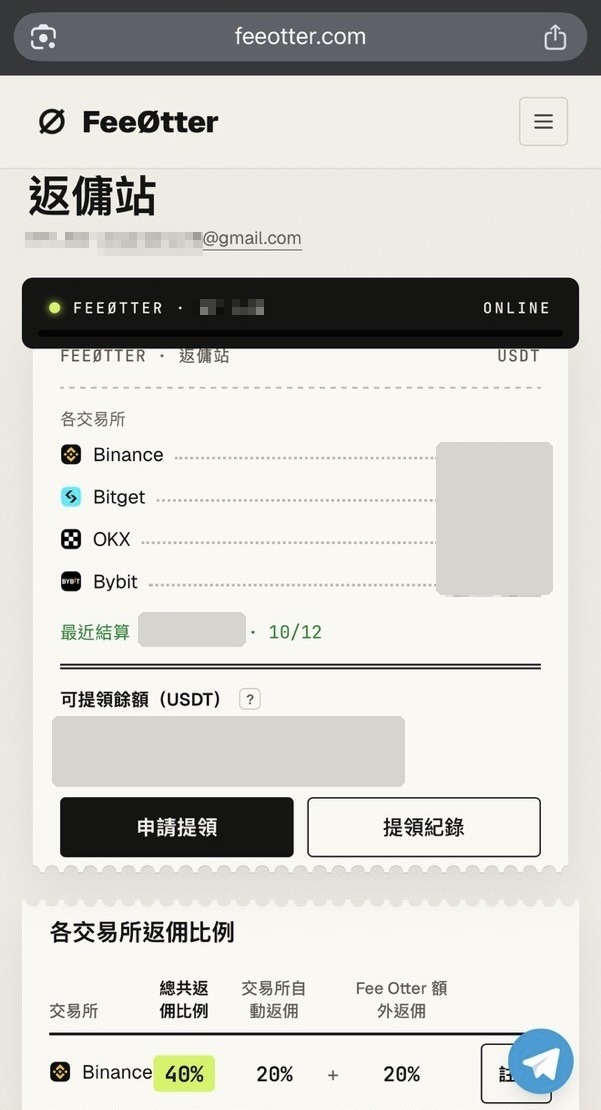
I use Fee Otter myself: my Binance, Bitget, OKX and Bybit accounts are all bound to its rebate dashboard, and it has been smooth to use. This review covers how Fee Otter works, its rate for each exchange, the binding and withdrawal rules, what to keep in mind when using it, and how to choose between it and the automatic fee rebate from this site’s referral codes.
Key points: Fee Otter’s rebate comes in two parts. The exchange’s automatic fee rebate is refunded by the exchange straight to your exchange account; the extra rebate is settled by Fee Otter every day and recorded on its rebate dashboard. When I checked on 2026-10-22, Fee Otter’s Bybit rebate was 40%, and because Bybit gives invitees no automatic fee rebate, Fee Otter pays all of it. Fee Otter’s terms of service, effective 2026-10-13, state that the extra rebate is paid only in USDT by on-chain transfer (BNB Smart Chain, BEP20) to the user’s own address; the withdrawal page lists a minimum of 1 USDT per withdrawal and a network fee of 0.015 USDT. An exchange account can have only one referrer: if you use Fee Otter’s sign-up code, you can’t use another referral code as well. If an exchange claws back commission, Fee Otter’s terms allow it to take back the matching rebate it has already paid.
The information below was checked against official pages on 2026-10-22 (data check date) and is provided for reference.
What is Fee Otter, and where does the rebate money come from?
Exchanges give part of the fees users pay to whoever referred them, and affiliate partners get a larger share than ordinary users. Fee Otter, founded in 2026, is a contracted affiliate partner of 15 exchanges (see its About page) and passes most of this share back to users. The money comes back to you in two ways:
- Automatic fee rebate from the exchange: the invitee rate Fee Otter sets in the exchange’s affiliate dashboard. The exchange refunds it directly to your exchange account; it doesn’t pass through Fee Otter, and you don’t need to apply for it.
- Fee Otter extra rebate: once Fee Otter receives the referral share the exchange pays it, it works out your portion from the exchange’s reports, settles it daily to its “rebate dashboard”, and you then request a withdrawal.
Fee Otter’s terms of service (effective 2026-10-13) spell out its role clearly: it isn’t an exchange, it doesn’t hold your assets, it doesn’t trade for you, and it won’t ask for your exchange password, verification codes, withdrawal permissions or an API key with trading permissions. The terms define the “withdrawable balance” shown in the member dashboard as an amount Fee Otter still owes you, not assets you’ve deposited with it. On income, section 9 of the terms states that the referral share exchanges pay it is its main revenue, and that most of it goes back to users as rebates. The terms are governed by Swiss law, with the courts of Zug, Switzerland, as the court of first instance. The difference between referrer commission and invitee rebates is covered separately in referrer commission vs invitee rebate.
Which exchanges does Fee Otter support, and what are the rebate rates?
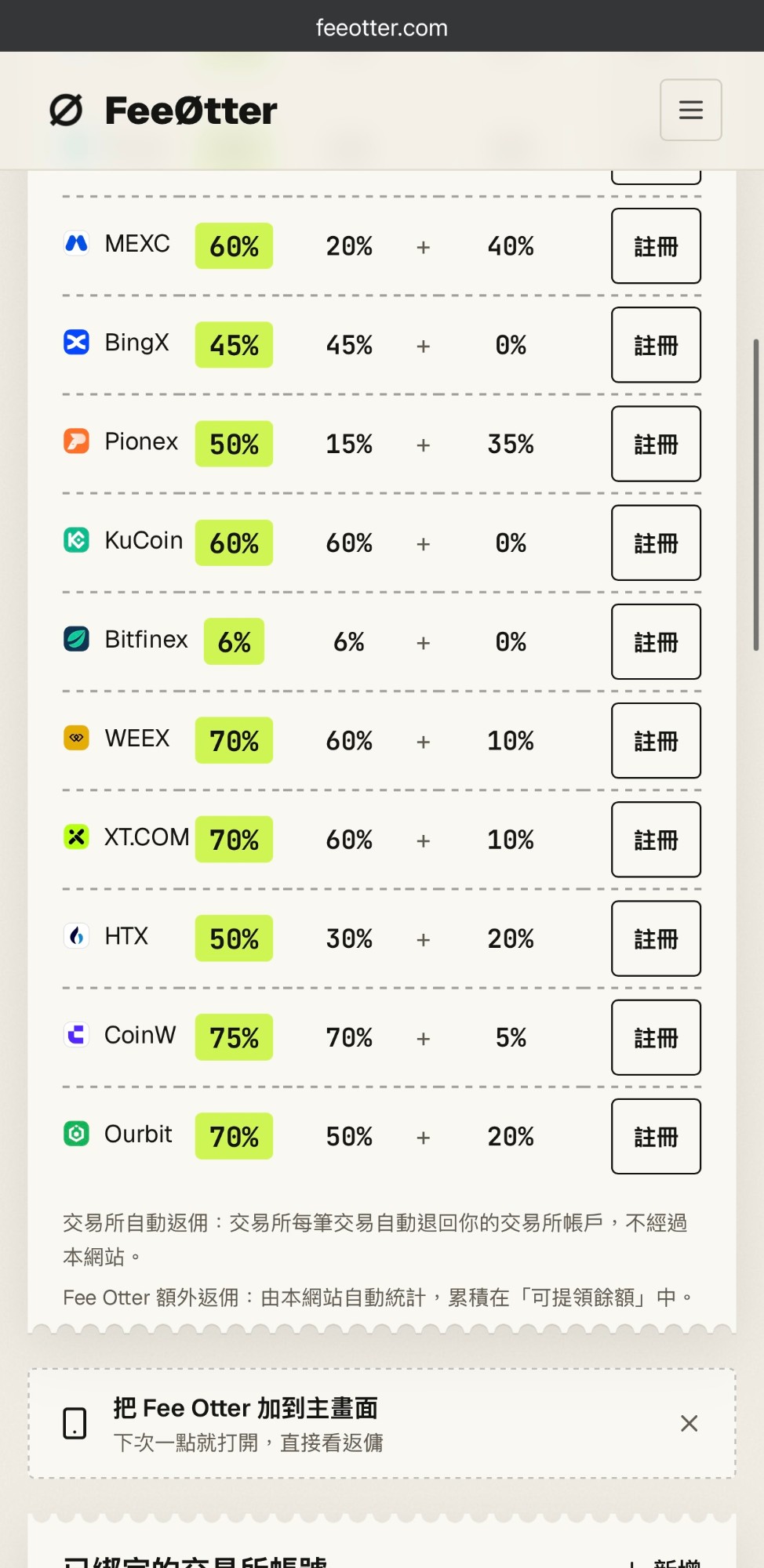
Fee Otter has a single rate per exchange, with no levels and no trading-volume threshold, so smaller traders get the same rate. The table below is copied from its rebate rate table. “Combined” means the exchange’s automatic fee rebate plus Fee Otter’s extra rebate; the main columns are for futures, and the last column is the combined spot rate.
| Exchange | Automatic fee rebate from the exchange | Fee Otter extra rebate | Futures combined | Spot combined |
|---|---|---|---|---|
| Gate | 20% | 50% | 70% | 65% |
| WEEX | Futures 60%, spot 35% | 10% | 70% | 45% |
| XT.COM | Futures 60%, spot 35% | 10% | 70% | 45% |
| Ourbit | 50% | 20% | 70% | 70% (Ourbit spot currently has 0 fees) |
| MEXC | 20% | 40% | 60% | 60% |
| KuCoin | 60% | 0% | 60% | 60% |
| Bitget | 20% | 30% | 50% | 45% |
| Pionex | 15% | 35% | 50% | 50% |
| HTX | 30% | 20% | 50% | 45% |
| BingX | 45% | 0% | 45% | 45% |
| Binance | 20% | 20% | 40% | 40% |
| Bybit | None | 40% | 40% | 40% |
| OKX | 20% | Rate not officially stated (a separate reward; ask support) | 20% | 20% |
| CoinW | Futures 70%, spot 20% | 5% | 75% | Not officially stated |
| Bitfinex | 6% | 0% | 6% | Not officially stated |
Source: Fee Otter’s rebate page and rebate rate table, checked 2026-10-22; rates change, and Fee Otter’s page is what counts. Ourbit’s spot fee rate is from Ourbit’s fee announcement.
Three details worth knowing as you read this table:
- Only one exchange reaches “up to 75%”: the “up to 75%” on Fee Otter’s homepage is CoinW’s futures rate, and CoinW isn’t one of the exchanges this site covers. For the 13 exchanges this site covers, the combined futures rate is between 20% and 70%.
- KuCoin, BingX and Bitfinex have a 0% extra rebate: on these three, the whole rebate is refunded automatically by the exchange, so you get the same rate whether or not you bind Fee Otter. Bitfinex is currently open for sign-up only; Fee Otter doesn’t accept Bitfinex UIDs for binding.
- OKX has only a 20% automatic fee rebate: Fee Otter lists 20% plus an “exclusive reward”. You have to ask support what the reward is; the page gives no rate, and the terms state that Fee Otter can change or cancel this part at any time.
How do you start using Fee Otter?
- Sign up on the exchange with Fee Otter’s link: the sign-up link and sign-up code for each exchange are listed on Fee Otter’s rebate page. For most exchanges the sign-up code is
FEEOTTER; MEXC, WEEX, CoinW and Bitfinex use other codes, so check the rebate page. Before you submit the sign-up form, make sure the referral code field has been filled in automatically. - Complete the exchange’s identity verification and copy your UID: the UID is your exchange account’s numeric ID, not your nickname or email. Where to find it on each exchange is covered in what is an exchange UID. If you have sub-accounts, Fee Otter’s Bybit notes say sub-account fees are counted under the main account’s UID, so binding the main account is enough.
- Log in to Fee Otter and bind your UID: you can log in with a Google account or an email verification code. Fee Otter refreshes the previous day’s data at about 16:00 (UTC+8) every day; if your account generated fees the previous day, the binding is approved automatically. The terms also reserve the right to switch to manual review, ask for more information or refuse a binding.
- Add a payout address: withdrawals only go to a BEP20 USDT address. Your first address can be used as soon as you add it; any address added after that has a 24-hour cooling-off period.
If you already have an exchange account: the referral relationship is fixed at the moment you sign up, and Fee Otter’s terms also state that a binding “usually can’t be changed afterward”. Whether you can add a code later or switch depends on each exchange’s rules. Bybit, for example, lets a main account with no referrer add a partner’s affiliate code within 14 days of sign-up; Fee Otter says you enter its affiliate ID 163627 there, not the sign-up code. Each exchange’s deadline is listed in can you add a referral code after signing up, and how to switch is covered in the guide to switching referral codes. To check who your referrer is after binding, see how to check whether your referral code is bound.
How is the Fee Otter rebate calculated, and when is it paid?
The rebate is based on the fees you actually pay, not the trade amount: rebate = fees actually paid × rebate rate. Fee Otter states that fees actually paid means the amount after any discount from a platform token such as BNB, and that VIP-level discounts are also taken into account. The terms add that the extra rebate is based on the referral share the exchange actually pays Fee Otter; if the exchange pays late, pays less, claws money back afterward or ends its referral program, Fee Otter can delay, adjust, suspend or claw back rebates accordingly.
Take Bybit as an example. Bybit’s futures fees for regular users are 0.02% Maker and 0.055% Taker (Bybit fee structure, checked 2026-10-22). Suppose you fill 200,000 USDT in futures notional value with market orders in a month:
| Item | Calculation | Amount |
|---|---|---|
| Fees charged by Bybit | 200,000 × 0.055% | 110 USDT |
| Automatic fee rebate from the exchange | Bybit has no invitee rebate | 0 USDT |
| Fee Otter extra rebate (40%) | 110 × 40% | 44 USDT |
| Withdrawn to your own BEP20 address | 44 − 0.015 network fee | 43.985 USDT |
| Fees actually paid after the rebate | 110 − 44 | 66 USDT (equal to a 0.033% Taker fee) |
Source: Bybit’s fee rates per Bybit’s official page, the 40% per Fee Otter’s rebate page, checked 2026-10-22; the 200,000 USDT is only an example, and Fee Otter’s page is what counts for the rate. Futures can be traded with leverage, and if the price moves against you, your position may be forcibly liquidated.
On exchanges that have both parts, the money arrives in two places. Take Gate: for the same 100 USDT in fees, Gate automatically refunds 20%, or 20 USDT, straight to your Gate account; Fee Otter’s extra rebate is 50%, or 50 USDT, recorded on Fee Otter’s dashboard. That adds up to 70 USDT, but only the 50 USDT needs to be withdrawn from Fee Otter.
When it’s credited: the timing of the exchange’s automatic fee rebate depends on each exchange; Fee Otter’s FAQ says “usually within a few hours”. Fee Otter’s extra rebate for the previous day’s fees is settled at about 16:00 (UTC+8) every day, and each entry lists the fee, the rate and the amount to four decimal places, so you can multiply it back yourself to check. If you question an amount, the terms require you to contact support with supporting information within 30 days of that settlement.
How do you withdraw from Fee Otter? Minimum and fees
| Item | Fee Otter’s stated rule |
|---|---|
| Payout method | USDT, on-chain transfer on BNB Smart Chain (BEP20) |
| Minimum per withdrawal | 1 USDT (as shown on the withdrawal page) |
| Network fee | 0.015 USDT, paid by you (as shown on the withdrawal page); no service fee |
| Number of withdrawals | Unlimited, but only one can be in progress at a time |
| Payout address | Must be your own address; the first address can be used once added, later ones have a 24-hour cooling-off period, and a confirmation email is sent every time you add one |
| Processing time | No fixed time officially stated; the FAQ says the withdrawal contract pays on-chain after a risk-control check, and the terms say the member dashboard at the time is what counts |
| Verification | Every payout is a public transaction you can look up on BscScan |
Source: Fee Otter’s rebate page FAQ and section 7 of its terms of service (effective 2026-10-13), checked 2026-10-22; Fee Otter’s pages are what count.
You can use an exchange’s USDT deposit address as the payout address, but you have to pick the BSC (BEP20) network on that exchange, and the amount has to be above its minimum deposit. The terms state that Fee Otter isn’t responsible for returning funds that don’t arrive because the amount was below the minimum deposit or the wrong network was chosen, and an on-chain transfer can’t be reversed once sent. For what to do after choosing the wrong network, see how to recover a wrong-network deposit; for the cost of withdrawing USDT on each network, see the USDT withdrawal fee comparison.
The withdrawal rules changed recently. When I wrote the Bybit rebate guide on 2026-10-11, Fee Otter still allowed internal transfers to an exchange UID, with up to 5 requests a month; the new terms effective 2026-10-13 keep only BEP20 on-chain payouts, with unlimited withdrawals, one at a time. The rules can change, so check the withdrawal page before you request one.
How is Fee Otter different from an exchange referral code’s automatic fee rebate? Can you get both?
Not on the same exchange account. Each account can have only one referrer: if you enter Fee Otter’s sign-up code when you sign up, you can’t also enter this site’s or anyone else’s referral code, and the reverse is also true, so decide before you sign up. You can choose separately for different exchanges, for example Fee Otter on Bybit and a referral code on Binance; one doesn’t affect the other.
| Exchange | This site’s referral code (automatic fee rebate from the exchange) | Fee Otter futures combined (automatic + extra) |
|---|---|---|
| Binance | 20% | 40% (20% + 20%) |
| OKX | 20% | 20% (all of it is the exchange’s automatic fee rebate) |
| Bybit | None (Bybit gives invitees no fee rebate) | 40% (all paid by Fee Otter) |
| Bitget | 20% | 50% (20% + 30%) |
| MEXC | 20% | 60% (20% + 40%) |
| Gate | 20% | 70% (20% + 50%) |
| BingX | 45% | 45% (all of it is the exchange’s automatic fee rebate) |
| KuCoin | 60% | 60% (all of it is the exchange’s automatic fee rebate) |
| HTX | 30% | 50% (30% + 20%) |
| XT.COM | Futures 60%, Spot 35% | 70% (60% + 10%) |
| WEEX | Futures 60%, Spot 35% | 70% (60% + 10%) |
| Pionex | 15% (fee reduction) | 50% (15% + 35%) |
| Ourbit | Futures 50%; spot has 0 fees, so no rebate | 70% (50% + 20%) |
Source: this site’s referral code rates are synced with the exchanges daily (method in rebate data methodology); Fee Otter’s rates are from its rebate page, checked 2026-10-22, and Fee Otter’s page is what counts.
When you compare, look at two things. The first is who pays. With this site’s referral codes, the whole rebate is refunded directly by the exchange, without any third party. On exchanges where Fee Otter adds an extra rebate, you can compare its combined rate directly with the left column, and the extra part is settled and paid by Fee Otter every day; if it ever stopped operating, you would still get the part the exchange refunds automatically, just without the extra part. The second is whether there’s an extra rebate at all. On KuCoin and BingX, Fee Otter’s extra rebate is 0%, so both options are the exchange’s automatic fee rebate and you can compare the numbers directly. Bybit is different: Bybit’s referral program gives the referrer commission and the invitee task rewards and a new-user gift, with no fee rebate for the invitee (Bybit referral program FAQ). So on Bybit, getting fees back currently means going through an affiliate partner such as Fee Otter; details are in Bybit fee rebate with Fee Otter.
Full details on each exchange’s referral code are in the exchange referral code overview; for a comparison of Fee Otter with another rebate site, 加密龐克 (Cryptopunks), see how to choose a rebate site; for the actual fee rates after rebates, see the fees after rebate comparison.
What should you keep in mind when using Fee Otter?
- Third-party payment: the extra rebate is paid by Fee Otter, not the exchange and not Kevin Wu. Fee Otter was founded in 2026, and its terms state that it can change its rates, supported exchanges and features at any time, and can suspend or end the service, so Fee Otter’s page is what counts for rates and rules; check the latest version before you use it.
- When rebates get clawed back: for self-referral, wash trading, abuse of bonuses or trial funds, or joining institutional or market-maker programs, the exchange may claw back commission, and Fee Otter can then deduct it from your withdrawable balance; any part the balance doesn’t cover, you have to repay. Each exchange’s rules for cancelling rebates are covered in can your rebate be cancelled.
- Check your region first: if you live in a region where the exchange doesn’t allow referrals, your rebate may be clawed back. The example in the terms is that Bybit doesn’t accept residents of Hong Kong, mainland China, the EU, the UK, the US, Singapore, Canada, Australia and other places.
- Liability cap: except in cases of intent or gross negligence, the terms cap Fee Otter’s total liability at the extra rebate you received in the three months before the incident. The withdrawable balance is an amount Fee Otter owes you; the terms state it isn’t a deposit or a guaranteed return. The more you leave there, the more third-party risk you carry; fortunately the minimum is only 1 USDT per withdrawal, so you can withdraw to your own address regularly.
- Impersonation scams: Fee Otter’s official domain is feeotter.com, and its support channels are Telegram, QQ and email. Binding needs only your UID; never give your password, verification codes, seed phrase or API key to anyone who asks in the name of rebates. Common tactics are covered in how to spot a rebate scam.
My own experience with Fee Otter
I’ve bound my Binance, Bitget, OKX and Bybit accounts on Fee Otter, and the dashboard shows all of them as “Verified”. Bybit is the simplest case: a Bybit referral code doesn’t automatically refund any fees to the invitee, so the whole rebate is paid by Fee Otter. In the screenshot below, the rebate records show two Bybit credits: +14.38 USDT on 2026-10-11 and +42.04 USDT on 2026-10-12, each listed separately with the date, exchange and amount.
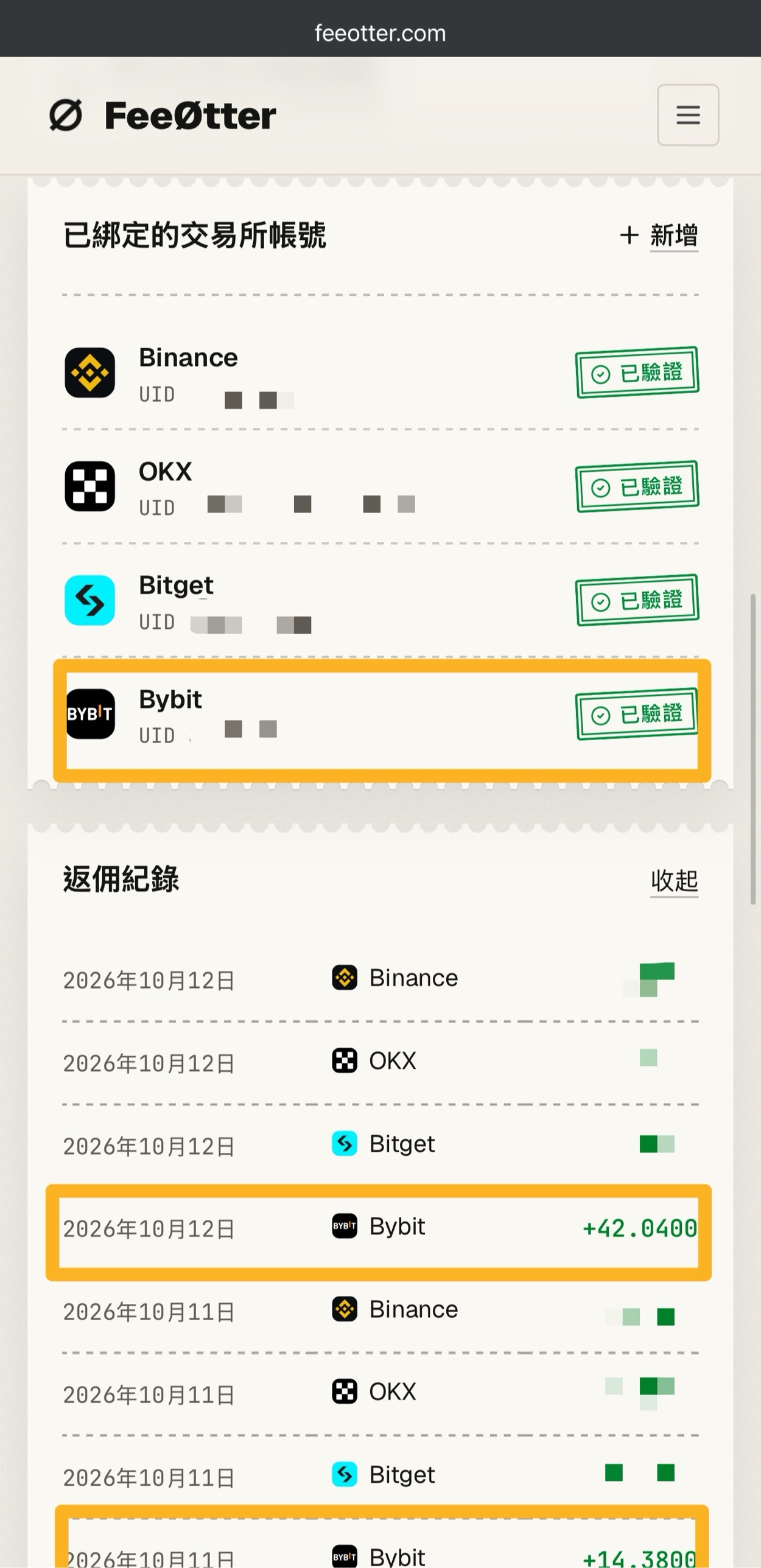
The day-by-day, exchange-by-exchange records make reconciling easy: look up on Bybit how much you paid in fees on a given day, multiply by 40%, and it should be close to that day’s credit. Rates and rules can both change, so Fee Otter’s page is what counts.
I’ve also used 加密龐克, and in my own experience Fee Otter is easier to use, for a few concrete reasons: 加密龐克 shows only a single total of bonus points, while Fee Otter lists each day and each exchange separately; 加密龐克’s minimum payout is 10 USDT (checked 2026-10-10), while Fee Otter’s is now 1 USDT per withdrawal; and 加密龐克 has V1 to V5 and SVIP levels, while Fee Otter has a single rate per exchange. The full comparison is in how to choose a rebate site.
I’m very happy with Fee Otter myself. If you’d like to get part of your fees back too, see Fee Otter’s rebate page for its current rates for each exchange and how to bind. The rebate is paid by Fee Otter, not the exchange and not Kevin Wu.
FAQ
Is Fee Otter legit?
In my own experience, Fee Otter is reliable: all four exchange accounts I’ve bound show as “Verified”, and my Bybit rebates have actually been credited. It publishes each exchange’s rate, its terms of service and an entry-by-entry rebate record, and withdrawals are BEP20 on-chain transfers you can look up on BscScan; binding needs only your UID, with no password or API key. That said, no rebate site can guarantee zero risk: Fee Otter was founded in 2026, and the extra rebate depends on it continuing to operate; the part the exchange refunds automatically isn’t affected by it.
Who pays the Fee Otter rebate?
The extra rebate is paid by Fee Otter, not the exchange and not Kevin Wu. The exchange’s automatic fee rebate is refunded by the exchange straight to your exchange account; Bybit has no such part, so Fee Otter pays all of it.
Do you have to give Fee Otter an API key or your password to bind?
No, binding needs only your exchange UID. Fee Otter’s terms state that it won’t ask for your password, verification codes, withdrawal permissions or an API key with trading permissions, and it can’t touch the assets in your exchange account.
What is Fee Otter’s minimum withdrawal, and what does it cost?
The minimum is 1 USDT per withdrawal, the network fee is 0.015 USDT, and Fee Otter charges no service fee (checked 2026-10-22; the withdrawal page is what counts). Payouts go only in USDT on the BEP20 network to your own address; the number of withdrawals is unlimited, but only one can be processed at a time.
What is Fee Otter’s Bybit rebate?
When I checked on 2026-10-22 it was 40%, the same for spot and futures, all paid by Fee Otter; Fee Otter’s page is what counts for the rate. Based on Bybit’s 0.055% futures Taker fee, the effective fee after the rebate is about 0.033%.
I already have an exchange account. Can I still use Fee Otter?
It depends on whether that exchange lets you add or switch referrers. Fee Otter only counts accounts that signed up with its sign-up code or were successfully switched to it. On Bybit, a main account with no referrer can add its affiliate ID within 14 days of sign-up; for other exchanges, see can you add a referral code after signing up.
Can I use Fee Otter and this site’s referral codes at the same time?
Not on the same exchange account; an account can have only one referrer. You can choose separately for different exchanges, for example binding Fee Otter on Bybit and using referral codes on other exchanges to get the exchange’s automatic fee rebate.
How long does the Fee Otter rebate take to arrive?
The extra rebate for the previous day’s fees is settled at about 16:00 (UTC+8) every day and recorded on Fee Otter’s rebate dashboard, and you then request a withdrawal. The exchange’s automatic fee rebate is refunded directly by the exchange, on a schedule that depends on each exchange’s rules.
For rebate terms, see the rebate glossary; to estimate how much you could save in a year, try how much can a rebate save you. Bybit’s fee rates and the cost after rebates are in the Bybit fees guide, and other exchanges’ referral codes and automatic fee rebates are in the exchange referral code overview.