


Updated
The Pionex Card, as Pionex officially calls it, is a crypto debit card issued by Pionex: it lets you pay with the USDT in your account at any store that accepts Visa or Mastercard, without first converting it to New Taiwan dollars. You apply in the Pionex app under “Wallet” → “Card” → “Apply Now”. The requirements are Level 2 identity verification (KYC2) and account assets above the amount shown on the application page. Pionex says you usually get the review result within one hour, and there is no application fee or annual fee.
Popular exchanges: referral rebates
Compare 17 exchange referral codes →Fees and cashback depend on which card you get. In most regions, applicants get the Visa card: each purchase carries a 1% transaction fee and earns 1% cashback in USDT, and Pionex’s official worked example calls the result “an almost zero-loss transaction”. The USDT balance in the card account also earns a 5% annual yield, paid hourly. The Mastercard has different fee and cashback rules, covered separately below.
Below, in order, are the requirements and steps to apply, Visa and Mastercard fees and cashback, how to add the card to digital wallets such as Apple Pay and LINE Pay, and a few rules to know before you use the card, each with an official Pionex source.
Key points:
1. The Pionex Card is a debit card, not a credit card, and it cannot be overdrawn. Only virtual cards are issued for now; physical card applications are not open.
2. Requirements: KYC2, plus account assets above the threshold shown on the application page. The threshold is checked only once, when you submit the application, so moving the funds out after the card is issued does not affect your use of the card.
3. Visa card: 1% transaction fee and 1% cashback (credited instantly, no cap), with no annual fee and no inactivity fee. Limits are 10,000 USDT per transaction and per day, and 50,000 USDT per month.
4. You can spend only USDT, and you first need to transfer it from the main account to the card account; you can also turn on “Auto Transfer”. USD is converted to USDT at a fixed 1:1 rate with no conversion fee.
5. If the card account balance goes negative, crypto withdrawals from your Pionex account are restricted until you top the balance back up.
The information below was checked against the official Pionex Help Center on 2026-11-19 (data check date) and is provided for your reference.
What is the Pionex Card? Is it a credit card?
It is not a credit card. Pionex’s official Pionex Card feature overview (updated 2026-11-17) states: “Pionex Card (Visa and Mastercard) is a debit card, not a credit card and not a prepaid card, and it does not support overdrafts.” Payments are deducted from the USDT in your card account. If the balance is too low, the payment does not go through, so you cannot run up card debt.
Both the Visa card and the Mastercard are currently virtual cards. Once the card is issued and you complete verification in the app, you can see the card number, expiry date and CVC, so you can shop online right away or add the card to a mobile wallet and tap to pay in physical stores. Pionex says the Visa card is issued out of Singapore and the Mastercard out of Hong Kong or the United States. Physical cards were only offered in a past limited-time promotion, which has ended. One account can hold more than one card, but all of them must be on the same card network, which is determined by the country or region where you completed identity verification (Pionex: How to Apply for Pionex Card, updated 2026-11-17).
How to apply for the Pionex Card: requirements and steps
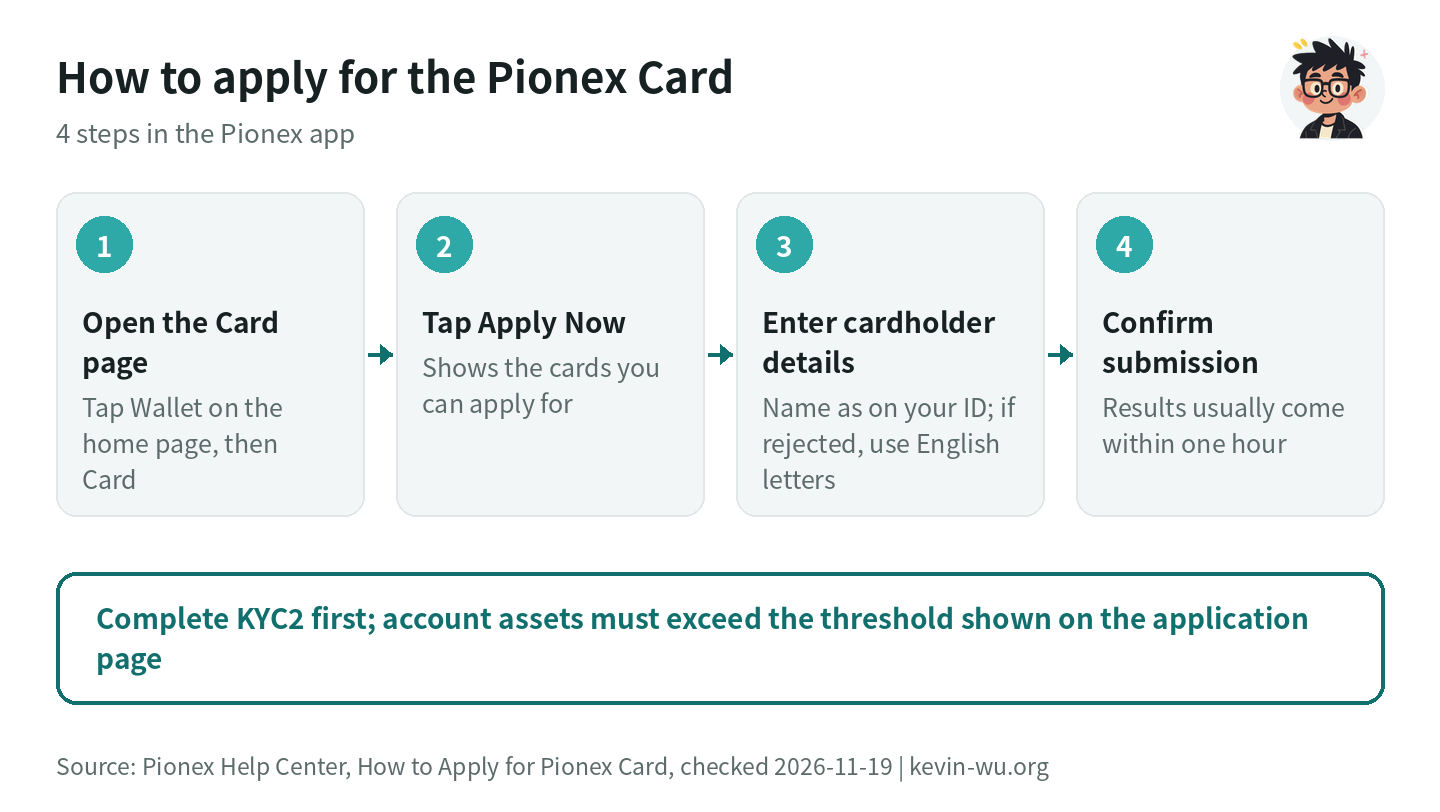
Before you apply, check two requirements:
- Level 2 identity verification (KYC2) is complete. If you haven’t done it yet, the steps are in the Pionex KYC guide.
- Your account assets are above the amount shown on the application page. Pionex explains that this is an eligibility threshold, not an application fee: the assets stay in your account and are not deducted. The threshold is not a fixed amount. It is adjusted based on market and risk conditions and is not announced in advance, so go by the page at the moment you submit the application. In some countries or regions, Mastercard applications look at your trading volume over the last 30 days instead of your assets.
Once you meet the requirements, apply in the app with these steps:
- Open the Pionex app, tap “Wallet” on the home page, and switch to the “Card” page.
- The app shows the card types you can apply for. Tap “Apply Now”.
- Enter the cardholder details. Start with the name as it appears on your ID; if the system doesn’t accept it, use English letters instead. Then tap “Next Step”.
- Check that the details are correct, tap “Confirm submission”, and wait for the review result.
On the website, click “Card” → “Apply Personal Card”, or go straight to pay.pionex.com. A few details for the form: the cardholder name (first name plus surname, including spaces) can be at most 25 characters and must match your KYC name. A Visa application asks for an address; if your address has no house number, enter “–” in the House Number field and you can submit. A Mastercard application does not ask for an address. If tapping “Next Step” does nothing, Pionex recommends updating the app to the latest version first and trying again. Source: Pionex: How to Apply for Pionex Card.
The Pionex Help Center does not list, country by country, which card users in Taiwan get. What it says is that “most regions apply for the Pionex Visa Card”, and the Mastercard is offered instead only in regions where Visa is no longer open to new applications (Pionex Card regional restrictions, updated 2026-11-19). The application page shows which card you can apply for. Also, for accounts whose KYC region is Hong Kong, Pionex currently allows withdrawals only, so they cannot apply (Pionex: countries not supported for KYC).
How much are Pionex Card fees? Visa vs Mastercard
| Item | Visa card | Mastercard |
|---|---|---|
| Application, annual and inactivity fees | Free | Free |
| Transaction fee | 1% | Up to 3.5% |
| Small payments (5 USD or less) | First one each month free, then 0.2 USDT each | First one each month free, then 0.2 USDT each |
| Failed payments | 0.5 USDT each (free when caused by authorization timeout or system maintenance; first one each month free) | 0.5 USDT each |
| USD to USDT conversion | Free, fixed 1:1 | Free, fixed 1:1 |
| ATM withdrawals | 2% (physical card only; not available on virtual cards) | Not supported |
| Per-transaction / daily / monthly limit | 10,000 / 10,000 / 50,000 USDT | 20,000 / 20,000 / 100,000 USD |
Sources: Pionex Visa Card fees and Mastercard fees (both updated 2026-10-19), read on 2026-11-19. For the Visa card’s small-payment threshold, the fee table says 5 USD or less, while the change log on the same page still says 1 USD; go by the charge record at the time of purchase. You can also request a temporary limit increase on the Visa card (80,000 USDT per transaction and 500,000 USDT per day and per month), which requires a card account balance of at least 16,000 USDT and lasts 14 days. The Mastercard does not support limit changes.
The Mastercard fees have changed three times this year: on 2026-02-03 the fee went from 1% to 2%, on 2026-04-29 it became “up to 3.5%”, and on 2026-10-19 the small-payment threshold changed from 1 USD to 5 USD. Pionex also states that newly issued Mastercards come as the DogPay card (Pionex DogPay Card). So if the application page offers you a Mastercard, read the fee table carefully at that time before you open it.
How much cashback does the Pionex Card pay? Do TWD purchases get 1% too?
They do on the Visa card. Pionex’s official Global Cashback Program Guidelines (updated 2026-10-23) list these cashback rates:
| Purchase type (Visa card) | Cashback | Notes |
|---|---|---|
| Local currency other than USD (e.g. TWD, HKD, JPY, EUR) | 1% | Paying in TWD in Taiwan falls into this category |
| General spending where the local currency is USD | 1% | Everyday spending such as shopping, dining and travel |
| Specific categories where the local currency is USD | 0% | A small number of merchant categories listed by Pionex |
| ATM withdrawals | 0% | Same for domestic and international |
Cashback is paid in USDT and credited at the same moment the transaction is recorded, with no cap and no monthly settlement to wait for. Pionex also excludes a few merchant categories in specific countries (such as eToro and Wise in the UK, and TikTok in Ireland); the same kinds of merchants in other regions still earn cashback. Take Pionex’s worked example: a purchase that converts to 24.15 USDT is charged a 1% fee of 0.2415 USDT and then earns about 0.2439 USDT back, so the card account is actually debited 24.1476 USDT. In Pionex’s words, “the 1% cashback offsets the 1% handling fees”.
Some posts online say USD purchases earn only 0.1% cashback, but that is an old rule. The change log shows that the Visa card’s cashback on USD purchases was cut to 0.1% on 2026-03-20 and raised back to 1% on 2026-05-15. The Mastercard currently lists 0.1% to 1%, and the DogPay card page lists a fixed 0.1% (MasterCard cashback guidelines). Pionex also notes that the cashback program may change and that major changes will be announced in advance, so the latest versions of these two pages are the most reliable thing to check before you apply.
Orders placed with partner merchants through “Exclusive Benefits” (such as Trip.com, Klook, Travala and TradingView) earn separate merchant cashback, up to 5% for Trip.com according to Pionex. This cashback is paid only after the order is completed, and you can track it in “Cashback History” (Pionex Card Ultimate Guide).
Does the Pionex Card balance earn interest? How the 5% annual yield works
Yes. Pionex’s official Pionex Card Ultimate Guide (updated 2026-11-17) says the “Pionex Card balance earns a 5% annualized yield”. Interest is paid hourly, and it starts accruing once the card balance is at least 0.1 USDT. On the Visa card it is paid into the card account; on the Mastercard it goes to the card account or the main account, depending on the card. The Visa card needs no separate subscription or lock-up, and this yield currently cannot be turned off.
As for where the yield comes from, Pionex says it works the same way as its spot-futures arbitrage product: spot and futures positions hedge each other, and the yield comes from perpetual futures funding rates, with a base annual yield of 5%. That is why the page labels it as a variable annual yield. The Visa Black Card gets a boost: if your monthly net deposits transferred in from Pionex plus your new spending reach a threshold (for example, 1,000 USDT in net deposits plus 500 USDT in spending), you can get 5.4% the following month, and higher thresholds pay 5.7% and 6.0%. If the balance goes negative, the yield is simply 0. As an example, 1,000 USDT kept in the card account would earn roughly 50 USDT over a year at a 5% annual yield. For a comparison of USDT flexible savings rates across exchanges, see USDT flexible savings rates compared.
How do you move USDT onto the Pionex Card?
The Pionex Card currently supports only USDT; other currencies are not available yet. Before you spend, you need to transfer USDT from the main account to the card account. Pionex states that only your own withdrawable USDT in the main account can be transferred in, not reward assets such as trial bonuses, and that “transferring to the Card account is equivalent to a withdrawal”. There is no minimum transfer amount. For how to move USDT into Pionex from another exchange or wallet, see the Pionex deposit and withdrawal guide.
If you don’t want to transfer manually every time, you can set rules and a deduction order under “Auto Transfer” on the Card page: when the card account balance runs short, the system automatically tops it up from the sources you specify, which helps you avoid failed payments. When you pay, the Visa card first holds an extra 1% of the bill amount and then adds the 1% fee, so with 100 USDT on the card, a 99 USD purchase may be declined. Pionex recommends keeping 3% to 5% more on the card than you actually plan to spend (FAQ in Visa Card fees). When you pay in a foreign currency, the Visa card converts the amount to USD at the Visa exchange rate and the Mastercard at Mastercard’s real-time rate, and the USD amount is then deducted in USDT at 1:1.
Can the Pionex Card be added to Apple Pay, Google Pay or LINE Pay?
| Digital wallet | Visa card | Mastercard |
|---|---|---|
| Apple Pay | Yes, one-tap add in the app | Yes, added manually |
| Google Pay | Yes | Yes |
| PayPal, Alipay, WeChat Pay | Yes | Not supported |
| LINE Pay | Yes, but it depends on the LINE Pay region | Not listed by Pionex |
| Samsung Pay | Not supported yet | Not supported yet |
Sources: Pionex Card digital wallet binding guide (updated 2026-11-16) and the Pionex Card feature overview. LINE Pay only accepts cards whose issuing country matches the user’s country, and the Pionex Visa card is issued out of Singapore, so Pionex warns that LINE Pay may not accept it in some regions. If the card won’t bind, just tap to pay with Apple Pay or Google Pay instead. Apple Pay works for in-store and in-app payments, but the card cannot be set as the payment method on your Apple Account, so Apple subscriptions such as the App Store and iCloud+ cannot be paid with the Pionex Card.
4 rules to know before you use the Pionex Card
- Don’t let the balance go negative. When the card account balance is too low, subscription auto-charges fail, and the fee for each failure can add up and push the balance below zero. While the balance is negative, crypto withdrawals from your Pionex account are restricted; they resume once you transfer funds into the card account and the balance is positive again. Subscriptions you no longer use must be canceled with the merchant, because freezing or deleting the card does not stop merchant charges (Pionex Card feature overview).
- Once you open the card, use it now and then. The platform regularly cancels cards that have been inactive for a long time or are rarely used, and the exact criteria are not published. An account whose card was cancelled by the platform cannot apply for any Pionex Card afterward, and this restriction is permanent (Pionex Card cancelled by the platform, updated 2026-11-09). Deleting a card yourself is free, and you can then apply for a new virtual card.
- Payments are declined at merchants in a few regions. Pionex lists 8 regions whose merchants cannot accept the card: Afghanistan, Venezuela, Russia, Myanmar, Ukraine, North Korea, Iran and Belarus. The Mastercard also has restrictions on some mainland China merchants and merchant categories (Pionex Card regional restrictions).
- Wait a day after changing your password before moving funds. For 24 hours after a Pionex password reset, transfers from the main account to the card account are paused as well, just like withdrawals, and they resume automatically once the time is up (see the Pionex deposit and withdrawal guide).
The Pionex Card’s cashback and the trading fee rebate from a referral code are two separate things. Pionex states that card cashback “is not Referral Cashback”, which is the trading fee discount you get after binding a referrer’s invitation code. You can get both at once: card cashback depends on the card, and the trading fee discount depends on the referral code you bound when you signed up. Fees for buying crypto with a credit card on exchanges are covered separately in credit card crypto purchase fees.
FAQ
Is the Pionex Card a credit card?
No. The Pionex Card is a debit card that draws on the USDT in your card account. It cannot be overdrawn, and it is not a prepaid card either. Both the Visa card and the Mastercard are currently issued only as virtual cards. You can use them to shop online, or add them to Apple Pay or Google Pay and tap to pay in physical stores.
Does it cost anything to apply for the Pionex Card?
No. There is no application fee, annual fee or inactivity fee. When you apply, your account assets must be above the threshold shown on the application page; that money is not deducted, and moving it out after the card is issued does not affect your use of the card. When you use the Visa card, each purchase carries a 1% transaction fee and earns 1% cashback in USDT.
Can I apply for the Pionex Card in Taiwan?
Taiwan is not on Pionex’s list of places where registration or KYC is not supported, so once you complete KYC2 you can apply in the app under “Wallet” → “Card”. Pionex says most regions get the Visa card, but the card you actually get is whatever the application page shows. Accounts whose KYC region is Hong Kong currently cannot apply.
How much cashback does the Pionex Card pay?
With the Visa card, purchases in non-USD regions (such as paying in TWD in Taiwan) and general USD purchases both earn 1% in USDT, credited instantly with no cap. A few specific USD categories and ATM withdrawals earn no cashback. The Mastercard pays 0.1% to 1%. Pionex notes that the cashback rules may change, so go by the latest Help Center page.
Can the Pionex Card be added to LINE Pay?
The Visa card can be added to LINE Pay, but LINE Pay only accepts cards whose issuing country matches the user’s country. The Pionex Visa card is issued out of Singapore, so Pionex warns that it may not bind in some regions. If it doesn’t, tap to pay with Apple Pay or Google Pay instead; the Visa card can also be added to PayPal.
How do I get the 5% interest on my Pionex Card balance?
There is nothing to subscribe to. Interest accrues automatically once the card balance is at least 0.1 USDT and is paid hourly; on the Visa card it goes straight into the card account. The yield comes from perpetual futures funding rates, so it is a variable annual yield with a base of 5%.
You need a Pionex account before you can apply for the card. If you haven’t signed up yet, enter the referral code KEVINWU when you register, or sign up directly through this site's sign-up link. The current trading fee discount is 15%, paid back to your main account in USDT after you trade. Once you have signed up and completed KYC2, go back to “Wallet” → “Card” to apply, and you can get both the card cashback and the trading fee discount.
The referral code and sign-up steps are in Pionex referral code, and if you forgot to enter one when signing up, see adding a Pionex referral code after sign-up. Identity verification is covered in the Pionex KYC guide, trading fees and bot fees in Pionex fees, and reserves and security record in Pionex review.
Want to see these updates more often in Google Search? Add Kevin Wu as a preferred source on Google