


Updated
The most common way to deposit on BTCC is to have USDT ready on another exchange or in a wallet, then tap “Deposit” on the BTCC app home screen (or “Assets” → “Top up”), pick the coin and network, copy the address and send the funds over. If you don’t hold any crypto yet, you can buy USDT under “Fiat” with Visa/Mastercard or a bank transfer; which channels you get depends on your region. To withdraw, go to “Assets” → “Wallet”, tap “Withdraw”, choose “Crypto withdrawal” and send the funds to your own wallet or another exchange. BTCC’s New Taiwan dollar (TWD) withdrawals are currently suspended, so to get TWD back you first have to move your USDT to an exchange in Taiwan.
Three mistakes cost people money most often: picking the wrong network, leaving out the tag (Tag/Memo), and depositing less than the minimum per deposit. BTCC states officially that using mismatched networks for a deposit and withdrawal may lead to lost assets; deposits below the minimum “will be confiscated and will not be credited”; and wrong-chain recovery requests are not accepted if the amount is under 100 USDT or the transaction has been on-chain for more than 3 months. As for identity verification (KYC), crypto deposits aren’t limited by verification level, unverified accounts can withdraw 10,000 USDT per day, and buying crypto with fiat requires completing verification first.
Below I’ve put together BTCC’s deposit and withdrawal steps, the fees for each USDT network, arrival times and daily limits, and how BTCC officially handles stuck withdrawals, each with a link to BTCC’s official source.
Key points:
1. BTCC charges no fee on crypto deposits. In BTCC’s official deposit and withdrawal settings data, read on 2026-10-31, USDT is open on 8 networks, each with a minimum deposit of 1 USDT; deposits below that amount are confiscated.
2. Official data from the same day: USDT withdrawals cost 1 USDT on Solana, 1.5 USDT on TRC20, 2 USDT each on BEP20 and ERC20, and 5 USDT each on Arbitrum One, Avalanche, Optimism and Polygon; from VIP 1 up, withdrawal fees are discounted.
3. Withdrawals usually clear the system review within about 10 minutes, and a few go to manual review; after approval, timing depends on blockchain confirmation speed and the receiving side.
4. After you change or reset your login password or fund password, or change or unbind your phone number or email, withdrawals are paused for 24 hours and this can’t be canceled manually; after a fiat deposit, it usually also takes about 24 hours before you can withdraw.
5. Daily withdrawal limits depend on your KYC level: 10,000 USDT unverified, 100,000 USDT with identity document verification, 1,000,000 USDT with facial verification.
The information below was checked against BTCC’s official pages on 2026-10-31 (data check date) and is provided for your reference.
How to deposit on BTCC: USDT deposit steps
Before you start, decide which network the sending side will use; both sides have to support it. If you’re wondering whether to verify your identity first, see the BTCC sign-up and KYC guide. BTCC’s interface calls deposits “Deposit” or “Top up” and withdrawals “Withdrawal” or “Withdraw”. The button names here follow BTCC’s official guides; if the interface changes, go by what you see on screen.
Deposit steps in the app
- Open the BTCC app and tap “Deposit” or “On-chain deposit” on the home screen; you can also go to the “Assets” page and choose “Top up”.
- Choose the coin you want to deposit, such as USDT.
- Choose the deposit network, such as TRON (TRC20). It has to match the network selected on the sending platform.
- Tap “Copy” to get the deposit address, paste it on the other exchange or wallet and follow the steps there to complete the transfer; you can also scan the QR code to get the address.
- To check progress, tap “Deposit history” in the top right of the deposit page, or open “Fund records” in the top right of the “Assets” page and look under “Deposit history”. Once the block confirmations are complete, it shows “Top-up successful”.
Deposit steps on the website
- Log in to the BTCC website and choose “Deposit crypto” from “Top up” at the top.
- Pick the coin and deposit network, copy the address, then paste it on the sending platform and submit.
- Check “Deposit history” under “Assets” → “Deposit”; clicking a deposit’s blockchain transaction ID (TxID) opens a block explorer where you can follow its progress in real time.
These steps are based on BTCC: how to deposit crypto to BTCC (updated 2026-08-05) and BTCC: how to check deposit progress. BTCC’s own example: if you deposit USDT-Tron (TRC20), the sending side must also choose TRC20 when withdrawing, or the assets may be lost. BTCC charges no deposit fee, but the amount that arrives will be reduced by the sending side’s withdrawal fee and any on-chain network (gas) fee.
Which USDT deposit networks are there, and what is the minimum?
The table shows the USDT networks returned by BTCC’s official deposit and withdrawal settings data on 2026-10-31. USDT-OMNI is also on the list but is currently closed for deposits and withdrawals, so it’s left out:
| Network (BTCC’s name) | Minimum per deposit (USDT) | Deposit fee |
|---|---|---|
| TRON (TRC20) | 1 | 0 |
| Ethereum (ERC20) | 1 | 0 |
| BNB Smart Chain (BEP20) | 1 | 0 |
| Solana (SOL) | 1 | 0 |
| Polygon (POL) | 1 | 0 |
| Arbitrum One | 1 | 0 |
| Optimism (OP Mainnet) | 1 | 0 |
| Avalanche (C-Chain) | 1 | 0 |
Source: BTCC official deposit and withdrawal settings data (USDT), queried on 2026-10-31; the figures match those found on 2026-10-19. The “Deposit & Withdrawal” tab of the BTCC fee page states that a deposit below the minimum amount “will be confiscated and will not be credited”. So even a small test deposit has to be more than 1 USDT, and since the sending side deducts its fee first, make sure the amount that reaches BTCC still meets the minimum after that. BTCC’s guides don’t list how many confirmations each network needs before a deposit is credited; they only say a deposit is credited once it reaches the number of confirmations set by the platform.
Deposit not arrived, wrong network or missing tag: what now?
BTCC: why hasn’t my deposit arrived? (updated 2026-08-11) lists several common causes:
- Delayed block confirmations: if all the details are correct, you usually wait anywhere from a few minutes to a few hours; if it still hasn’t been credited after a long time, contact online support.
- Coin mismatch: if the coin’s full name or contract address differs from the one BTCC supports, the assets can’t be credited.
- Wrong address or network: for example, sending assets on the Ethereum network to an incompatible network.
- Missing or wrong tag: coins like XLM and XRP need a tag (Memo/Tag). BTCC’s tags are usually 7 or 8 digits; go by what the deposit page shows.
- Sending to the token’s “contract address”: you must use the deposit address generated by BTCC’s system, not the contract address shown on-chain.
- Below the minimum deposit amount: it can’t be credited and can’t be returned.
BTCC’s examples of coins that need a tag are XRP, TON and XLM (BTCC: how to view your deposit address and tag). TON isn’t among BTCC’s current 8 USDT networks, but whenever the deposit page shows a tag, you must fill it in along with the address. If you did send funds the wrong way, contact online support to request a manual recovery. BTCC: how to recover digital assets from a deposit that hasn’t arrived lists the processing times and fees below:
| Recovery type | Estimated time | Fee | Outcome |
|---|---|---|---|
| A listed token sent over a supported network to a different deposit address | 1–3 business days | Free | Credited |
| Tag or Memo missing or wrong on a deposit | 7 business days | Withdrawal fee | Refunded |
| Deposit of an old or delisted token | 7 business days | 10% (minimum 50 USDT, maximum 500 USDT) | Refunded |
| Deposit of an unlisted token over a supported network | 7 business days | 10% (minimum 50 USDT, maximum 500 USDT) | Refunded |
| Deposit to a hot wallet | 7 business days | 10% (minimum 50 USDT, maximum 500 USDT) | Refunded |
Source: the fee table in the same official article (an image in the article, 2025-09-02 version), checked on 2026-10-31. The same page also lists the cases that are not accepted: any token deposited over an unsupported network, a wrong-chain deposit that has been on-chain for more than 3 months, and a wrong deposit under 100 USDT. Requests are also rejected if the transaction ID or address doesn’t match, or if the amount doesn’t match the on-chain record; BTCC recommends copying and pasting the transaction details instead of typing them. BTCC also states that recovery isn’t guaranteed. A comparison of different exchanges’ recovery rules is in how to recover a deposit sent on the wrong network, and terms such as network, Memo and transfer are explained in deposit and withdrawal terms explained.
Which account does a deposit go to, and how do you move it to the futures account?
BTCC keeps funds in separate accounts such as the “Wallet account” and the “Futures account”. The website’s “Top up” menu describes crypto deposits as “top up crypto assets to your futures account instantly”; if the Assets page shows your USDT in the wallet account, you need to transfer it before placing a futures order. According to BTCC: what is a transfer and how do I do it? (updated 2026-08-05), tap “Transfer” on the app’s “Assets” page, switch the direction with the two-way arrow on the right, pick the coin, enter the amount (you can pick 25%, 50%, 75% or 100%) and tap “Confirm transfer”; transfers from the wallet account to the futures account arrive instantly. The coins you can currently transfer are USDT, BTC, ETH, SOL, XRP, ADA and LTC.
One thing to watch: if your account holds deduction vouchers from a promotion, BTCC’s voucher description on its website states that once a withdrawal or transfer is made from the futures account, the vouchers “will be reclaimed and reset to zero”, so it’s best to use them up before moving funds out. Also, once your cumulative deposits reach 200 USDT (or the equivalent in other coins), BTCC immediately upgrades you to VIP 1, which lowers futures fees to Taker 0.05% and Maker 0.025% and discounts withdrawal fees too (details in the BTCC fees guide). Futures use leverage, and if the price moves against you, your position may be forcibly liquidated; order types and the risks are covered in the BTCC futures guide.
If you don’t have a BTCC account yet, sign up with referral code KEVINWU and BTCC will return Futures 60% of your futures fees in USDT to your spot account. The referral code has to be entered at sign-up; if you register with a third-party account such as Google or Apple, enter it before you authorize.
No USDT? How to buy crypto with fiat on BTCC
Tap “Top up” or “Fiat deposit” on the BTCC app home screen, or tap “Top up” on the “Assets” page and choose “Fiat”, to see the payment methods available to you. BTCC states that you must complete KYC before a fiat top-up, and which payment methods appear depends on your country or region, account status and payment channels.
- Visa/Mastercard credit or debit card: enter the card number, expiry date, security code and the amount of USDT you want to buy, tap “Buy with 0 fees”, then complete your card issuer’s 3DS verification. BTCC says the minimum purchase is the fiat equivalent of 200 USDT, and funds can arrive instantly, usually in about 2–30 minutes; some banks may block debit cards from crypto or cross-border transactions (BTCC: how to buy crypto with a credit/debit card, updated 2026-09-17).
- Buying USDT by bank transfer: fill in your own bank account details, then transfer to the receiving account shown on the page. BTCC says funds usually arrive within about 10 minutes; transfers from an account that isn’t in your name can’t be processed. BTCC’s tutorial demonstrates a South Korean bank transfer channel (BTCC: how to buy USDT by bank transfer, updated 2025-05-20).
- Third-party providers: BTCC: what to do if a crypto purchase fails mentions providers such as MoonPay and Simplex. Buying with a card may involve the bank’s card fee, network fees and the provider’s administrative service fee, so check the payment amount before you choose a provider.
Your KYC level also affects fiat limits: with only identity document verification, fiat deposits are capped at 2,000 USDT cumulative, and after facial verification there’s no limit (BTCC identity verification benefits table, see the BTCC KYC guide). After a fiat deposit, it usually takes about 24 hours before you can withdraw. Your bank may also charge a foreign transaction fee on card purchases; how it’s calculated is in credit card crypto purchase fees.
As for New Taiwan dollars, BTCC’s “Fiat withdrawal” and “TWD withdrawal” tutorials are both marked “not supported for now”, and the withdrawal review rules page also says fiat withdrawals are “unavailable during system maintenance” (BTCC fiat withdrawal notice). The full route for buying crypto with TWD in Taiwan and converting USDT back to TWD is covered in guides on the Traditional Chinese version of this site.
How to withdraw from BTCC: crypto withdrawal steps
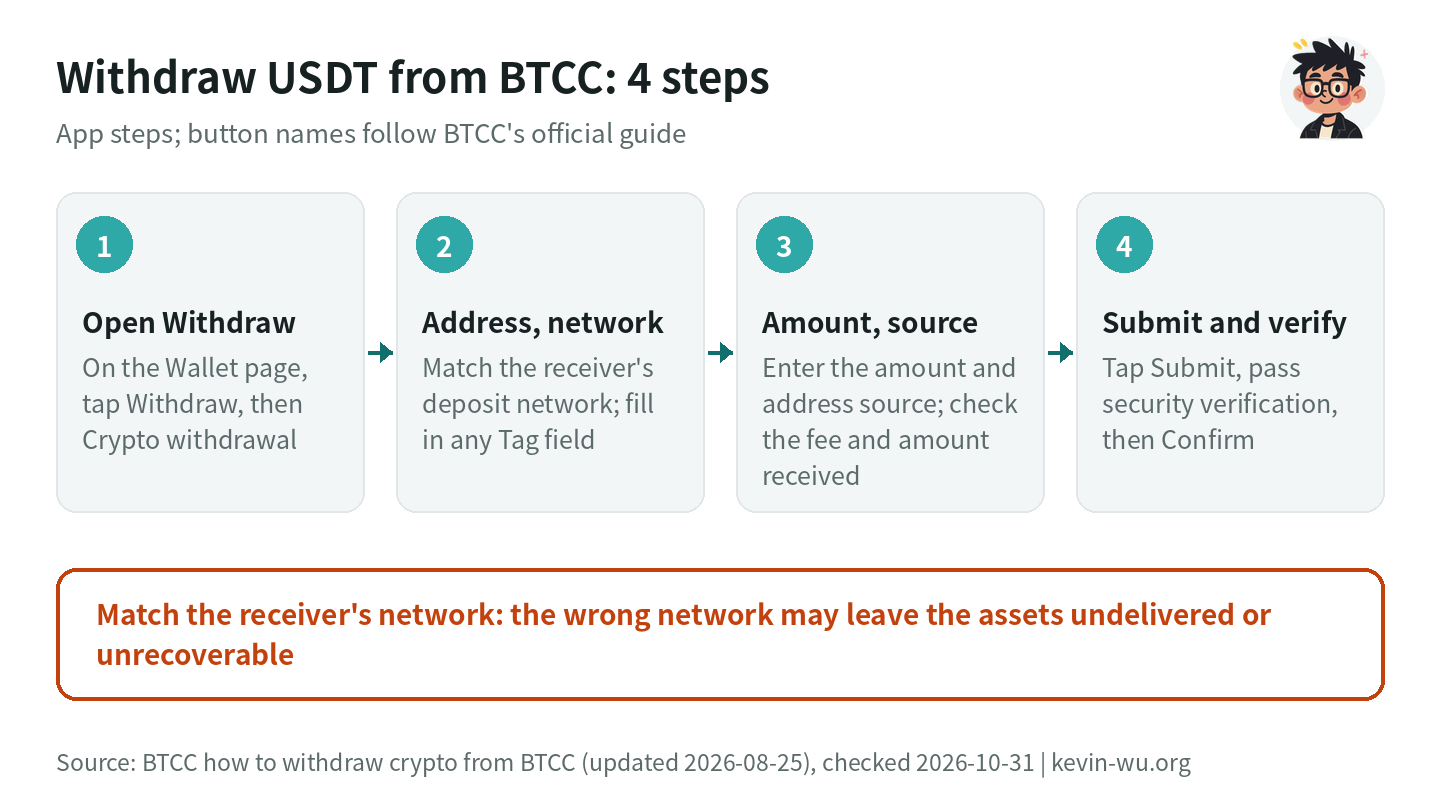
Withdrawal steps in the app
- Log in to the BTCC app, tap “Assets” at the bottom, go to the “Wallet” page and tap “Withdraw”.
- Under “Choose withdrawal method”, tap “Crypto withdrawal” and pick the coin you want to withdraw, such as USDT.
- Get the address from the deposit page of the receiving exchange or wallet, then go back to BTCC and enter it in “Withdrawal address”; you can paste it, scan a QR code or pick a saved address.
- Under “Blockchain network”, choose the same network as the receiver. For example, if they gave you a USDT-TRC20 address, choose “TRON (TRC20)”. If a Tag field appears, enter the Tag provided by the receiving platform in full.
- Enter the “Withdrawal amount” (or tap “All”); the page shows your available balance and withdrawal limit. Under “Withdrawal address source”, choose the receiving exchange, wallet or another source.
- After checking the fee and the actual amount received at the bottom of the page, tap “Submit”, complete the security verification required by your account settings (fund password, email code, SMS code and so on), then tap “Confirm”.
These steps are based on BTCC: how to withdraw crypto from BTCC (updated 2026-08-25); the official tutorial uses the app. You can check withdrawal progress with the “Records” icon in the top right of the withdrawal page. BTCC warns that if you pick the wrong network or enter the wrong address, the assets may not arrive or may not be recoverable, and that you shouldn’t make up or leave out a Tag the receiving platform requires. If your USDT is in the futures account, it’s best to move it back to the wallet account with “Transfer” before withdrawing; if you have deduction vouchers, keep in mind the reset-to-zero rule mentioned above.
What are BTCC’s USDT withdrawal fees?
| Network | Withdrawal fee (USDT) | Fee as a share of a 100 USDT withdrawal |
|---|---|---|
| Solana (SOL) | 1 | 1% |
| TRON (TRC20) | 1.5 | 1.5% |
| BNB Smart Chain (BEP20) | 2 | 2% |
| Ethereum (ERC20) | 2 | 2% |
| Arbitrum One | 5 | 5% |
| Avalanche (C-Chain) | 5 | 5% |
| Optimism (OP Mainnet) | 5 | 5% |
| Polygon (POL) | 5 | 5% |
Source: BTCC official deposit and withdrawal settings data (USDT), queried on 2026-10-31. The BTCC fee page states that withdrawal fees are set by the mainnet and may be adjusted without notice when the network is congested; BTCC: withdrawal limits and fees explained (updated 2026-08-25) also states that the actual fee and minimum withdrawal amount are whatever the withdrawal page shows in real time. BTCC’s official data doesn’t publish minimum withdrawal amounts, so check them on the withdrawal page.
BTCC USDT withdrawal fees by network
In USDT; orange marks the pricier networks; go by the withdrawal page before you submit

- Solana1
- TRC201.5
- BEP202
- ERC202
- Arbitrum One5
- Avalanche C5
- Optimism5
- Polygon5
The fee is a fixed amount per withdrawal, so the less you withdraw, the bigger the percentage. If you withdraw 100 USDT 10 times a month, Solana costs 10 USDT in total, TRC20 15 USDT, BEP20 or ERC20 20 USDT, and Polygon, Arbitrum and the other 5 USDT networks 50 USDT. Unlike most exchanges, BTCC charges only 2 USDT for ERC20, which makes it cheaper than Polygon or Arbitrum One; BEP20 is also 2 USDT, while Binance charges just 0.01 USDT for BEP20 (2026-10-29). For a full comparison across exchanges, see USDT withdrawal fees compared.
If you’re sending to an exchange in Taiwan, first check which networks it accepts. According to this site’s 2026-10-12 roundup, MAX accepts USDT on ERC20, TRC20, BEP20, Polygon, Arbitrum One, Avalanche C-Chain and Aptos, and BitoPro accepts BEP20, Polygon, Kaia, ERC20 and TRC20; neither accepts Solana. So from BTCC to MAX or BitoPro, the cheapest shared network is TRC20 at 1.5 USDT. In the other direction, from MAX to BTCC, MAX’s Avalanche C-Chain withdrawal fee is 0 and BTCC also accepts deposits on that network; just check that the network names and contract addresses match on both sides before you submit.
How long do BTCC withdrawals take, and how much can you withdraw per day?
BTCC withdrawal review rules and notes (updated 2025-11-07) says every withdrawal goes through a system review, usually completed within 10 minutes; some withdrawals then go to manual review, which takes longer, a few may require you to submit supporting documents, and network congestion can also slow things down. Only after approval are the assets sent on-chain, and the arrival time depends on that chain’s confirmation speed and the receiving platform’s crediting requirements.
| Item | Unverified | Identity document verification | Facial verification |
|---|---|---|---|
| Daily withdrawal limit | 10,000 USDT | 100,000 USDT | 1,000,000 USDT |
| Crypto deposits | Unlimited | Unlimited | Unlimited |
| Fiat deposits (buying crypto) | Not available | 2,000 USDT cumulative | Unlimited |
Source: the benefits table in BTCC: what is identity verification (KYC) and how do I complete it? (an image in the article, updated 2026-08-05), checked on 2026-10-31. Tap “Withdrawal limit” on the withdrawal page to see the limit currently available to you. VIP 3 and above get an additional 24-hour withdrawal limit (500,000 USDT for VIP 3, per the BTCC fee page, checked by this site on 2026-10-19), available only to accounts that have completed facial verification. For a comparison of limits across exchanges, see exchange withdrawal limits compared.
What security settings should you set up before withdrawing?
BTCC: how to enable two-factor authentication (2FA) (updated 2026-08-18) recommends linking your phone number and email and adding Google Authenticator. Once they’re linked, tap the linked verification method under “Security settings” and turn on “Withdrawal verification”; after that, every withdrawal asks for a verification code. It’s best to set this up before your first withdrawal, because linking or changing your phone number or email pauses withdrawals for 24 hours.
For addresses, the withdrawal page lets you pick from saved addresses. BTCC’s website interface also describes an address whitelist: “Once the address whitelist is turned on, your account can only withdraw to addresses in your frequently used addresses”. The help center has no setup guide for it, so go by what you see on screen for where the switch is. My advice: the first time you withdraw to a new address, send a small amount and confirm it arrives; after that, pick it from your saved addresses instead of pasting it manually each time, and check the first and last few characters of the address before you submit. A comparison of security settings across exchanges is in exchange account security settings.
Can you send funds to another BTCC user?
In the BTCC help center articles I found, there’s no guide to internal transfers to other BTCC users by UID, email or phone number, and the only withdrawal method in the withdrawal guide is “Crypto withdrawal”. So for now, to send funds to a friend, ask them for the address and network from their deposit page and send it with the on-chain withdrawal steps above; you still pay that network’s withdrawal fee. “Transfer” only works between your own accounts and can’t send funds to anyone else. For what else a UID is used for, see what an exchange UID is.
BTCC withdrawal stuck or failed: what to do
If the withdraw button won’t go through, your withdrawable balance is lower than your account funds, or a withdrawal never gets sent, it’s usually one of the officially documented cases below. Work out which one applies first, then handle it through the official channel:
| Situation | What BTCC says | What to do | Source |
|---|---|---|---|
| You changed security settings | After you change or reset your login password or fund password, or change or unbind your phone number or email, withdrawals are paused for 24 hours | Wait the full 24 hours for it to lift automatically; BTCC states it can’t be canceled manually. If you didn’t make the change yourself, contact online support right away | Account changes and withdrawal security rules |
| You just made a fiat deposit | After a fiat deposit (including debit card, open banking and so on), it usually takes about 24 hours before you can withdraw; your withdrawable balance will be lower than your account funds | Wait for the lock period to end; if you hit a risk control or review, contact online support | Withdrawal security rules, withdrawal review rules |
| Sent to manual review | A few withdrawals go to manual review after the system review and may require supporting documents | Provide the documents as soon as you’re notified | Withdrawal review rules |
| Over the daily limit | Daily withdrawal limits depend on your KYC level: 10,000/100,000/1,000,000 USDT | Complete identity document verification or facial verification to raise the limit | Identity verification guide |
| Account security review triggered | In cases such as unusual logins or high-risk activity, withdrawals may be temporarily restricted; when the restriction lifts depends on the system’s assessment and notifications | Follow the notification, or contact online support from the top right of the app home screen or the bottom right of the website | Withdrawal security rules |
| Network congestion | Withdrawals may take longer during congestion | Check the status under “Records” and wait for block confirmations | Withdrawal review rules |
| BTCC has sent it, but the receiver hasn’t credited it | Arrival time depends on blockchain confirmation speed and the receiving platform’s crediting requirements | Look up the TxID on a block explorer; if it’s confirmed, give the TxID to the receiving platform | Withdrawal guide |
| You want to withdraw TWD directly | Fiat withdrawals are marked “not supported for now” | Withdraw USDT to an exchange in Taiwan instead and convert it to TWD there | Fiat withdrawal notice |
Sources are linked in the table, checked on 2026-10-31. More complex cases, such as a restricted account or a request for additional documents, are covered in what to do if your exchange account is frozen.
Also be careful: none of the official procedures above asks you to pay an “unfreezing fee”, a “deposit” or “tax” first. BTCC: how to guard against common scams states that BTCC will never message users privately asking for a transfer and will never ask for verification codes or private keys. If you get an email, website or Telegram account claiming to be BTCC, you can check it with the official verification channel under “Services” in the footer of BTCC’s website. Treat anyone who says you must send money before you can withdraw as a scammer. Common tactics are covered in fake exchange withdrawal scams; if you’re in Taiwan, you can call Taiwan’s 165 anti-fraud hotline to check, and elsewhere you can check with your local police or anti-fraud hotline.
FAQ
Does BTCC charge a deposit fee?
Crypto deposits are free; what you pay is the sending side’s withdrawal fee and any on-chain network (gas) fee. In BTCC’s official data from 2026-10-31, the deposit fee is 0 on all 8 USDT networks and the minimum per deposit is 1 USDT on each; deposits below that amount are confiscated and not credited.
Which network is cheapest for withdrawing USDT from BTCC?
As of 2026-10-31, Solana is the cheapest at 1 USDT per withdrawal, followed by TRC20 at 1.5 USDT; BEP20 and ERC20 are 2 USDT each, and Arbitrum One, Avalanche, Optimism and Polygon are 5 USDT each. Before choosing, make sure the receiver supports that network; for example, neither MAX nor BitoPro accepts Solana.
How long does a BTCC withdrawal take to arrive?
BTCC says the system review is usually done within about 10 minutes, and a few withdrawals go to manual review and take longer. After approval, the arrival time depends on blockchain confirmation speed and the receiving platform’s crediting requirements, and it’s slower when the network is congested; you can check progress under “Records” in the top right of the withdrawal page.
Can you deposit and withdraw on BTCC without KYC?
With crypto, yes. According to BTCC’s identity verification benefits table, unverified accounts have no limit on crypto deposits and can withdraw 10,000 USDT per day; identity document verification raises that to 100,000 USDT, and facial verification to 1,000,000 USDT. Fiat top-ups, such as buying USDT by credit card or bank transfer, require completing KYC first.
What if you sent USDT to BTCC on the wrong network or without the tag?
Contact BTCC online support to request a manual recovery. BTCC’s fee table says: a missing or wrong Tag or Memo takes an estimated 7 business days and is refunded after a withdrawal fee is deducted; deposits of unlisted, old or delisted tokens, or deposits to a hot wallet, cost 10% (minimum 50 USDT, maximum 500 USDT). Deposits over an unsupported network, wrong-chain deposits older than 3 months, and amounts under 100 USDT are not accepted, and BTCC doesn’t guarantee that funds can be recovered.
Can you withdraw from BTCC to a Taiwanese bank account?
Not at the moment: BTCC’s fiat withdrawal and TWD withdrawal tutorials are both marked “not supported for now”. The usual approach is to withdraw USDT to MAX or BitoPro and convert it to TWD under that platform’s rules. Neither of them accepts Solana, so the cheapest shared network from BTCC is TRC20, at 1.5 USDT per withdrawal (2026-10-31).
This site’s BTCC referral code is KEVINWU, and it’s filled in automatically when you sign up through the BTCC official sign-up page. Sign up with this code and the exchange’s automatic fee rebate is Futures 60%. The steps for entering the code and the rebate rules are in BTCC referral code.
If you haven’t opened a BTCC account yet, the sign-up steps and referral code are in BTCC referral code. For identity verification, see the BTCC KYC guide; for trading fees and VIP levels, BTCC fees; for the company’s background and reserves, the BTCC review; and for the security settings worth setting up before you withdraw, exchange account security settings. Deposit and withdrawal guides for other exchanges: how to deposit and withdraw on XT, how to deposit and withdraw on MEXC and how to deposit and withdraw on Binance.
Want to see these updates more often in Google Search? Add Kevin Wu as a preferred source on Google