


Updated
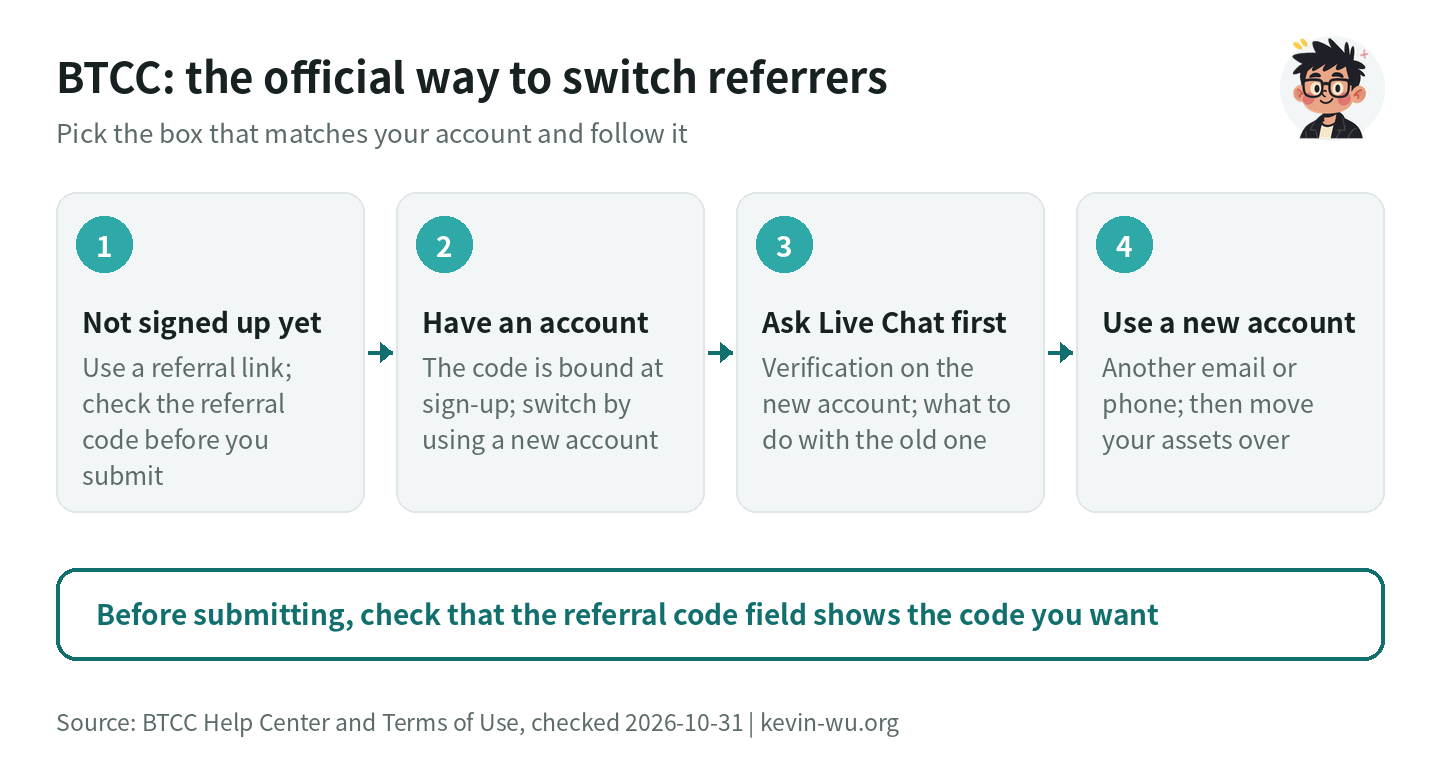
You enter a BTCC referral code (BTCC’s interface calls it a “Referral code”) when you sign up. The BTCC Help Center has no process for adding or changing a referrer after sign-up, so if you want a different referrer, the way to do it is to open a new account through the new referral link, using another email address or phone number of your own that has never been registered with BTCC. BTCC’s Terms of Use say that, in principle, each user keeps only one active account, so before you start, check with Live Chat how to handle your old and new accounts.
This guide covers BTCC’s official referral rules, what to ask Live Chat before opening a new account, and identity verification and withdrawal limits on the new account. The official rules below were checked on 2026-10-31 and are provided for reference.
Can you switch your BTCC referral code?
| Your situation | Can you switch? | How |
|---|---|---|
| Not signed up yet | Yes | Sign up through a referral link and check the referral code field before you submit |
| Signed up without a referral code | Use a new account | Ask Live Chat first, then sign up through the new referral link with another email address or phone number |
| Signed up with someone else’s referral code | Use a new account | The referral is set at sign-up; same steps as above |
| Want to use a sub-account to switch referrers | Use a new account | The BTCC Help Center doesn’t list a sub-account feature; to switch referrers, open a new account |
What are BTCC’s official referral rules?
BTCC’s sign-up guide says: “When a friend completes registration through a valid invitation link, they are successfully bound to the inviter,” and also states: “Friends must open their account through the referrer’s referral link or referral code; otherwise it does not count as a valid referral” (BTCC, “How to Register a BTCC Account?”). If you sign up with a Google, Apple, Telegram or LINE account, enter the referral code before you authorize it (BTCC’s guide to signing up with a third-party account).
The rebate FAQ adds that users who didn’t sign up through an invitation won’t appear in the trading rebate data (BTCC Invite Friends Trading Rebate FAQ). I went through the Help Center’s articles on registration, referral rebates and account security, and none of them offers a way for registered users to add or change a referrer, so switching referrers means signing up for a new account.
Already have a BTCC account? How to move to a new one
A new account signed up through a new referral link is bound to the new referrer. Before you open it, read through the official rules below and follow them in order.
Ask Live Chat two questions first
Clause 4.1 of BTCC’s Terms of Use says each user may, in principle, maintain only one active account, subject to BTCC’s operational requirements (BTCC Terms of Use). On identity verification, each user can complete individual identity verification on only 1 BTCC account, and once verification is complete, the identity information can’t be transferred to another account (BTCC identity verification FAQ).
So before opening a new account, use Live Chat on the app home page or the website to ask two things: whether the new account can complete identity verification with your own ID, and whether you should close the old account first or can keep it. Then set up your old and new accounts the way Live Chat tells you.
Use another email address or phone number for the new account
BTCC states that each email address or phone number can register only one BTCC account, so the new account needs an email address or phone number in your own name that has never been registered with BTCC. If you sign up with a third-party account such as Google or LINE, BTCC creates the account with the email address linked to it, so choose one whose linked email address hasn’t been registered with BTCC, and enter the referral code before you authorize it.
You can trade futures without KYC
According to BTCC, live trading and market data aren’t restricted by verification level. The difference is in funding: per the official benefits table, an unverified account has a daily withdrawal limit of 10,000 USDT and can’t deposit fiat; after identity document verification the limit is 100,000 USDT, and after facial verification it’s 1,000,000 USDT (BTCC, “What Is KYC Verification and How Do I Complete It?”). For the verification steps, see the BTCC sign-up and KYC guide.
What to do with the old account and its assets
When you withdraw assets from the old account to the new one, pick the same network on both sides. BTCC charges no deposit fee and a fixed network fee on withdrawals: USDT is 1.5 USDT on TRC20 and 1 USDT on Solana (checked 2026-10-19; see BTCC fees). Don’t change your password, email address or phone number before you move your assets, because doing so pauses withdrawals for 24 hours.
If Live Chat asks you to close the old account, withdraw all your assets first, then apply through Live Chat or by writing to [email protected] from the linked email address (BTCC account closure guide).
How do you confirm your new BTCC account has the right referral code?
- Before you submit the sign-up form, check that the “Referral code” field shows the code you want; if you sign up with a third-party account, check it before you authorize.
- After trading on the new account, go to “Assets” → “Funding records” in the top right corner of the website and switch to “Spot funds”. BTCC states that invitees’ cashback is paid in USDT to the spot account, with the spot portion calculated daily and credited within 3 days (BTCC rebate FAQ).
- If you still don’t see any cashback after a few days, go through what to do if your referral rebate hasn’t arrived. Where to check on each exchange is covered in how to check your referral code.
How do you switch your BTCC referral code to this site?
- If you haven’t signed up for BTCC yet, just sign up through this site's sign-up link; there’s nothing to switch. Before you submit, check that the referral code field shows
KEVINWU. - If you already have a BTCC account, first ask Live Chat about identity verification on the new account and what to do with the old one. Then sign up for a new account through this site's sign-up link with another email address or phone number of your own that has never been registered with BTCC, and before you submit, check that the referral code field shows
KEVINWU. Use your own details for the new account, and handle the old account the way Live Chat tells you.
Once you sign up or bind with this site’s referral code, your automatic trading fee rebate is Futures 60%, paid back into your account by the exchange.
Good to know before you switch on BTCC
- Cashback starts with the new account: cashback is calculated on the trading fees you pay after the new account is registered; fees paid on the old account aren’t counted retroactively.
- Set up 2FA first: after you link a phone number, email address or Google Authenticator, you can’t withdraw for 24 hours. Set it up as soon as the new account is open, and the waiting period won’t get in the way when you want to withdraw later.
- Limits on the new account: before KYC you can withdraw 10,000 USDT a day and trade futures as usual; to deposit fiat or withdraw more, complete identity verification.
- Don’t hand over account details: never give your password, a verification code or an API key to anyone who asks for them; see how to spot a rebate scam.
FAQ
Can you change your BTCC referral code?
The referral is set at sign-up, and there’s no process for changing the referrer on the original account. To switch referrers, ask Live Chat first, then open a new account through the new referral link with another email address or phone number of your own that hasn’t been registered.
Can you add a BTCC referral code after signing up?
There’s no official way to add one later, and no deadline for doing so is stated. BTCC states that an account must be opened through a referral link or referral code to count as a valid referral, so enter it when you sign up. The rules for adding a code on each exchange are covered in can you add a referral code after signing up.
Does a new BTCC account have to complete identity verification?
Not necessarily. BTCC states that trading isn’t restricted by verification level, and an unverified account can withdraw 10,000 USDT a day but can’t deposit fiat. Whether the new account can be verified again with your own ID is something to ask Live Chat before you open it.
How much rebate do you get after switching to this site?
If you switch to this site, the exchange automatically refunds Futures 60% of your trading fees.The cashback rate depends on the referral link the new account signed up with. BTCC’s sign-up guide says a standard invitation returns 5% of the fee on each trade, up to a total of 400 USDT (BTCC sign-up guide); rates for agent referral codes are set separately. See BTCC referral code for details.
How long does the BTCC rebate take to arrive after switching?
Cashback is paid in USDT to the spot account. BTCC states that cashback from spot trading is calculated daily and credited within 3 days; the timing for futures isn’t stated separately. After trading, check under “Assets → Funding records → Spot funds”.
Do you have to close your old BTCC account?
Follow what Live Chat tells you. BTCC’s Terms of Use say each user keeps, in principle, only one active account, so ask Live Chat before opening a new one. If you need to close the old account, withdraw all your assets first, then apply through Live Chat or at [email protected].
Whether each exchange allows switching, and how, is covered in the guide to switching exchange referral codes; for every exchange’s referral code, see all exchange referral codes.
Want to see these updates more often in Google Search? Add Kevin Wu as a preferred source on Google