


Updated
The most common way to deposit on LBank is to have USDT ready on another exchange or in a wallet, then go to “Deposit” → “Deposit Crypto” on LBank, pick the coin and network, copy the address and send the funds in. If you don’t own any crypto yet, you can buy some under “Buy Crypto” with Quick Buy or P2P. To withdraw, go to “Assets” → “Withdraw” and choose “On-chain Withdrawal”, enter the address and pick the network to send funds to your own wallet or another exchange. If the recipient is also an LBank user, choose “Internal Transfer” instead, which LBank states is free and arrives instantly.
KEVINWUOn fees: LBank charges nothing for crypto deposits. LBank’s official public API, read on 2026-10-31, shows USDT withdrawals at 0.2 USDT per transaction on BEP20 and Plasma and 1 USDT on ERC20, while TRC20 is actually the most expensive of the common networks at 1.5 USDT. The things to watch most closely are picking the wrong network and leaving out the Memo: LBank’s withdrawal guide states that the coin, address and network must match exactly, or the assets may be lost.
Below I’ve put together the deposit and withdrawal steps on the website and the app, the fees and minimum withdrawals for each USDT network, internal transfers, the address whitelist, and LBank’s official fixes for stuck withdrawals, each with a link to LBank’s official source.
Key points:
1. LBank charges no fee for crypto deposits, and deposited assets go to your spot account. The official deposit guide gives an average arrival time of under 3 minutes; the deposit FAQ says deposits usually arrive automatically within 30 minutes.
2. Official API, 2026-10-31: USDT withdrawals cost 0.2 USDT on BEP20 (minimum 2 USDT), 0.2 USDT on Plasma (minimum 1 USDT), 0.5 USDT on Arbitrum One and Solana, 1 USDT on ERC20 and 1.5 USDT on TRC20; withdrawals on Avalanche C-Chain and Omni were suspended that day.
3. To send to another LBank user, use “Internal Transfer” with their UID, email or phone number: no fee, instant arrival. Before your first internal transfer you need to link Google Authenticator.
4. After you reset your login password or change Google Authenticator, the account can’t withdraw for 24 hours. With “New address withdrawal lock” turned on, newly added addresses also have to wait 24 hours.
5. For coins with “Fast Deposit” enabled, you can trade once half of the block confirmations are in, but you can only withdraw after all confirmations complete, which LBank says usually takes 10 minutes to 2 hours.
The information below was checked against official pages on 2026-10-31 (fact-check date) and is shared for your reference.
How to deposit on LBank: crypto deposit steps (website and app)
Before you start, decide which network the sending side will use. For sign-up and identity verification steps, see the LBank KYC guide. Button names follow LBank’s official tutorials; if the interface changes, go by what you see on screen.
Deposit steps on the website
- Log in on the LBank website and click “Deposit” → “Deposit Crypto”.
- Choose the coin you want to deposit, for example USDT, then choose the network. It must be the same one the sending platform uses.
- Copy the deposit address shown on the page and paste it into the withdrawal address field on the sending platform or wallet. You can also scan the QR code on the page with your wallet app.
- After sending, go to “Assets Overview” → “Financial Records” → “Spot Bills” and filter by date, coin and bill type to find the deposit.
Deposit steps in the app
- Log in to the LBank app, tap “Deposit” → “Deposit Crypto”, then search for the coin or pick it from “Popular Coins”.
- Choose the “Deposit Network”, and check the networks on both sides once more before sending.
- Tap “Copy” to get the deposit address, or scan the QR code with your wallet app to transfer.
- When you’re done, tap “Order History” and filter by transaction type, coin and status to check progress. Tap a single record to see its network, status and address.
These steps are based on LBank’s crypto deposit guide (updated 2025-11-19) and how to check deposit/withdrawal progress. LBank states that each coin’s minimum deposit, required number of confirmations and contract address are listed on the deposit page, and amounts below the minimum deposit are not credited. Fees are covered in LBank deposits: no fees: LBank charges no deposit fee, and blockchain network fees are paid by the sending side.
If you’re still at VIP 0, your first deposit can come with a perk: LBank’s VIP levels and benefits page states that VIP 0 users whose first single on-chain deposit or P2P trade reaches 5,000 USDT can claim a 15-day VIP 1 trial card. It takes effect as soon as it’s claimed and can’t be stacked or extended. VIP 1 fee rates are in LBank fees.
Which USDT deposit networks are there, and what’s the minimum deposit?
The table below shows the USDT data returned by LBank’s official public API on 2026-10-31. The deposit fee is 0 on every network. The API doesn’t give the number of confirmations needed to credit a deposit; you can see it on the deposit page once you open a network.
| Network (API name) | Deposits | Minimum deposit (USDT) | Memo required |
|---|---|---|---|
| BEP20 (BSC) | Open | 0.0001 | No |
| TRC20 | Open | 0.01 | No |
| ERC20 | Open | 0.0001 | No |
| Polygon | Open | 0.0001 | No |
| Arbitrum One | Open | 0.0001 | No |
| Solana | Open | 0.0001 | No |
| Plasma | Open | 0.0001 | No |
| NEAR | Open | 0.0001 | No |
| Kaia (klay) | Open | 0.0001 | No |
| Avalanche C-Chain (c-chain) | Open | 0.0001 | No |
| TON (toncoin) | Open | 0.0001 | No |
| TON (ton) | Open | 0.0001 | Yes |
| Omni | Closed | — | — |
Source: LBank public API asset configuration (USDT), queried 2026-10-31. The API lists two entries for USDT on TON with the same contract address: toncoin is open for deposits and withdrawals and marked as not needing a Memo; ton is open for deposits only and marked as needing a Memo. When you send USDT on the TON network and the deposit page shows a Memo, you must fill it in too. LBank also notes that USDT doesn’t support the OMNI network.
LBank has a “Fast Deposit” feature: some coins are credited once half of the block confirmations are in, so you can trade right away, but you can only withdraw after all confirmations complete. LBank’s example is USDT-TRC20, which normally needs 12 confirmations; with Fast Deposit you can trade after 6. If you request a withdrawal at that point, you’ll see “Withdrawal failed, your remaining withdrawable assets are insufficient (60045)”. Just wait until the deposit record shows “Confirmations 12/12 (Completed)”; LBank says unlocking usually takes 10 minutes to 2 hours (why withdrawals fail after a Fast Deposit and how to fix it).
Deposit not arrived, wrong network or missing Memo: what to do
What to do if your LBank deposit hasn’t arrived (2025-08-29) says deposits usually arrive automatically within 30 minutes, and special cases take 24 hours or longer. Before contacting support, have the transaction hash (TxID), deposit network, LBank deposit address and coin ready. LBank splits the handling into several cases:
- Not enough block confirmations yet: wait for the network to finish confirming. Usually nothing else is needed.
- Cases that need manual crediting: one transaction hash containing several transfers, non-standard transfer calls, a single deposit below the minimum (you need to send another deposit to reach the threshold), or an on-chain transfer on Solana from one LBank address to another LBank address. These usually take 24 hours; contact support with the transaction details.
- Sent to the address of a different coin on LBank: the wallet tech team reviews it within 1 week, and the result may be manual crediting or may be that it can’t be handled.
- Used a network or contract address LBank doesn’t support: the funds can be returned to the sender, with a 30 USDT return fee and processing time of about 1 month or more.
- Memo left out or entered wrong: LBank can’t credit it manually, but can return it to the original sending address for a 10 USDT fee, with processing time of about 1–2 months.
- Sent to a project’s contract address, or to an address that doesn’t belong to LBank: LBank can’t step in; you need to contact the project team or the owner of that address.
The return fee must be paid via LBank’s “Internal Transfer” to the account named on the official page, and LBank specifically states that on-chain transfers can’t be used. Go by the official page for the receiving account; after paying, send a screenshot of the transfer record through a ticket or to the support email [email protected]. Another article, how to recover assets deposited to the wrong address, says eligible requests are reviewed within 5 business days, and recoverable assets are usually returned within 30 business days. LBank’s advice is also practical: send a small test amount on your first deposit, and send the larger amount once it arrives (how to avoid depositing coins LBank doesn’t support). A comparison of each exchange’s recovery rules is in how to recover a wrong-network deposit, and terms like network, Memo and transfer are explained in deposit and withdrawal terms explained.
Which account does a deposit go to, and how do I move it to futures?
It goes to the spot account. LBank: how to transfer funds to your futures account states that purchased or deposited assets go to the “Spot Account”, and to trade futures you need to transfer them to the “Futures Account”. On both the website and the app, click “Assets” → “Transfer”, choose the coin, enter the amount and click “Confirm”. Transfers between accounts are free. Futures use leverage, and if the price moves against you the position may be liquidated; how to enable futures and the risks are in the LBank futures guide.
In the other direction, money in the futures account has to go back to the spot account before you can withdraw it. If the withdrawal page shows too little, LBank’s tutorial says you can click the transfer-in button next to “Withdrawable Amount” to adjust. If you have a futures bonus, note that when you transfer funds out of the futures account or withdraw, the system takes back any unused bonus (LBank futures bonus guide).
No USDT? Deposit with LBank Quick Buy or P2P
LBank’s “Buy Crypto” menu offers two ways to get crypto with fiat currency. Which fiat currencies and payment methods you can use depends on your region, so go by what the page shows before ordering.
- Quick Buy: “Buy Crypto” → “Quick Buy”. Choose the fiat currency to pay with (LBank’s examples are USD and EUR) and the coin to buy, enter the amount, and the system estimates the quantity and recommends the provider with the best quote. Users who haven’t done KYC are asked to complete identity verification first, and card payments require the CVV/CVC code. LBank says it usually arrives in 15 seconds to 48 hours, depending on the provider’s processing speed (Quick Buy guide (Web), (App)). The two articles describe the fees differently: the Quick Buy guide says LBank charges a Quick Buy fee with a rate set by the market, while the deposit fee article says credit card and bank transfer fees are charged by the bank, card issuer or payment provider. Go by the “Fee” field on the confirmation page before you order.
- P2P: “Buy Crypto” → “P2P” → “Buy”. Choose the fiat currency, coin, amount and payment method, pick a seller and place the order, pay using the payment details on the order, then tap “I have paid”. Once the seller confirms receipt, the coins are released from escrow straight to your account (LBank P2P buying tutorial (App), updated 2026-04-27). You can cancel at most 3 orders per day; beyond that you can’t trade for 24 hours. The web tutorial says you can have at most 2 open orders at the same time (P2P buying tutorial (Web)). The P2P process and precautions are covered in the P2P crypto buying guide.
For coins bought through P2P, some fiat zones (LBank’s example is USD) have a 24-hour T+1 cooldown: for 24 hours after the order completes you can’t make on-chain withdrawals, internal transfers or fiat withdrawals. Trading on the platform isn’t affected, and the restriction lifts automatically when the time is up (why withdrawals of crypto deposited through P2P are restricted). Card purchases also come with an overseas transaction fee charged by your bank; see credit card crypto fees for how it’s calculated.
As for the New Taiwan dollar (TWD), none of the official LBank pages I checked describe a way to deposit or withdraw TWD directly, and they don’t state whether P2P has TWD quotes. A common approach in Taiwan is to buy USDT with TWD on a Taiwanese exchange and transfer it over on-chain, then do the reverse on the way back. Taiwan’s MAX and BitoPro both accept USDT on BEP20 (see the USDT withdrawal fee comparison), and sending it back from LBank on BEP20 costs 0.2 USDT per transaction.
How to withdraw from LBank: on-chain withdrawal steps (website and app)
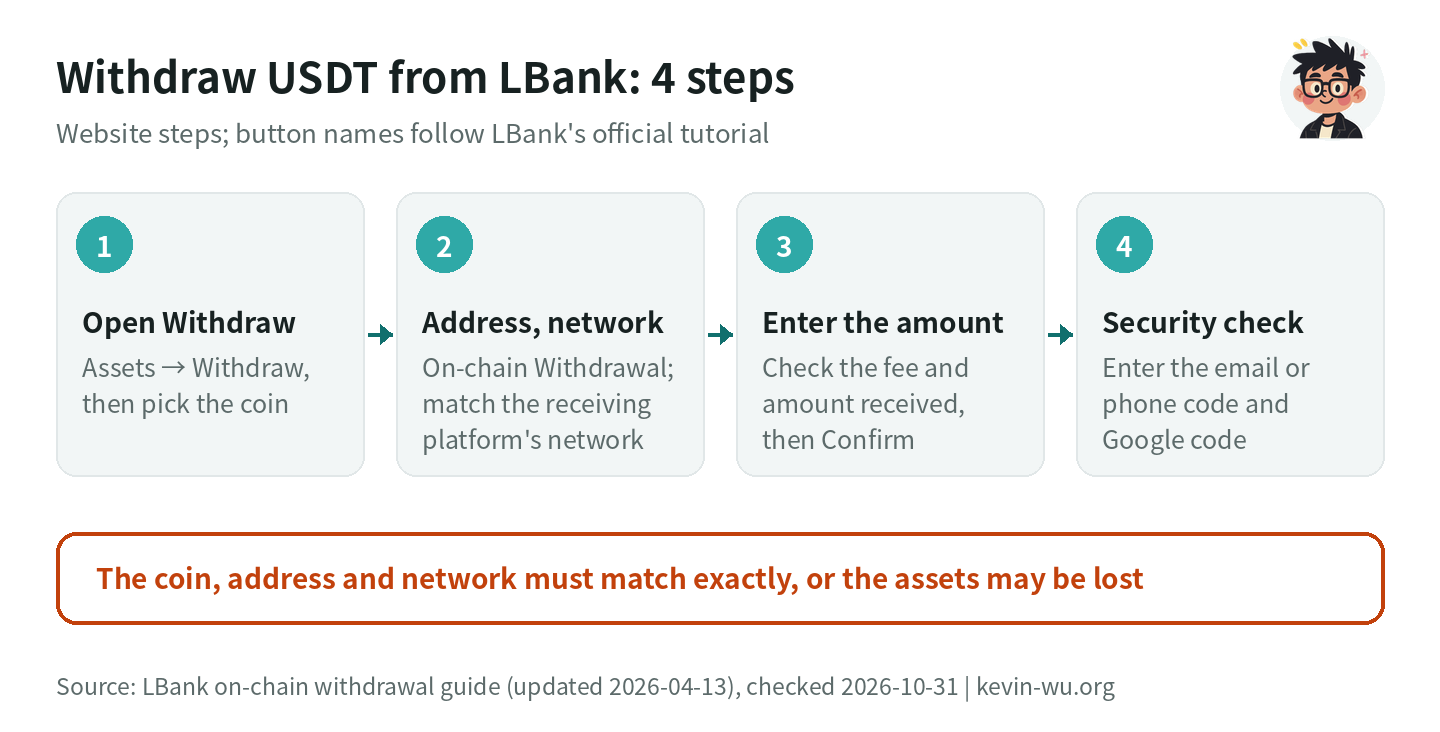
Withdrawal steps on the website
- Log in on the LBank website and click “Assets” → “Withdraw”. If you haven’t set up security verification yet, LBank recommends turning on Google Authenticator first.
- Search for or select the coin to withdraw, for example USDT, and choose “On-chain Withdrawal”.
- Enter the withdrawal address and choose the withdrawal network, which must match the receiving platform. If the recipient requires a Memo/Tag, fill it in too.
- Enter the withdrawal amount, check the fee and the estimated amount received on the page, then click “Confirm”.
- Enter the email or phone verification code and the Google Authenticator code, then click “Confirm” to submit. Once the system approves it, the assets are sent automatically to the address you entered.
Withdrawal steps in the app
- Log in to the LBank app, tap “Assets” → “Withdraw” and choose the coin.
- Choose “On-chain Withdrawal”, enter the address, pick the network, and fill in the Memo/Tag when needed.
- Enter the amount, check the fee and the estimated amount received, tap “Confirm” and complete the security check.
- Go to “Withdrawal History” in the top-right corner of the withdrawal page and filter by type and status. Tap a record to see withdrawal details such as the network, status and address.
These steps are based on how to make an on-chain withdrawal on LBank (updated 2026-04-13) and common reasons for delayed or suspended LBank withdrawals. LBank states that “amount received = withdrawal amount − withdrawal fee”, so if you want the other side to receive an exact figure, add the fee on top. When withdrawing to another exchange, first go to the receiving platform’s “Deposit” page, choose the same coin and network and copy the address, then paste it into LBank. If the token doesn’t show up after you withdraw to an on-chain wallet, you can add the token contract address manually in the wallet.
LBank USDT withdrawal fees: fees and minimum withdrawals by network
LBank’s withdrawal fee is a fixed amount per transaction, paid by the person withdrawing. It may be adjusted with network conditions, so go by what the withdrawal page shows at the time. The table below shows USDT data from the official public API on 2026-10-31:
| Network | Withdrawal fee (USDT) | Minimum withdrawal (USDT) | Fee as a share of a 100 USDT withdrawal |
|---|---|---|---|
| BEP20 (BSC) | 0.2 | 2 | 0.2% |
| Plasma | 0.2 | 1 | 0.2% |
| Arbitrum One | 0.5 | 5 | 0.5% |
| Solana | 0.5 | 10 | 0.5% |
| ERC20 | 1 | 5 | 1% |
| Polygon | 1 | 5 | 1% |
| TON (toncoin) | 1 | 1 | 1% |
| NEAR | 1 | 5 | 1% |
| Kaia (klay) | 1 | 5 | 1% |
| TRC20 | 1.5 | 5 | 1.5% |
| Avalanche C-Chain, TON (ton), Omni | Withdrawals suspended | — | — |
| Internal transfer to an LBank user | 0 | 0.0001 | 0% |
Source: LBank withdrawal configuration API and asset configuration API, queried 2026-10-31. The two give the same figures, which also match the ones this site compiled on 2026-10-19. On the website, you can check them on the deposit and withdrawal tab of LBank’s fee rate page.
LBank USDT withdrawal fees by network
In USDT; orange marks the pricier networks. Go by what the withdrawal page shows before you submit

- BEP200.2
- Plasma0.2
- Arbitrum One0.5
- Solana0.5
- ERC201
- Polygon1
- TON1
- NEAR1
- Kaia1
- TRC201.5
LBank’s order differs from many exchanges: ERC20 costs only 1 USDT, while TRC20, the network many people default to, is actually 1.5 USDT. In numbers: withdrawing 100 USDT 10 times a month costs 15 USDT in total on TRC20, 10 USDT on ERC20 and 2 USDT on BEP20. This assumes the recipient also supports that network. Plasma is also 0.2 USDT, but neither MAX nor BitoPro accepts it. A comparison across exchanges is in the USDT withdrawal fee comparison.
As for daily withdrawal limits, none of the LBank help center articles I checked include a daily limit table for regular accounts, and the KYC information doesn’t list tiered limits either (details in the LBank KYC guide). The withdrawable amount shown on the withdrawal page is what counts. A comparison of each exchange’s limits is in exchange withdrawal limits compared.
How to set up the address book and withdrawal whitelist
On the website, go to “Assets” → “Withdraw”, choose a coin and click “Address Management” (how to manage your deposit and withdrawal addresses). There you can do the following:
- Add a withdrawal address: click “Add Address”. For “On-chain Withdrawal”, choose the coin (or set it as a universal address) and the network, then enter the address and a name; for “Internal Transfer”, enter the other person’s UID, email or phone number. If you have many addresses, use “Batch Add”.
- Verification-free withdrawals: when adding an address, tick “Save as a verified address to skip verification in the future” and confirm with the email code and Google Authenticator code. The address is then added to the withdrawal whitelist, and future withdrawals to it don’t need verification.
- Address whitelist mode: once ticked, you can only withdraw to addresses in the address book, and the withdrawal page no longer accepts new addresses.
- New address withdrawal lock: once ticked, newly added addresses can’t be used for withdrawals for 24 hours.
You can manage deposit addresses too: you can add up to 20 deposit addresses per network, add notes and set a default address. My own habit is to turn on “Address whitelist mode” together with the “New address withdrawal lock”, withdraw a small amount the first time I use a new address to confirm it arrives, and from then on pick from the address book instead of pasting manually each time. Verification-free addresses are convenient, but if your account is stolen, that’s one less barrier, so I only recommend them for your own wallets. Settings like 2FA and the anti-phishing code are covered in exchange account security settings.
Is there a fee to send to another LBank user?
No. On the website, click “Internal Transfer” under “Assets” → “Withdraw”; in the app, choose “Internal Transfer (Free)”. Then choose UID, email or phone number, enter the recipient’s details and the amount, add a note if needed, and complete email and Google Authenticator verification after submitting. How to make an internal transfer on LBank (updated 2026-01-16) states that internal transfers are free, don’t go through blockchain confirmation and arrive instantly; before your first one you need to link Google Authenticator. LBank also states that once a transaction is confirmed it can’t be reversed, so check the recipient’s UID digit by digit before sending. For what else a UID is used for, see what an exchange UID is.
To move coins between two LBank accounts, an internal transfer is the easiest option. As mentioned earlier, an on-chain transfer on Solana from one LBank address to another isn’t credited automatically by LBank and has to be handled manually.
How long do LBank withdrawals take?
LBank doesn’t give a fixed withdrawal time. Its withdrawal guide says that after a request is submitted it has to wait for platform review and block confirmations, and the actual arrival time depends on on-chain network conditions. Common reasons for delayed or suspended withdrawals (2025-12-11) lists these situations:
| Status or symptom | What LBank says | What you can do |
|---|---|---|
| App/website shows “Processing” | Queued for platform processing; this is normal | Wait; if there’s no progress after 24 hours, email [email protected] |
| Queue during peak withdrawal times | API node rate limits put some requests in a queue or on hold. They can’t be canceled manually and are canceled automatically if not processed in time; expected 8–24 hours | Wait for the system; if it’s canceled, submit it again later |
| Wallet maintenance or upgrade | All withdrawals of the affected coin are suspended and resume automatically after maintenance; expected 8–24 hours | Check official announcements, or use another network that’s open |
| TxID generated, but not yet received | Waiting for blockchain confirmation | Check the confirmations with the TxID on a block explorer |
| TxID confirmed, but the receiving wallet doesn’t show it | An issue on the receiving side | Contact the receiving wallet or exchange with the TxID |
Deposits are much faster: the official deposit guide gives an average arrival time of under 3 minutes and the deposit FAQ says usually within 30 minutes; Quick Buy takes 15 seconds to 48 hours, and internal transfers arrive instantly. To track ERC20 and TRC20 transfers, the block explorers LBank points to are etherscan.io and tronscan.io.
LBank withdrawal stuck or failed: what to do
When a withdrawal can’t be submitted or fails, it’s usually one of the cases below that LBank has documented. Work out which one it is first, then follow the official route:
| Situation | Official rule | What to do | Source |
|---|---|---|---|
| Just reset your login password | Withdrawals are suspended for 24 hours after a password reset | Wait 24 hours | How to reset your account password |
| Just changed Google Authenticator | Triggers a 24-hour security restriction on withdrawals and fiat trading | Wait 24 hours | Reset Google Authenticator settings |
| Newly added withdrawal address | With “New address withdrawal lock” on, new addresses can’t be used for withdrawals for 24 hours | Wait 24 hours, or use an older address from the address book | Manage deposit and withdrawal addresses |
| Withdrawing right after a Fast Deposit | Withdrawals fail (60045) until all confirmations complete; unlocking usually takes 10 minutes to 2 hours | Wait until the deposit record shows completed; if you still can’t withdraw 1 hour after confirmations are full, contact live support with the TxID and order number | Withdrawal fails after a Fast Deposit |
| Coins bought on P2P | Some fiat zones (such as USD) have a T+1 cooldown: no on-chain withdrawals, internal transfers or fiat withdrawals for 24 hours | Wait 24 hours for it to lift automatically; you can trade on the platform meanwhile | P2P deposit withdrawal restrictions |
| Account withdrawals restricted | Complete “C3 video verification” depending on the case | Submit a “Withdrawal Restricted” ticket; LBank says review usually finishes within 2 hours | Account restriction guide |
| Platform queue or wallet maintenance | Expected 8–24 hours; resumes automatically after maintenance | If there’s no progress after 24 hours, email [email protected] with the withdrawal order number or TxID | Common reasons for delayed or suspended withdrawals |
| Memo/Tag missing or wrong on a withdrawal | Common with coins such as XRP, XLM, TON and EOS | Contact the receiving platform with the TxID for help recovering it; whether it can be recovered depends on their policy | Common reasons for delayed or suspended withdrawals |
Sources are linked in the table, checked 2026-10-31. Before a large withdrawal, avoid changing your password or Google Authenticator right beforehand, and you’ll save yourself the 24-hour wait. For more complicated cases, such as a restricted account or requests for extra documents, how each exchange handles them is covered in what to do if your exchange account is frozen.
Each of the official fixes above either lifts automatically when the time is up or is handled through a ticket, live support or the official email. None of them asks you to pay an “unfreezing fee”, “deposit” or “tax” first. LBank also states that its official support will never proactively ask for your password or passkey. Treat anyone who says you must send money before you can withdraw as a scammer; common tactics are in fake exchange withdrawal scams. In Taiwan, you can call Taiwan’s 165 anti-fraud hotline to check.
FAQ
Does LBank charge a deposit fee?
Crypto deposits are free; what you pay is the sending side’s withdrawal fee and network fee. In the official API on 2026-10-31, the USDT deposit fee is 0 on every network. If you use Quick Buy with a card or bank transfer, the confirmation page lists the fee before you order.
Which network is cheapest for withdrawing USDT from LBank?
As checked on 2026-10-31, BEP20 and Plasma are the cheapest at 0.2 USDT per transaction, with minimum withdrawals of 2 USDT and 1 USDT respectively. Arbitrum One and Solana are 0.5 USDT, ERC20 is 1 USDT and TRC20 is 1.5 USDT. Before choosing, make sure the recipient supports that network.
How long do LBank withdrawals take to arrive?
LBank doesn’t give a fixed time; after submission, a withdrawal goes through platform review and block confirmations. If it shows “Processing” with no progress for more than 24 hours, LBank recommends emailing [email protected]. During peak withdrawal times or wallet maintenance, LBank estimates 8–24 hours. Internal transfers to LBank users arrive instantly.
Can I deposit and withdraw on LBank without KYC?
LBank’s user agreement states that you must complete identity verification before trading digital assets, and the KYC FAQ says that in regions or accounts required to complete KYC, you can’t deposit, trade or withdraw until you’re verified. Quick Buy also requires KYC first. The easiest route is to finish KYC right after signing up; the steps are in the LBank KYC guide.
I sent USDT to LBank on the wrong network or forgot the Memo. What now?
Contact support with the TxID, deposit network, LBank deposit address and coin. According to LBank’s deposit FAQ, a missing or wrong Memo can be returned to the original sending address for a 10 USDT fee in about 1–2 months; a network or contract LBank doesn’t support can be returned to the sender for a 30 USDT fee in about 1 month or more. If it went to an address that doesn’t belong to LBank, LBank can’t help.
Why can’t I withdraw after changing my password or Google Authenticator?
This is an LBank security measure: after you reset your login password, withdrawals are suspended for 24 hours; after you change Google Authenticator, you can’t withdraw or trade fiat for 24 hours. It lifts when the time is up, and you don’t need to pay anything or get a third party involved.
If you don’t have an LBank account yet, enter the referral code KEVINWU in the “invitation code” field when you sign up, and LBank will automatically refund Futures 50%, Spot 30% of the trading fees you actually pay. If you open the page from the LBank official sign-up page, the referral code is filled in automatically. How the rebate is calculated and how to check you’re getting it are covered in LBank referral code.
Identity verification steps are in the LBank KYC guide, spot and futures fees and VIP levels in LBank fees, the platform’s background and reserves in the LBank review, and the security settings worth turning on before you withdraw in exchange account security settings. For deposit and withdrawal guides on other exchanges, see how to deposit and withdraw on MEXC, how to deposit and withdraw on XT and how to deposit and withdraw on Binance.
Want to see these updates more often in Google Search? Add Kevin Wu as a preferred source on Google