


Updated Rules checked 2026-10-13
An OKX individual account has to complete identity verification (KYC) before you can use it normally. The OKX Help Center states that you can trade, deposit and withdraw only after completing identity verification, and the Traditional Chinese version of the guide also says that “users who have not completed identity verification cannot deposit or withdraw crypto or buy and sell crypto via C2C.”
You need an original, valid, government-issued ID in your own name (a passport, national ID card, driver’s license and so on; which ones you can actually choose depends on the list the verification page shows for your country), plus face verification, and in some cases proof of address. OKX’s stated review time: documents are processed in about 30 seconds after upload; if further review is needed, it is completed within 24 hours, and you are notified of the result by SMS or email.
KYC comes after sign-up. If you don’t have an OKX account yet, start with the OKX referral code and sign-up guide, then come back to this guide for identity verification once you’ve registered.
Key points: an OKX individual account must complete identity verification before it can trade, deposit and withdraw (OKX Help Center, updated 2026-08-25). Your ID must be a genuine, valid, government-issued original in your own name; photocopies, screenshots, an ID displayed on another device and previously taken photos are not accepted. Documents are processed in about 30 seconds after upload, and if further review is needed it is completed within 24 hours. One identity can verify only one OKX account, and you cannot change verified identity details yourself in the app or on the website; you have to contact customer support. A referral code can only be entered at sign-up: once an OKX account is created, a referral code cannot be added or changed.
The information below was checked against OKX’s official guides on 2026-10-13 (fact-check date). The screenshots come from the OKX Help Center and OKX Learn and are shown for reference.
Not signed up yet? Enter a referral code before KYC
On OKX you sign up first and do KYC afterwards. A referral code can only be entered at sign-up: the OKX affiliate FAQ states that a referral code cannot be added or changed after the account is created, so if you only think of it when you get to KYC, it is too late. I’ve summarized which exchanges let you add one afterwards in can you add a referral code after sign-up.
Our OKX referral code is KEVINWU. The steps for entering it at sign-up and the rebate rules are in OKX referral code.
What are OKX’s KYC levels, and what does each unlock?
OKX’s current official guides have no level table such as Lv1 and Lv2. An individual account has a single identity verification (called advanced identity verification in the English guide), plus an “additional verification” that the system requests when it sees fit. The verification page on the website also offers “Entity/institutional verification,” which is for companies or institutions and is outside the scope of this article.
| Verification | When it’s required | What you submit | After completion | Official review time |
|---|---|---|---|---|
| Individual identity verification | After sign-up, before depositing, withdrawing or trading | Basic information, ID, face verification; proof of address in some regions | You can trade, deposit and withdraw, and your deposit and withdrawal limits go up | About 30 seconds; within 24 hours if further review is needed |
| Additional verification | Prompted after the system periodically reviews accounts | Depends on the questionnaire: proof of address, proof of source of funds and source of wealth, an employment history questionnaire, a politically exposed person (PEP) questionnaire | Update your identity information as the page prompts | Within 24 hours |
| Entity/institutional verification | Using OKX in the name of a company or institution | Not covered in this article | Not covered in this article | Not covered in this article |
On withdrawal limits, OKX says that completing identity verification raises your deposit and withdrawal limits and that “the 24-hour withdrawal limit depends on your fee tier,” but the guide does not give specific amounts (OKX identity verification FAQ for beginners). So KYC decides whether you can withdraw, and your fee tier decides how much. The contents of additional verification and its 24-hour review time come from OKX: How to complete additional verification.
What do you need for OKX KYC?
- Basic information: country or region of residence, nationality, name in the local language (if applicable), full name, date of birth, ID number, ID type and residential address.
- ID: a genuine, valid, government-issued original in your own name. Common options are a passport, national ID card, driver’s license or residence permit; which ones you can actually choose depends on the list the page shows once you’ve selected your place of residence and nationality.
- ID photos: in color, with all four corners in the frame, sharp and not blurry, showing your full name, date of birth, issue date and expiry date; the ID must not be expired. You usually photograph both the front and the back, and for a passport only the photo page. OKX’s verification failure guide also states that the ID must be valid for at least 60 more days.
- Face verification: fit your whole face inside the oval frame, with no mask, glasses or hat, and avoid glare from a flash; only one person may be in the frame.
- Proof of address (when required): the document must show your current residential address and be issued within the last 6 months for users in the European Economic Area, or within the last 3 months elsewhere. Accepted documents include a driver’s license with a clear address, a government ID showing your current address, a utility bill (water, electricity or gas) from the last 3 months, a bank statement or a property service payment receipt; letters or parcels you have received cannot be used as proof of address.
Photocopies, screenshots, an ID displayed on another device, previously taken photos, digital IDs in other apps and separately taken photos of you holding your ID cannot replace the original ID unless the page explicitly offers that option. You must be at least 18 to use OKX. Sources: How do I verify an individual account?, OKX identity verification eligibility, review time and supported ID types, OKX: Why did my identity verification fail? and OKX identity verification FAQ for beginners.
OKX KYC steps on the website
The web path the OKX Help Center currently describes is: log in to okx.com, click the profile icon, select Verification, and click Continue under Individual account. The first screenshot below comes from the Help Center, and the screenshots in the official guide show the English interface; the others come from an OKX Learn tutorial from February 2024 in the Traditional Chinese interface. The website has been redesigned since then, so go by the button positions and labels you actually see.
- Log in to the OKX website, click the profile picture in the top-right corner and choose Verification from the menu (“Identity verification” in the Traditional Chinese interface).
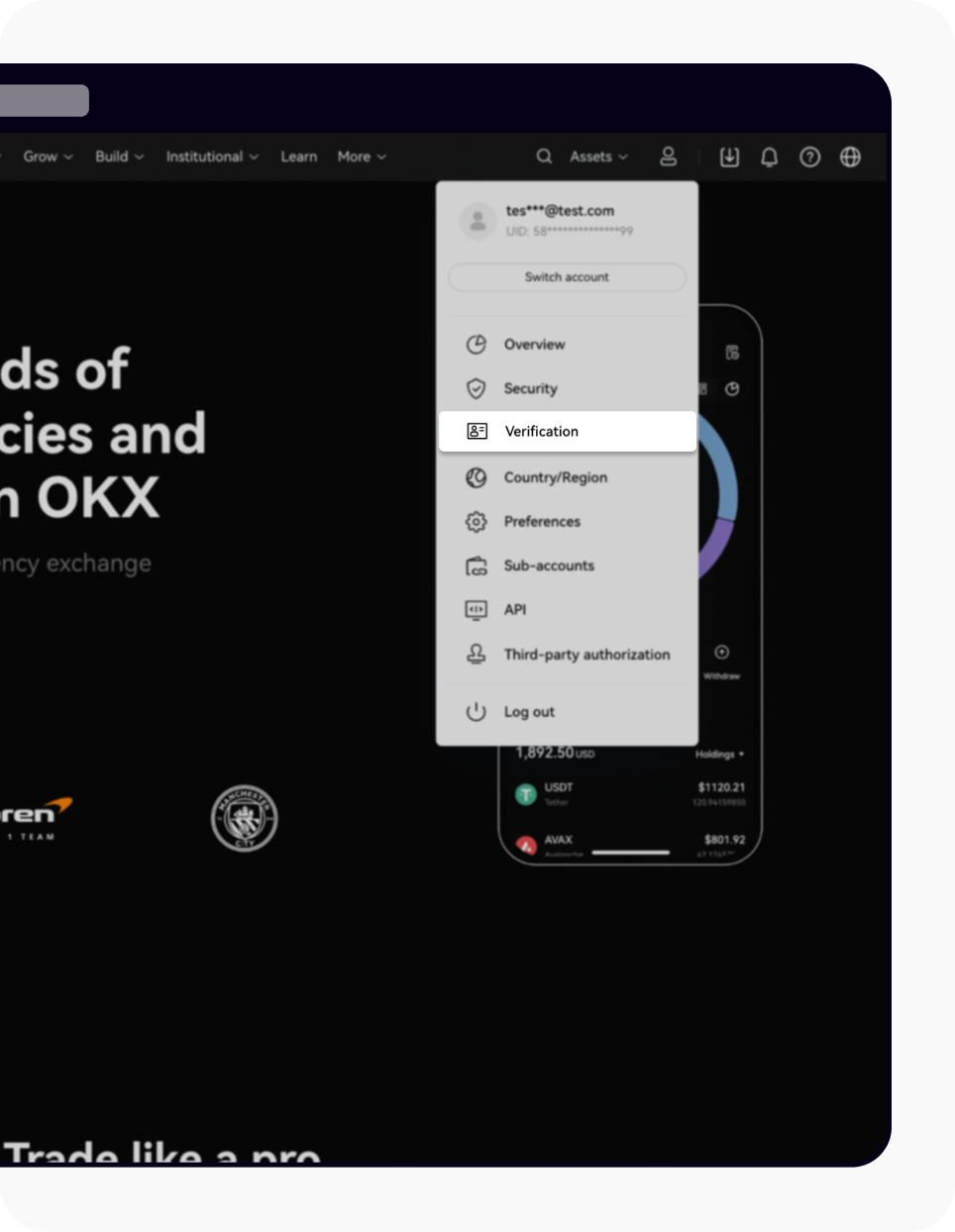
Image source: OKX Help Center
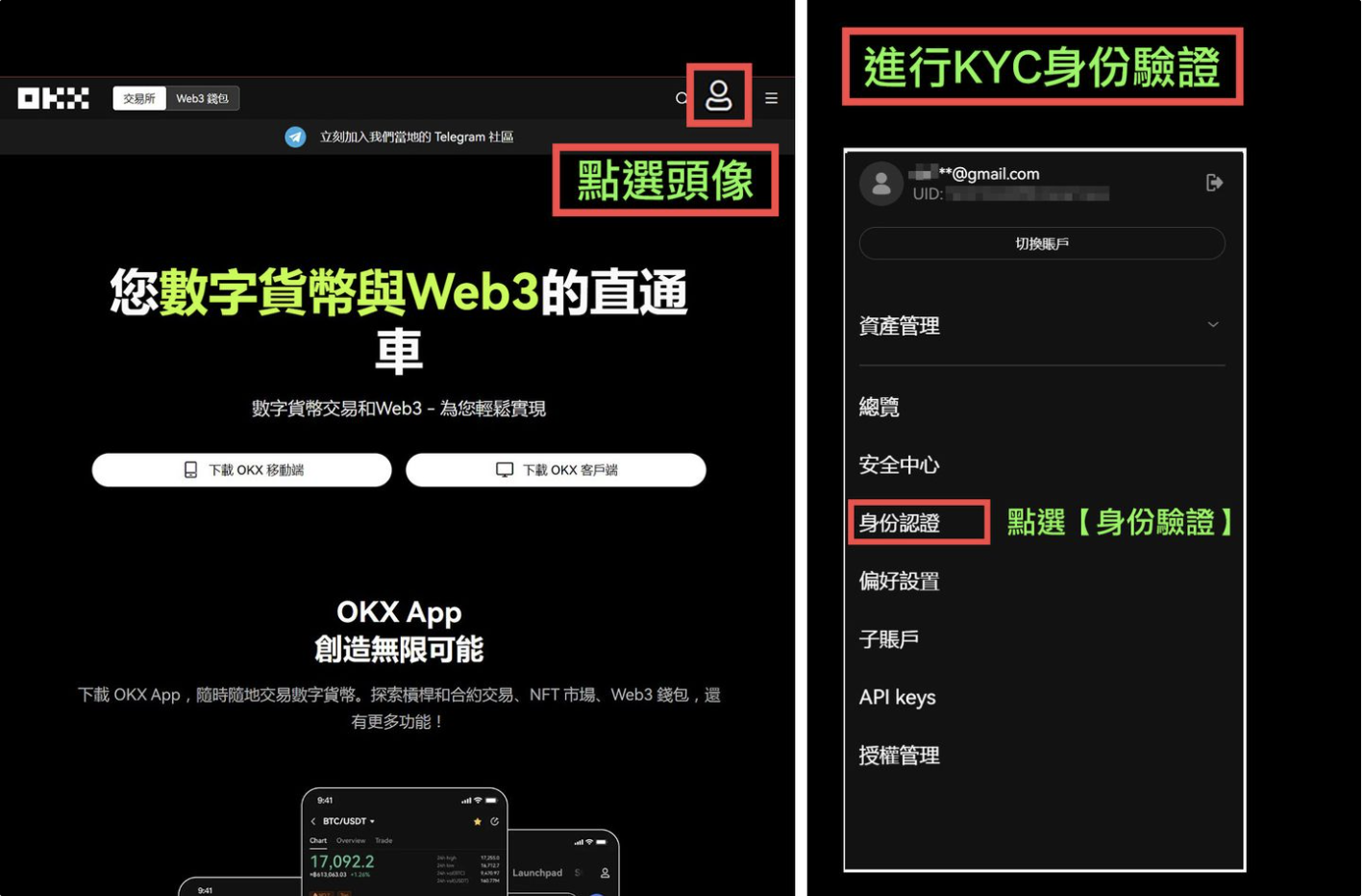
Image source: OKX Learn
- Choose “Individual verification” and click “Go to verify.” The next page, “Please complete identity verification,” lists the ID, facial recognition and residential address you need to provide; click “Verify now.”
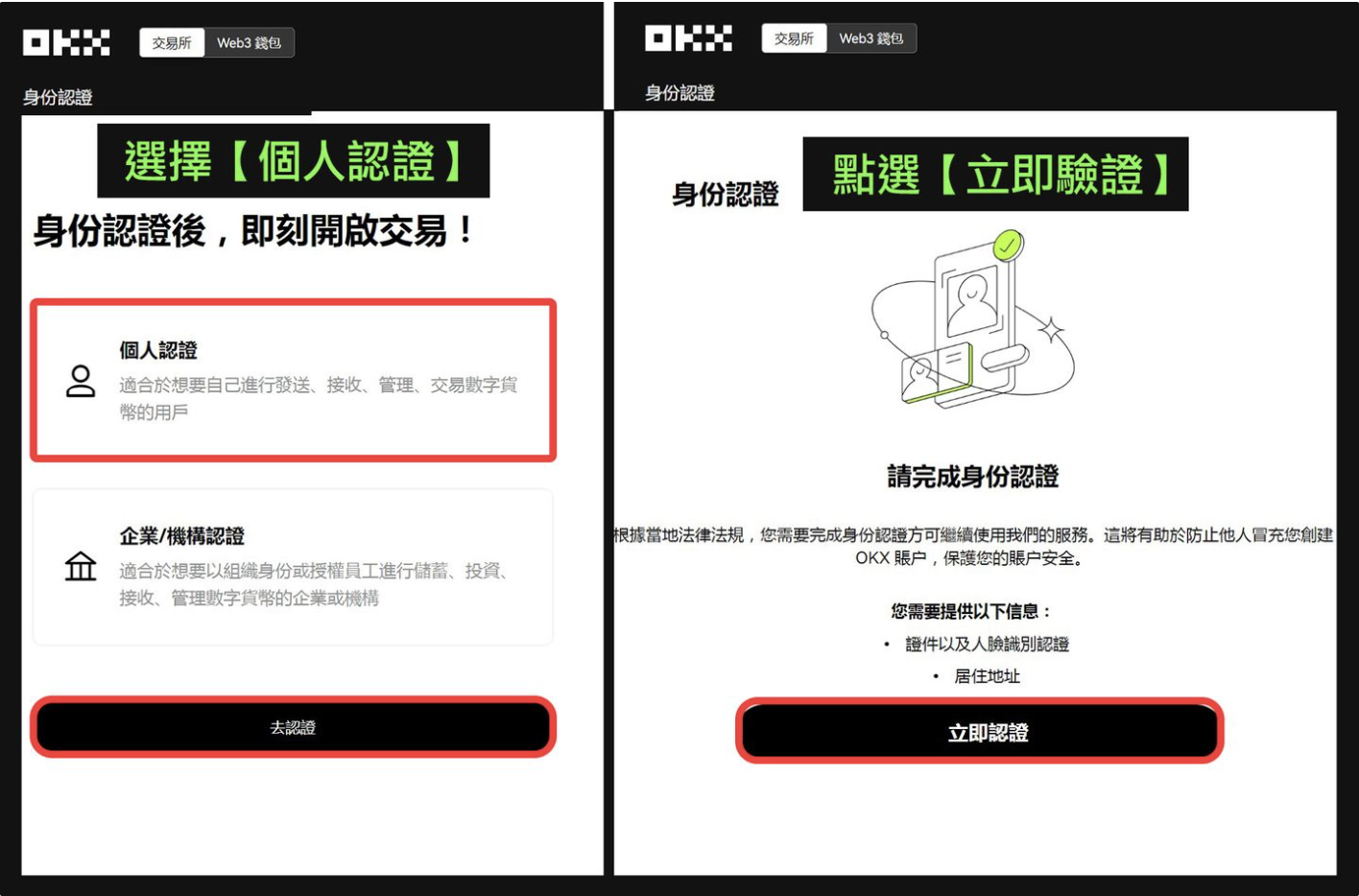
Image source: OKX Learn
- Fill in your basic information as the page asks: country or region of residence, nationality, name, date of birth, ID type and number, and residential address.
- On the verification page, click “Start,” then choose how to upload: “Continue on mobile device” (take the photos with your phone) or “Take photos with webcam.”
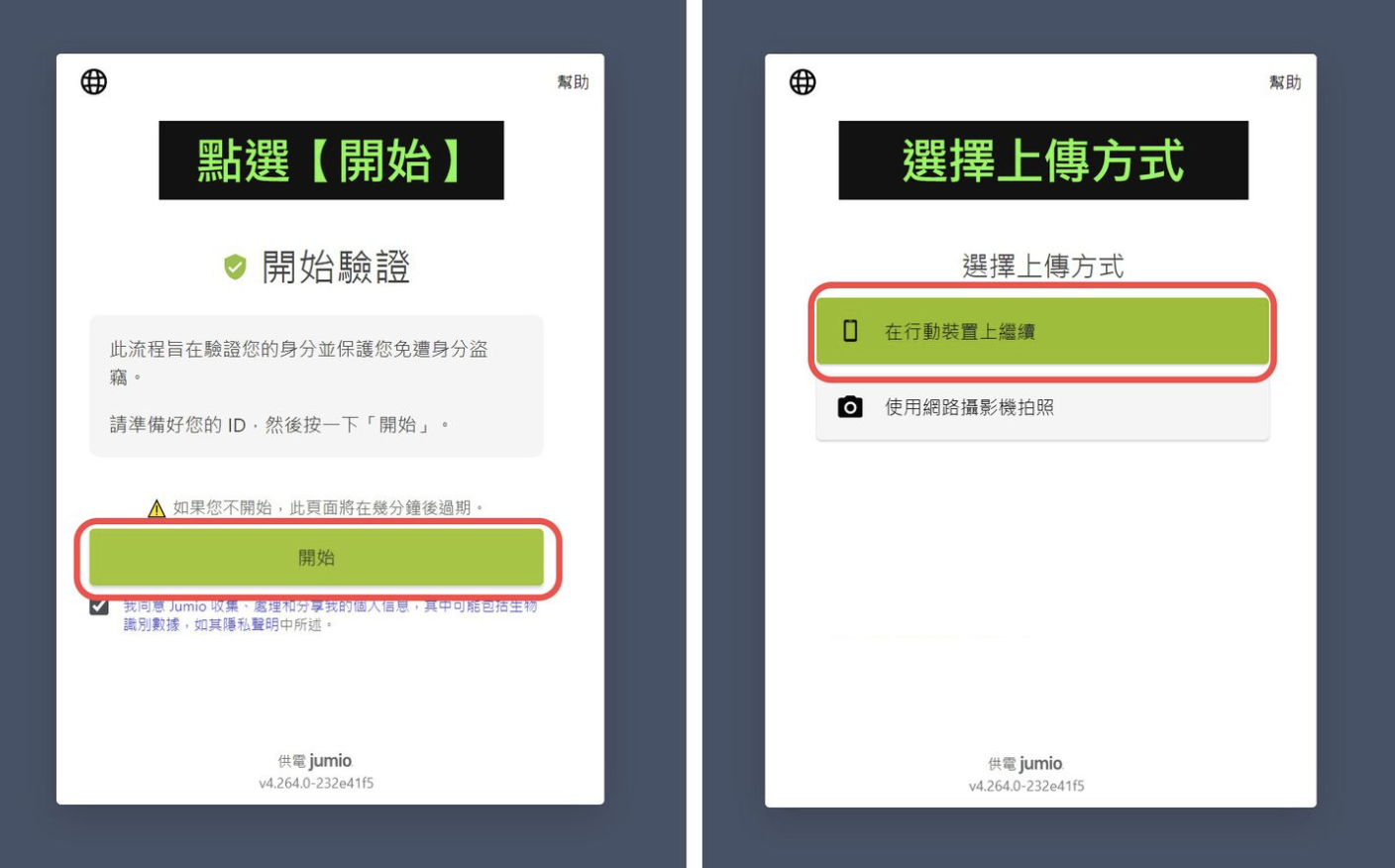
Image source: OKX Learn
- Follow the prompts to photograph the front of your ID, then the back, and finish with face verification: three steps in total.
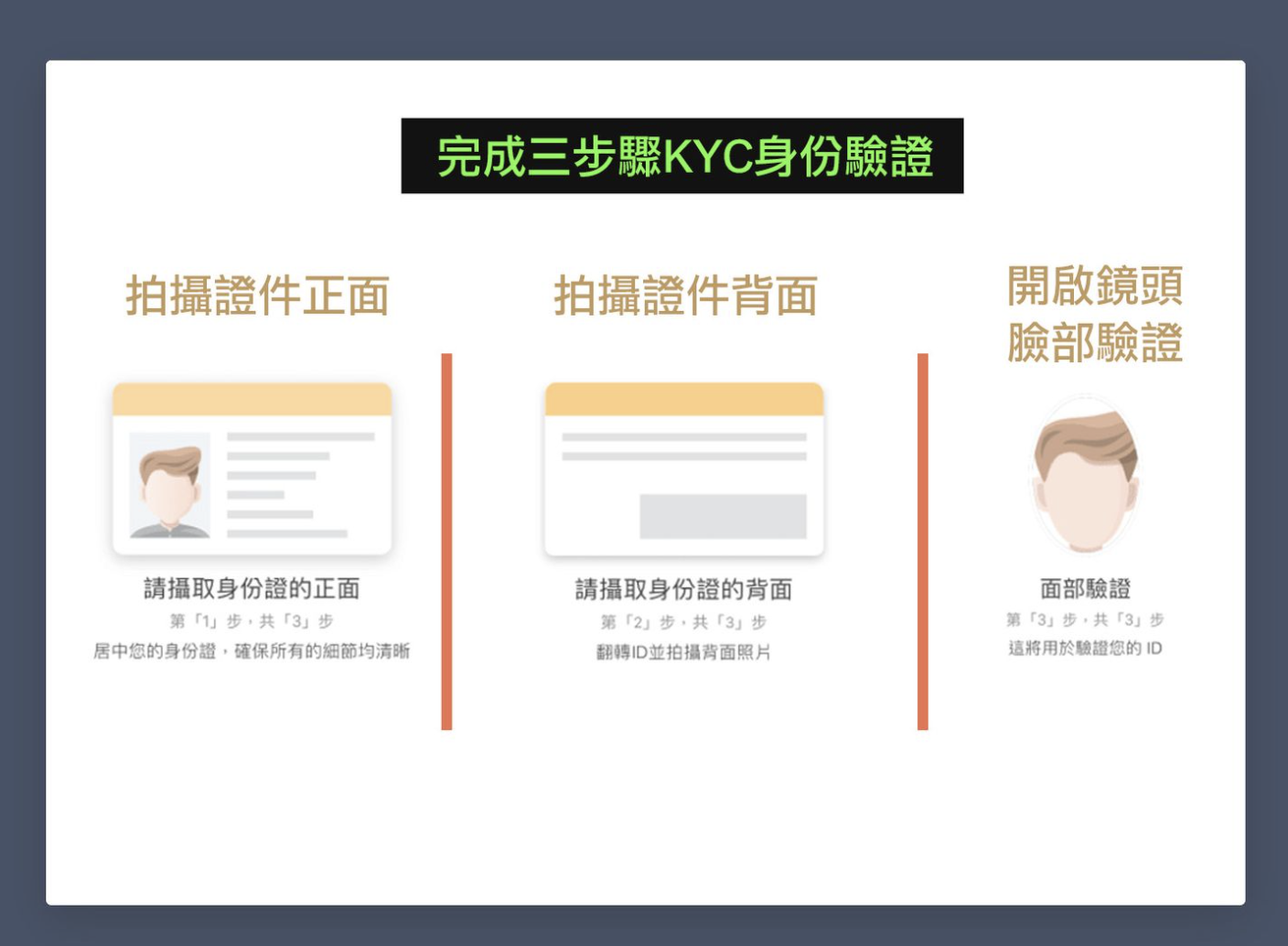
Image source: OKX Learn
- Submit and wait for the review. Once you pass, the page shows “Identity verification successful.”
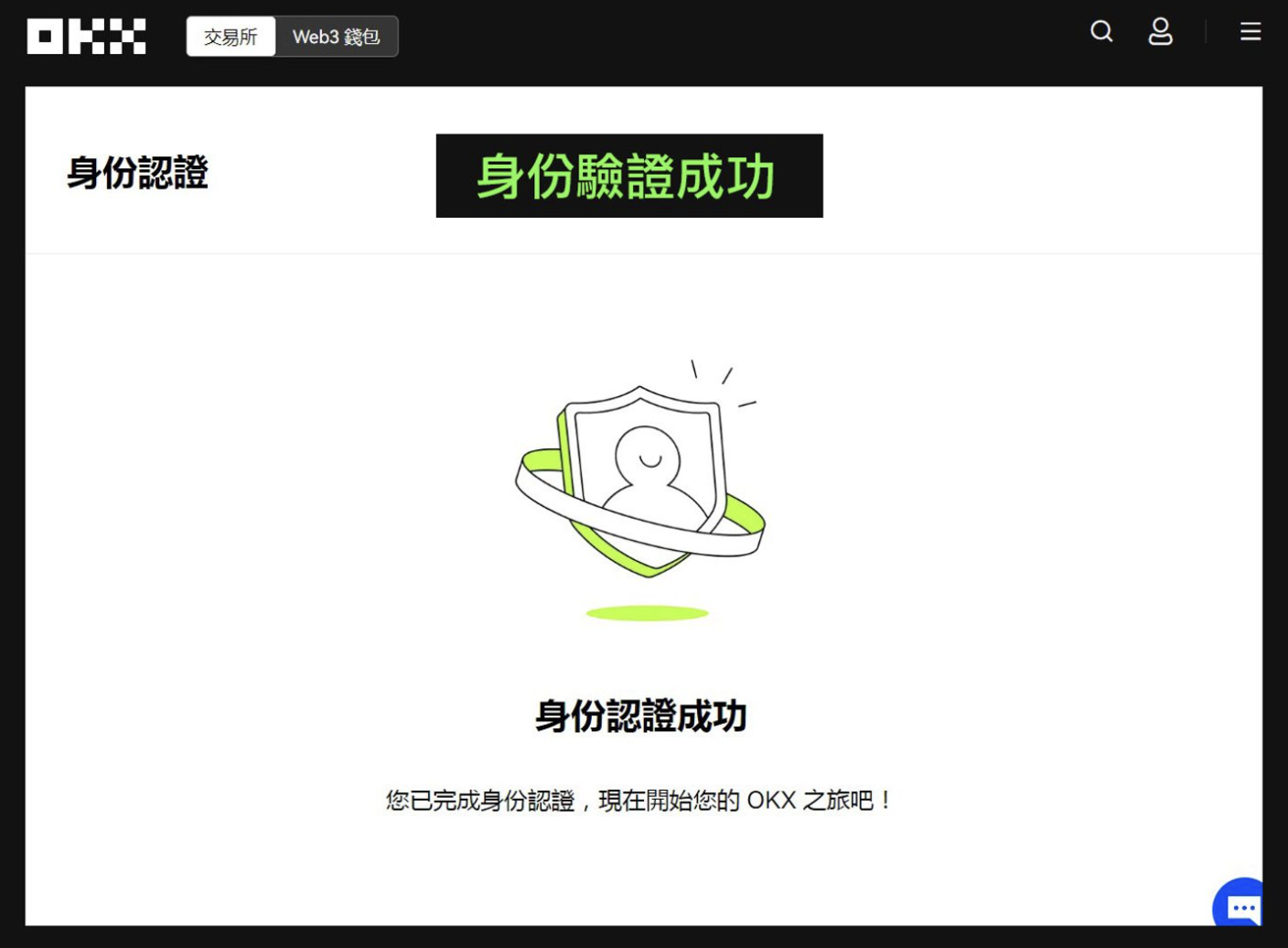
Image source: OKX Learn
OKX KYC steps in the app
First update the app to the latest version; the official guide says you can check the version under Menu > User center > Account settings > About OKX. The official screenshot for this section also shows the English interface.
- Open the OKX app and tap the menu (grid) icon in the top-left corner.
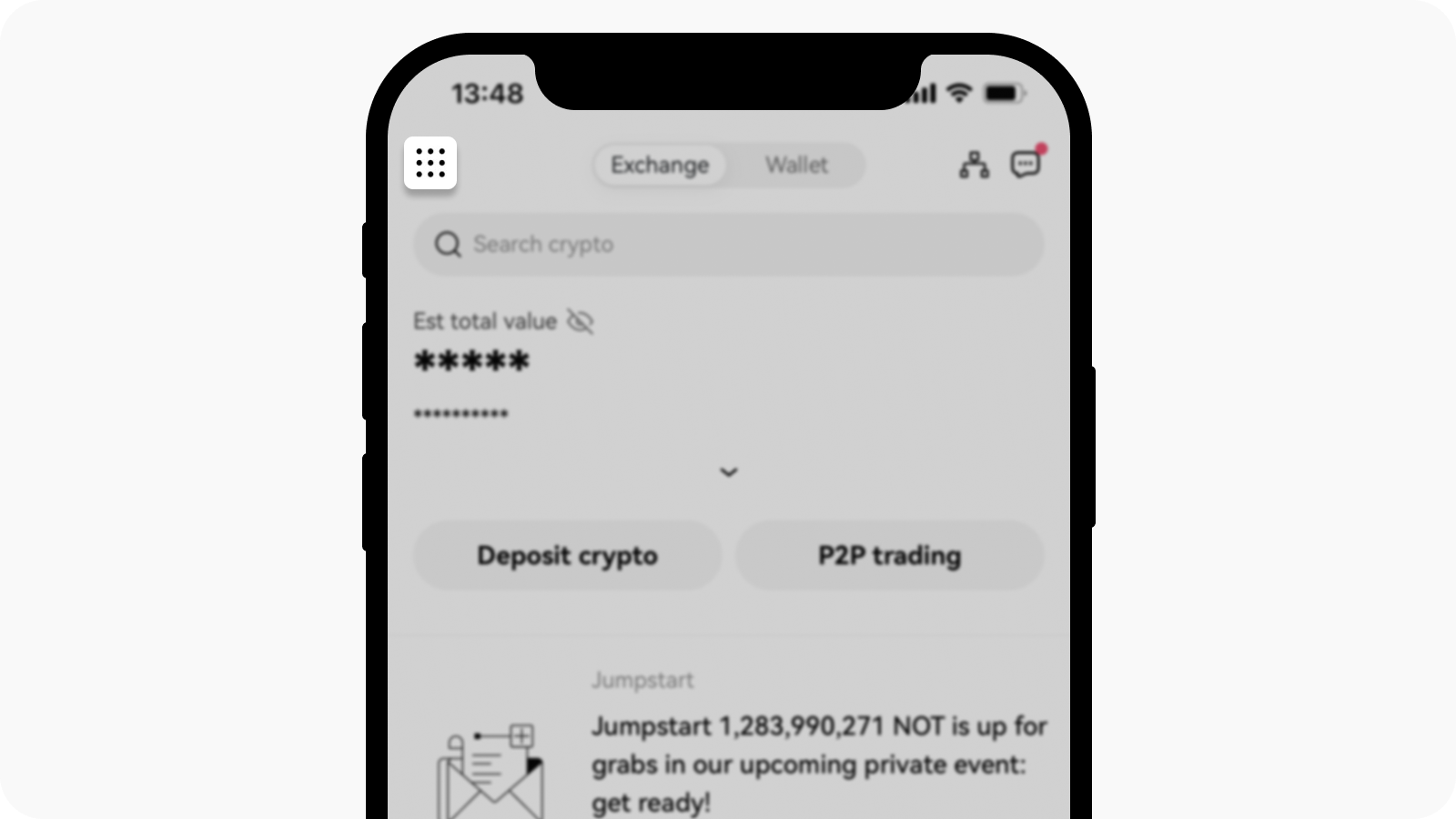
Image source: OKX Help Center
- Go to Account settings, and under Profile choose Identity verification.
- Tap “Verify now,” then fill in your basic information, photograph your ID and complete face verification as the screens guide you, and submit.
- To check your verification status later, use the same path: the grid icon in the top-left of the app → Account settings → Identity verification; on the website it’s profile picture → Profile → Identity verification.
If face verification on your phone keeps getting stuck, one of OKX’s suggestions is to upload your ID on the website first and then go back to the app for facial recognition (OKX: What should I do if facial recognition fails?).
How long does KYC review take, and what if you’re rejected?
OKX says that “after the documents are uploaded, processing takes about 30 seconds. If further review is needed, it will take up to 24 hours,” and you are notified of the result by SMS or email. Waiting times may be longer when the market is busy; if you have heard nothing after 24 hours, you can go to the Help Center or contact the AI support assistant (OKX: How long does it take to verify my identity?). If the page shows “Submitted” or “Under review” and there is no new task, OKX asks you not to submit the same information again.
| Rejection reasons listed by OKX | What to do |
|---|---|
| The ID has expired or is not supported | Use a valid ID from the list on the page, valid for at least 60 more days |
| The image is incomplete or blurry | Retake a color photo of the original with all four corners in the frame and no glare |
| The information you entered doesn’t match the ID | Correct your name, date of birth and other details to match the ID, then resubmit |
| Face verification failed | Try again indoors in soft lighting with your whole face visible; if you see “Maximum number of attempts reached,” wait 30 minutes before trying again |
| Age or region restrictions | Users under 18 cannot use OKX; the relevant services are unavailable in restricted regions |
| The identity information is already used on another account | One identity can verify only one account; contact customer support and provide your ID number for confirmation |
Once you’ve fixed the problem the page or email points out, go back to the identity verification page and resubmit. Sources: OKX identity verification eligibility, review time and supported ID types, OKX: Why did my identity verification fail? and OKX: What should I do if facial recognition fails?
Accounts that have already passed KYC may also be asked to verify again later. OKX’s English guide states that it periodically asks users to confirm their identity information; accounts that don’t complete this within the grace period may be frozen but can still withdraw funds, and full functionality returns once they pass again.
What should users in Taiwan watch out for with KYC?
- No Taiwan-specific rules: none of the official OKX KYC guides I checked have provisions specifically for Taiwan. The IDs you can use only appear after you select your actual place of residence and nationality on the verification page, and OKX also states that you should not choose another country, nationality or ID type to get around options that aren’t available to you.
- Some Traditional Chinese guides cover mainland China: for example, OKX’s Traditional Chinese version of “How do I verify an individual account?” describes C2C video verification, with screenshots in Simplified Chinese and a renminbi interface, and the “ID and selfie guide for identity verification” says CN-region users verify with a resident ID card or passport. If you follow them, the screens may differ from what you see. OKX’s pages also note that the translations are machine translations and that the English version is the authoritative text.
- Characters in your name: OKX’s verification failure guide mentions cases where “rare Traditional Chinese characters cannot be recognized”; the fix is to contact online customer support.
- Multiple nationalities or a different address: OKX recommends verifying with “the nationality inseparable from your personal identity.” You can still verify if your current address differs from the one on your ID, but you may need to provide proof of address as well.
Is KYC safe, and how is your personal data used?
According to OKX, your selfie is compared with your ID photo to verify your identity and is stored securely, and it will “never be disclosed to third parties”; the ID and selfie guide also states that the information collected is used only to complete verification. In addition, in the 2024 OKX Learn screenshots, the verification page is labeled as provided by Jumio and asks you to tick a box agreeing that Jumio may collect, process and share your personal information (which may include biometric data); the current Help Center text does not say which verification provider is used. The full rules are in the OKX privacy policy.
In practice, keep these points in mind:
- Only verify on the official OKX website or the official app. OKX itself warns against installing the app through unknown links or from unknown developers.
- No one can do KYC for you. OKX states that it only discusses account and identity verification issues with the account holder, so anyone who claims they can “get you through KYC” and asks you to send photos of your ID is not OKX. Common tactics are covered in crypto exchange scam types and rebate scam warning signs.
- Never give anyone your seed phrase, private keys, passwords or verification codes; the KYC process never asks for them.
What 3 things should you do first after KYC is approved?
Once your identity verification is approved, you can deposit. Before you deposit, I recommend getting these three things done first:
- Turn on two-factor authentication (2FA) or a passkey: link an authenticator app such as Google Authenticator or Microsoft Authenticator (OKX authenticator linking guide). OKX also supports passkeys, which let you log in without a password once linked (OKX passkey setup, OKX passkey FAQ).
- Set an anti-phishing code: set it under “Profile → Security Center → Anti-phishing code,” and from then on, every email OKX sends you will include this code (OKX account security guide).
- Test with a small withdrawal first: the first time you withdraw to a new address, send a small amount, confirm it arrived, then send the larger amount (OKX withdrawal guide). Once the withdrawal allowlist is on, you can withdraw only to addresses already in your address book, and a new address has to be added to the address book first (OKX withdrawal allowlist guide).
These three steps protect your own account; the platform’s own security record, hacks and proof of reserves are covered in the OKX review.
FAQ
How long does OKX KYC take?
OKX says documents are processed in about 30 seconds after upload, and if further review is needed it is completed within 24 hours. You are notified of the result by SMS or email; if you have heard nothing after 24 hours, you can contact the OKX AI support assistant.
Can I trade or withdraw on OKX without KYC?
No. OKX states that individual accounts must complete identity verification before use, and only then can you trade, deposit and withdraw. An account that was already verified but did not complete re-verification by the deadline may be frozen, and in that case it can still withdraw funds.
Can I use a family member’s or someone else’s ID for KYC?
No. OKX requires your own ID and requires you to complete face verification yourself; if the system determines that the ID belongs to someone else, verification is rejected. OKX also states that accounts may not change their verification information (switching to another person or another ID), so if your verification is restricted for this reason, the restriction cannot be lifted.
What should I do if OKX KYC fails?
First check the rejection reason on the page or in the email sent to your registered address, fix it, then go back to the identity verification page and resubmit. Common reasons are an expired ID, blurry photos, details that don’t match the ID, and failed face verification; if facial recognition shows “Maximum number of attempts reached,” wait 30 minutes and try again.
How many OKX accounts can one person open?
One identity can verify only one OKX account. OKX states that its user agreement prohibits registering multiple accounts for any purpose, that the platform checks for this from time to time, and that it restricts the accounts involved when it finds a violation.
Can I transfer my OKX KYC to a new account?
No. OKX’s multiple accounts FAQ states that once an account is verified, its identity information can’t be merged, transferred or unlinked, and each user may keep only one verified OKX account (OKX multiple accounts FAQ). If you want to switch referrers, OKX’s official switch request and reassignment after 180 days of inactivity are covered in how to switch your OKX referral code.
Can I change my name or details after passing KYC?
Not by yourself. OKX states that identity verification information cannot be edited directly in the app or on the website and that you need to contact customer support; the English guide adds that the option to change your name yourself is only available in some regions.
Can I add a referral code after completing KYC?
No. Once an OKX account is created, a referral code cannot be added or changed, whether or not you’ve done KYC. To check whether your account is linked to a referral code, see how to check whether your referral code is bound.
Sources
These are the official OKX pages used in this article (dates are the published/updated dates shown on each page, checked on 2026-10-13). The screenshots come from the OKX Learn KYC tutorial (February 2024, Traditional Chinese interface) and the English guide in the OKX Help Center.
- How do I verify an individual account? (published 2023-09-25, updated 2026-08-25; screenshots kyc-okx-06 and kyc-okx-07)
- How do I verify an individual account? (Traditional Chinese) (published 2023-09-25, updated 2026-08-25)
- Identity verification eligibility, review time and supported ID types (2026-08-28)
- Identity verification FAQ for beginners (published 2023-09-25, updated 2026-08-25)
- How long does it take to verify my identity? (published 2023-09-05, updated 2026-08-25)
- Why did my identity verification fail? (published 2023-09-05, updated 2026-08-25)
- What should I do if facial recognition fails? (published 2024-10-11, updated 2026-08-25)
- How to complete additional verification (published 2024-11-18, updated 2026-09-22)
- ID and selfie guide for identity verification (published 2026-01-27, updated 2026-08-11)
- OKX Learn: What is KYC at a crypto exchange, and how do you complete KYC verification? (published 2022-12-06, updated 2024-12-17; screenshots kyc-okx-01 to kyc-okx-05)
- OKX affiliate FAQ and OKX privacy policy
If you haven’t signed up yet, the sign-up steps and referral code are in OKX referral code. Once KYC is done and you’re ready to trade, fee details are in OKX fees, and an overview of the platform is in OKX review. To confirm your referral code is linked, see how to check whether your referral code is bound.