


Updated Rules checked 2026-10-13
HTX (formerly Huobi) calls its KYC “Personal KYC Verification” in the official guide and splits it into three levels: L1 Basic Permissions, L2 Primary Verification and L3 Advanced Verification. The official wording is direct: you unlock deposits and withdrawals only after completing L1, while L2 and L3 raise your deposit and withdrawal limits and your crypto purchase limits. The KYC guide doesn’t say whether you can trade spot without verifying; the HTX user agreement says you can use its services “after completing account registration and identity verification.”
What you need to prepare grows with each level: for L1 you enter your nationality, ID number, name and date of birth; for L2 you upload a photo of your passport, national ID card or driver’s license; for L3 you complete face recognition on your phone. The official guide doesn’t say how long the review takes, and it only walks through the app.
Two things up front. First, the official guide was published on 2023-04-10 and its screenshots show the Simplified Chinese interface, so the current app may look different. Second, the HTX user agreement lists Taiwan as a region where derivatives trading is prohibited, so Taiwan users can’t trade futures even after completing KYC.
Key points: HTX’s personal KYC has three levels, L1 Basic Permissions, L2 Primary Verification and L3 Advanced Verification. According to the official guide (2023-04-10), deposits and withdrawals unlock only after L1. L1 asks for your nationality, ID number, name and date of birth; L2 asks for a photo of your passport, national ID card or driver’s license, and the upload screen accepts JPG, JPEG or PNG files larger than 10KB and smaller than 5M; L3 is face recognition and requires passing L1 and L2 first. HTX’s official guide doesn’t say how long KYC review takes. An HTX announcement dated 2026-03-30 caps futures leverage at 5x for newly registered users who haven’t completed L2, but the HTX user agreement (updated 2026-09-16) lists Taiwan as a region where derivatives trading is prohibited. The HTX user agreement states that registration data and identity information are kept for at least 6 years after the account is closed or the transaction is completed.
The information below was checked against HTX’s official documentation on 2026-10-13 (fact-check date). The screenshots come from the official help center and are provided for reference.
Not signed up yet? Enter the referral code before KYC
KYC happens after you register, while the referral code goes on the sign-up page. If you want to use a referral code, register first by following the steps in the HTX referral code guide, then come back here for identity verification.
Our HTX referral code is KEVINWU; just enter it when you sign up.
If you’ve already registered and forgot to enter one, note this: HTX’s official documentation doesn’t mention any way to add or change a referral code after sign-up, and that has nothing to do with whether you’ve done KYC. For what you can still do, see how to switch your HTX referral code and can you add a referral code after signing up.
What are HTX’s KYC levels, and what does each unlock?
The official text only describes what each level is for; the withdrawal limits appear only in the screenshots. I’ve kept the two sources in separate columns:
| Level | Prerequisite | What you provide | Permissions in the official text | Withdrawal limit in the 2023 official screenshot |
|---|---|---|---|---|
| L1 Basic Permissions | None | Nationality, ID number, name, date of birth | Unlocks deposits and withdrawals | 5 BTC per 24 hours |
| L2 Primary Verification | Pass L1 | Photo of passport, national ID card or driver’s license | Raises deposit/withdrawal limits and crypto purchase limits | 200 BTC per 24 hours |
| L3 Advanced Verification | Pass L1 and L2 | Face recognition | Raises deposit/withdrawal limits and crypto purchase limits | 3000 BTC per 24 hours |
| Investment capability certification | Not listed in the official guide | Not listed in the official guide | Not listed in the official guide | 3000 BTC per 24 hours |
Source: HTX, “How to complete personal KYC verification” (2023-04-10). The last column comes from the official screenshot and isn’t in the text. The screenshot shows an old version of the app, and I couldn’t find 2026 limits on HTX’s official pages, so go by what the “Identity verification” page in your own account shows. HTX also says that the higher your verification level, the easier it is to get matched with better merchants and prices in fiat trading. At the bottom of the screenshot there’s also an entry for institutional verification; this article only covers personal accounts.
There’s a new futures rule for 2026. According to HTX’s announcement on futures leverage limits for new users, from 2026-03-30 15:00 (UTC+8), newly registered users are capped at 5x futures leverage until they complete L2; unverified users and users who have only passed L1 can’t place futures orders through the API; and a sub-account’s verification level follows its main account. In practice this rule doesn’t affect Taiwan users, because the user agreement already prohibits them from trading derivatives (see the “Taiwan users” section below). Futures use leverage, and if the price moves against you, your position may be forcibly liquidated.
What do you need for HTX KYC?
- L1 details: nationality, ID number, surname, given name and date of birth. The official Traditional Chinese text says “Chinese surname, Chinese given name,” but the fields in the screenshot say “English surname, English given name,” so fill in whatever fields your screen shows. HTX reminds you to enter the information exactly as it appears on your ID document.
- L2 documents: HTX says it currently supports passports, national ID cards and driver’s licenses. Supported document types vary by country, and you can check them on the screen where you submit verification. If you use a national ID card, upload the photo side and the back side to their matching slots; if you swap them, face recognition can’t proceed.
- Photo rules (shown on the L2 upload screen): use an original, government-issued document; place it on a plain, single-color background; make sure the photo is clear, with nothing covering it and no glare; don’t use black-and-white images. Files must be JPG, JPEG or PNG, larger than 10KB and smaller than 5M.
- L3 face recognition: good lighting, a stable internet connection, only you in the frame, your face lined up with the guide frame as closely as possible, and no hat or mask.
- The full list in the user agreement: section 10.1 of the HTX platform user agreement says individual users must provide their name, address (verified in the way HTX specifies), email address, date of birth, nationality, a photo of themselves holding their ID document, an official identity document (passport, front and back of a national ID card, and so on), and any other information HTX may request later. The agreement also says the required documents differ by region and that notarized documents may be requested; if your documents aren’t in English or Chinese, you may be asked for a notarized English translation. The L1 to L3 steps in the official KYC guide don’t mention proof of address, but the agreement reserves the right to ask for it.
HTX app KYC steps
The official guide only covers the app; HTX doesn’t explain the steps for the website. The screenshots in the official guide show the Simplified Chinese interface and come from the article published on 2023-04-10, so the current app’s screens and button positions may differ. The button names below are translated from HTX’s official Traditional Chinese guide.
- Open the HTX app, tap your avatar in the top-left corner of the home screen, and on your profile page tap “Pending verification” (the screenshot shows the Simplified Chinese label). Then follow the on-screen prompts through L1 to L3.
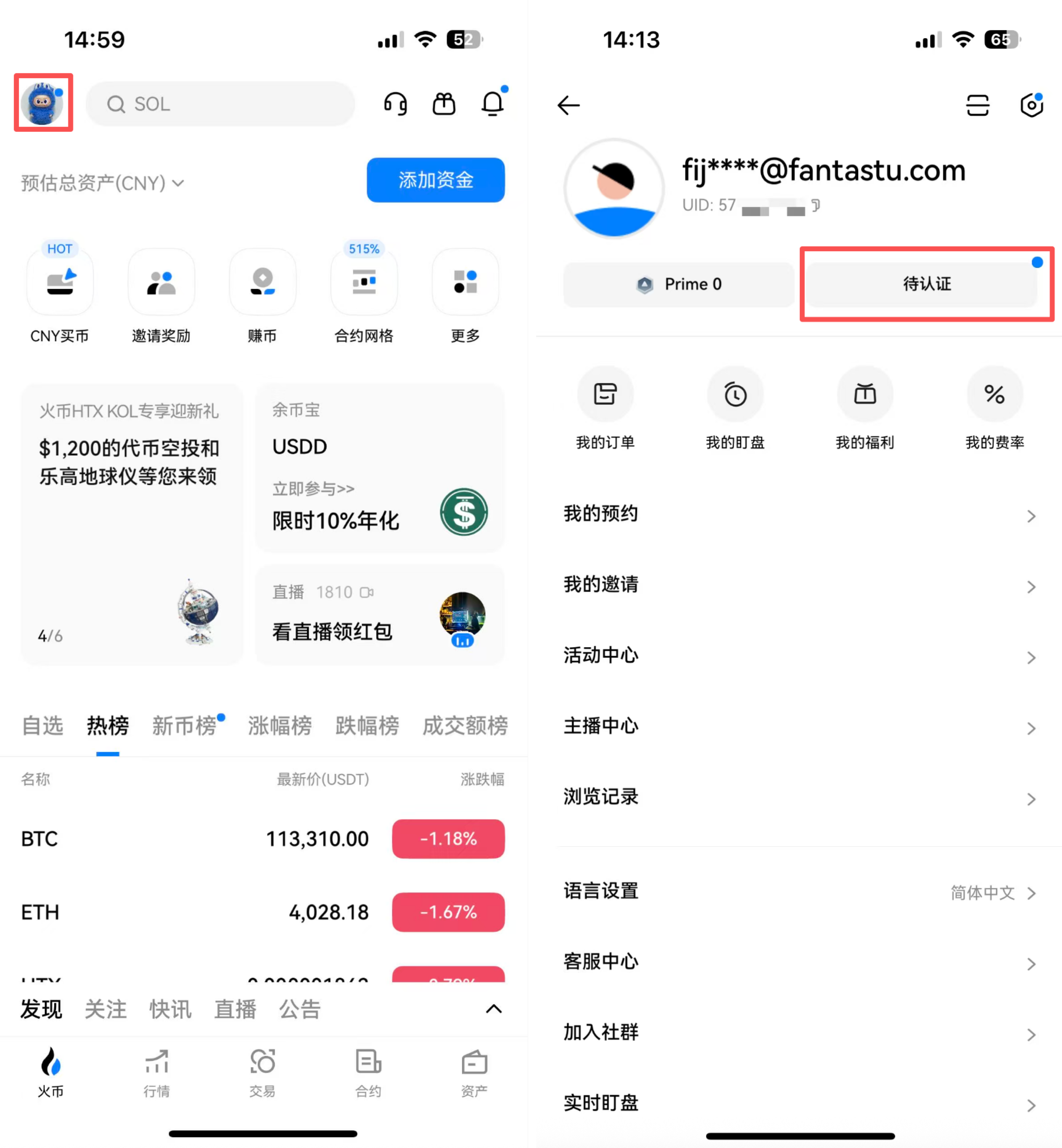
Image source: HTX Help Center
- On the “Identity verification” page, start with L1 Basic Permissions: enter your nationality, ID number, surname, given name and date of birth, then tap “Submit.” HTX notes that if your region isn’t supported for verification but verification with Dominica citizenship is, the system will automatically prompt you to switch; agree and submit. The official screenshot shows exactly this case: the nationality is set to mainland China, and the system prompts the user to apply with Dominica citizenship instead.
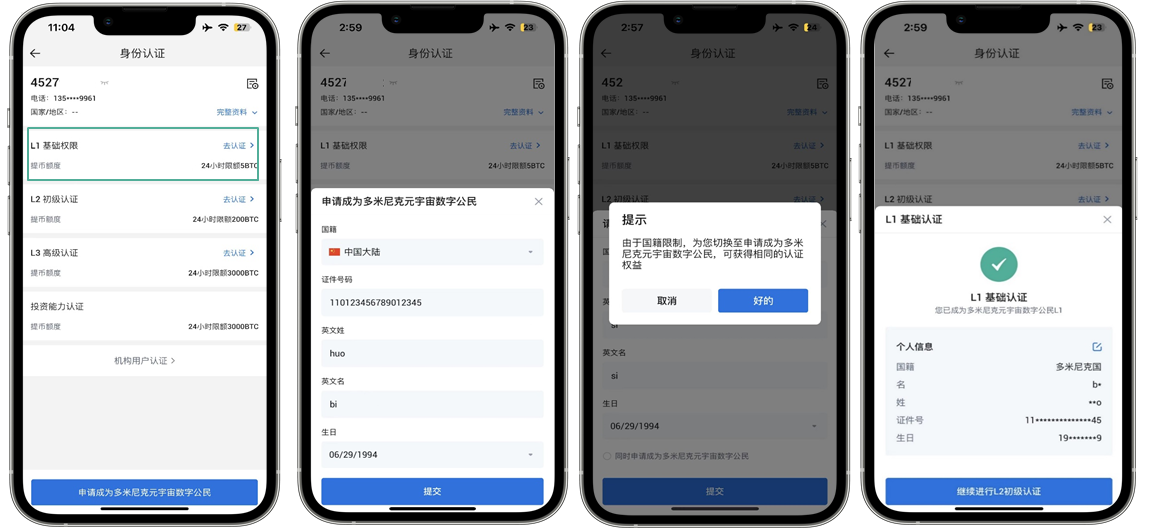
Image source: HTX Help Center
- After passing L1, tap L2 Primary Verification: choose a document type (national ID card, passport or driver’s license), tap “Next,” upload the photo side and the back side to their matching slots, and tap “Submit.”
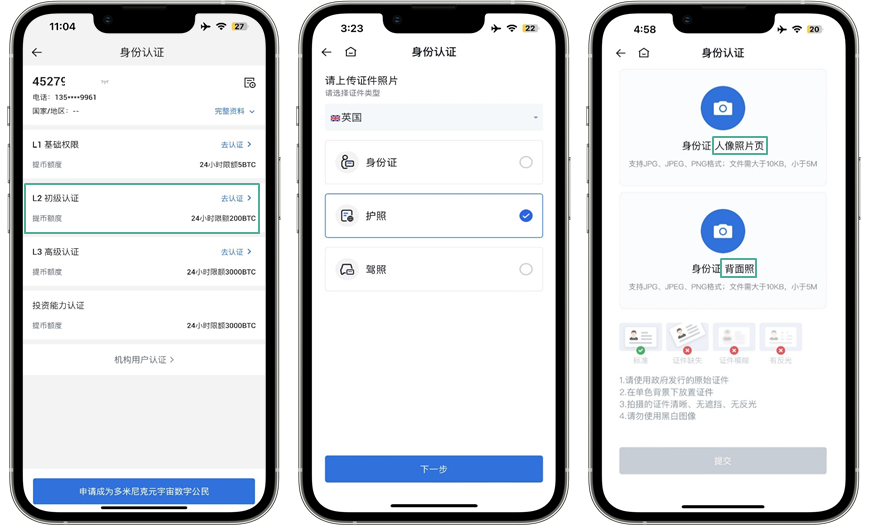
Image source: HTX Help Center
- After passing L1 and L2, tap L3 Advanced Verification to open the face recognition screen and follow the instructions.
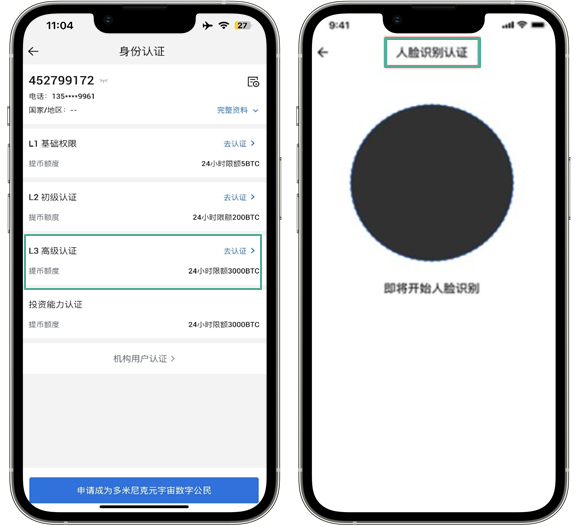
Image source: HTX Help Center
These 4 screenshots are all the official guide includes; there are no images for the website.
How long does HTX KYC take? What if it’s rejected?
HTX’s official documentation doesn’t state a review time or list rejection reasons. The official text mentions only two things related to failure: in L2, if the front and back of your ID card are in the wrong slots, face recognition can’t proceed; in L3, you need good lighting, a stable connection, only yourself in the frame, and no hat or mask. The upload screen also lists four photo rules (original document, single-color background, clear with nothing covering it and no glare, no black-and-white images), which you can check one by one before retaking your photos.
HTX doesn’t explain how to resubmit. If you get stuck, use “Customer Service Center” on your profile page in the app (the menu shown in the official screenshot), or the support email listed on HTX’s official pages, [email protected]. If your details need updating, section 4.1 of the user agreement says users are responsible for updating their registration data and keeping it accurate; section 12 says that if HTX suspects your information is wrong, it will ask you to correct it, and if you don’t, your service may be suspended. The official documentation doesn’t say where to change your details, so check with customer support.
What should Taiwan users know about KYC?
- The official KYC guide has no Taiwan-specific rules. Which documents you can choose depends on the types shown for your country on the verification screen.
- No derivatives: section 1.2 of the HTX platform user agreement (updated 2026-09-16) lists Taiwan as a region where derivatives trading is prohibited, and the agreement defines being “from” a region as an individual who lives in or is physically located in that region. So completing L2 or L3 doesn’t let Taiwan users trade futures; they can use spot and other services. The agreement also says this list may change, and not necessarily with separate notice.
- Name fields: the official text says Chinese name, while the screenshot shows English name fields. Fill in whatever your screen shows and match your ID document. The notarized English translation mentioned in the agreement applies only to documents that aren’t in English or Chinese.
- To compare each exchange’s restrictions on Taiwan side by side, see exchange restricted countries.
Is HTX KYC safe? How is your personal data used?
HTX’s KYC guide doesn’t say which third-party verification provider it uses. Section 9 of the user agreement says users authorize HTX to verify their identity itself or through third parties, and that personal information may be shared with credit reference agencies and with fraud prevention and financial crime agencies; the agreement says these checks are only for identity verification and shouldn’t affect your credit rating. Section 10.1 says registration data and identity information are kept for at least 6 years after the account is closed or the related transaction is completed. The agreement also makes the privacy policy part of the agreement.
In practice, I’d suggest paying attention to these points:
- Verify only inside the official app or website. The footer of HTX’s help center has a “Verification channel” entry; if someone contacts you claiming to be from HTX, check there first.
- Don’t send photos of your ID or selfies to anyone offering to “do your KYC for you” or “unfreeze your account.” You can complete KYC yourself in the app.
- Don’t lend out your account: section 4.3 of the user agreement says that without HTX’s prior consent, you may not give your account to anyone else by gift, loan, lease, transfer or similar means.
- Common scams are covered in exchange scam types and rebate scam warning signs.
What 3 things should you do first after KYC is approved?
Once your identity verification is approved, you can deposit. Before you deposit, I recommend getting these three things done first:
- Turn on two-factor authentication (2FA): link Google Authenticator under “Account & Security” and keep the key safe (HTX 2FA linking FAQ). I couldn’t find any guide to passkey login in HTX’s help center.
- Set an anti-phishing code: HTX’s account security settings include an anti-phishing code of 4–20 letters, numbers or underscores; once it’s set, emails from HTX will show this code.
- Test with a small withdrawal first: the first time you withdraw to a new address, send a small amount, confirm it arrived, then send the larger amount (HTX withdrawal guide). HTX has a withdrawal address whitelist, and a newly added address can be used only after a waiting period (HTX withdrawal address whitelist).
These three steps protect your own account; the platform’s own security record, hacks and proof of reserves are covered in the HTX review.
FAQ
How long does HTX KYC review take?
HTX’s official documentation doesn’t state a KYC review time. The official guide only explains that L1 to L3 are verified in order: L2 requires passing L1, and L3 requires passing L1 and L2. Check the status on the “Identity verification” page in the app for your actual progress.
Can I trade or withdraw on HTX without KYC?
Withdrawals, no: the official guide says deposits and withdrawals unlock only after you complete L1 basic verification. The KYC guide doesn’t say whether you can trade spot without verifying; Appendix 1 of the user agreement says you can use its services after completing account registration and identity verification.
Can I use a family member’s or friend’s ID for KYC?
No. Section 4.1 of the HTX user agreement requires your real name and identity documents, and the information must be true and accurate; section 4.3 prohibits lending or transferring your account to anyone else. If HTX suspects your information is false, it can ask you to correct it, and if you don’t, your service may be suspended or terminated (section 12).
What should I do if HTX KYC fails?
Retake your photos following the official photo rules and face recognition conditions, then go back to the “Identity verification” page in the app and follow the on-screen prompts; HTX doesn’t separately explain how to resubmit. For L2, check above all that the front and back of your ID card are in the right slots; for L3, make sure the lighting and connection are good, that only you are in the frame, and that you’re not wearing a hat or mask. If it still doesn’t work, contact the in-app Customer Service Center or [email protected].
How many HTX accounts can one person open?
Neither the official HTX KYC guide nor the user agreement I checked says how many accounts one person can open. What HTX does mention is sub-accounts: the 2026-03-30 announcement states that a sub-account’s verification level follows its main account.
Can I transfer my HTX KYC to a new account?
No. HTX states that one identity can verify only one account, and once approved, the verification normally can’t be unlinked; if you verified before, you need to log in with your original account or apply to close the old one (HTX identity verification FAQ). HTX’s referral rewards program terms add that re-registering after closing an account counts as an invalid referral (HTX referral rewards program terms). For the limits on switching inviters, see how to switch your HTX referral code.
Can Taiwan users trade HTX futures after KYC?
No. Section 1.2 of the HTX platform user agreement (updated 2026-09-16) lists Taiwan as a region where derivatives trading is prohibited, regardless of KYC level. Taiwan users can use spot and other services; for the fees, see the HTX fees guide.
Sources
- HTX Help Center, “How to complete personal KYC verification”, published 2023-04-10. All 4 screenshots in this article come from this page (Simplified Chinese interface).
- HTX, “Announcement on futures leverage limits and API permission changes for new HTX users”, published 2026-03-30 (Simplified Chinese).
- HTX platform user agreement, last updated 2026-09-16 (sections 1.2, 4.1, 4.3, 9, 10.1 and 12).
All the pages above were accessed on 2026-10-13.
If you haven’t signed up yet, the referral code and sign-up steps are in HTX referral code; spot fee rates and discount options are in the HTX fees guide; HTX’s safety record, proof of reserves and restricted regions are covered in the HTX review. To confirm your referral code was bound after signing up, see how to check whether your referral code is bound.