


Updated Rules checked 2026-10-13
You need to complete KYC to use Bybit. The official Individual KYC FAQ states: “All Bybit products and services require at least Standard-level identity verification.” An unverified account cannot deposit, trade spot or derivatives, or use P2P. The one exception is crypto withdrawals: non-KYC users can withdraw up to 20,000 USDT a day and up to 100,000 USDT a month.
Bybit has no automatic exchange rebate. This extra rebate is paid by Fee Otter, not by the exchange and not by Kevin Wu; the rate is whatever Fee Otter's page shows (checked 2026-10-22).
For Standard verification you need one valid physical ID issued by your country of origin (national ID card, passport, driver’s license or residence permit), and you complete a selfie liveness check with your camera; some users also have to fill in an identity assessment questionnaire. Proof of address is only needed to upgrade to Advanced. On review time, Bybit says it usually takes about 15 minutes, but complex cases may take up to 48 hours.
Below, based on the Bybit Help Center, are the levels, the document rules, the steps, and what to do if you are rejected. Referral codes and rebates belong to the sign-up stage; the next section covers them briefly.
Key points: every Bybit product and service requires at least Standard-level individual KYC, and an unverified account can only withdraw crypto, up to 20,000 USDT a day and 100,000 USDT a month. Individual KYC has three levels: Standard, Advanced and Pro. Standard requires proof of identity plus an identity assessment, Advanced requires proof of address, and Pro requires enhanced due diligence (a questionnaire plus proof of income). For non-VIP users the daily crypto withdrawal limit is 1 million USDT at Standard and 2 million USDT at Advanced and Pro, with no monthly limit at either. Bybit only accepts physical documents, not digital copies, screenshots or scans, and proof of address must be dated within the last three months. Bybit says KYC usually takes about 15 minutes and may take up to 48 hours; if you are rejected more than 5 times within 24 hours, you have to wait 24 hours before trying again.
The information below was checked against Bybit’s official guides on 2026-10-13 (fact-check date). The screenshots come from the Bybit Help Center and are shown for reference.
Not signed up yet? Enter a referral code before KYC
The referral relationship is set up at sign-up, and KYC comes after sign-up. Bybit differs from most exchanges here: if you sign up with a referral code, the exchange does not refund any trading fees to you as the invitee. To get fees back you need a rebate site, such as Fee Otter. That extra rebate is paid by Fee Otter, not by the exchange and not by Kevin Wu, and the rate is whatever Fee Otter’s page shows at the time. The sign-up link, UID binding and withdrawal steps are in Bybit fee rebate: getting fees back with Fee Otter.
If you already have an account: Bybit’s guide How to add and check a registered affiliate code (updated 2026-06-09) says that within 14 days of sign-up, a main account that is not yet linked to any affiliate or referrer can add an affiliate code manually. Only affiliate program codes are accepted, not regular users’ referral codes, and once added the code cannot be canceled or changed. If you are past that window, see adding a referral code after sign-up and switching your Bybit referral code.
What are Bybit’s KYC levels, and what does each unlock?
Individual KYC has three levels, and you must complete Standard before you can do Advanced. The table is based on Benefits of different KYC levels (updated 2026-10-06) and the Individual KYC FAQ (updated 2026-08-20). Withdrawal limits are the figures for non-VIP users:
| Level | Verification required | Daily crypto withdrawal limit | Monthly limit | What you can use |
|---|---|---|---|---|
| No KYC | None | 20,000 USDT | 100,000 USDT | Withdrawals only; no deposits, crypto purchases, spot, derivatives, P2P, Convert, Earn or Rewards Hub claims |
| Standard | Proof of identity (POI) + identity assessment | 1 million USDT | None | Crypto and fiat deposits, spot, margin, perpetual and futures contracts, options, copy trading, P2P, Earn, Launchpad, Rewards Hub claims |
| Advanced | Proof of address (POA) | 2 million USDT | None | Everything in Standard, plus Bybit Card; crypto purchases above a certain amount may require Advanced |
| Pro | Enhanced due diligence (EDD): questionnaire + proof of income | 2 million USDT | None | The official table lists it in the same column as Advanced, with no separate differences |
VIP users get higher limits: from VIP 1 it is 8 million USDT a day, and at the top tier, PRO 6, it is 60 million USDT a day. The daily limit resets at midnight UTC, which is 8 a.m. Taiwan time. In practice, if you never withdraw more than 1 million USDT a day, Standard is enough; Advanced adds another 1 million USDT of daily limit and Bybit Card. The no-KYC allowance of 100,000 USDT a month runs out after 5 days of withdrawing the full 20,000 USDT, and Bybit also reserves the right to require KYC before approving a withdrawal, so don’t treat that allowance as a reliable way to withdraw. Internal transfers to a recipient who has not completed KYC are also restricted.
What do you need for Bybit KYC?
The proof-of-identity rules, from the FAQ and Common reasons and solutions for KYC verification failures:
- Document type: a passport, national ID card, residence permit or driver’s license issued by your country of origin, showing your photo, name, date of birth, document number and issue date. Student visas, work visas, tourist visas and domestic passports are not accepted.
- Physical documents only: digital copies, scans, screenshots, photocopies and black-and-white photos are not accepted, and the photo must not be edited with photo-editing software. Upload a color photo.
- Photo quality: your full name, date of birth and expiry date must be clear, with all four corners in the frame. Overexposed, blurry, glare-covered or cropped photos may fail. The document must be valid, and if you use a passport it must carry your signature.
- Selfie liveness check: keep your face inside the frame and follow the on-screen prompts. On the web version, the instruction is to face the camera and slowly turn your head in a circle. Only one person may be in the frame.
- Age: you cannot verify if you are under 18, and a document already verified on one account cannot be used on another.
Proof of address (needed only for Advanced) must be dated within the last three months and clearly show your name and full residential address. The FAQ, the failure-reasons guide and the official screenshots all list these as acceptable: bank statements, utility bills, internet/cable TV/home phone bills, tax returns, council tax bills, and government-issued proof of residence. All three reject mobile phone bills, insurance documents and medical bills. On two points the official sources disagree: the FAQ lists “a lease agreement of more than six months” and “an identity document showing your full address” as acceptable, while the failure-reasons guide lists leases, ID cards, driver’s licenses and passports as not acceptable, and the accepted list in the app screenshot does not include either one. To avoid a rejection, a bank statement or utility bill is the safer choice.
Bybit app KYC steps
The steps follow How to complete individual KYC verification (updated 2026-07-13). The screenshots in the official guide show the English interface, and the button names below are the English labels shown in those screenshots.
- Tap the profile icon in the top-left corner, go to Settings, then tap “Identity Verification”. You can also tap “Verify Now” in the prompt on the home screen.
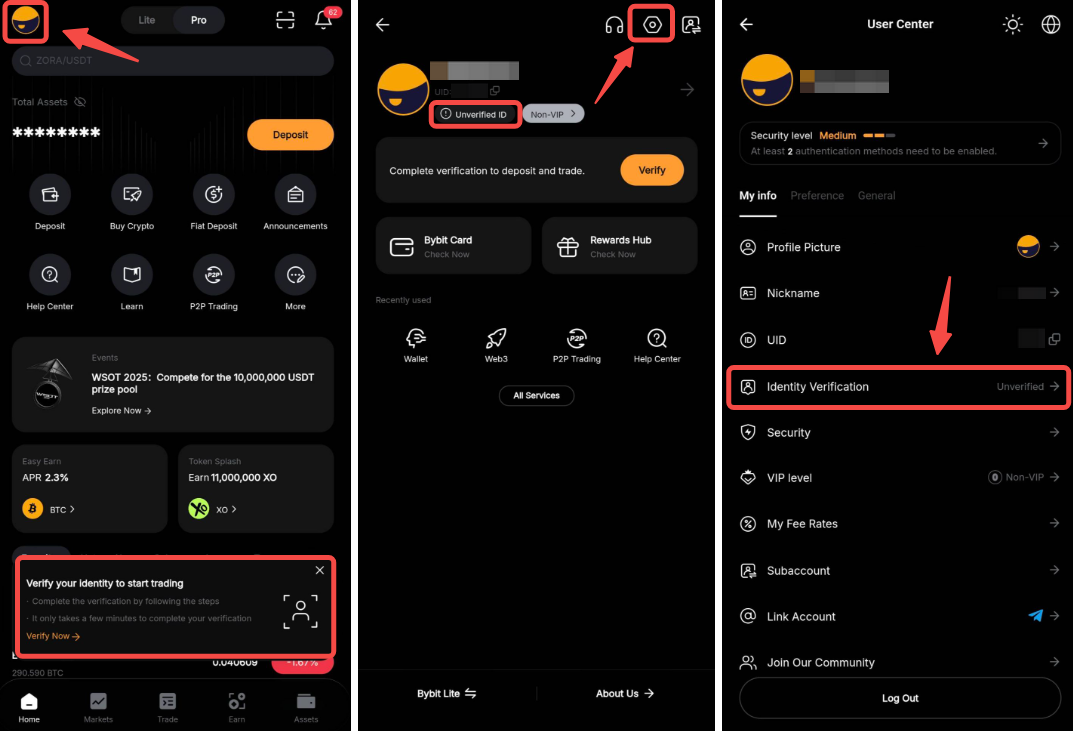
Image source: Bybit Help Center
- Tap “Verify”, then choose the country or region that issued your document and the document type: national ID card, passport, driver’s license or residence permit.
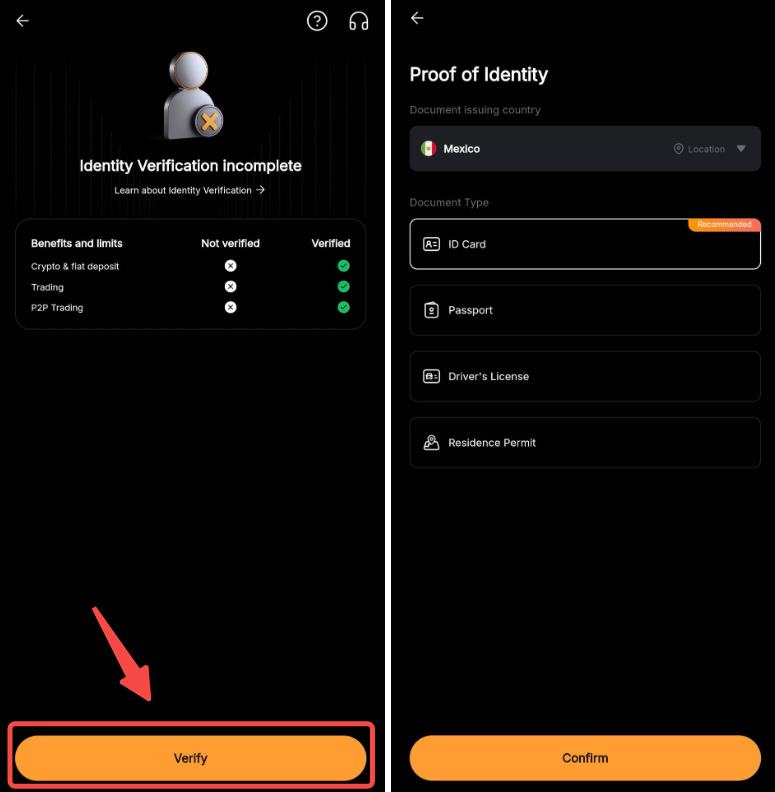
Image source: Bybit Help Center
- Enter your nationality and current residential address, then photograph your document (Step 1: Identity document) and complete the selfie liveness check (Step 2: Selfie).
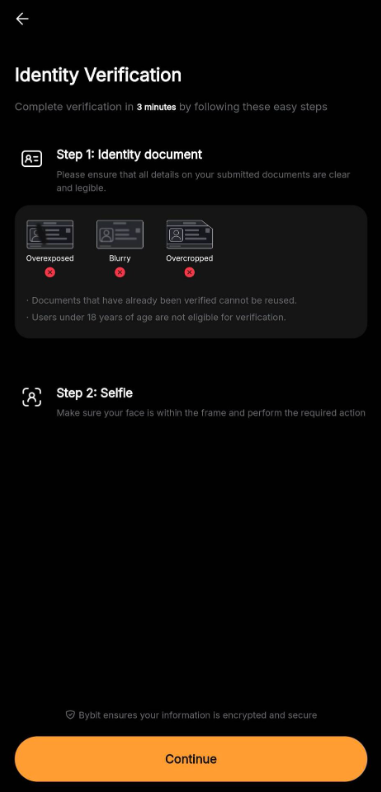
Image source: Bybit Help Center
- Identity assessment: this is usually completed automatically once your proof of identity is approved, but some users have to fill in an identity assessment questionnaire. You cannot complete Standard verification without passing the identity assessment.
- Once approved, the verification center shows a verified badge and you can start depositing and trading. To upgrade to Advanced, tap “Upgrade Now” in the verification center and submit proof of address.
If you still can’t reach the liveness check page after several tries, Bybit says your document may not meet the requirements or you may have submitted too many times in a short period. Wait 30 minutes and try again; if it still doesn’t work, submit a case to customer support.
Bybit web KYC steps
- Click the profile icon on the right side of the navigation bar, then click “Account”.
- Under “Account Info”, click the verification option (“Verify Now” next to Identity Verification) to open the identity verification page.
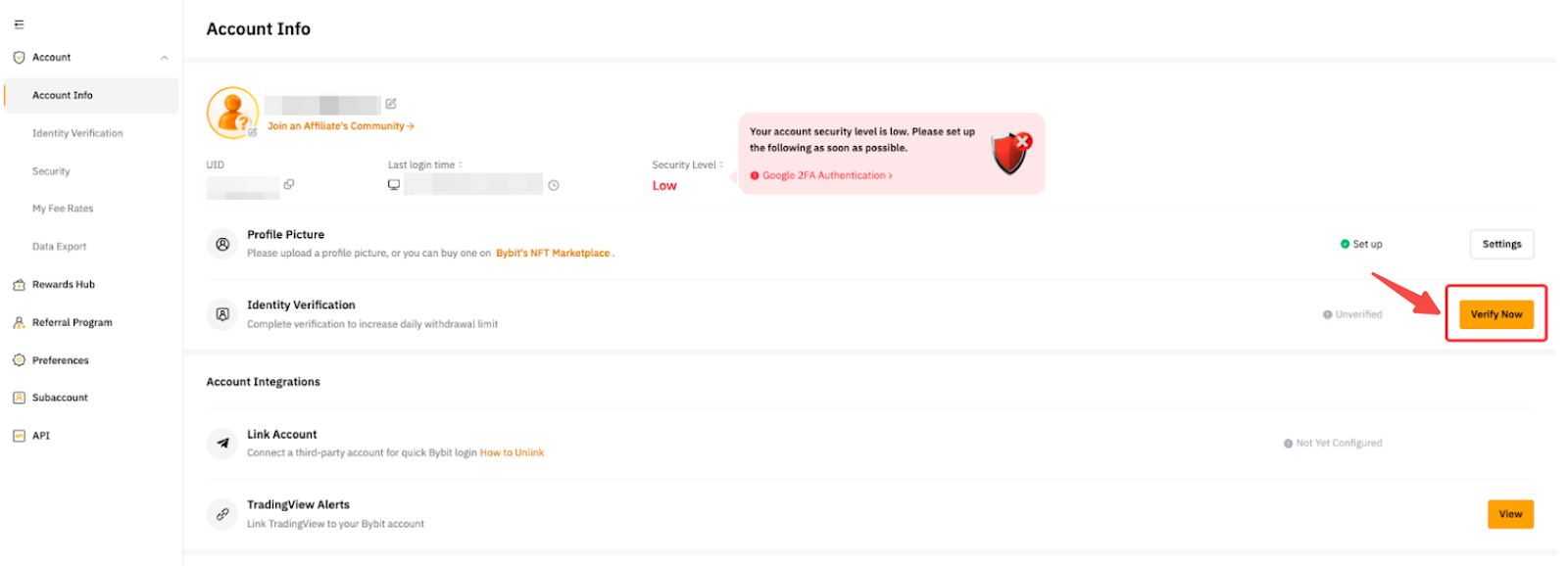
Image source: Bybit Help Center
- Select your current country/region of residence and confirm. Bybit notes that this choice affects the verification process, and changing it after you confirm may require additional verification.
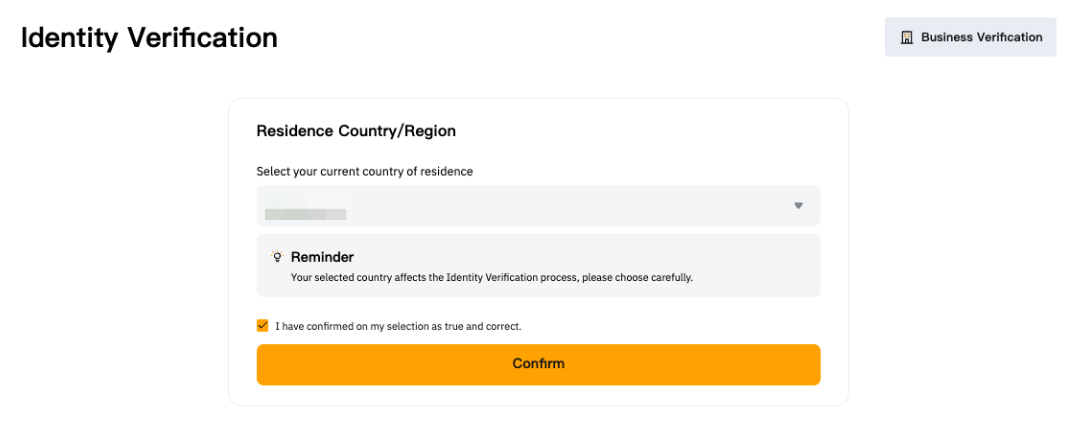
Image source: Bybit Help Center
- Under “Identity Verification”, click “Verify”, then choose the issuing country/region and the document type. This window also offers “Verify with App” if you would rather finish on your phone.
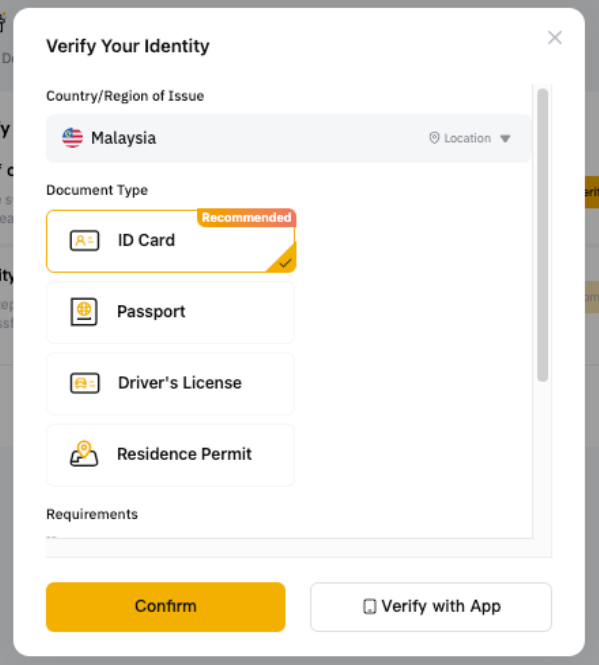
Image source: Bybit Help Center
- Photograph your document. Bybit reminds you that the photo must clearly show your full name and date of birth, and the document must not be altered in any way.
- Complete the face scan with your laptop camera, or scan the QR code to do it on your phone instead. The screen asks you to face the camera and slowly turn your head in a circle.
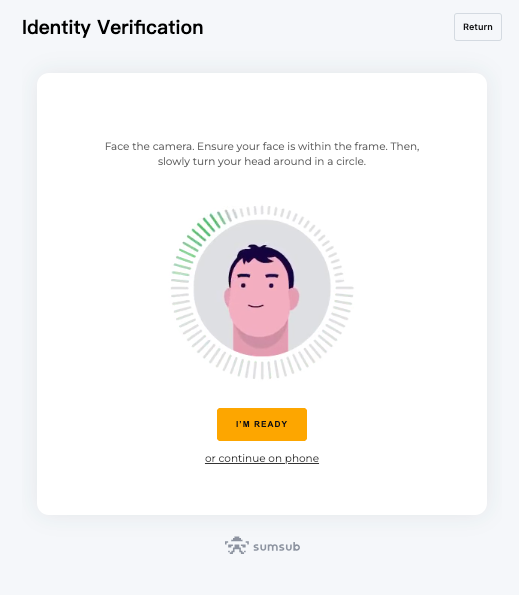
Image source: Bybit Help Center
- After the identity assessment completes automatically or you finish the questionnaire, the status bar on the left shows Standard as completed, and a “Verify” button for proof of address appears below it.
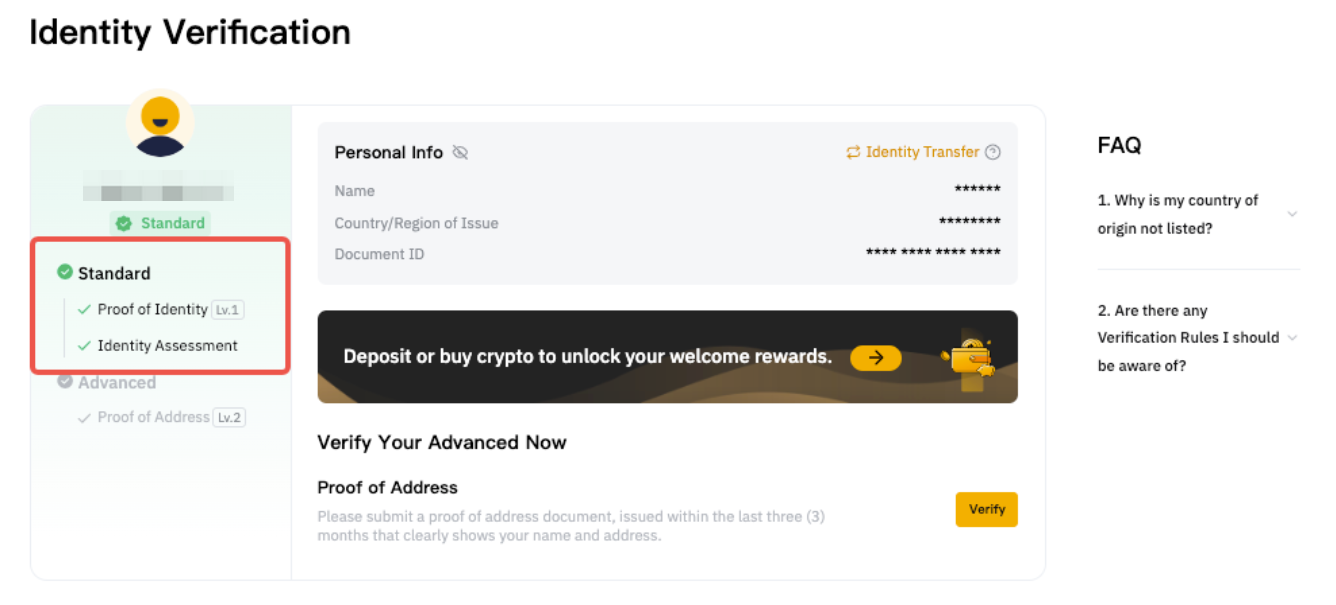
Image source: Bybit Help Center
What does upgrading to Advanced and Pro involve?
Advanced only requires uploading proof of address. After you click “Verify” for proof of address, the screen first lists the accepted and rejected documents, then you upload the file. Web uploads support JPEG, JPG, PNG and PDF, and you can also continue on your phone. Once approved, you can click the eye icon on the identity verification page to view what you submitted; this requires your Google Authenticator code.
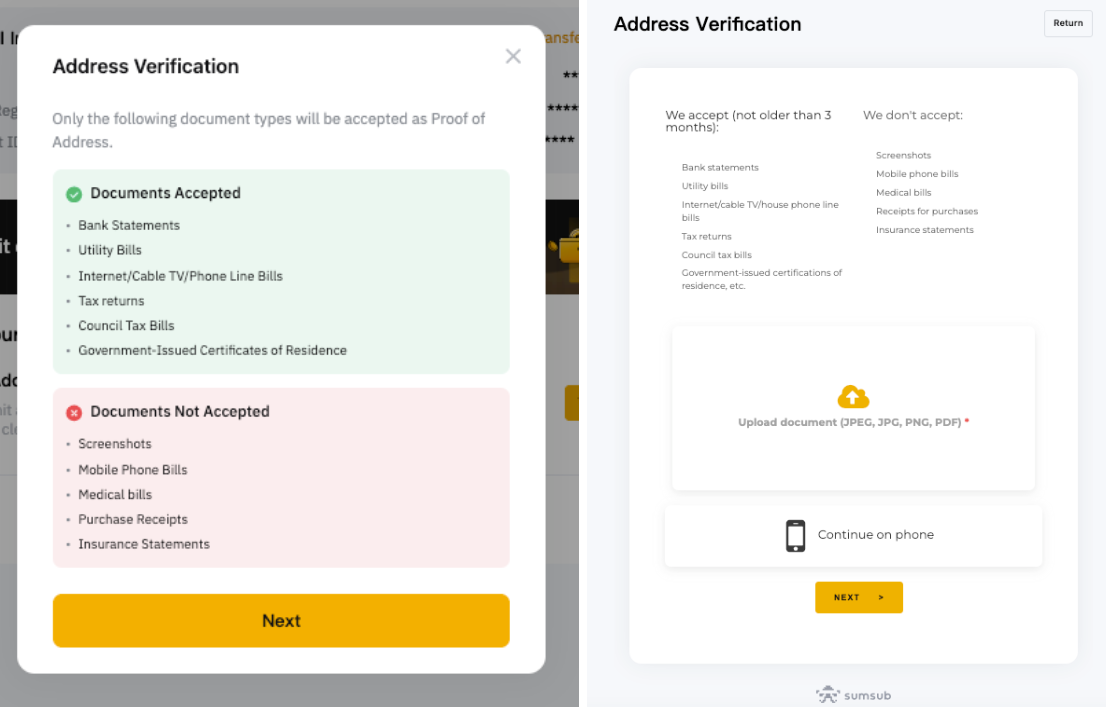
Image source: Bybit Help Center
The Pro level is enhanced due diligence (EDD): click “Verify”, fill in the questionnaire and provide proof of income. Bybit also says that even after completing EDD, in a few cases you may still be asked for more documents when withdrawing funds.
How long does Bybit KYC review take, and what if you are rejected?
The official FAQ says: “Generally, the KYC verification process takes about 15 minutes. However, depending on the complexity of the information being verified, KYC verification may take up to 48 hours.” If you are still not approved after 48 hours, you can submit an inquiry; you will get an automatic reply with an inquiry number, and the relevant team will contact you within one business day. The result is sent to the email address you registered with, and you can also click the question mark icon on the KYC page to see why you were rejected.
The failure-reasons guide sorts common rejections into a table. These are the ones you are most likely to run into:
| Rejection reason | What Bybit describes | What to do |
|---|---|---|
| Invalid ID | Full name or date of birth unreadable; face on the document unclear; passport not signed | Retake the photo, make sure name, date of birth and expiry date are clear, and sign your passport |
| Invalid document photo | Blurry, cropped or covered details; an unrelated document uploaded | Keep all four corners in the frame and upload an accepted document again |
| Screenshot / not an original document | Screenshots, scans, printouts, paper photocopies or black-and-white photos | Upload the original document or a PDF, in color and unedited |
| Expired document | The document has expired | Use a document that is still valid |
| Unrecognized language | For example Arabic, Sinhala, Burmese | Use a document with Latin characters or an international passport |
| Face mismatch / invalid selfie | Selfie does not match the document photo; image shaky or too dark | Redo it somewhere bright, face the camera, with only one person in the frame |
| Same document used on multiple accounts | The same identity details are already verified on another account | Bybit allows one verified account per person; keep the account that was originally approved |
| Too many invalid submissions | Too many uploads | If rejected more than 5 times within 24 hours, wait 24 hours and try again |
To resubmit, click “Verify” on the KYC page and go through it again; Bybit says you will get the result within 15 to 20 minutes. If you can’t find the result email even in your spam folder, Bybit says your details may have run into its terms of service (a restricted country, being underage, or a risk issue), and you should contact live chat support or submit an inquiry. Retry time limits: if you can’t reach the liveness check page, wait 30 minutes; if you are rejected more than 5 times within 24 hours, wait 24 hours; if there is no result after 48 hours, submit an inquiry.
What should users in Taiwan know about KYC?
None of the 4 official guides checked for this article has KYC rules specific to Taiwan. Bybit’s “local document verification” (verifying directly against government data sources without uploading a document) currently lists Nigeria, Indonesia, India, Argentina, the UAE and South Africa, not Taiwan, so users in Taiwan go through the standard process of uploading a document plus a liveness check. Which document types you can choose depends on the options shown for the issuing country you select during the process.
- Nationality matters more than residence: Bybit says “restrictions are determined by the trader’s nationality, not their current place of residence.” Regions where Bybit’s services are restricted are listed in exchange restricted countries.
- Choose the right country/region of residence: the choice affects the verification process, and changing it after you confirm may require additional verification.
- Document language: the unsupported languages Bybit lists are Arabic, Sinhala, Burmese “and others”; it does not say how a document written only in Chinese is treated. If you are rejected for language reasons, Bybit recommends using a document with Latin characters or an international passport.
- Consistent name: Standard and Advanced must use the same name, and the name on your proof of address must match your ID.
- Proof of address: mobile phone bills are not accepted, and the document must be within three months.
Is Bybit KYC safe? How is your personal data used?
The official FAQ says Bybit encrypts and protects personal information, uses it only to verify your identity, and does not share it externally or use it for other promotional purposes. In the official screenshots, the document photo and face scan screens carry the Sumsub name at the bottom, but the guide text does not say which verification provider Bybit works with. Viewing the details you submitted requires your Google Authenticator code. Bybit also notes that if a KYC-verified account loses its login credentials, account recovery is simpler.
In practice, KYC is done only on Bybit’s official website or in the official app. If anyone offering to “do your KYC” or “get you approved” asks for photos of your ID, a selfie or verification codes, whether by private message, on social media or claiming to be customer support, don’t give them anything: ID photos and selfies can be used to open accounts in your name. Common tactics are covered in crypto exchange scam types and rebate scam warning signs.
What 3 things should you do first after KYC is approved?
Once your identity verification is approved, you can deposit. Before you deposit, I recommend getting these three things done first:
- Turn on two-factor authentication (2FA) or a passkey: link Google Authenticator; Bybit strongly recommends keeping the recovery key phrase somewhere separate and secure (Bybit: link Google Authenticator). Bybit also supports passkeys, which you can use to log in without a password (Bybit passkey setup, Bybit Protect overview).
- Set an anti-phishing code: once set, the code appears in all official Bybit emails and text messages (Bybit anti-phishing code setup).
- Test with a small withdrawal first: the first time you withdraw to a new address, send a small amount, confirm it arrived, then send the larger amount (Bybit on-chain withdrawal guide). Addresses you’ve confirmed can be added to the withdrawal address whitelist, so that you withdraw only to whitelisted addresses from then on (Bybit withdrawal security settings).
These three steps protect your own account; the platform’s own security record, hacks and proof of reserves are covered in the Bybit review.
FAQ
How long does Bybit KYC take?
Bybit says it usually takes about 15 minutes, and complex cases may take up to 48 hours. After a resubmission the result comes in about 15 to 20 minutes. If you are still not approved after 48 hours, you can submit an inquiry, and the support team will contact you within one business day.
Can you trade or withdraw on Bybit without KYC?
You can’t trade, but you can withdraw. In the official table, an account without KYC cannot deposit, buy crypto, or trade spot or derivatives; it can only withdraw crypto, up to 20,000 USDT a day and 100,000 USDT a month, and Bybit reserves the right to require KYC before approving a withdrawal.
Can you use a family member’s or someone else’s ID for KYC?
No. The selfie liveness check has to match the document photo, and “face mismatch” is one of the rejection reasons Bybit lists; the same identity details can also verify only one account. The name on your proof of address must match your ID as well.
What if Bybit KYC keeps failing?
First check the rejection reason in the email or under the question mark icon on the KYC page, fix what it points to, and resubmit. If you are rejected more than 5 times within 24 hours, wait 24 hours before trying again. If you were rejected because of a restricted country or being under 18, Bybit says you can appeal by submitting an inquiry.
How many KYC-verified Bybit accounts can one person have?
One. Bybit says each user may use only one account for KYC verification. Subaccounts cannot do KYC; only the main account can. If you want to move your verification to another account, Bybit has a KYC transfer process (Identity Transfer in the interface).
Can I transfer my Bybit KYC to a new account?
Yes. Bybit has an official Identity Transfer feature that moves a completed individual identity verification to another account (Bybit identity transfer guide). The receiving account must not be verified yet; for 24 hours after the transfer, neither account can withdraw or use fiat products, and the original account reverts to unverified. Only the identity data moves over: the original account’s referral code, affiliate code, assets and registered email or phone number stay behind. Bybit also states that each user is allowed only one account with identity verification. For how this feature affects referral relationships and the risks to watch for, see how to switch your Bybit referral code.
Can you change your name or details after passing KYC?
Yes, with conditions: the account has passed individual KYC, is not a subaccount, is not disabled or restricted, and has no update or transfer in progress. Click “Update” on the identity verification page; the whole process takes about two hours. If your name only has a typo, a missing character or the wrong order, you can correct it with “Update Information”. That usually takes about 5 minutes and at most one business day, and once it succeeds you cannot use it again for 30 days.
Sources
- How to complete individual KYC verification, Bybit Help Center, page updated 2026-07-13. All screenshots in this article come from this page.
- Benefits of different KYC levels, page updated 2026-10-06.
- Individual KYC FAQ, page updated 2026-08-20.
- Common reasons and solutions for KYC verification failures, page updated 2025-11-25.
- How to add and check a registered affiliate code, page updated 2026-06-09.
These pages were checked on 2026-10-13. Bybit may change its process and limits at any time, so go by what the app or website actually shows when you verify. If you haven’t signed up yet, the rebate approach is in Bybit fee rebate: getting fees back with Fee Otter; fees are in Bybit fees, and proof of reserves, security record and restricted regions are in Bybit review. To check after sign-up whether your referral relationship was linked, see how to check whether your referral code is linked.
